
AI business proposal generator for reviewable proposal drafts
Start with the RFP, meeting notes, deck, or account context you already have. Gixo Arc works as an AI business proposal generator that shapes that material into a draft you can review, improve with your team, and export in the format you need.
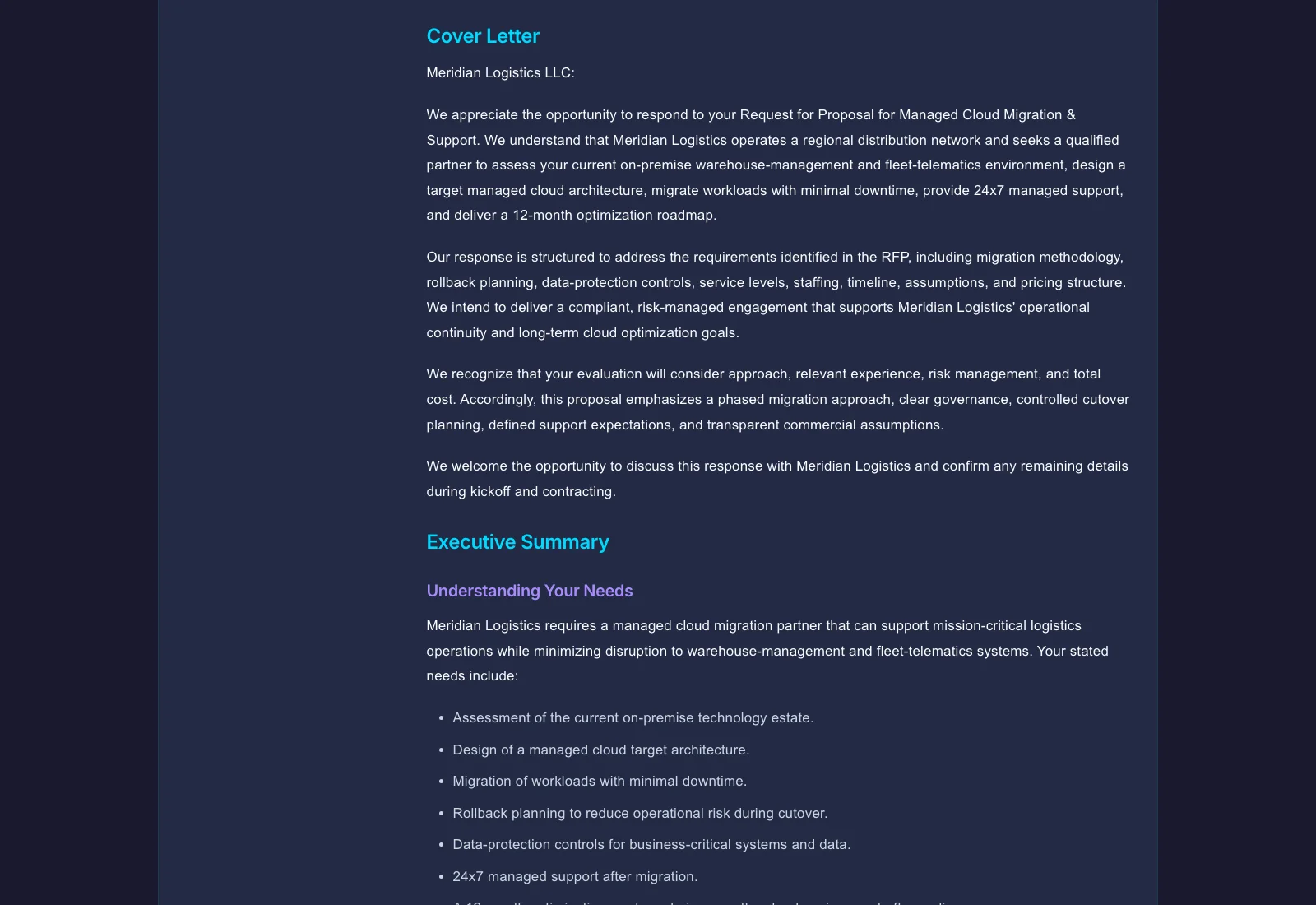
An AI proposal generator turns source material you already have — an RFP, notes, a deck, or account context — into a structured first draft, rather than starting from a blank page or a fixed template. Gixo Arc drafts reviewable proposal first drafts from the briefs, RFPs, scopes, case studies, pricing notes, and other source files you provide. Gixo's version (Arc) reads uploaded files, applies one of 21 proposal-type structures, and produces a reviewable draft you can edit inline, review with a team, and export as PDF, DOCX, or HTML. It is built for messy, file-based input rather than fill-in-the-blank forms. It includes simple electronic signature, with the signed proposal sealed as a PDF, and it is not a replacement for CRM or full proposal-ops platforms.
What does an AI proposal generator need to do, and how does Gixo compare?
| Capability | Gixo AI | Template Tools | Manual Drafting |
|---|---|---|---|
| Time to first draft | Reviewable draft faster | Hours (fill-in-the-blank) | Manual drafting cycle |
| Source file intake | OCR + multi-format | Copy-paste only | Manual reading |
| Section structure | Proposal-type structure (21 types) | Fixed templates | Manual outline |
| Tone adaptation | Configurable per deal | Static | Writer-dependent |
| Inline AI editing | Rewrite / expand / simplify | No | N/A |
| Real-time collaboration | Multi-user + comments | Varies | Email rounds |
| Export formats | PDF / DOCX / HTML | Yes (varies) | Yes |
| E-signatures | Simple electronic signature, sealed PDF | Some tools | N/A |
| CRM sync | No self-serve CRM sync | Some tools | N/A |
See what Arc helps your team review
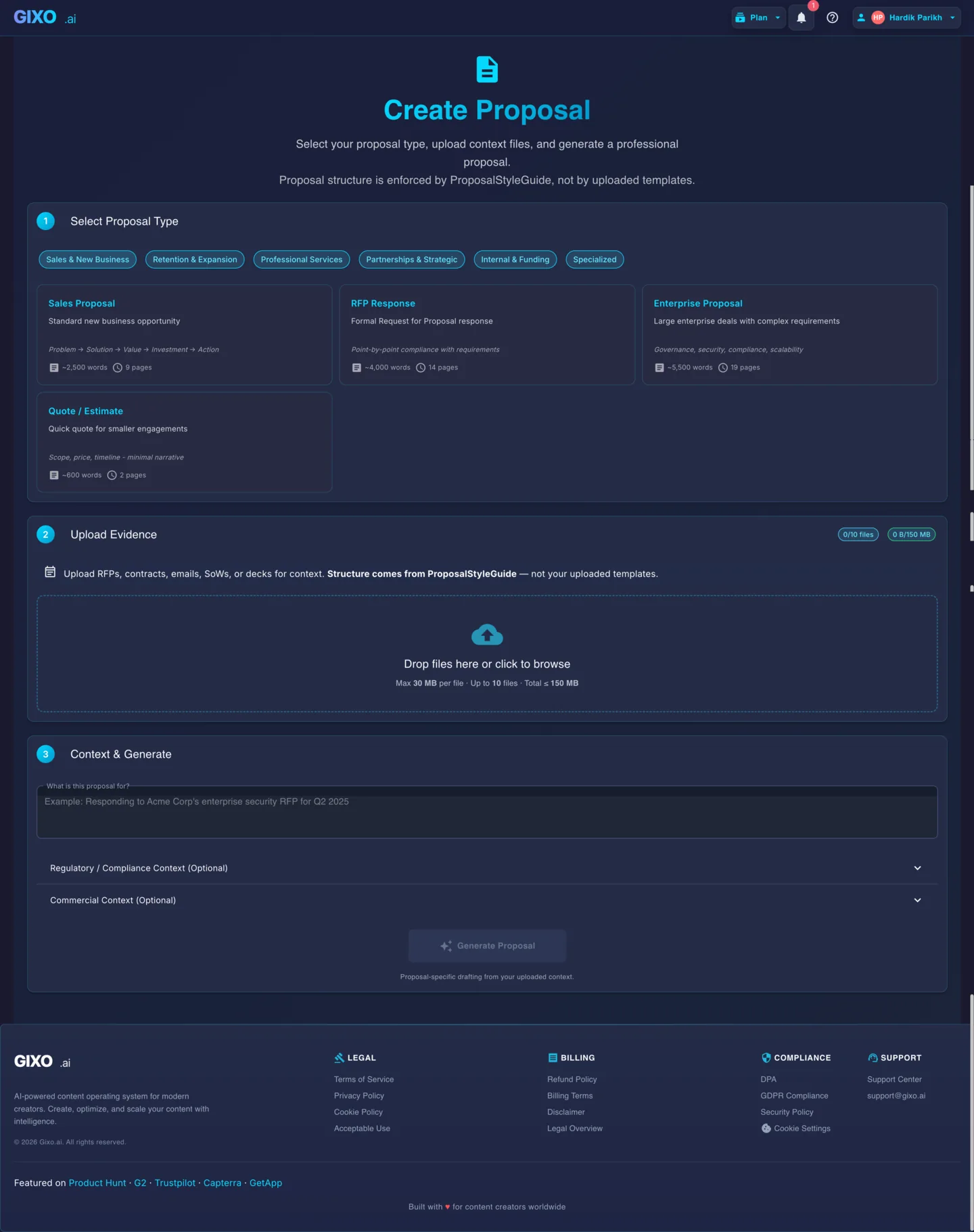
Choose the proposal type, add the RFP, brief, notes, or prior work, then review a structured first draft before it reaches a client.
- 1Add source materialRFPs, briefs, notes, decks, and prior work
- 2Draft to the proposal typeSections and structure follow the real opportunity
- 3Review before deliveryYour team checks facts, scope, pricing, and commitments
What is proposal automation software?
Proposal automation is the use of structured source material, repeatable proposal types, AI-assisted drafting, team review, and document export to reduce the repetitive work between an opportunity brief and a finished proposal.
A proposal is not just another generated document. It is a buyer-specific argument that connects a stated problem to a recommended approach, scope, evidence, commercial assumptions, and next step. Useful proposal writing software preserves that logic instead of filling a generic template with product descriptions.
The strongest use of AI proposal software is the source-to-draft stage: organizing messy files, applying an appropriate structure, drafting connected sections, and helping reviewers improve weak passages. Strategy, pricing, delivery capacity, legal language, security commitments, customer facts, and final approval remain accountable human decisions.
This distinction matters when comparing business proposal software. Some proposal management software covers CRM synchronization, workflow routing, e-signature, engagement analytics, and a maintained content library. Arc focuses on creating and improving a grounded proposal draft from the material your team supplies; it does not claim to replace those broader proposal-operations systems.
Where Gixo Arc fits
- Use it as proposal automation software for source intake, structured drafting, collaborative editing, and export.
- Keep opportunity qualification, win strategy, prices, contractual promises, and final approval with named owners.
- Send the finished proposal for simple electronic signature from the workspace; the completed copy is sealed as a PDF with an audit certificate. It is not a qualified or certificate-based signature.
- Use CRM and specialist proposal management tools separately when the deal requires those capabilities.
What does an AI proposal generator do differently from a blank document?
This works best when your material is spread across files and notes and you need a strong starting point faster than a blank document gives you.
Bring in RFPs, notes, decks, spreadsheets, and reference files so the draft starts from real deal context.
Pick from 21 proposal types so the draft starts with the right structure for the situation.
Gixo lays out the draft with the sections buyers and approvers usually expect, so you are not building the frame yourself.
Adjust the voice for formal procurement, consulting work, partnerships, or sales conversations without rewriting everything yourself.
Keep review and comments in the same workspace instead of juggling separate files and email threads.
Send out PDF, DOCX, or HTML versions without rebuilding the content in another editor.
Tighten, expand, or simplify individual sections without blowing away the rest of the draft.
The proposal starts from the files you uploaded, not just from a short prompt and generic filler.
When the buyer issues a structured questionnaire, Arc writes your reviewed responses back into the original XLSX, CSV, or DOCX file, deterministically and in place, preserving the workbook's formulas, styles, and layout as well as Word content controls and response-table cells. A preflight previews every target first and blocks on protected sheets, formula cells, merged cells, dropdown values the buyer does not allow, missing required or scored answers, and conflicting requirements, so a person still runs the final check and submits.
Arc runs proposal review as governed team execution: each requirement can carry a response owner, a reviewer, a due date, and a workflow status, and subject-matter-expert, security, legal, commercial, and executive review gates track who must approve, their decision, and when. A deterministic workload view surfaces open, due-soon, overdue, and escalation tasks under a team capacity policy, with reviewer reminders. Your organization still owns every approval.
Arc creates recipient-specific tracked view-only or view-and-download links. You can send the link directly by email from Gixo or copy it to send yourself, and receive alerts when buyers view, download, ask questions, or accept; Arc does not submit the proposal to a procurement portal.
The goal is a strong first draft you can improve quickly, not a rough outline that still needs a full rewrite.
How to create a better business proposal with AI
A practical proposal automation workflow starts before generation and keeps human review after it.
Define the buyer, opportunity, desired outcome, known requirements, decision process, deadline, contributors, assumptions, and risks before drafting begins.
Collect the RFP, discovery notes, prior deck, scope details, approved service descriptions, case studies, team information, and commercial assumptions tied to the deal.
Select the Arc proposal type that fits the opportunity so the outline reflects the buyer's decision rather than the seller's organization chart.
Arc reads the uploaded context and drafts connected sections such as the executive summary, buyer context, approach, scope, timeline, evidence, assumptions, and next steps.
Confirm requirements coverage, facts, proof, prices, scope boundaries, delivery dates, legal terms, security statements, and every customer-specific commitment.
Use inline AI and team review to tighten weak sections, then export the approved proposal as PDF, DOCX, or HTML for your normal delivery process.
How does an AI proposal generator compare to template tools and manual drafting?
See how Gixo's source-first proposal generation compares to template tools and manual drafting.
| Capability | Gixo AI | Template Tools | Manual Drafting |
|---|---|---|---|
| Time to first draft | Reviewable draft faster | Hours (fill-in-the-blank) | Manual drafting cycle |
| Source file intake | OCR + multi-format | Copy-paste only | Manual reading |
| Section structure | Proposal-type structure | Fixed templates | Manual outline |
| Tone adaptation | Configurable per deal | Static | Writer-dependent |
| Context-aware content | Reads your files | Generic fill-ins | Manual research |
| Inline AI editing | Rewrite / expand / simplify | No | N/A |
| Real-time collaboration | Multi-user + comments | Varies | Email rounds |
| PDF / DOCX export | Yes | Yes | Yes |
| Buyer questionnaire round-trip | XLSX / CSV / DOCX in place | Usually copy-paste | Manual |
| Review gates | Owners, due dates, decisions | Varies | Email rounds |
| Tracked delivery links | Email from Gixo, or copy and send | Some tools | Email attachment |
| CRM sync | No self-serve CRM sync | Some tools | N/A |
| Best for | Strong first drafts from messy input | Standardized repeatable proposals | Highly custom engagements |
What should you prepare before using proposal automation software?
An automated proposal generator can organize and draft what you provide, but it should not invent the information the deal is missing.
Buyer and opportunity context: explain the current situation, desired outcome, decision criteria, stakeholders, deadline, and what happens if the buyer does nothing.
Response requirements: identify mandatory questions, requested sections, format rules, commercial instructions, attachments, and evaluation criteria. For a formal RFP, maintain a separate requirements matrix and validate it outside the generated narrative.
Approved proof: supply relevant case studies, capability descriptions, team biographies, implementation methods, and technical answers. Old proposals may contain stale claims, expired credentials, former employees, or customer-specific concessions, so validate reusable material before uploading it.
Boundaries and assumptions: state what is included, excluded, dependent on discovery, or subject to approval. When facts are unknown, identify the gap instead of asking an AI business proposal writer to make the draft sound complete.
Named reviewers: assign owners for solution feasibility, pricing, delivery, legal terms, security, and the final client-facing version. AI can improve the draft, but it cannot accept commercial or professional responsibility.
Example: turning discovery notes into a sales proposal
A B2B sales team finishes discovery with meeting notes, a short requirements list, a product deck, two relevant case studies, an implementation outline, and draft pricing assumptions. In a manual process, a seller may copy fragments into an old document and ask subject-matter experts to repair the result near the deadline.
With sales proposal automation software, the team can upload the approved material, choose a sales proposal structure, and create a first draft organized around the buyer's problem, desired outcomes, recommended approach, delivery plan, evidence, assumptions, and next step. Reviewers then correct the commitments that belong to their functions instead of rebuilding the whole document.
The benefit is not automatic selling or a guaranteed win rate. It is less blank-page work, a clearer relationship between source material and draft sections, and a more consistent review process. That is the practical value an automated proposal software workflow should provide.
Proposal automation checklist
- The proposal reflects the buyer's objectives, stakeholders, requirements, and decision criteria.
- Claims, case studies, dates, prices, scope, assumptions, and exclusions have named human reviewers.
- Generic company material has not displaced the buyer-specific recommendation and evidence.
- Missing information is visible as a question or assumption rather than completed with invented detail.
- The final version has been reviewed before export and delivery.
Frequently Asked Questions
Which teams and scenarios is an AI proposal generator used for?
Updated