Skip to content
Arc
Sign In Get started

Create Polished Consulting Proposals Fast

Upload engagement context, client briefs, and scoping notes — Gixo generates a structured consulting proposal with approach, deliverables, timeline, team composition, and commercial terms. Designed for management consultants, strategy firms, and independent advisors who need polished first drafts fast.

Generate Consulting Proposal View pricing
Additional workflow illustration
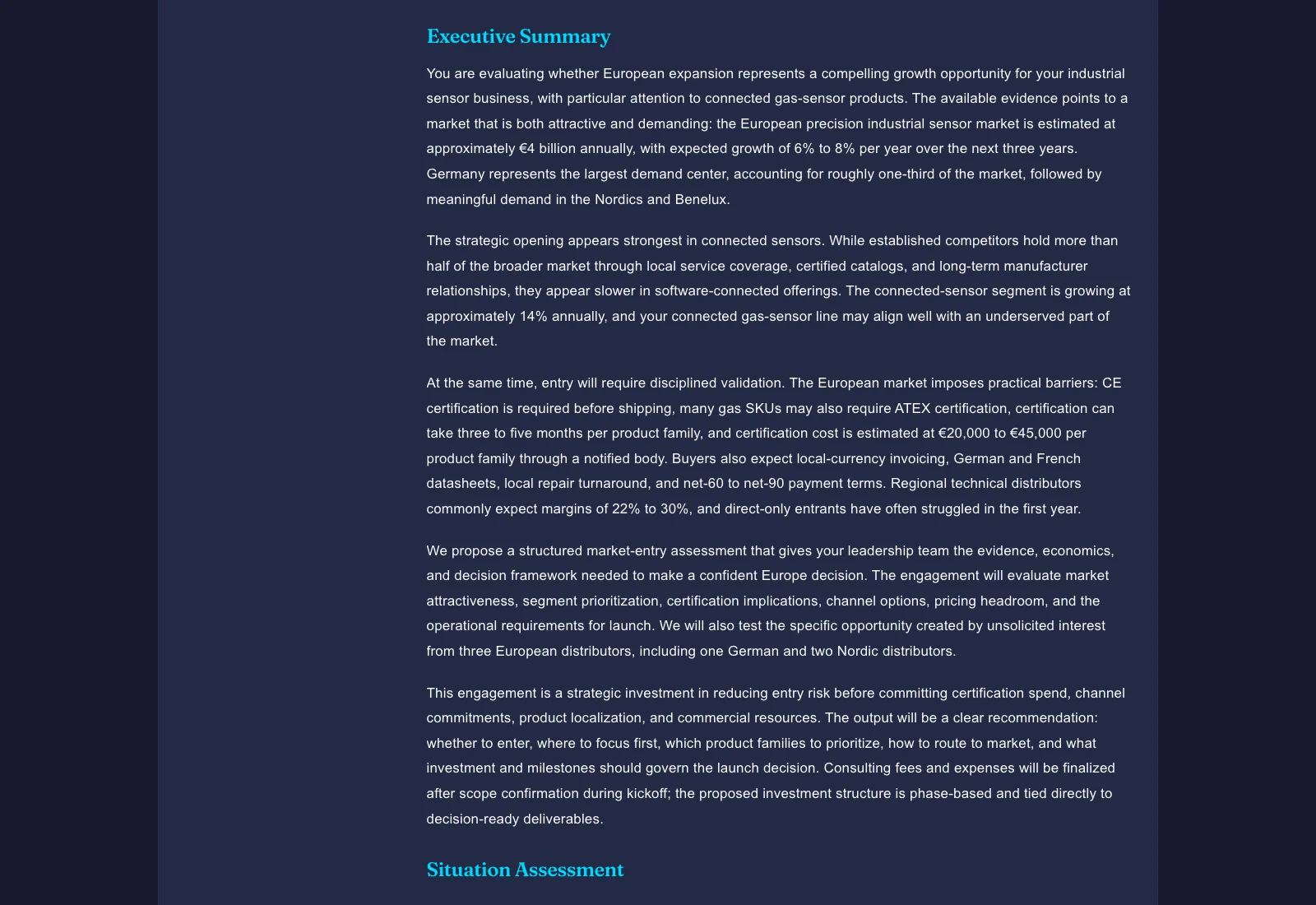
Illustrative AI-drafted consulting engagement proposal example from Gixo Arc
Illustrative Gixo Arc output — a market-entry proposal example grounded in engagement context.

A real consulting proposal Arc wrote

Arc wrote this proposal on 3 October 2026 from a buyer's document, a bidder's evidence file and the deal terms shown, and exported it as a PDF and a Word file without editing. The bidder and the buyer are invented, and the cover says so.

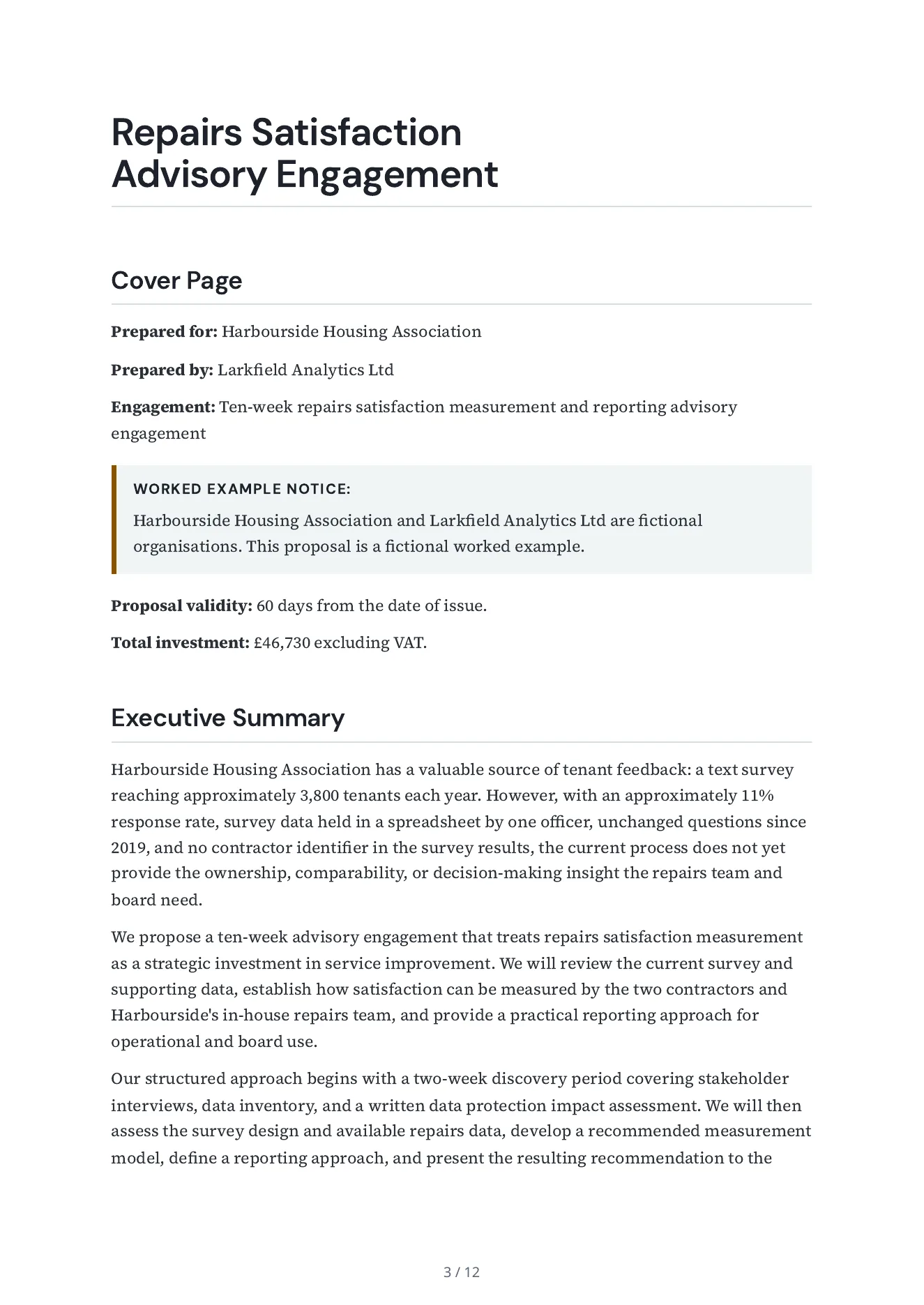
The first page of the consulting proposal Arc wrote: the cover details, the notice that the buyer and bidder are fictional, and the start of the executive summary.
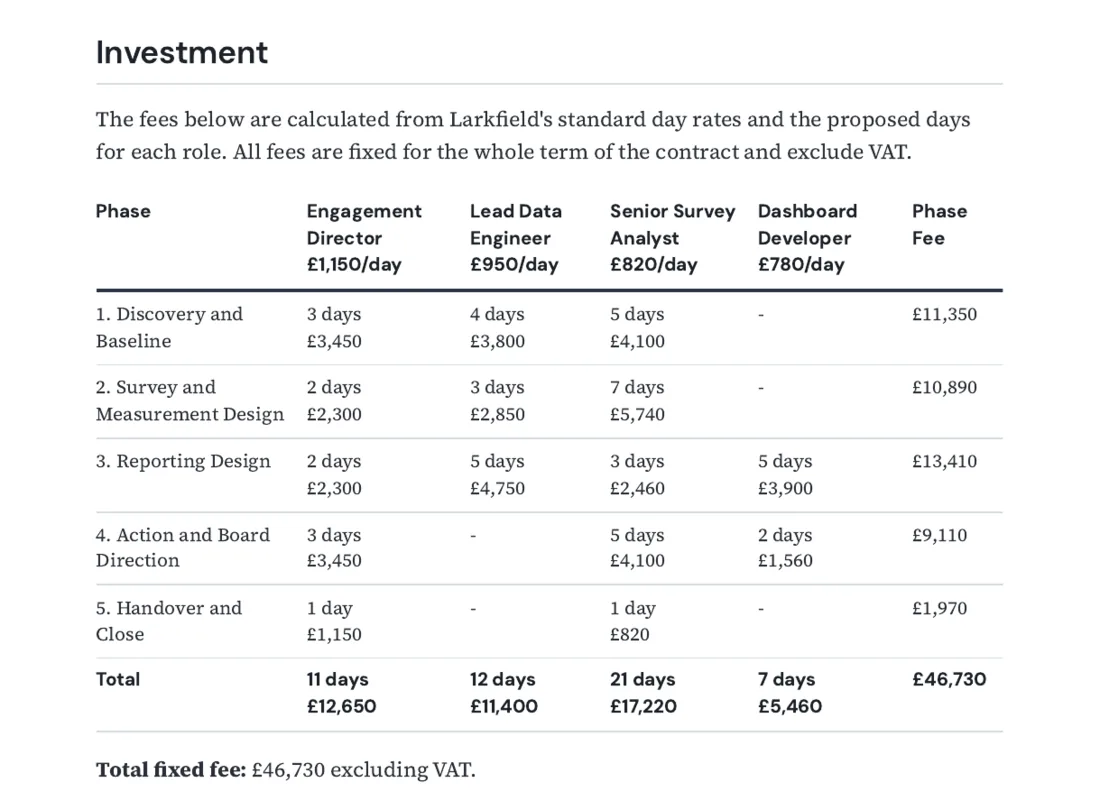
The pricing table of the consulting proposal: each line is days or units times a standard rate from the bidder's evidence file, with the total.

Consulting proposal · 12-page PDF · 2,740 words

Consulting proposal: repairs satisfaction measurement, Harbourside Housing Association

A ten-week advisory engagement for an invented housing association: situation, approach and phases, a requirement-by-requirement compliance matrix, deliverables, timeline, team, terms, and a fee built phase by phase from the bidder's day rates, with the days of each role shown.

The brief and the inputs Arc was given

Propose a ten-week advisory engagement for Harbourside Housing Association, on behalf of Larkfield Analytics Ltd, that answers the association's brief: review the current repairs survey, recommend how to measure repairs satisfaction by contractor, and leave a reporting approach for the repairs team and the board. Build the fee for each phase from the standard rates in the evidence file (the days of each role times the day rate) and show those days. Add nothing the evidence file does not state. Put a notice on the cover page that the buyer and the bidder are fictional and the proposal is a worked example. Inputs: the buyer's document (brief-harbourside-housing.md); the bidder's evidence file (larkfield-evidence.md); commercial terms: value 46,000 to 52,000 GBP, valid for 60 days, payment terms 'Invoiced monthly in arrears, payable within 30 days.'; deal context: The buyer and the bidder in this proposal are fictional, and this proposal is a worked example. The engagement lead presents to the buyer's board in the ninth week.

PDF (309 KB)Word (15 KB)

A separate reviewer agent read its 177 claims against the bidder's evidence file, the buyer's brief and the deal terms: 115 are supported, 58 add design detail or an inference, 4 are in no input (it calls the fee fixed) and none contradicts one. Every price line recomputes. It is not a person's review.
What a reviewer must settle before a client sees a draft like this: the evidence file fixes the day rates for the contract term, and no input says the total is a fixed fee. The draft still writes “fixed advisory fee” on page 4 and “total fixed fee” on pages 9 and 11, so whoever owns the commercials confirms a fixed fee or rewords those lines. The file above is the raw draft; no corrected edition is published.

A consulting proposal generator is AI software that turns uploaded engagement context — client briefs, scoping notes, past proposals, team bios, and rate cards — into a structured consulting proposal covering executive summary, approach, scope of work, deliverables matrix, phased timeline, team composition, and commercial terms. Gixo's version reads your reference files directly rather than working from a generic prompt, so the first draft reflects your actual engagement instead of placeholder consulting language. It is not a replacement for partner-level review — it eliminates the blank-page problem and produces a professional first draft in minutes instead of days.

Arc · real output

From a supplied scope to a proposal you can inspect.

The first page of the consulting proposal Arc wrote: the cover details, the notice that the buyer and bidder are fictional, and the start of the executive summary.
Related worked example · Consulting proposal · Consulting proposal: repairs satisfaction measurement, Harbourside Housing Association. View full size ↗

Read a real exported proposal alongside the brief Arc received. The example keeps supplied scope, commercial assumptions and reviewer responsibility visible.

Consulting proposal: repairs satisfaction measurement, Harbourside Housing Association

A ten-week advisory engagement for an invented housing association: situation, approach and phases, a requirement-by-requirement compliance matrix, deliverables, timeline, team, terms, and a fee built phase by phase from the bidder's day rates, with the days of each role shown.

Inspect the source brief or data

Propose a ten-week advisory engagement for Harbourside Housing Association, on behalf of Larkfield Analytics Ltd, that answers the association's brief: review the current repairs survey, recommend how to measure repairs satisfaction by contractor, and leave a reporting approach for the repairs team and the board. Build the fee for each phase from the standard rates in the evidence file (the days of each role times the day rate) and show those days. Add nothing the evidence file does not state. Put a notice on the cover page that the buyer and the bidder are fictional and the proposal is a worked example. Inputs: the buyer's document (brief-harbourside-housing.md); the bidder's evidence file (larkfield-evidence.md); commercial terms: value 46,000 to 52,000 GBP, valid for 60 days, payment terms 'Invoiced monthly in arrears, payable within 30 days.'; deal context: The buyer and the bidder in this proposal are fictional, and this proposal is a worked example. The engagement lead presents to the buyer's board in the ninth week.

Read the sample review notes

A separate reviewer agent read its 177 claims against the bidder's evidence file, the buyer's brief and the deal terms: 115 are supported, 58 add design detail or an inference, 4 are in no input (it calls the fee fixed) and none contradicts one. Every price line recomputes. It is not a person's review.
Prepare the source pack

Choose the proposal kind and supply the buyer brief, approved evidence, delivery assumptions and commercial terms. For RFP work, retain the issued requirements and separate known answers from missing evidence.

Review the proposed response

Inspect scope, exclusions, requirements and price assumptions. Use reviewable edits and saved comparisons; an unresolved buyer question needs an owner or an explicit qualification.

Package the reviewed version

Inspect the actual PDF, Word or HTML output. Tracked delivery activity and a recorded deal outcome answer different questions; verify the recipient, permissions and current approval state before sharing.

Buyer requirements and response ownership

Keep buyer RFP files separate from bidder evidence and approved reusable answers. Inspect extraction coverage, requirement source locations, questionnaire previews and submission limits. Response work can carry an SME owner, due date, escalation owner and required reviewer decisions. Compare an addendum with the source before changing a response.

Commercial schedules and recurring totals

Review each line's quantity, rate, unit, optional status and one-off, monthly or annual recurrence. Inspect recurrence totals and the estimated first-year total separately. Currency, supplied tax input and commercial assumptions need review. When importing Business metrics, select and review the source values before applying them to the schedule.

Buyer edition and submission package

Choose the current saved response or an approved edition. Inspect retained attachments, filled questionnaires, the compliance matrix and the package preview. A release manifest identifies stored delivery bytes. For tracked links, review recipient access, expiry, password and permissions separately from delivery activity and the recorded opportunity outcome.

A draft or readiness check is not approval of pricing, legal terms or a delivery commitment. Arc proposal drafting does not imply CRM, CPQ or tax-calculation automation.

From source material to reviewable draft

See what Arc helps your team review

Choose the proposal type, add the RFP, brief, notes, or prior work, then review a structured first draft before it reaches a client.

  1. 1Add source materialRFPs, briefs, notes, decks, and prior work
  2. 2Draft to the proposal typeSections and structure follow the real opportunity
  3. 3Review before deliveryYour team checks facts, scope, pricing, and commitments
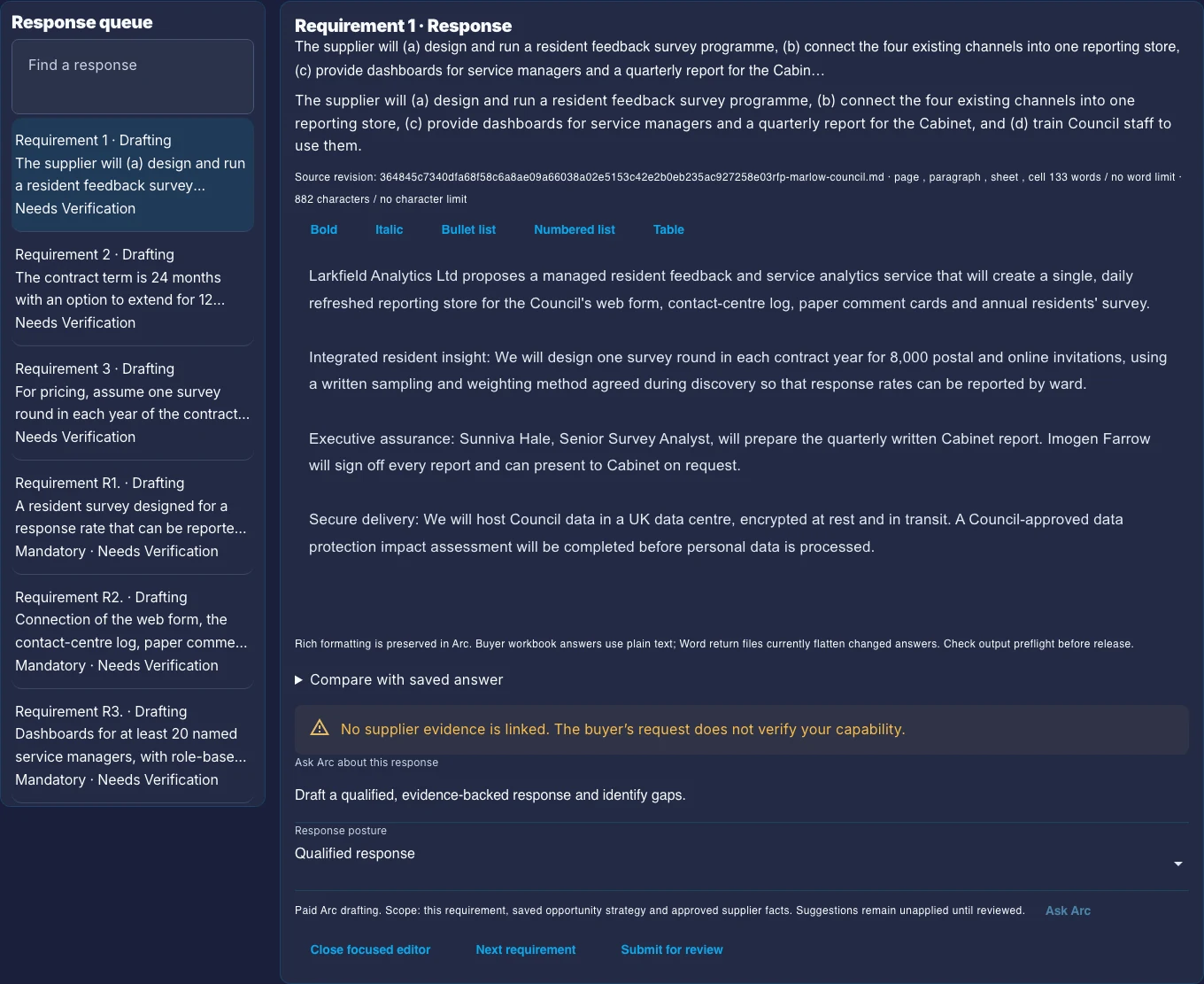
The Arc response workspace: a queue of buyer requirements marked Needs Verification, beside one requirement's response, its source file and a warning that no supplier evidence is linked.
What your team reviews. A buyer requirement beside its response, its source file and status, and a warning that no supplier evidence is linked yet. This is a real Arc screen captured on 10 October 2026 with a fictional sample. The response in it was prepared by hand, so read it for the review controls.
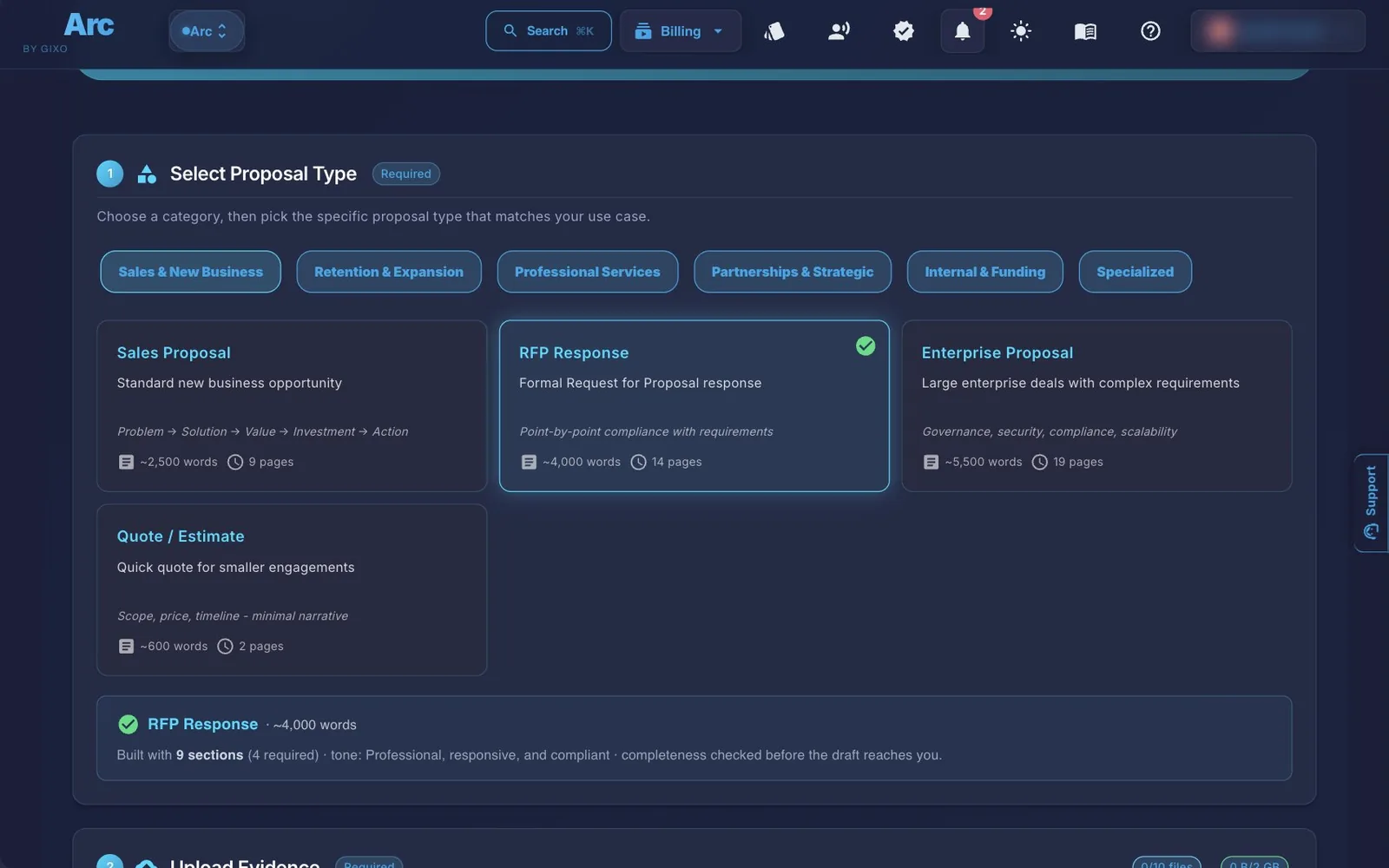
The Arc create page with RFP Response selected among the proposal types, and the upload step starting below it with no files added.
Where it starts. Choose a proposal type, add source material, and keep the drafting controls visible. Arc takes up to 10 source files per proposal, at up to 500 MB each (64 MB for Word, Excel and PowerPoint files) and 2 GB in total.
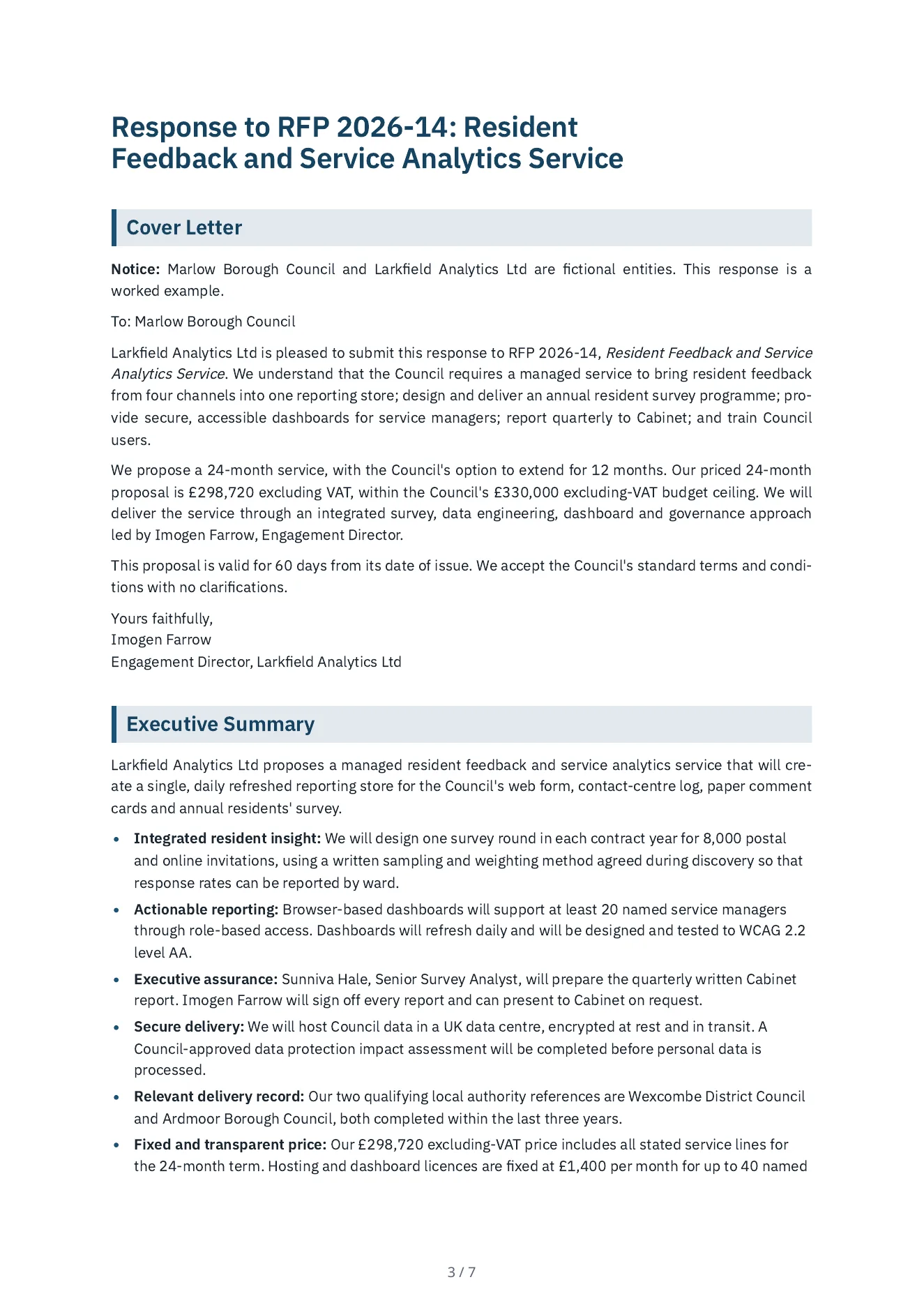
The first page of the RFP response Arc wrote: the cover details, the notice that the buyer and bidder are fictional, and the start of the executive summary.
What Arc wrote. A response to a council's request for proposals, written for an invented bidder: a cover letter, an executive summary, an answer to each of the ten mandatory and three desirable requirements, the team, two local-authority references, and a price built from the bidder's day rates and unit rates, with every line showing its days or units. A separate reviewer agent read its 150 claims against the bidder's evidence file, the council's RFP and the deal terms: 132 are supported, 16 go a little beyond an input, 2 are in no input (it calls the price fixed, and it cites a 1,950-word limit nobody set) and none contradicts one. Every price line recomputes. It is not a person's review. PDFWord Follow three buyer questions through reviewer decisions to the returned workbook. That walkthrough is fictional and its answers and decisions are hand-authored; the returned file comes from Arc's exporter.
6+ Consulting Sections
Auto Approach + Deliverables
Phased Timeline Structure
Terms Commercial Section

What Does an AI-Generated Consulting Proposal Include?

Gixo reads your engagement context files and generates a consulting proposal with the sections clients expect — not a generic document. Approach, deliverables, timeline, team, and terms are structured from your actual inputs.

Engagement Structure

Every consulting proposal is organized with the sections decision-makers expect: executive summary, situation assessment, proposed approach, scope of work, deliverables, timeline, team, commercial terms, and assumptions.

Scope and Approach

The AI generates a detailed approach section that outlines methodology, workstreams, and key activities. Scope boundaries are defined clearly — what is included, what is excluded, and what assumptions underlie the engagement.

Deliverables Matrix

Gixo generates a structured deliverables table that maps each deliverable to its associated phase, responsible team member, and expected completion date. Clients can see exactly what they will receive and when.

Timeline and Phases

The proposal includes a phased timeline with milestones, phase gates, and key decision points. Each phase describes its objectives, activities, and outputs so the client understands the progression of the engagement.

Team Composition

Gixo generates a team section with roles, seniority levels, and allocation percentages. Upload your team bios or capability statements and the AI incorporates relevant experience into each team member's description.

Commercial Terms

The generated proposal includes a commercial section with fee structure, payment schedule, expense policy, and engagement terms. Provide your standard rate card or pricing framework as a reference file and the AI adapts accordingly.

Reference File Intake

Upload scoping documents, client briefs, past proposals, capability statements, and rate cards. The AI reads these files to generate content that reflects your actual engagement context — not generic consulting language.

PDF and DOCX Export

Export the final proposal to PDF for formal client presentations or DOCX for editable versions. All section structure, deliverables tables, timelines, and formatting are preserved in the exported file.

How to Generate a Consulting Proposal with AI

1
Upload engagement context and reference files

Upload client briefs, scoping notes, past proposals, team bios, and rate cards. The more context you provide, the more specific the generated proposal will be to your actual engagement.

2
AI generates a structured consulting proposal

Gixo reads your uploaded context and generates a complete proposal with approach, scope, deliverables matrix, phased timeline, team composition, commercial terms, and assumptions — all structured for consulting engagements.

3
Refine with inline AI and team input

Edit any section with inline AI to rewrite, expand, or adjust tone. Invite partners or engagement managers to shared team proposals; see who is editing and compare versions after conflicting saves.

4
Export and present to the client

Export the polished proposal to PDF or DOCX. All deliverables tables, timelines, team sections, and commercial terms are preserved with professional formatting ready for client review.

How Does Gixo Compare to Manual Drafting and Generic AI Tools?

See how Gixo's context-driven consulting proposal generation compares to manual drafting and generic AI tools.

Capability Gixo AI Manual (McKinsey-Style) Generic AI Tools
Time to first draftMinutesDaysMinutes; check how much comes from your files
Engagement structureAuto consulting sectionsPartner-definedWhatever the prompt asks for
Deliverables matrixAuto-generated tableManualIf you ask for it
Phased timelineMilestones + phase gatesManualIf you ask for it
Team compositionRoles + allocationManualFrom what you supply
Commercial termsFee structure + paymentManualFrom what you supply
Context from filesReads uploaded sourcesManual researchDepends on the tool and plan
Inline AI editingRewrite / expand / simplifyN/ARewrite on request
Best forFast first drafts from context filesHigh-stakes engagementsQuick rough drafts

This table describes three ways of working. It is not a dated test of any product, and general AI tools differ by vendor and plan. To compare them, give each one the same brief and files, then check its output against the real Arc proposal and inputs shown earlier on this page.

Frequently Asked Questions

What sections does a generated consulting proposal include?
Gixo generates consulting proposals with executive summary, situation assessment, proposed approach, scope of work, deliverables matrix, phased timeline with milestones, team composition with roles and allocation, commercial terms with fee structure and payment schedule, and assumptions and exclusions.
How does the deliverables matrix work?
The deliverables matrix is a structured table that maps each engagement deliverable to its associated phase, responsible team member, format (report, presentation, workshop), and expected completion date. It gives clients a clear view of what they will receive throughout the engagement.
Can I upload my firm's rate card or pricing framework?
Yes. Upload your standard rate card, pricing framework, or past proposals with commercial terms as reference files. Gixo uses these to generate a commercial section that reflects your actual fee structure, seniority rates, and payment terms — not generic placeholder pricing.
Is this a replacement for partner-level proposal writing?
No. Gixo generates a strong structured first draft that saves hours of initial drafting time. Partners and engagement managers still need to review, refine positioning, and add strategic nuance. The value is in eliminating the blank-page problem and producing a professional starting point quickly.
How does phased timeline generation work?
Based on the scope and deliverables, Gixo structures the engagement into logical phases — typically discovery, analysis, solution design, and implementation support. Each phase includes objectives, key activities, outputs, and milestones. Phase gates define decision points between phases.
Does Gixo support team bios and capability statements?
Yes. Upload team bios, CVs, or capability statements as reference files. Gixo incorporates relevant experience and qualifications into the team composition section, matching each team member's background to the engagement context for a credible and personalized team description.
What is a consulting proposal generator?
A consulting proposal generator is AI software that reads uploaded engagement context — client briefs, scoping notes, past proposals, team bios, and rate cards — and produces a structured consulting proposal with executive summary, situation assessment, proposed approach, scope of work, deliverables matrix, phased timeline, team composition, and commercial terms, instead of a generic templated document.
How is Gixo's consulting proposal generator different from a template or generic AI tool?
A template gives you what its layout contains, and a general AI tool gives you what your prompt and attachments support, so check each one for a deliverables matrix, a phased timeline with milestones, and a team and commercial structure. Gixo reads your uploaded reference files — briefs, past proposals, team bios, rate cards — and generates auto-structured consulting sections, an auto-generated deliverables table, milestones with phase gates, and a commercial section with fee structure and payment terms drawn from your own files.

Generate Your Consulting Proposal in Minutes

Upload engagement context. Get a structured proposal with approach, deliverables, timeline, team, and terms. Edit and export to PDF or DOCX.

Start Arc trial Compare plans

Updated