
Gixo Arc · User guide
Everything you need to draft and deliver proposals in Arc
Proposal drafts grounded in your own files, a response workspace for formal bids, tracked delivery and a free completeness check, with a link to each screen.
Start here
What Arc is
Arc writes first drafts of proposals from your own source material. Pick one of 21 proposal types — a sales proposal, an RFP response, a renewal, a consulting proposal, a grant or a government bid — and upload the RFP, past proposals, case studies and pricing schedules. Arc builds a structured draft that follows the section plan for that type. Web search is off, so Arc uses your files as its factual grounding. Missing details may be omitted, phrased generally or marked for confirmation; they do not all appear as TBD. Compare the draft with your sources and check names, dates, amounts and commitments before sending.
Every proposal opens in its own workspace, with four tabs: Preview, Draft, Review and Deliver. For a formal bid, Draft lists the buyer's requirements so your team can answer each one, with owners, reviewers, due dates and evidence, plus win themes, bid scoring, sign-offs and a reusable answer library. Review is one list of what to fix before sending. Deliver downloads the proposal, sends it to the buyer — as a tracked link, an email from Gixo or a signature request — and locks the final version. And anyone can run the free Proposal Completeness Check on a draft or an RFP without an account.
Your Arc dashboard
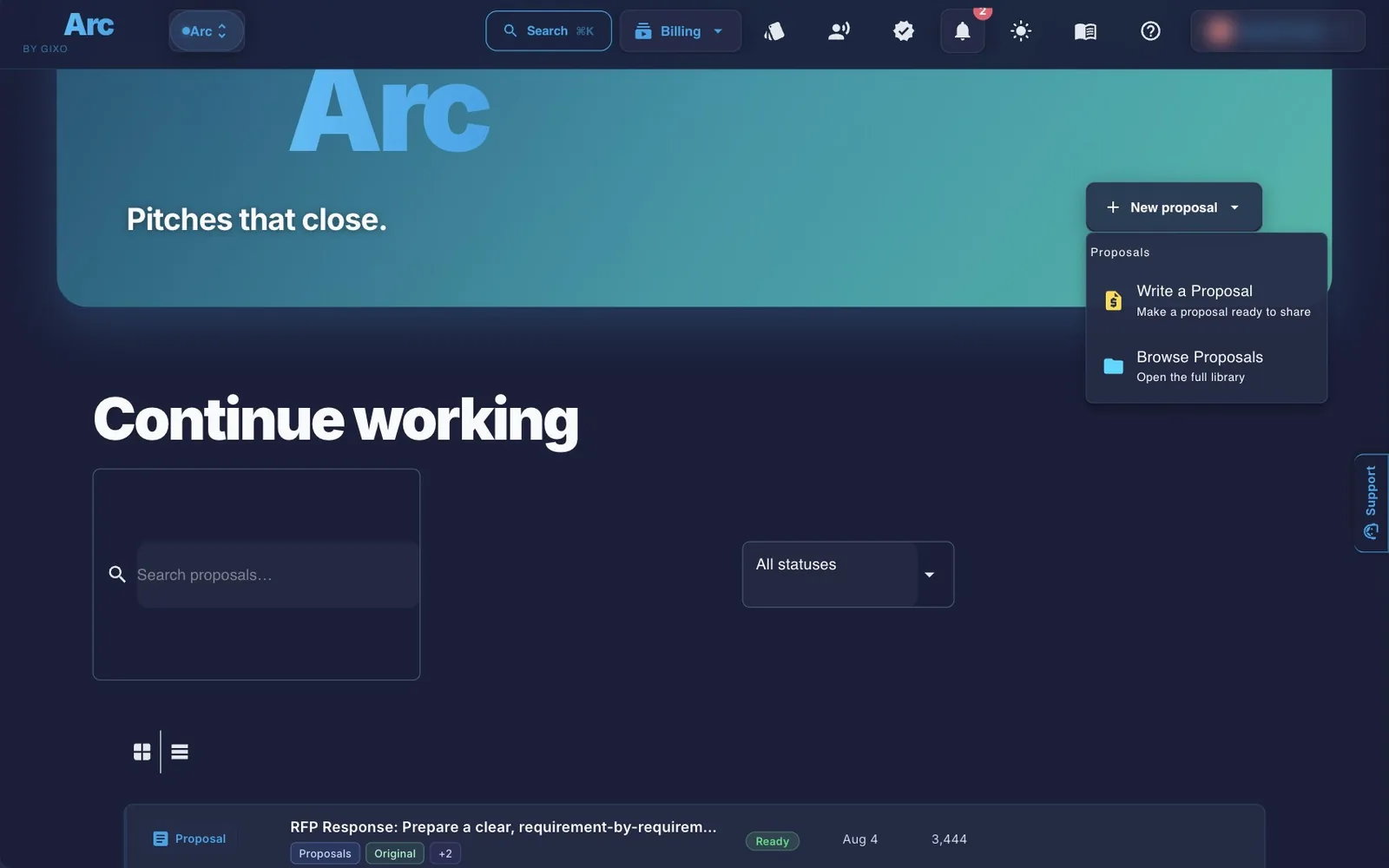
New proposal at the top starts a draft, and three tiles under it start a Client proposal, a Consulting proposal or an RFP response. Your proposals lists your work as cards or as a list. Search and the status filter (Ready, Writing…, Needs attention) run over every proposal you have, and Load more pages past the first 72. A proposal Arc is still writing shows as a Writing… card that opens it. The list view is a table with each proposal's deadline, readiness and status; once three or more proposals have a recorded result, it also says how many you won. Every proposal opens in its workspace.
Answer library sits at the top beside Tools. Tools holds the free Arc tools and your last six deliveries, each with Copy tracked link.
Writing a proposal
Three steps, all on one page. Generating the draft uses plan capacity.
1. Proposal type
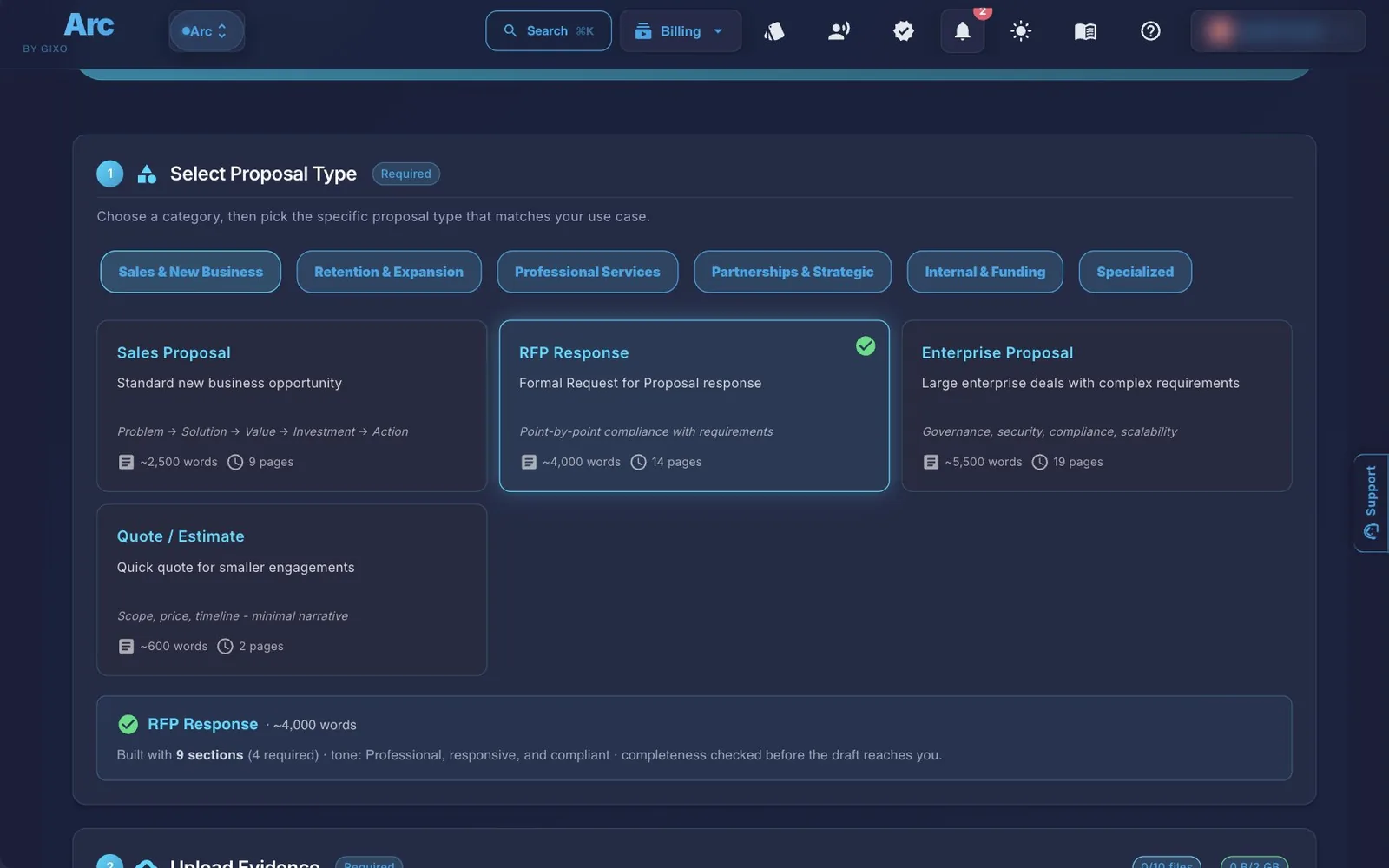
Six types are tiles — Sales Proposal, RFP Response, Consulting Proposal, Project Proposal, Quote / Estimate and Renewal Proposal — three of them showing the first page of a proposal Arc wrote for that type. More types holds the other fifteen. Sales Proposal is chosen to begin with. If one of your sources is the buyer's RFP, Arc switches the type to RFP Response and says so, with Undo; once you pick a type yourself, Arc leaves it alone. Each type comes with its own section plan, target length and tone. All 21, in the catalog's groups:
| Group | Types (about how many words) |
|---|---|
| Sales & New Business | Sales Proposal (2,500) · RFP Response (4,000) · Enterprise Proposal (5,500) · Quote / Estimate (600) |
| Retention & Expansion | Renewal Proposal (1,800) · Expansion Proposal (1,500) · Win-Back Proposal (1,200) |
| Professional Services | Consulting Proposal (2,200) · Project Proposal (2,000) · Retainer Proposal (1,800) · Staffing Proposal (1,200) |
| Partnerships & Strategic | Partnership Proposal (2,500) · Joint Venture Proposal (3,000) · Sponsorship Proposal (1,800) |
| Internal & Funding | Internal Business Case (2,000) · Grant Proposal (3,500) · Investment Proposal (3,000) |
| Specialized | Government Proposal (5,000) · Research Proposal (4,000) · Creative Proposal (1,800) · Tech Implementation Proposal (3,500) |
2. Sources
Arc needs at least one source. Paste a brief, an RFP, notes or an email under Paste your brief, notes or the RFP and click Add pasted text (up to 150,000 characters; it stays on this page only, so add it again if you reload). Or upload up to 10 files and 2 GB in total, with a 500 MB general per-file ceiling and a 64 MB ceiling for Word, PowerPoint and Excel files: PDF, Word (.docx), PowerPoint (.pptx), Excel (.xlsx), plain text (.txt), and PNG or JPEG images. To use an email as a file, save it as a PDF first. Reuse saved content as a source copies the text of something you've already saved in Gixo.
Each source arrives with a Role filled in: the buyer's RFP for the first source of an RFP response, a buyer attachment otherwise, and the buyer's RFP for a file whose name or opening line says it is one. Change it if Arc guessed wrong — buyer RFP or questionnaire, buyer addendum, buyer attachment, pricing schedule, submission instructions, company policy, product documentation, case study, past proposal, legal or commercial terms, or team credential — so Arc knows how to use it. A role never holds up Generate. The draft's structure comes from the proposal type, not from any template you upload. To see how it works first, click Try with a sample RFP.
3. Extra details (optional)
Say what the proposal is for under Extra instructions for Arc, and choose the proposal language. Add any Regulatory / Compliance Context — jurisdiction, applicable laws or standards, specific references — which steers the draft but isn't treated as evidence. Commercial Context takes a value range, how many days the proposal stays valid (1–365), a currency from the current regional currency picker and payment-terms guidance. Then click Generate Proposal, below this step.
Once Arc starts, a progress panel takes the form's place. Open proposal opens it in its workspace when it's written. Arc keeps writing if you leave the page or start another proposal; you'll find it in Your proposals.
If Generate stays greyed out
A list above the button says what is still needed, with a link to each: a proposal type, a source, or a source whose text Arc hasn't read yet. If a file still shows Processing or No text extracted, wait and use Check status, or remove the file.
Working on the draft
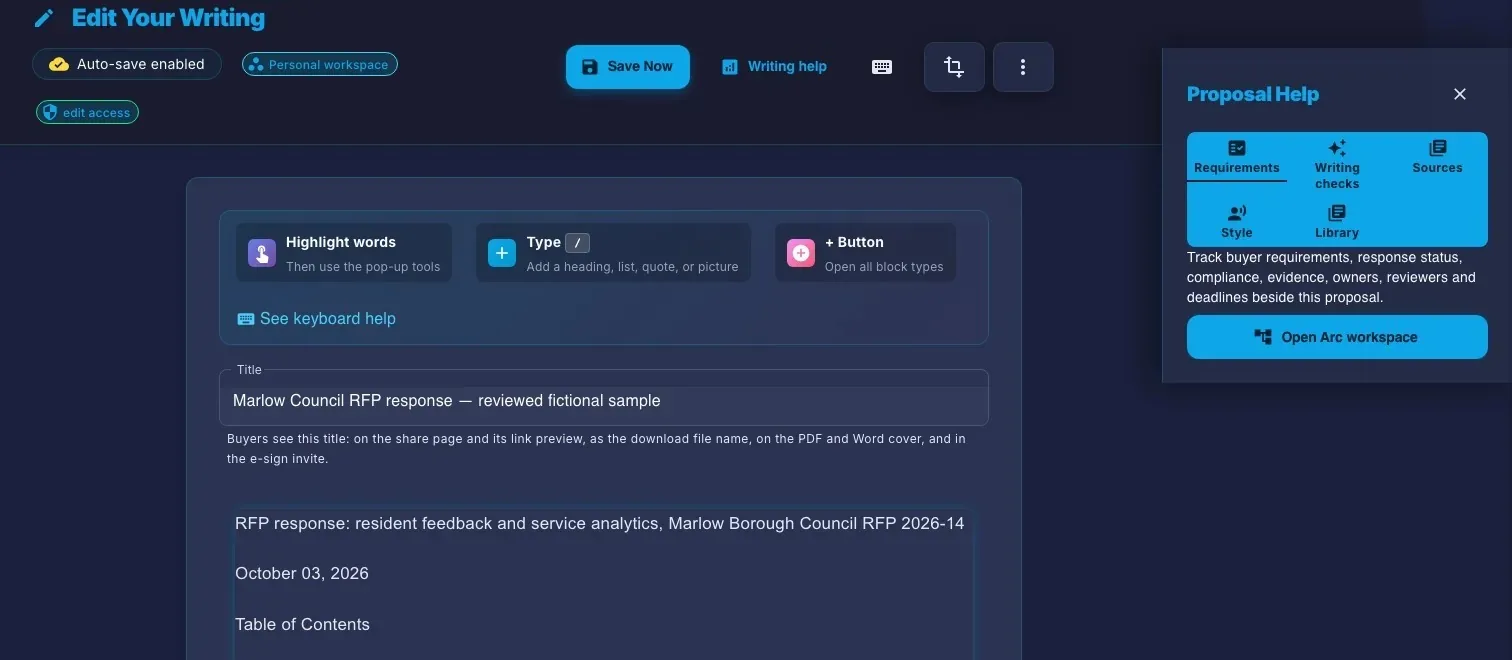
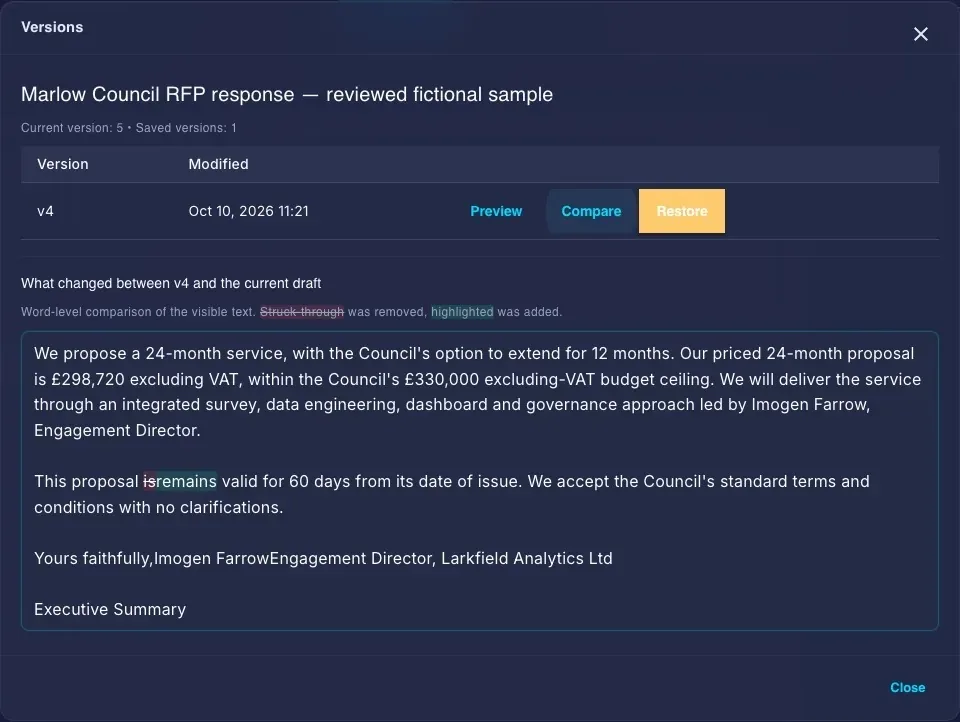
A proposal opens in its workspace (described below). Edit proposal at the top of the workspace opens the editor. Comments, versions and signatures, on the Preview tab, opens the read view, whose action bar has Edit, Regenerate, Create from this, Response workspace, Send to buyer, Create pitch deck and Download. More actions holds Versions, Import a new version, Copy link and Delete this. The read view also shows the proposal's delivery history and its signature requests.
| In the editor | What it does |
|---|---|
| Proposal Help | A side panel with three tabs. Checks holds the draft checks, suggestions and your style terms. Sources holds the proposal's sources and the fact library, which adds approved facts, claims and sources to your writing. Requirements has Open Arc workspace. |
| Selection AI | Select text and choose Rewrite… for Rewrite, Simplify, Expand or Power edit, where you say in your own words what to change. |
| Versions | Save a Version and Versions, in the editor's More menu. |
| Handing it over | Download and Send to buyer sit in the editor's top row, as in the read view. A proposal is shared through Send to buyer; the More menu's Copy link for your team copies a link to the proposal in Gixo, for your team. |
The proposal workspace
Every proposal opens here, from every list in Arc and from the editor's Requirements tab. The top of the page has Edit proposal and, once the requirements are listed, Create pitch deck. Below it are four tabs.
| Tab | What it holds |
|---|---|
| Preview | The proposal as the buyer will read it, with a note of how many things Arc's AI check against your files found and Open Review to see them. Comments, versions and signatures opens the read view. |
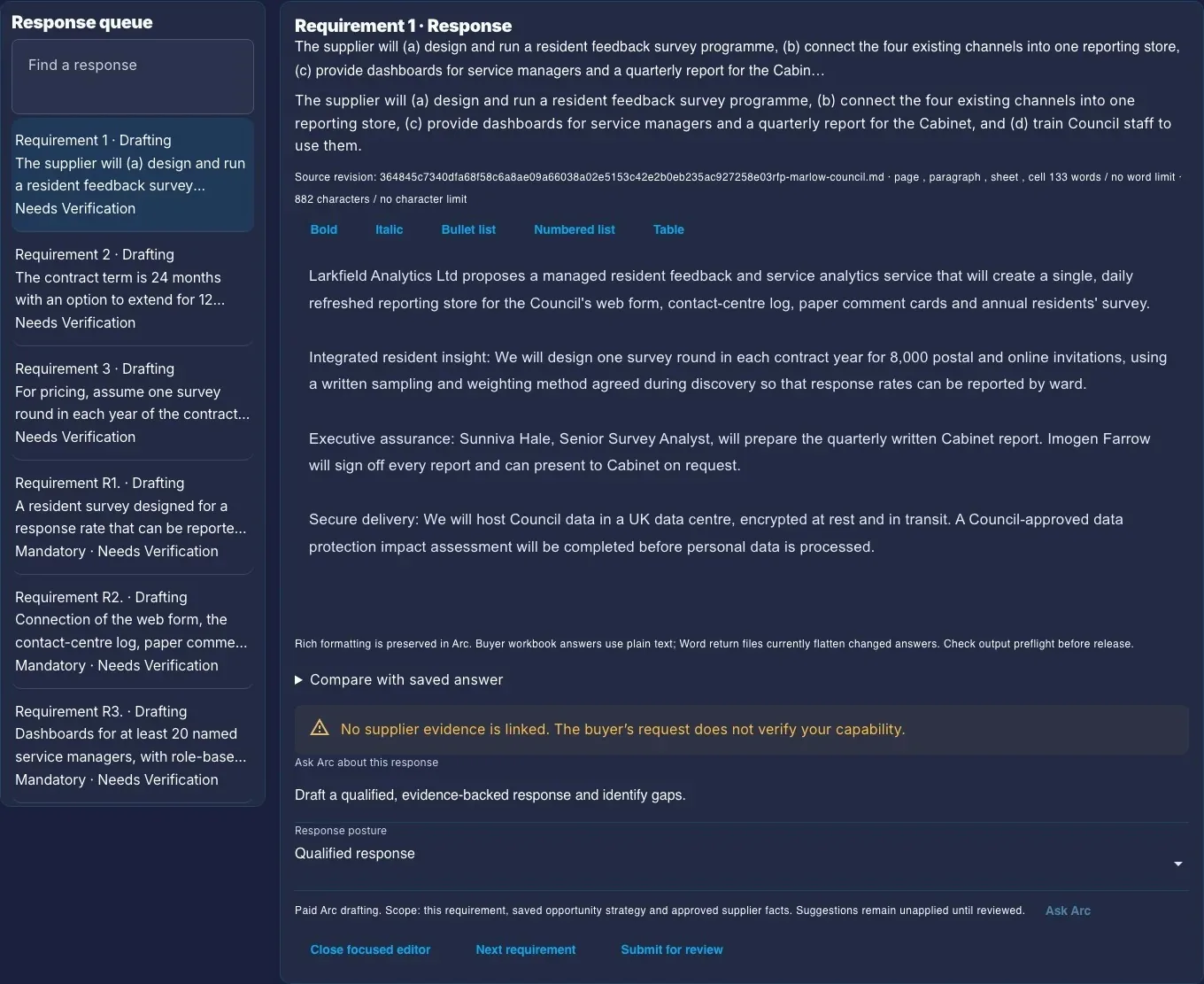
| Draft | For a bid, List the requirements asks for the opportunity name, buyer, RFP or tender number and submission deadline, then reads the buyer's files and lists every requirement so you can answer each one. After that, Draft holds the answers and the focused answer editor, the requirement and response matrix, Work profile and approved evidence, Bid details and strategy notes and the sources. The proposal type decides whether Draft leads with scope, deliverables and fees or with the buyer's requirements. |
| Review | What to fix before sending: one list, with a row per requirement, a row for the whole proposal and a row for the AI check against your files. Each row says what Arc found in plain words and quotes the sentence it's about; Open answer, Fix with Ask Arc and Show in proposal take you to it. Items that don't block sending can be marked checked. Review settings holds sign-offs, who checks what, company facts, files read and review rules. |
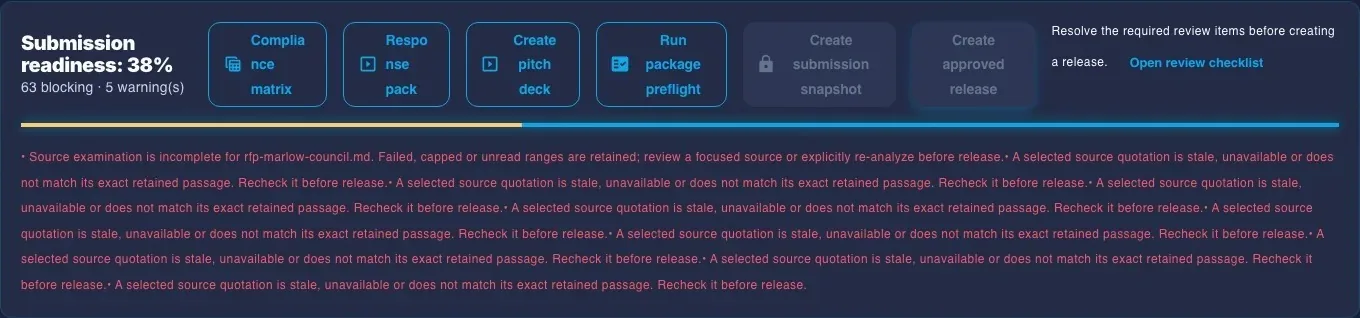
| Deliver | Download proposal (Word or PDF), Send to buyer and, once the requirements are listed, Download compliance matrix as CSV or Markdown. Then a readiness line and Lock final version, and the history of what was sent. More holds the Response pack (PowerPoint), Check the buyer's files and Save a snapshot (not final); Records and settings holds the outcome, CRM links and webhooks. |
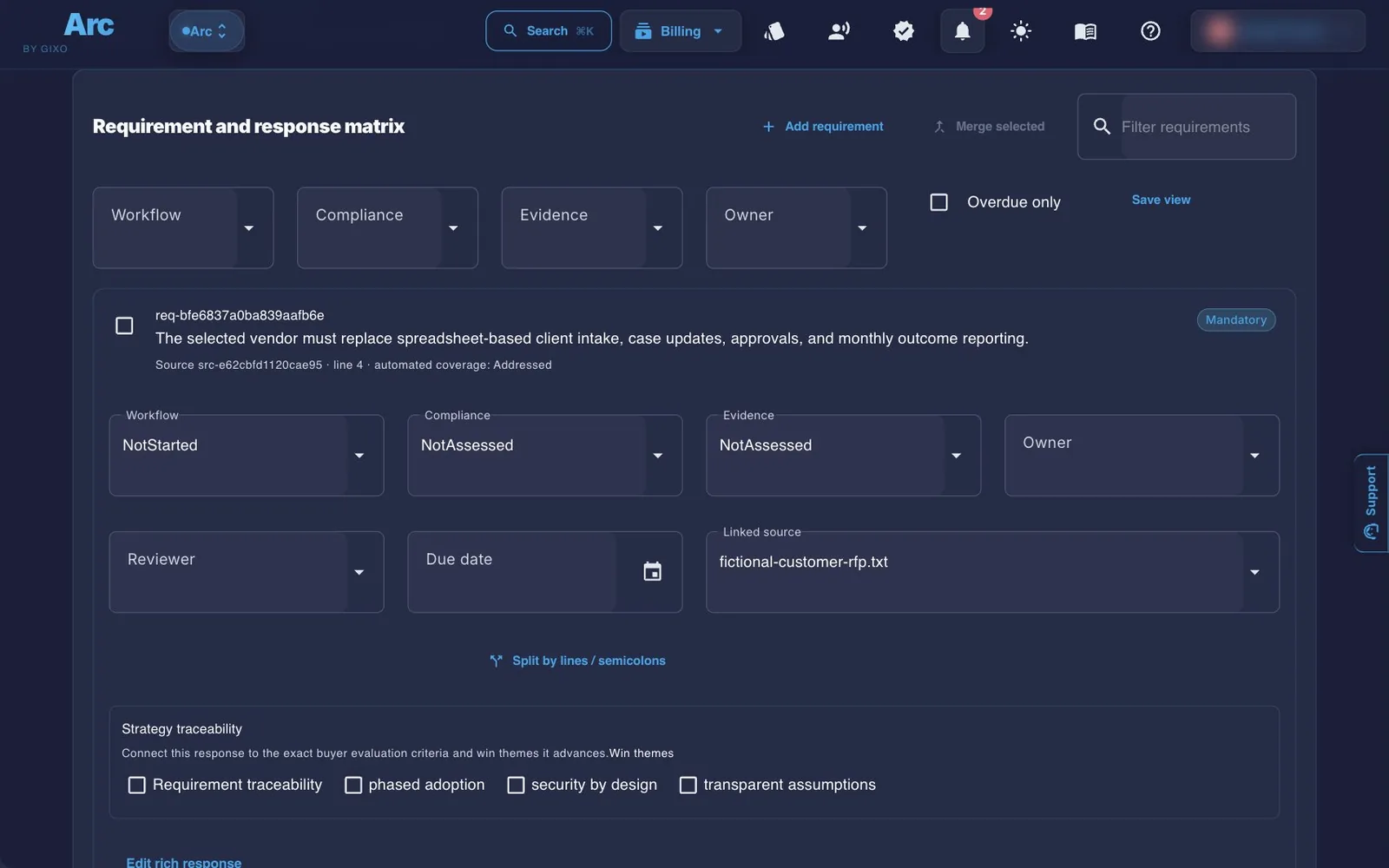
- Requirement and response matrix. In Draft, under All requirements in one list (and addendum changes). Each requirement has an owner, a reviewer, a due date, a structured or rich response, and evidence. Find reusable answer pulls from your answer library, and Save response to library adds a good answer to it. You can add and merge requirements, filter by workflow, compliance, evidence, owner or overdue items, and save views.
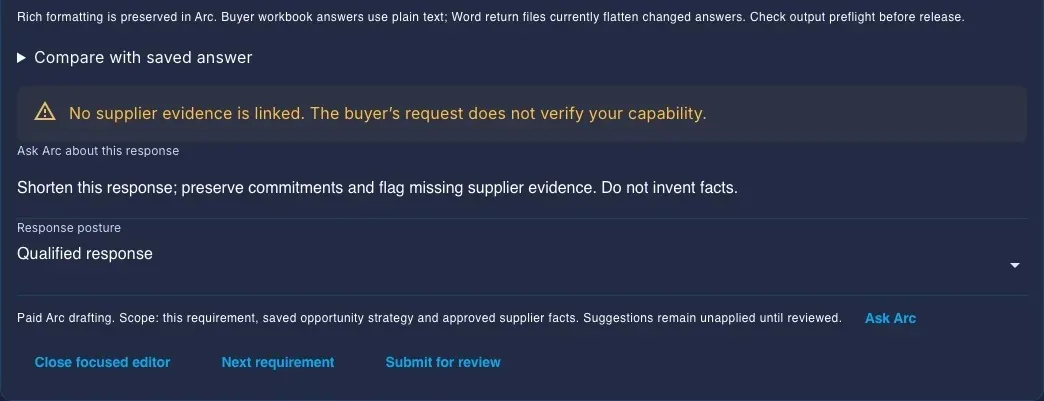
- Ask Arc about this response. Arc drafts a suggested response for the requirement, which stays unapplied until you review it. It requires active Arc generation access, with no per-run deduction for this action. Review the suggestion before applying it.
- Strategy. Under Bid details and strategy notes, record the bid decision, score qualification criteria from 0 to 5, and list stakeholders, competitors, differentiators and win themes, each with a buyer-facing message and proof. The buyer never sees these notes; Ask Arc reads them when it drafts an answer.
- Sign-offs. Under Review settings, apply a sign-off template, set a decision, reviewer and due date for each, mark which are required for submission, and notify pending reviewers. A sign-off can also be marked from the Review list.
- AI answer checks. Each time you save the workspace, Arc's AI review reads the answers: whether an answer's passage covers its requirement (addressed, partly, declined, not addressed, or only repeating the requirement), whether the evidence attached to an answer supports a high-risk claim, and whether tone, terms and other answers agree. Each verdict must quote the answer. What the review can't check shows as not checked, with Arc's word-match estimate. It needs active Arc generation access and doesn't draw on plan capacity.
- Placeholders. A bracketed placeholder left in the draft, such as [Firm Name], stays visible in Review and blocks Lock final version until you replace it; so do prices marked TBD in the price table.
- Lock final version. Once nothing required is open, every answered requirement is approved and the required sign-offs cover the current version, Lock final version freezes the reviewed proposal and its files. Each locked version is listed with Download locked version, and Send to buyer can send it exactly as it was locked. Its Word and PDF use the Arc proposal theme and, when your plan includes it, your Brand Kit, as do the signing PDF and the buyer page's downloads. Save a snapshot (not final) keeps a copy without locking.
- Saving. The status line shows All changes saved. If a save doesn't go through, a recovery draft is offered back to you.
Your proposals (gixo.ai/arc/projects) is your list as a table, with each proposal's deadline, readiness and bid decision. Above it: how many bids are active, how many are due in the next seven days, average readiness and the open pipeline. Search by opportunity or buyer, and filter by status, deadline or go / no-go. The Arc answer library holds approved answers, with approve and request-changes steps and an audit CSV export. gixo.ai/arc/library
What Arc checks, and what you set
Switching tabs does not approve the proposal. These are the deeper tools behind Draft, Review and Deliver.
Arc's AI check against your files
When Arc finishes writing a proposal, it checks the text against the files it was written from and saves the result with the proposal. Each thing it flags is a row in Review, with the draft passage and the file and passage it was checked against. The saved check isn't rerun as you edit: once the proposal changes, it is marked out of date, and regenerating the proposal checks it again.
Inspect evidence and source coverage
Use Load retained passage to inspect a source before selecting a literal quotation and its character offset. Saving lets the server check that passage against the retained source version. A passage found there shows that the wording occurs there, not that its interpretation is correct or that your company meets the requirement. Source examination coverage records read, failed and limit-reached ranges; it does not establish that every requirement was discovered. Review unread material and source changes explicitly.
Approved supplier facts require company evidence and an explicit human review. Optional Paid semantic requirement review returns quoted candidates for amendment review, leaving existing answers unchanged. It needs active Arc generation access and has no per-call deduction; the free deterministic reanalysis remains a separate action. Arc then cross-checks the candidates against the source: a line that states an obligation with shall, must, required or mandatory but that no candidate covers is listed under Possible missed requirements, and a candidate with no obligation word or requirements heading behind it is marked AI-only for you to confirm. Both are advisory; neither adds, removes or rewrites a requirement. All of these sit under Review settings.
Set a proposal review policy
Under Review settings, a review administrator can append a retained policy version with required phrases, prohibited phrases, maximum line discounts or minimum offer validity. Mark a rule required before release when it should block. Save the workspace to publish the version; published versions cannot be edited or removed. These literal and commercial checks cover structured responses, scope sections and included buyer answers. They do not interpret legal clauses or replace specialist approvals, which must cover the current revision.
Separate the buyer value case from the quote
Under Work profile and approved evidence in Draft, enable Include a buyer value case and enter upfront cost, annual operating cost, annual benefit, horizon, discount rate, assumptions and evidence uncertainties. Arc calculates total benefit, total cost, net benefit, ROI, simple payback and NPV for base and benefit 20% lower or higher cases over one to ten years. Annual costs and benefits are constant, cash flows occur at year end, and tax, inflation, financing and growth are excluded. The result does not change the pricing schedule or forecast an outcome; a finance owner reviews the assumptions.
Import reviewed Prism pricing metrics
After adding pricing rows, import a reviewed calculation metric pack. Choose raw or display values for quantities and unit prices, inspect the preview and apply it explicitly. Units and currencies must match exactly: no conversion is performed. Imported values stay pinned to the retained pack rather than live-syncing. Unlink them or import and preview a revised pack to change them.
Prepare a repeatable response run
Under More in Deliver, once a buyer addendum is among the sources or a run exists, a saved response recipe records required source roles, scope, review gates and costing selections for a named request or period. Prepare the run, inspect source, answer and price changes, and explicitly confirm review before accepting it. Acceptance uses the normal Lock final version checks. This is not scheduled autonomous drafting or publication; accepted bundles remain retained within the workspace history limits.
Choose the proposal source for a Lumen pitch deck
Create pitch deck, at the top of the workspace, asks for current saved scope sections or a retained approved edition. The handoff retains the source revision and digest, then opens the separate Lumen outline workflow. Lumen access and normal generation checks apply. Later proposal edits do not automatically update the deck; review source drift and the resulting presentation before sharing. A response-pack PowerPoint is a separate direct workspace export.
Your proposals reports the recorded Won/Lost result, the library-assisted result, loss reasons and open-pipeline value once three or more proposals have a recorded result, with cycle and answer-learning signals under What's working. It works from the most recently updated proposals the page loads, and says so when there are more. These signals are descriptive, not CRM-wide attribution or a promise of improved win rate. Record a result under Records and settings → Did you win? in Deliver.
Delivering the proposal
Send to buyer
Send to buyer — in Deliver, in the read view and in the editor — opens one dialog with three choices. Tracked link: Gixo makes a link for this buyer, and you copy it and send it yourself. Email it for me: Gixo emails the buyer a link made for them, with an optional note, and tells you when they open it; tick Enable automatic follow-up reminders to remind the recipient by email if the proposal stays unopened or before the link expires. Ask them to sign: the signature request form, below.
For a link, fill in the recipient's name and email (used for tracking), choose View only or View & download, and optionally add an expiry date and a password. Give it a Delivery label. Sent from Deliver once you've locked a version, What the buyer gets lets you send that version instead of the proposal as it is now. Then click Create Link, or Send by Email. The recipient can read the proposal and click Accept proposal, and your delivery history shows when it was opened, downloaded and accepted. When the recipient opens or downloads the proposal, you also get a notification in Gixo and, unless you switch those emails off in Settings, an email. At the foot of the dialog, Public link makes one link for anyone who has it, on plans that include it.
Signatures
In Send to buyer, choose Ask them to sign. Add up to 10 signers (name, email and optional role) and an optional message, then click Freeze document & send. Each signer gets a personal email link to a fingerprinted PDF snapshot of the document as it stands at that moment. It's a simple electronic signature, not a qualified or certificate-based one. The read view's Signatures panel lists your requests; there you can void one or download the signed copy.
Downloads
Download proposal in Deliver, or Download in the read view or editor, opens the export page. Choose PDF or Word, then Download. More formats holds a web page (HTML), Markdown, JSON and plain text, and the text formats can also be copied. A proposal starts on the theme made for its kind — an RFP on RFP Response, a grant or public-sector bid on Grant / Public Sector, and so on — among six proposal themes: Executive Sales, Consulting Engagement, RFP Response, Grant / Public Sector, Partnership / Strategic and Tech Implementation. The general themes are under More themes, and a sources section is included by default. The workspace adds the compliance matrix (CSV or Markdown), the response pack (PowerPoint) and locked versions.
Plans and your trial
Arc is priced per seat, in US dollars. Every paid Arc plan includes drafting capacity that resets each month; your subscriptions page shows a usage bar rather than counts.
| Plan | Per seat, monthly | Per seat, annual | Minimum seats |
|---|---|---|---|
| Starter | $49 | $490 | 1 |
| Professional | $129 | $1,299 | 2 |
| Business | $149 | $1,499 | 5 |
| Enterprise | $179 | $1,799 | 10, through Azure Marketplace or a private offer |
- Every paid Arc plan includes proposal drafting, the response workspace, tracked links, signature requests and exports.
- Comments, including comments on requirements in the workspace, start at Professional.
- The 14-day trial needs no card, and each email address gets one. It works like Starter and takes you straight to Create Proposal. After it ends, your proposals stay open to you, and drafting pauses until you choose a plan.
Free tools, no account needed
Proposal Completeness Check
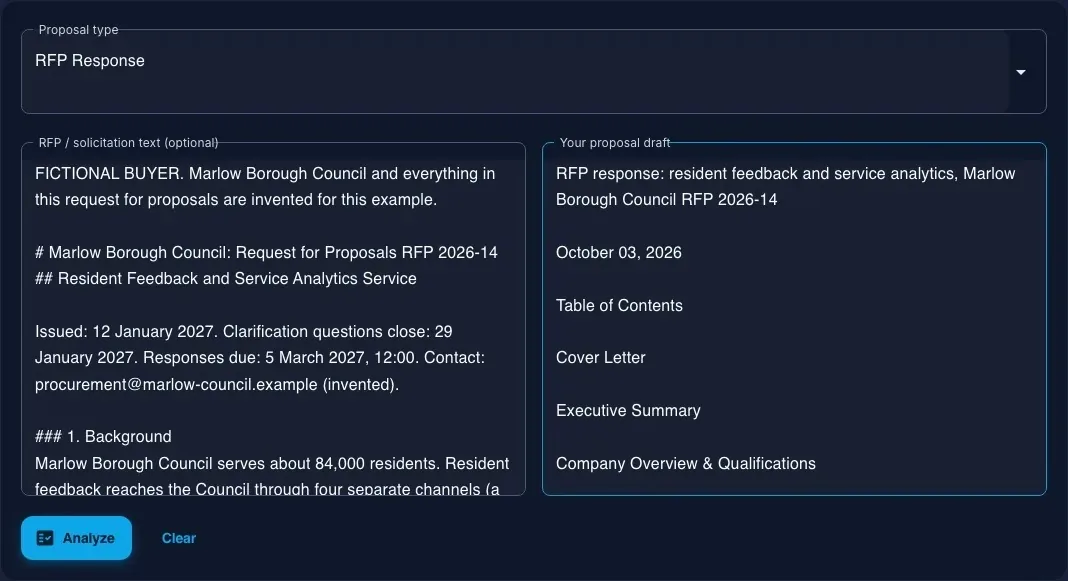
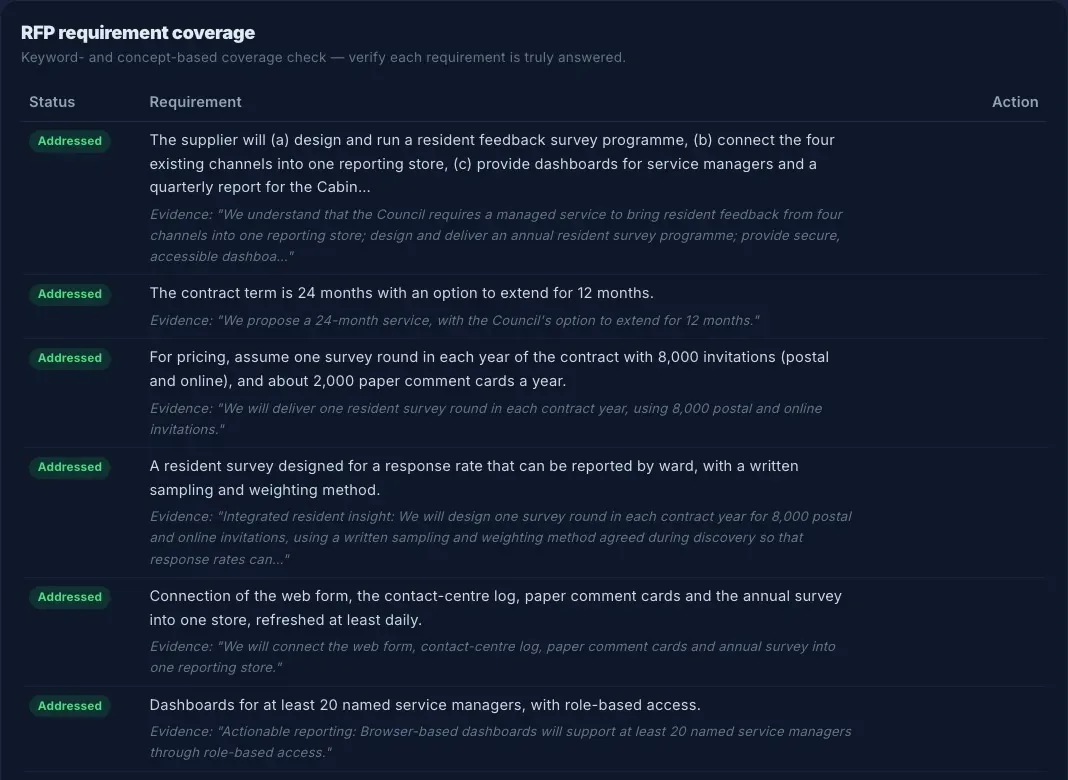
Choose one of the 21 proposal types and paste your draft, the RFP, or both (up to 150,000 characters each). Arc scores readiness from 0 to 100 — Not ready below 40, Emerging 40–59, Close 60–79, Ready 80 and above — and reports RFP requirement coverage, section coverage, a readiness checklist and consistency findings. It uses fixed rules and no AI, so it doesn't draw on any plan. Requirement coverage is matched on keywords and concepts, so check each requirement yourself. The PDF report needs a sign-in.

| More free tools | What it does |
|---|---|
| RFP Requirement Extractor gixo.ai/tools/rfp-requirement-extractor | Pulls explicit submission requirements, deadlines, “musts” and response instructions out of an RFP. |
| Bid / No-Bid Scorecard gixo.ai/tools/bid-no-bid-scorecard | Scores an opportunity on fit, access, evidence, capacity, risk and economics. |
| Proposal Version Diff gixo.ai/tools/proposal-diff | Writes a section-by-section change log between two versions of a proposal. |
| Statement of Work (SOW) Template Builder gixo.ai/tools/sow-builder | Builds a scope with numbered deliverables, acceptance criteria, dependencies and change control. |
| Capability Statement Builder gixo.ai/tools/capability-statement-builder | Assembles a one-page capability statement and checks common government-supplier identifiers. |
Tips
- Check each source's role. Arc fills one in for every source; the role tells Arc what the buyer asked for and what counts as your evidence, so correct any it guessed wrong.
- Review missing details before you send. Check names, dates, amounts and commitments against your files. Missing information may be omitted, phrased generally or marked for confirmation, so searching for TBD alone is not enough.
- Use the readiness score as a review aid. The free completeness check can flag section, requirement and consistency gaps. It does not establish that every fact is supported or every missing detail is marked; review the draft against your sources before you send it.
- Search on the Arc dashboard covers every proposal, and Load more pages past the first 72. Your proposals at gixo.ai/arc/projects works from the most recently updated proposals it loads, and says so when there are more.
Quick links
| Arc dashboard | gixo.ai/dashboard/arc |
| Create Proposal | gixo.ai/proposals/create |
| Your proposals (table) | gixo.ai/arc/projects |
| Arc answer library | gixo.ai/arc/library |
| Proposal Completeness Check | gixo.ai/arc/analyze |
| All free tools | gixo.ai/tools |
| Arc plans | gixo.ai/products/proposals#plans |
| Help and support | gixo.ai/support |
The text was checked against the Arc code on 24 October 2026 at commit 9c3e18153e. The screenshots were not retaken after the screens changed on 19–23 October, so some show earlier controls: the free-check inputs, coverage and five editing-access figures were captured on 10 October 2026, and the earlier interface illustrations on 14 September 2026. Editing-access figures use manually prepared sample text, an unsubmitted Ask instruction and genuine saved manual versions. If a screen doesn't match what you see, the product has moved on — tell us at gixo.ai/support and we'll update this guide.