
How to write a proposal with AI
Upload your source files, select a proposal type, and let AI generate a structured first draft. Edit collaboratively, then export to PDF or DOCX.
To write a proposal with AI: upload your source files (the RFP, past proposals, and scope brief), pick from Gixo's 21 proposal types across 6 categories, and generate a structured first draft with each section grounded in what you uploaded. Then edit in place, keep a human review step, and export to PDF or DOCX before sending.
See what Arc helps your team review
Choose the proposal type, add the RFP, brief, notes, or prior work, then review a structured first draft before it reaches a client.
- 1Add source materialRFPs, briefs, notes, decks, and prior work
- 2Draft to the proposal typeSections and structure follow the real opportunity
- 3Review before deliveryYour team checks facts, scope, pricing, and commitments
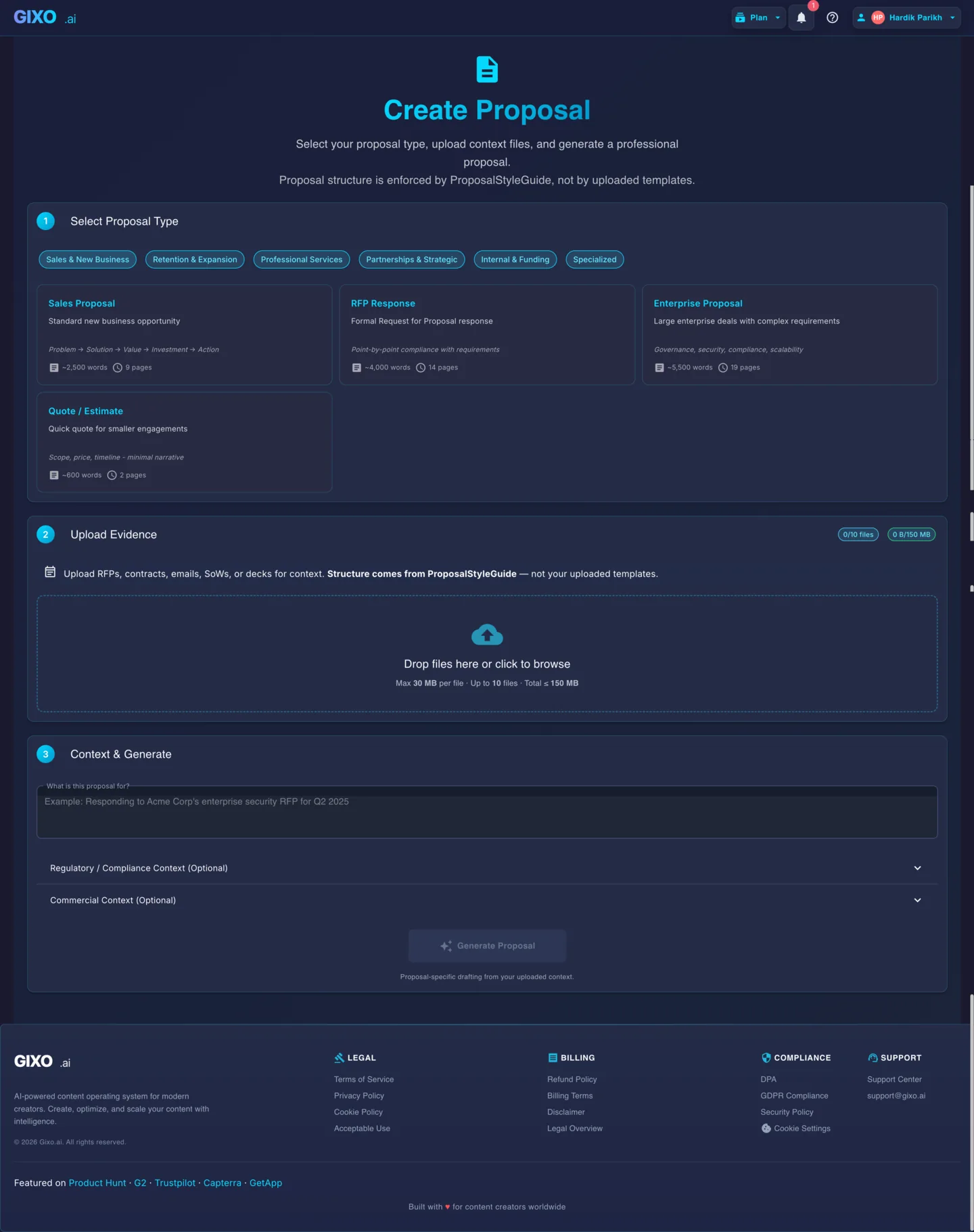
How do you write a proposal with AI?
From blank page to a reviewable proposal draft. Gixo drafts from your source material so every section starts closer to real context.
Choose Your Proposal Type
Select from consulting, sales, grant, business case, renewal, or RFP response. Each type uses a tailored structure and section flow.
Gather Your Source Files
Collect RFP documents, past proposals, scope briefs, or any reference material. The AI reads these to understand the opportunity and requirements.
Upload and Configure
Upload your files to Gixo. Add a brief description of the project, client, and any specific instructions for tone or emphasis.
Generate Your First Draft
Click generate. The AI produces a structured proposal with executive summary, scope, methodology, timeline, pricing, and terms -- all drawn from your uploaded context.
Edit and Refine
Use the built-in editor to adjust language, reorder sections, add details, or regenerate specific parts. Collaborate with teammates in real time.
Export and Send
Export the reviewed proposal as a formatted PDF or DOCX. Share via link or download for email delivery after your team approves it.
What does each step do when you write a proposal with AI?
The AI drafts the structure and the sections; you keep control of the shape, the context it uses, and the final sign-off. Evidence is bound to what you uploaded, and nothing is sent until you approve it.
| Step | What you do in Gixo | What the AI does | What you control |
|---|---|---|---|
| 1. Pick a type | Choose from 21 proposal types across 6 categories (sales, retention, professional services, partnerships, internal/funding, specialized) | Loads the matching section structure | The proposal shape and flow |
| 2. Add sources | Upload the RFP, past proposals, scope brief, or reference docs | Reads them to ground the draft in real context | What context the AI is allowed to use |
| 3. Generate | Click generate | Drafts exec summary, scope, methodology, timeline, pricing, terms -- evidence bound to what you uploaded | Nothing is sent yet; it's a first draft |
| 4. Review & edit | Revise wording, reorder, regenerate sections | Regenerates only the parts you ask for | Human sign-off before it leaves |
| 5. Export & send | Export to PDF or DOCX, share by link | Preserves headings and layout | Final approval and delivery |
What should you give the AI before it drafts?
Give it your source files first: the RFP you're responding to, past proposals that already won, and a scope brief describing the project and client. A draft grounded in those files beats a draft written from a blank prompt, because every section starts from your real context instead of generic filler.
What can AI NOT do when writing a proposal?
AI won't own your win strategy, your pricing rationale, or the differentiators that set you apart -- those are judgment calls only you can make. It can also produce confident errors, so a first draft always needs a human review step before it goes to a client. Gixo is built around that review step rather than around removing it.
Which proposal types can AI write?
Gixo covers 21 proposal types across 6 categories: sales, retention, professional services, partnerships, internal/funding, and specialized. You start with a no-card 14-day trial; after that, generation requires a paid plan.
Frequently Asked Questions
What types of proposals can I write with Gixo?
Gixo supports consulting proposals, sales proposals, grant proposals, business case proposals, renewal proposals, and RFP responses. Each type uses a dedicated structure optimized for that use case.
Do I need to upload source files?
Source files are optional but strongly recommended. Uploading RFPs, scope documents, or past proposals lets the AI ground its output in real context, producing far more relevant and accurate drafts.
How long does it take to generate a proposal?
Generation time depends on the proposal type and source material. Treat the output as a first draft that still needs human review before sending.
Can I edit the proposal after generation?
Yes. Gixo includes a full editor where you can revise text, reorder sections, regenerate individual parts, and collaborate with team members before exporting.
What export formats are available?
You can export proposals as formatted PDF or DOCX files, and also as HTML, Markdown, JSON, or plain text. PDF and DOCX preserve your structure, headings, and layout for professional delivery.
Can I try it before paying?
Yes. Gixo offers a 14-day free trial that lets you generate proposals and test the full workflow before upgrading to a paid seat.
How do you write a proposal with AI?
Upload your source files (the RFP, past proposals, and scope brief), pick from Gixo's 21 proposal types across 6 categories, and generate a structured first draft with each section grounded in what you uploaded. Then edit in place, keep a human review step, and export to PDF or DOCX before sending.
What can AI not do when writing a proposal?
AI won't own your win strategy, pricing rationale, or differentiators, and it can produce confident errors, so a first draft always needs a human review step before it goes to a client. Gixo keeps that human sign-off in the loop rather than removing it.
Write Your First AI Proposal
Upload your source files and generate a structured proposal draft for review. Start your 14-day free trial, no card required.
Start WritingUpdated