
Proposal Software vs Word and Google Docs
Word and Google Docs were built to write documents — not to assemble a complex proposal. On a simple one-page quote they are fine. On a high-stakes deal with multiple stakeholders and varying scope, the DIY approach shows up as version chaos, manual errors, and generic content. Here is where it breaks, and what proposal software does differently.
Proposal software differs from Word and Google Docs because it starts you from a populated, structured first draft instead of a blank page: it reads your uploaded brief, RFP, and past proposals and drafts a source-grounded document with the right sections for the proposal type, while Word and Docs leave every step — drafting, structuring, version control, and formatting — fully manual. For a simple one-page quote or standardized agreement, a word processor is still fine; the gap opens up on complex, multi-stakeholder deals with variable scope and long RFPs. Gixo Arc covers 21 proposal types across 6 categories (sales and new business, retention and expansion, professional services, partnerships and strategic, internal and funding, and specialized), reads scanned RFPs through OCR intake, and exports to PDF, DOCX, and HTML. Plans run $49–$179 per seat per month, minimum 1–10 seats depending on tier, with a 14-day no-card trial. Arc handles assembly, structure, grounding, export, recipient-specific tracked links, and simple electronic signature with a sealed PDF. It does not email the tracked link; you share the link through your existing tools.
See what Arc helps your team review
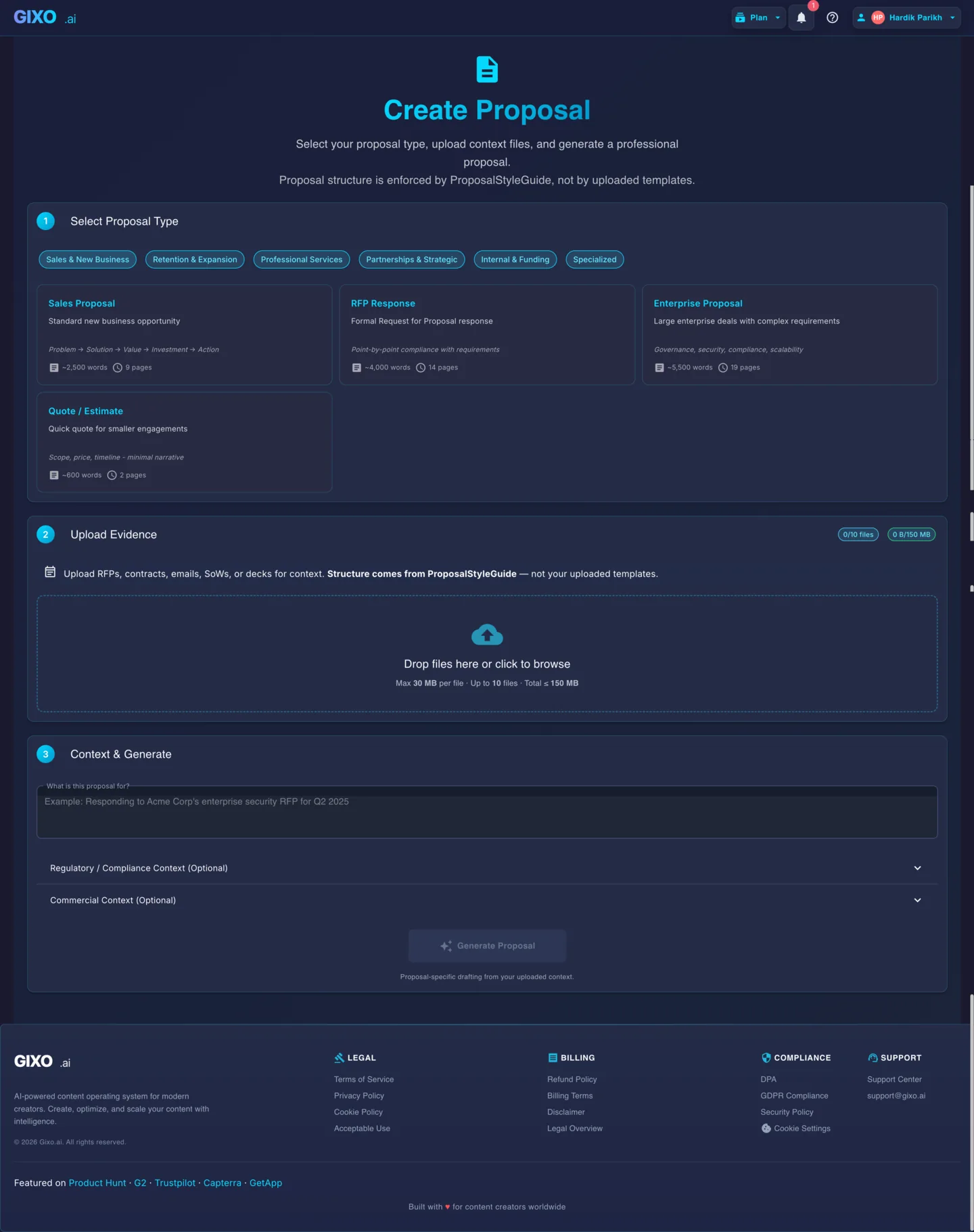
Choose the proposal type, add the RFP, brief, notes, or prior work, then review a structured first draft before it reaches a client.
- 1Add source materialRFPs, briefs, notes, decks, and prior work
- 2Draft to the proposal typeSections and structure follow the real opportunity
- 3Review before deliveryYour team checks facts, scope, pricing, and commitments
Why does a word processor start you at a blank page, and proposal writing software start you at a draft?
Word and Google Docs are excellent at one thing: turning your typing into a formatted document. That is a document-creation tool. A complex proposal is a different job — it is assembled from a client brief or RFP, drawn from your past work, structured into the right sections, reviewed by several people, and exported to a clean final file.
When you do that job in a word processor, every step is manual and disconnected: you copy-paste from an old proposal, retype client details, rearrange sections by hand, email the file around for edits, and hope the version you send is the right one. The friction is small on a simple quote and compounds as the deal gets more complex.
Proposal software like Gixo Arc works the other way around: you upload the brief, the RFP, and your strongest past proposals, and it drafts a structured, source-grounded first draft your team refines together — then exports it cleanly. The starting point is a populated draft, not a blank page.
The structure is not one generic outline either. Arc carries 21 proposal types grouped into 6 categories — sales and new business, retention and expansion, professional services, partnerships and strategic, internal and funding, and specialized — and each type carries its own section order and length target. A quote or estimate targets roughly 600 words of scope, price, and timeline; a standard sales proposal targets about 2,500; an RFP response targets about 4,000 because it answers stated requirements point by point. In Word, that difference is something you remember to do. In Arc, it is what the proposal type already knows.
What's the difference between proposal software and Word or Google Docs?
The same proposal task, done in a word processor versus in Gixo Arc.
| The task | Word / Google Docs | Gixo Arc |
|---|---|---|
| Starting a draft | Blank page; copy-paste from an old proposal | Structured first draft from your brief, RFP, and past work |
| Keeping it accurate and on-brand | Manual; prone to drift and copy-paste errors | Source-first — claims bound to the files you upload |
| Several people editing | Proposal_v3_FINAL_USE-THIS.docx chaos | One live collaborative workspace |
| Matching structure to the deal | Reorder sections by hand | Right sections per proposal type — 21 types across 6 categories |
| Reading a long RFP | Manual, requirement by requirement | OCR intake, point-by-point structure |
| Producing the final file | Manual formatting and clean-up | One-click export to PDF, DOCX, and HTML |
| Sending and signing | Attach to an email yourself | A recipient-specific tracked link you share yourself, plus simple electronic signature — each signer gets an emailed link and the signed copy is sealed as a PDF |
| What it costs | Bundled in Microsoft 365 or Google Workspace | Per seat, per month: $49 Starter (minimum 1 seat), $129 Professional (minimum 2 seats), $149 Business (minimum 5 seats), $179 Enterprise (minimum 10 seats). 14-day no-card trial |
The hidden costs of the DIY approach
A draft goes to a manager, a solution lead, and legal, and comes back as a web of conflicting files and scattered email feedback. The real risk is not annoyance — it is sending the wrong version, with an unapproved price or term still in it.
Retyping client names, scope, and figures by hand is where a misplaced decimal or a leftover detail from the last client slips through. On a complex deal, one of those mistakes can turn a profitable project into a loss-leader.
Reusing the last proposal means the buyer can tell it was written for someone else. Source-first drafting starts from this client's brief and your relevant past work, so the proposal speaks to their situation instead of reading like a recycled brochure.
When should you still use Word or Google Docs instead of proposal software?
This is not "word processors are dead." For a simple one-page quote or a standardized agreement, a Word or Docs template is perfectly fine — the overhead of dedicated software is not worth it.
They are also still the natural place to draft raw prose. A subject-matter expert can write a technical section in Word, and you bring that text into Gixo as a source. The point is not to stop writing in Word — it is to stop assembling a complex, multi-stakeholder proposal there. Gixo handles the assembly, structure, grounding, and export; you keep using whatever you like for raw drafting.
Gixo also stays in its lane: it is a drafting and review workspace, not an email-delivery platform. You can export a finished PDF or DOCX, create a recipient-specific tracked link and share it with whatever email or messaging tool you already use, or send the proposal for simple electronic signature, which seals the signed copy as a PDF with an audit certificate. That is not a qualified or certificate-based signature.
Frequently Asked Questions
Updated