
Should You Use Proposal Software or a Template Tool?
Template tools give you fill-in-the-blank documents. Proposal software uses AI to generate content from your source files. Here is how they compare and when each approach works best.
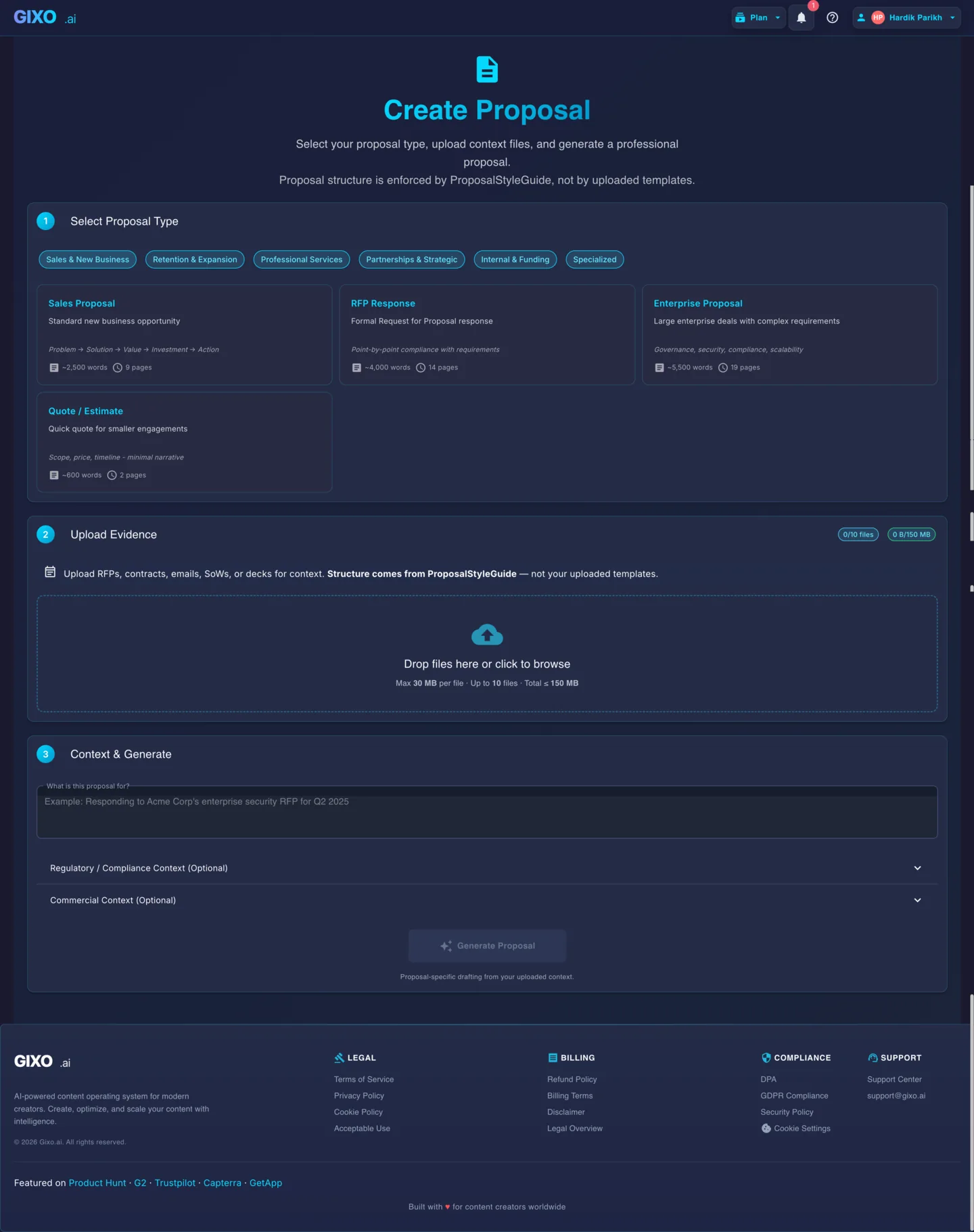
Proposal software writes the draft; a template tool hands you a pre-formatted blank and you write every word. Gixo Arc is proposal software: you attach up to 10 source files per proposal (PDF, DOCX, TXT, CSV, XLSX, PNG, JPG, EML, or MSG, at up to 500 MB per file and 2048 MB in total), choose one of 21 proposal-type structures, and get a reviewable first draft you can export as PDF or DOCX using one of 9 proposal export layouts. A template tool has no source-file intake and no requirement extraction — the same starting sections appear on every deal regardless of the RFP. Arc plans run $49 to $179 per seat per month with a 14-day no-card trial and no free plan; template-tool pricing varies by vendor, so check the vendor's current pricing page.
See what Arc helps your team review
Choose the proposal type, add the RFP, brief, notes, or prior work, then review a structured first draft before it reaches a client.
- 1Add source materialRFPs, briefs, notes, decks, and prior work
- 2Draft to the proposal typeSections and structure follow the real opportunity
- 3Review before deliveryYour team checks facts, scope, pricing, and commitments
A worked choice: the same brief, two starting points
Imagine a five-page implementation proposal built from an RFP, a scope spreadsheet, and one approved case study. The point of this example is the handoff difference; your own files and review rules still decide the result.
| Step | Template tool | Arc workflow |
|---|---|---|
| Start | Choose a pre-designed implementation template | Upload the RFP, scope sheet and approved case study |
| Adapt | Replace placeholder copy and reorganise sections manually | Map requirements and draft against the buyer's structure |
| Review | Reviewers comment on the filled document | Reviewers check requirement coverage, source support and unresolved gaps |
| Export | Export the branded document in the vendor's supported format | Review the Arc draft, then export PDF or DOCX for the final handoff |
The example does not mean software is always better. If the content is stable and visual layout is the bottleneck, a template may be the more efficient choice.
Key Differences
Two fundamentally different approaches to creating proposals. One starts with structure, the other starts with context.
Content Generation vs Fill-in-Blank
Proposal software reads your uploaded files and generates new content. Template tools provide pre-written sections with placeholder text you replace manually.
Context-Aware vs Generic
AI proposal software drafts from RFPs, briefs, and past work -- producing content specific to each opportunity. Templates give you the same starting point every time regardless of the deal.
Draft Speed vs Design Control
Proposal software gets you to a reviewable first draft faster. Template tools give you more control over visual layout and branding but require you to write every word.
Side-by-Side Comparison
How the two approaches stack up across the proposal creation workflow. The Gixo Arc column describes its available workflow and limits; the template-tool column describes the category, so confirm any specific product against its own current documentation.
| Capability | Proposal software (Gixo Arc) | Template tools |
|---|---|---|
| Content creation | AI-generated from context | Manual fill-in-the-blank |
| Source file input | Up to 10 files per proposal — 500 MB each, 2048 MB total | Not supported |
| Accepted source formats | PDF, DOCX, TXT, CSV, XLSX, PNG, JPG, EML, MSG | None — you type into the template |
| Document structures | 21 proposal types, from quote/estimate to RFP response, grant, and tech implementation | Whatever the template library ships |
| First draft speed | Minutes | Hours |
| Customization per deal | Automatic from uploaded context | Manual rewriting required |
| Visual design control | 9 fixed export layouts, no drag-and-drop canvas | High (drag-and-drop layouts) |
| Brand consistency | Via export formatting | Built into templates |
| RFP requirement mapping | Automatic extraction | Manual identification |
| Section regeneration | Yes | N/A |
| Export formats | PDF and DOCX | Vendor-dependent; usually PDF plus a web link |
| Answer library, bid analytics | Not included — Arc drafts, it does not run bid operations | Sometimes bundled — check the vendor |
| E-signature | Simple electronic signature, sealed PDF | Sometimes bundled — check the vendor |
| Learning curve | Low (upload and generate) | Medium (learn template system) |
| Published price | $49–$179 per seat per month, 14-day no-card trial, no free plan | Varies by vendor — check the current pricing page |
| Best for | Getting to a first draft fast | Standardized, design-heavy docs |
Where the Arc boundary sits
- Arc includes approved-answer reuse, requirement owners, review gates, project outcome metrics, and operator-configured Salesforce/HubSpot stage push. It does not provide self-serve CRM sync, SSO, or managed bid-team onboarding; evaluate those requirements separately.
- The free analyzer is a deterministic review aid for structure, section coverage, and requirement-coverage signals. It does not certify RFP compliance or replace final human review.
When Each Approach Works
Neither approach is universally better. The right choice depends on your bottleneck.
Use Proposal Software When
Your bottleneck is writing. You have source files (RFPs, briefs, past proposals) and need a structured first draft fast. You deal with unique opportunities that require customized content each time.
Use Template Tools When
Your proposals follow a consistent format with minor variations. Visual design and brand consistency matter more than speed. You have a small number of proposal types that rarely change.
Use Both Together
Generate the proposal draft with AI software like Gixo, then export and apply your brand template for final polish. This combines fast drafting with design consistency.
Frequently Asked Questions
What is proposal software?
Proposal software uses AI to generate proposal content from uploaded source files like RFPs, briefs, and past work. It produces structured first drafts with executive summaries, scope sections, timelines, and pricing -- grounded in your specific context.
What are proposal template tools?
Template tools provide pre-designed document layouts with placeholder text. You manually replace the placeholder content with your own writing. They prioritize visual consistency and branding over content generation.
Which approach is faster?
AI proposal software is usually faster for producing a first draft because it can draft from uploaded RFPs, briefs, and past work. Template tools save time on formatting but still require you to write the content manually.
How many source files can proposal software read at once?
In Gixo Arc, up to 10 files per proposal, at up to 500 MB per file and 2048 MB in total. Accepted formats are PDF, DOCX, TXT, CSV, XLSX, PNG, JPG, EML, and MSG, so an RFP, a spreadsheet of requirements, a saved email thread, and a past case study can all inform the same draft. Template tools accept no source files at all — you retype the relevant content into the placeholder sections.
How many proposal types does Gixo Arc support?
Gixo Arc supports 21 proposal types. They span sales and new business (standard sales proposal, RFP response, enterprise, quote or estimate), retention and expansion (renewal, expansion, win-back), professional services (consulting, project, retainer, staffing), partnerships (partnership, joint venture, sponsorship), internal and funding (business case, grant, investment), and specialised work (government, research, creative, technology implementation). The proposal type sets the expected sections; your uploaded files supply the content.
What does proposal software cost compared with a template tool?
Gixo Arc publishes $49 to $179 per seat per month across four tiers, with a 14-day no-card trial and no free plan. Template-tool pricing varies widely by vendor and often bundles e-signature or tracking, so compare the current published pricing page of any specific product rather than a category average.
What formats can you export a generated proposal to?
Gixo Arc exports finished proposals as PDF or DOCX, using one of 9 proposal export layouts — Business, Technical, Legal, Executive Sales, Consulting Engagement, RFP Response, Grant / Public Sector, Partnership / Strategic, and Tech Implementation. DOCX keeps the document editable in Word if your client or reviewer expects to redline it.
Can I use proposal software for RFP responses?
Yes. AI proposal software like Gixo can read an uploaded RFP, extract requirements, and generate a structured response mapped to those requirements. Template tools cannot parse RFP documents or map content to specific requirements.
Is Gixo proposal software or a template tool?
Gixo is proposal software. It generates proposal drafts from your uploaded source files using AI. It focuses on content creation and structured output rather than visual template design.
Try AI Proposal Drafting
Upload your source files and create a structured proposal draft without starting from a blank template.
View PricingUpdated