Skip to content
Lex
Sign In Get started
Gixo Lex

AI legal drafting. Built for careful review.

Prepare legal documents from structured intake and reference material. Inspect Draft Checks, revise clauses, compare versions and carry the work into an Agreement Pack for qualified review.
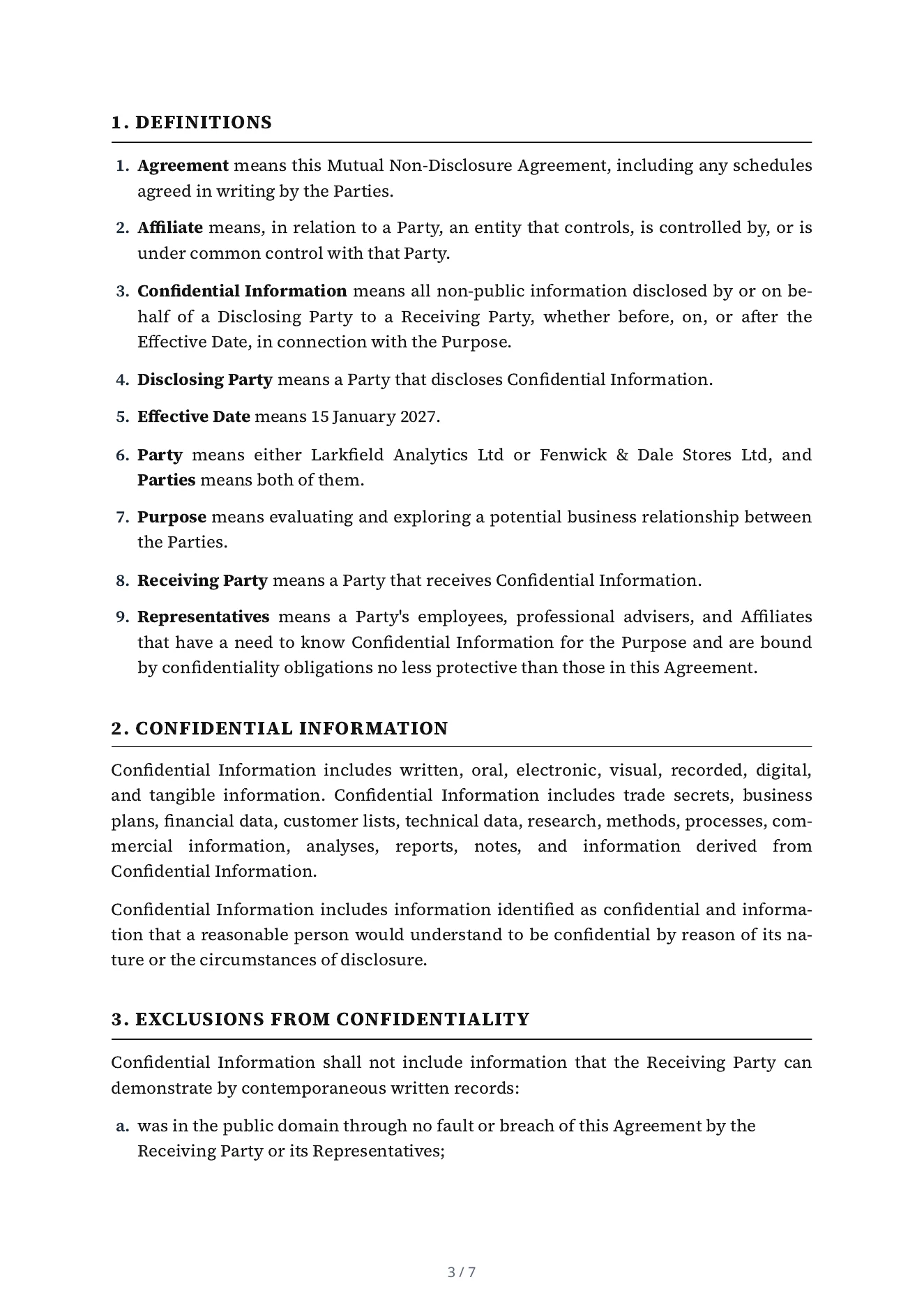
An NDA you can inspectInspect the sample ↗
Actual numbered definition and confidentiality clauses from a Lex NDA drafted for two fictional parties
Actual draft clauses from a fictional NDA. This worked example is not legal advice or a document approved for execution.

Explore the review workflow and compare current access options. Compare plans

Gixo Lex · 75 seconds

Review the clause. Keep the change visible.

Follow a fictional confidentiality clause through review, revise its duration and inspect the tracked changes in the Word export.

Recorded in the product using fictional inputs. Follow the input, the review step and the exported result.

Watch on YouTube ↗

Loading the video player…

Inspect current clause editing, Ask Lex instructions and saved-version comparisons, with dated screenshots from a fictional NDA.
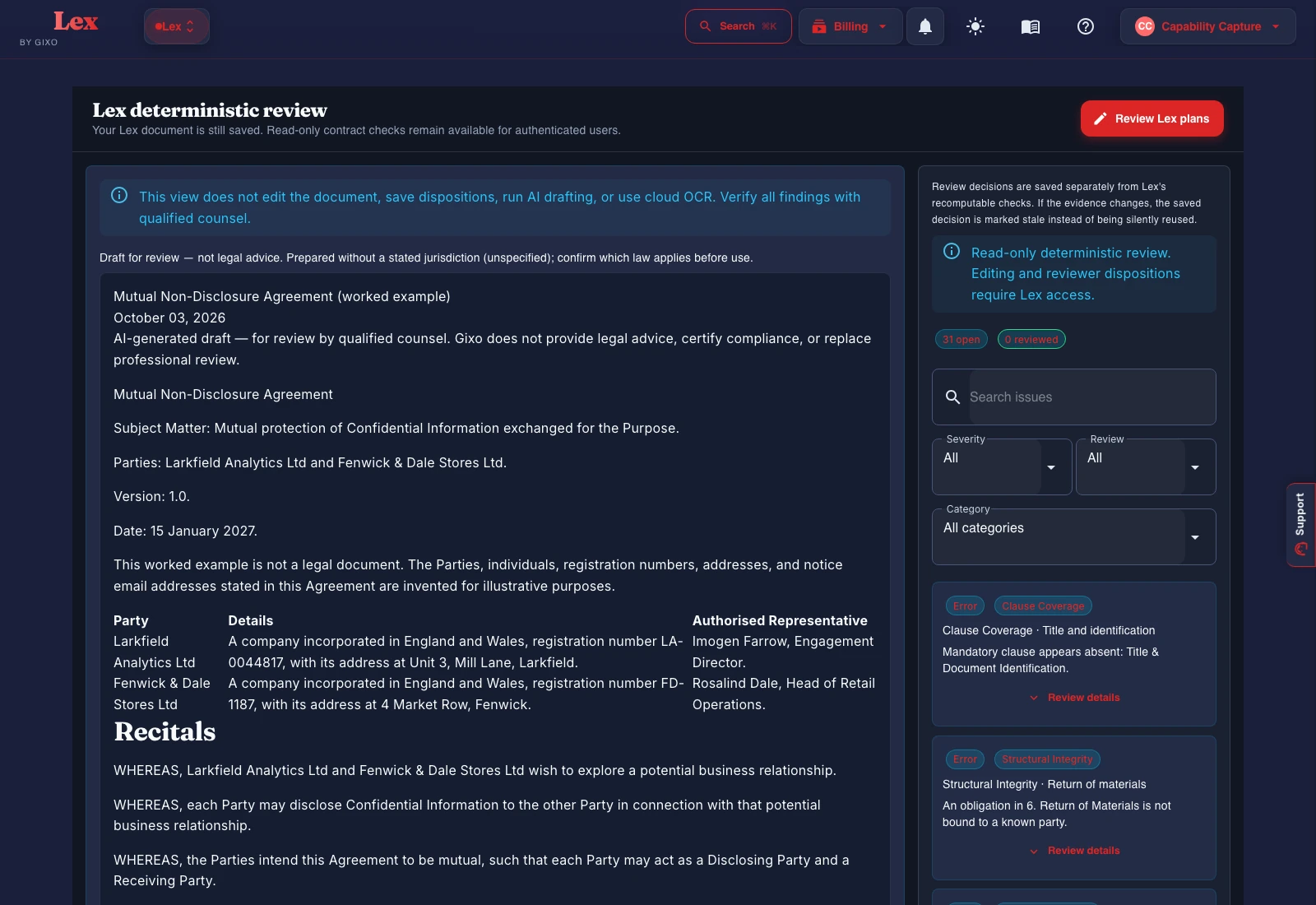
Lex Free read-only review captured on 10 October 2026 with a fictional NDA, rule-based findings and editing-access boundary
Lex read-only review, captured 10 October 2026. A fictional NDA sits beside rule-based checks; editing and reviewer decisions require Lex access. The findings are not legal approval.
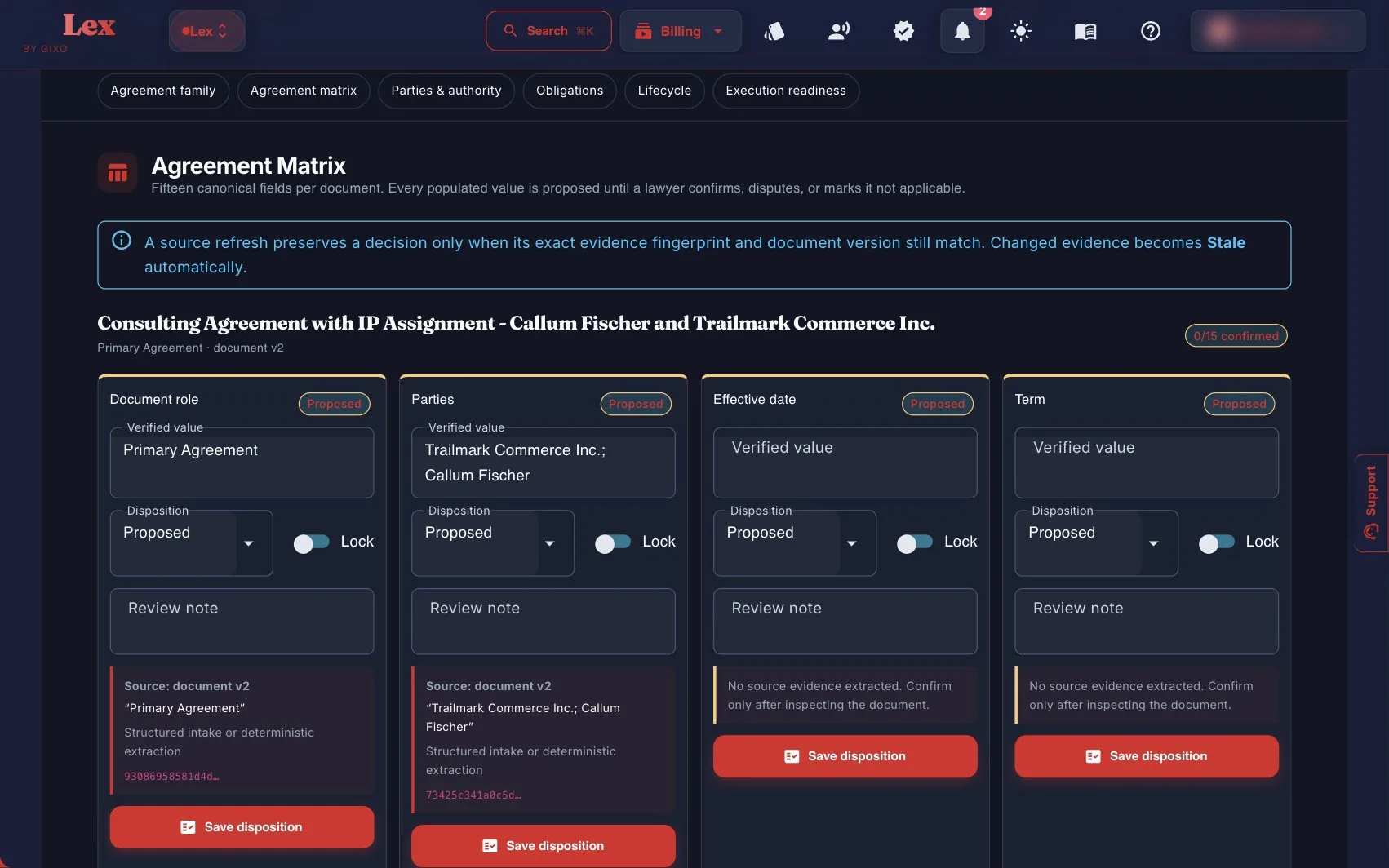
Lex Agreement Matrix with proposed parties, dates, and lockable dispositions for a consulting agreement
Agreement Pack matrix: party, date, and term fields stay proposed until a reviewer confirms, disputes, or marks them inapplicable.
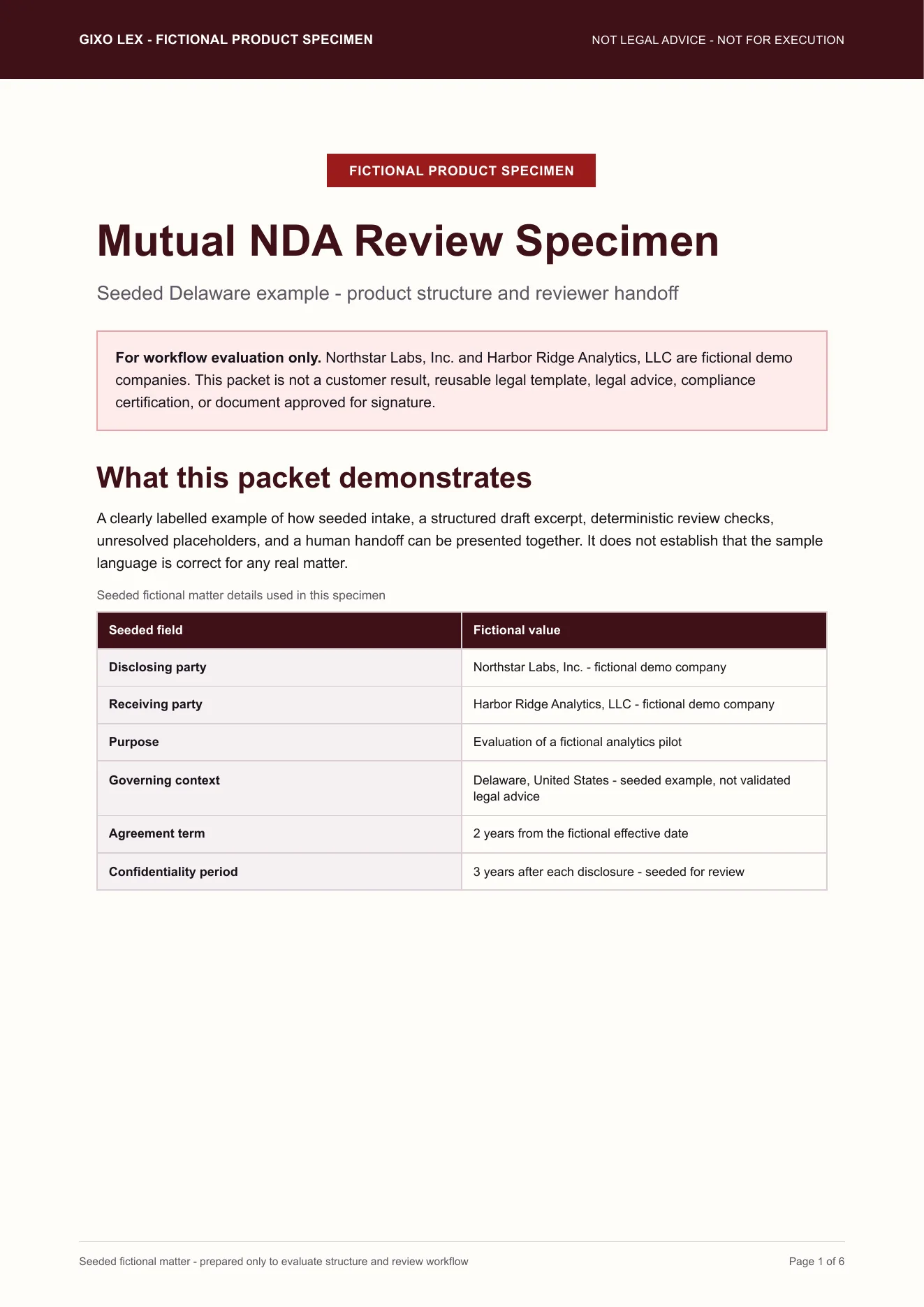
First page of the fictional Lex Mutual NDA review specimen PDF, labelled not for execution
The downloadable review packet: seeded intake, placeholders, and a not-for-execution banner on every page. Open the tagged PDF from the link on the right.
See the workflow before choosing a plan

From matter context to review, packs, and execution records

  1. Draft from structured inputs

    Start with document type, parties, business facts, governing context, instructions, and reference files.

  2. Inspect deterministic Draft Checks

    Before review, Gixo Lex runs a draft analysis pass: a clause inventory, missing-clause coverage, defined-term consistency, cross-reference validation, and execution-readiness checks. Those checks are rule-based rather than generated: they call no model, write no new legal text, and draw no plan capacity, so the same draft checked twice gives the same answer and reviewers start from a cleaner draft instead of hunting for gaps.

  3. Review against playbooks

    After the first draft, Lex runs an AI contract review of the whole contract, with every quotation checked against the text, beside rule checks: clause coverage against a versioned playbook, clause-conflict detection, and defined-term and cross-reference checks. Findings, tracked-change DOCX redlines, comments, review state, assignees, due dates, and version history all stay attached to the same document. A contract imported from Word can go back as that same DOCX, with the Lex edits shown as Word tracked changes; where Lex cannot track an edit faithfully, such as inside a field, an existing revision, a header or a footer, it refuses the export instead of altering the document. Reviewers still verify every clause and conclusion.

  4. Connect the Agreement Pack

    Agreement Packs connect related documents, proposed party and obligation facts, version-bound approval receipts, and execution records on the same matter. Fields stay proposed until a reviewer confirms, disputes, or marks them inapplicable.

  5. Record execution, then track obligations

    Lex can collect simple electronic signatures on a frozen PDF of the approved agreement. When everyone has signed, Lex appends an audit certificate to make the signed copy and records the SHA-256 fingerprint of each file against that approved version; the PDF carries no embedded digital signature, so a copy is checked against the fingerprint Lex records. The signature is a simple electronic signature, not a qualified or certificate-based one, and it is not witnessing, notarization, or recording. Once execution is recorded, Lex tracks operative obligations with owners and due dates, sends in-app and email reminders on each reminder date and again if an item goes overdue, and exports confirmed due dates as an .ics calendar file.

  6. Export the reviewable handoff

    Keep professional judgment in the loop, rerun checks after edits, and export in PDF, DOCX, HTML, and TXT.

Content is not used to train Gixo models TLS 1.2 or higher in transit and AES-256 at rest are stated in Gixo's security policy Drafting assistance, not legal advice or certified compliance

The linked PDF uses seeded fictional parties and selected draft excerpts to evaluate structure, Draft Checks, and reviewer handoff. It is not legal advice, a customer outcome, a reusable legal template, or a document approved for execution.

29 Named Legal Draft Workflows, Plus Custom Drafting
10 Parties Per Agreement
20 Compliance Forms
5 Execution Modes

What the product is actually built for: legal AI software for drafting and compliance

Built for in-house legal, legal ops, finance, audit, and compliance teams that need reviewable work product rather than generic AI answers.

Structured legal intake
Start with the parties, terms, governing law, and reference files. Gixo builds a structured legal first draft that counsel can review clause by clause.
Multi-Party Support
Support agreements with up to 10 parties, including entity details, representatives, and role-specific drafting context.
Reference inputs with explicit review limits
Reference files and governing context can shape the draft. Cited sources can show which draft sentences are supported by supplied reference files. This in-app support does not establish legal authority or statutory compliance and is not inserted into the contract or its exports; reviewers still check the facts and law independently.
Agreement Packs and version-bound approval
Agreement Packs connect related documents, proposed party and obligation facts, version-bound approval receipts, and execution records on the same matter. Fields stay proposed until a reviewer confirms, disputes, or marks them inapplicable.
Missing-fact visibility for compliance artifacts
Prepare compliance drafts designed to surface missing facts as review items. Reviewers still verify every fact and conclusion before action.
Drafting and compliance coverage
29 named legal document types on the main create flow, plus custom drafting. 20 compliance forms with 5 execution modes. Deterministic checks flag every mandatory clause a document type's catalogue requires but the draft is missing, from 116 clause definitions across 29 named document types.
Review workflow built in
After the first draft, Lex runs an AI contract review of the whole contract, with every quotation checked against the text, beside rule checks: clause coverage against a versioned playbook, clause-conflict detection, and defined-term and cross-reference checks. Findings, tracked-change DOCX redlines, comments, review state, assignees, due dates, and version history all stay attached to the same document. A contract imported from Word can go back as that same DOCX, with the Lex edits shown as Word tracked changes; where Lex cannot track an edit faithfully, such as inside a field, an existing revision, a header or a footer, it refuses the export instead of altering the document. Reviewers still verify every clause and conclusion.
Negotiation and approved precedent
Record version-bound negotiation turns, capture positions and rationale, and compare a draft with approved or executed personal precedent of the same document kind.
Obligations, execution records, and export
Lex can collect simple electronic signatures on a frozen PDF of the approved agreement. When everyone has signed, Lex appends an audit certificate to make the signed copy and records the SHA-256 fingerprint of each file against that approved version; the PDF carries no embedded digital signature, so a copy is checked against the fingerprint Lex records. The signature is a simple electronic signature, not a qualified or certificate-based one, and it is not witnessing, notarization, or recording. Once execution is recorded, Lex tracks operative obligations with owners and due dates, sends in-app and email reminders on each reminder date and again if an item goes overdue, and exports confirmed due dates as an .ics calendar file. Export in PDF, DOCX, HTML, and TXT.

More of the Lex workspace: matters, imported contracts, clause help, and export themes

Beyond drafting from structured intake, Lex can start from a contract you already hold, keep a matter's sources and findings together, help with one clause at a time, and record every applied clause edit. Each still ends in qualified review.

Review a contract you already have
Lex can also start from a contract you already have. On the Review a Contract screen, paste the text or upload the file, choose the contract type, and Lex runs its rule checks and the AI contract review against it. A DOCX upload is kept privately so the edited contract can be exported back in its original Word format.
Matters with source-linked findings
Matters is a personal workspace for one client matter. Upload up to 200 source document versions, search their stored text, and record findings as exact quotations tied to the source version and character position, arranged by issue and in a chronology, then download a bundle of reviewed work products. Matter findings retain exact source-version links. A draft has a separate in-app Cited sources view for supplied-file sentence support; neither establishes legal authority or statutory compliance.
Ask Lex for one clause
Ask Lex drafts proposed language for one clause at a time, bounded to that clause and the document context. It never applies a proposal automatically: you stage it, validate it, and review it with qualified counsel before applying it.
A record of every applied clause edit
Each applied clause edit saves a new document version and is recorded in the Gixo content audit log with who made it, which clause changed, and the kind of edit.
Legal export themes
Lex exports offer a base Legal theme plus eight legal themes: Nordic Law, Intellectual Property, Corporate Governance, Court Filing, Compliance, Arbitration, Real Estate, and International Treaty. A theme styles PDF and HTML exports, DOCX exports take its colors and fonts, and TXT export stays plain text. A contract imported from Word can instead go back in its own original formatting.
Questions before you start
The Lex FAQ answers how playbook review, Agreement Packs, Word files, signing and obligations, and matters work, and where each one stops. Read the Lex FAQ or see what Lex added since the product tour.

Review contract changes against the saved version

Compare contract versions. Use Compare to inspect saved revisions. With Lex review access, Review mode keeps the document read-only while you inspect findings and record decisions; it does not certify legal correctness.

Review clause edits before applying them. A manual edit or staged Ask Lex proposal shows the before and after wording. Replacement normally keeps subsections unless you include them; removal and changed numerical terms need acknowledgement. Validate the proposed text again after changing it, then decide whether to Apply to the saved version it was previewed against.

Approve the version you reviewed. The contract approval workflow ties the approval receipt to the exact saved version. With no approvers named, one approver's receipt records the decision; approvers can also be named in order, with two rules that add an approver for high-risk findings or for a liability cap above an amount you set, and then the drafter cannot approve, the next approver is notified in Gixo and by email, and the receipt records the whole chain. Resolve findings and open items before approval; later text or source changes require fresh review. This is a reviewer decision, not a legal verdict.

Decide the AI review findings. Every contract in Lex, drafted or imported, gets an AI contract review that reports expected clauses as present, weak or absent, risks with the party they fall on and replacement wording, and provisions that cannot both be followed, with every quotation checked against the contract text. Each finding is decided before approval; an edit leaves the review as the review of the earlier version until you review the changes.

Keep saved obligations current as source documents change, and review upcoming dates before preparing a new-period worklist. Explore obligation and calendar review.

Gixo helps prepare regulated work. It does not provide legal advice, certify compliance, or replace professional review.

Learn before you start

Guides, tutorials, FAQ, pricing context, and competitor comparisons for Legal & Compliance.

Guide Legal drafting guide How to move from parties, terms, governing law, and reference files to a draft counsel can review. Guide Compliance guide How the compliance workspace handles forms, missing-fact placeholders, evidence fill, and reviewer handoff. Tutorial How to draft a legal document Step-by-step onboarding: intake, jurisdiction, reference upload, clause review, and export. Tutorial How to create a compliance checklist Use the compliance flow to prepare a checklist with placeholders, evidence prompts, and final reviewer signoff. FAQ Legal & Compliance FAQ Pre-purchase answers on document types, compliance work product, jurisdiction, and what Gixo is not. Pricing AI legal software pricing guide Compare pricing models, cost drivers, and evaluation criteria across the market. Workflow AI lease agreement drafting workflow Prepare lease drafts with intake, clause structure, risk notes, and reviewer handoff. Pillar AI compliance documentation software How Lex prepares checklists, evidence matrices, working papers, policy drafts, and gap notes. ICP Fractional GC software A Lex landing page for multi-client general counsel work, precedent reuse, and clause validation loops. ICP AI drafting for solo lawyers How solo lawyers can move from intake facts to reviewable contract drafts without adding CLM overhead. Founder NDA generator for startups A founder-focused NDA draft workflow with placeholders, review boundaries, and export-ready structure. Alternative Spellbook alternative Compare a standalone drafting workspace against an in-editor copilot workflow. Tool AI legal document generator Choose from 29 named legal draft types, or use custom drafting when a built-in workflow is not the right fit. Tool AI employment agreement generator Employment-contract intake for compensation, IP, restrictive covenants, and reviewer handoff — still counsel-reviewed. Tool AI memorandum of understanding generator MOU drafts with structured scope, obligations, and binding-section logic before qualified review. Workspace Lex workflows See how intake, Draft Checks, playbooks, Agreement Packs, and export sit in one legal-work lifecycle. Trust Lex trust and review boundaries See what Gixo controls, what infrastructure providers attest, and what qualified reviewers must still verify. Tool AI compliance checklist generator Prepare checklist-style compliance artifacts with missing-fact placeholders and evidence prompts. Tool AI risk register generator Likelihood, impact, and mitigation fields for enterprise risk management reviews. Tool AI policy generator Organizational policy drafts shaped around the compliance frameworks you name, with a guided form. Free deterministic builder Internal policy builder Structure ownership, approval, review dates, requirements, exceptions, and revision history without a model call.

Read the supporting passage, then make the legal judgment

Supplied-file citations and legal authority answer different questions

Cited sources can show which sentences of a draft are supported by the reference files you supplied. The AI contract review separately returns findings whose quotations are checked against the contract text. Neither proves that a source is correct or that the wording complies with the governing law.

Keep the review with the version you are deciding on

Review a current contract finding, its quotation and the requested decision before approval. For related documents, the review table keeps quoted results and your questions together. A new draft or changed text needs its own review; a prior clean result is not an approval of later wording.

Keep authority and export boundaries visible

Matter findings can retain exact source-version and passage links. Draft Cited sources remains an in-app review aid and is not inserted into the contract or its exports. Governing-law research and an imported contract’s Word-format fidelity have separate availability and limits. Counsel still decides what can be relied on, approved and signed.
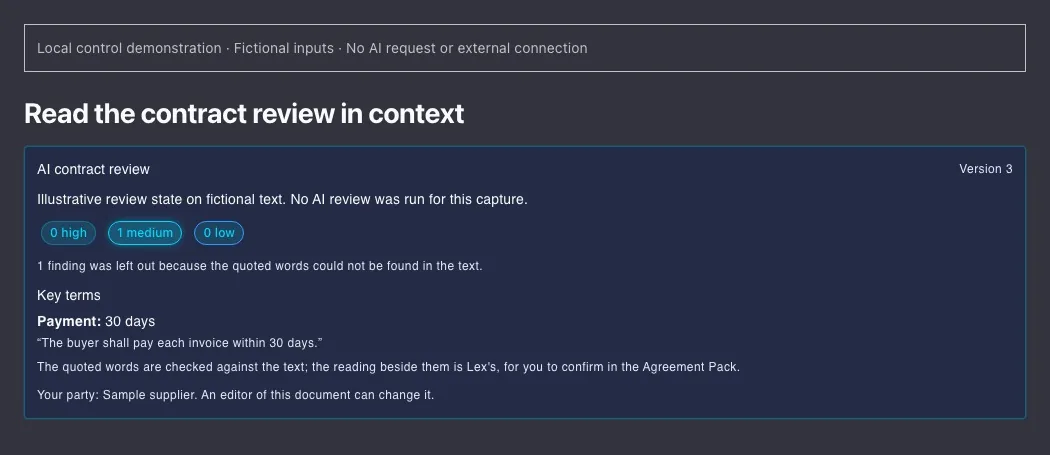
Inspect the reviewed version, quoted term and omitted findings
Inspect the reviewed version, quoted term and omitted findings. Fictional supplied review state in the current panel; no AI review performed. Captured locally on 2 November 2026. Open full-size example.

Start with reviewable work product

The job is not to ask AI for a legal answer. The job is to prepare a draft or artifact that a qualified reviewer can actually work with.

Start with Gixo Lex View Lex pricing

A worked workflow

One clause change, an inspectable redline and a saved version

The captured run comes first and is a separate fictional NDA. The brief and steps after it are their own example: a fictional confidentiality draft says “twelve months”; the supplied reviewer instruction requests “twenty-four months”. The task is to inspect and apply that bounded change while keeping the source, draft version and export path clear.

Compare the saved versions and open the real Word redline

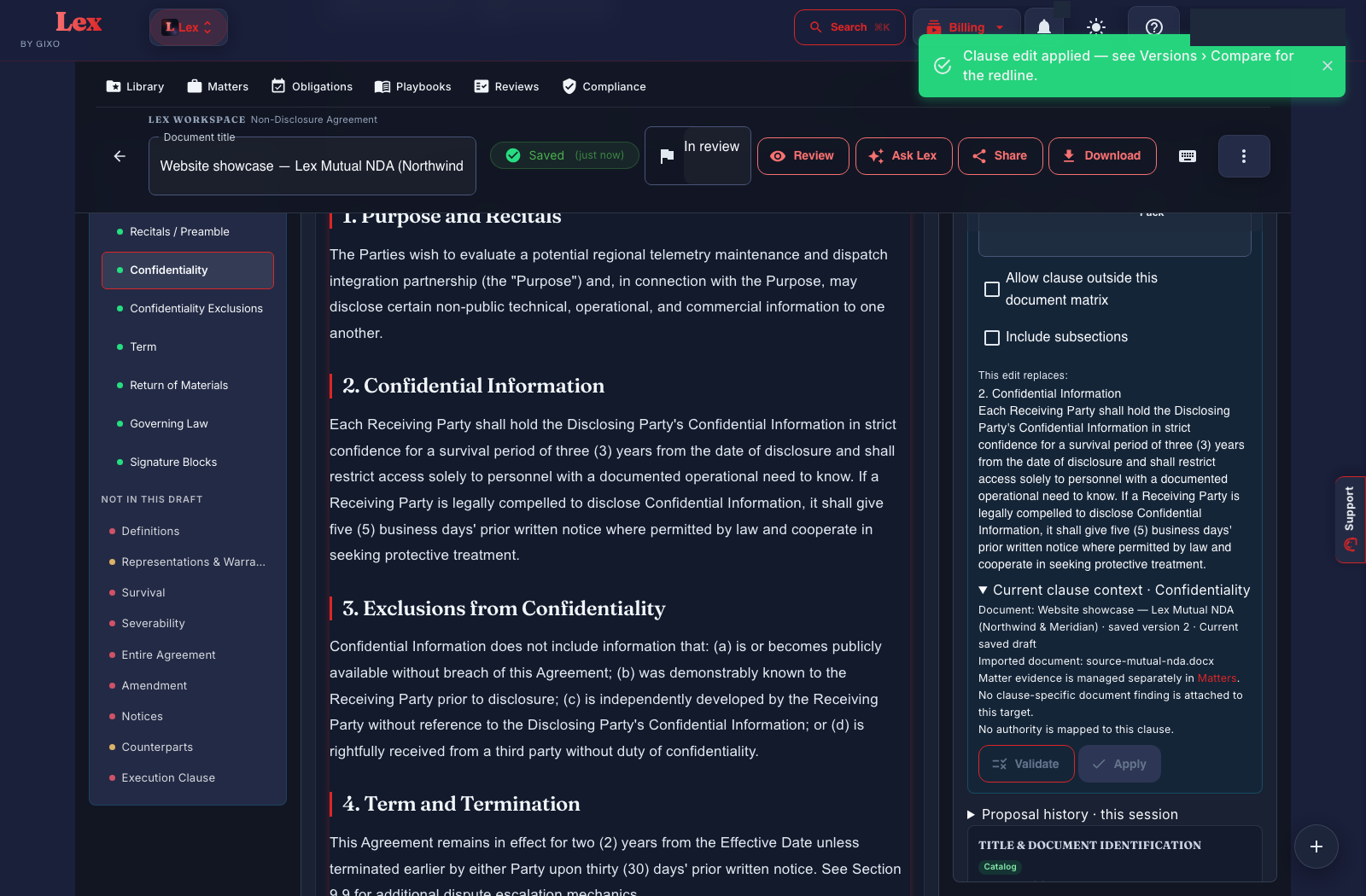
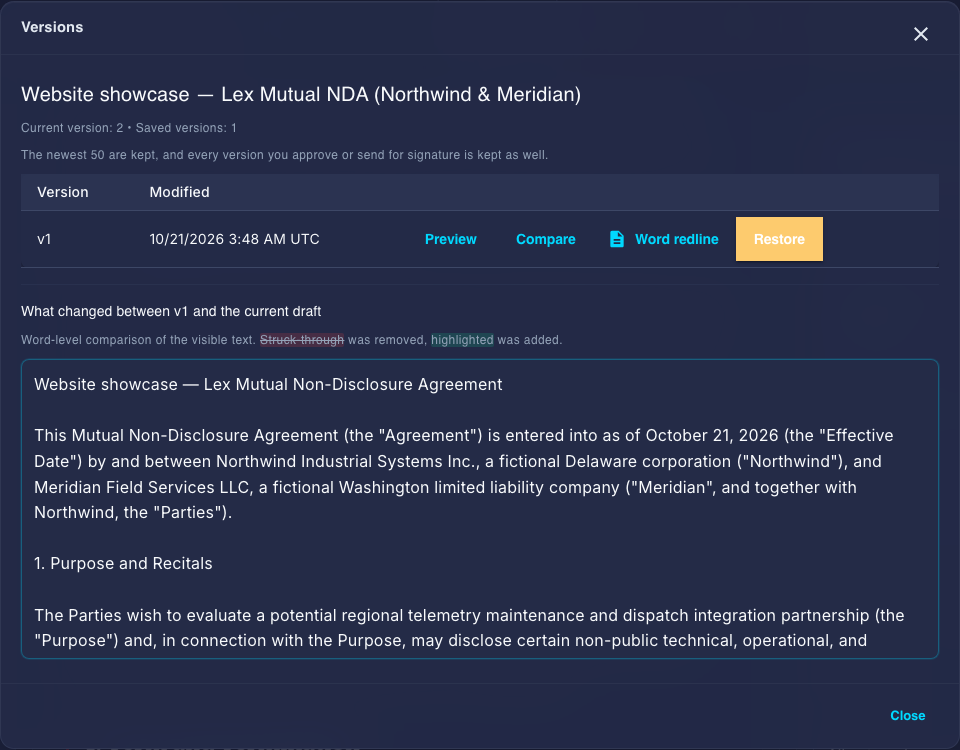
A separate run from the brief further down this section: a supplied fictional NDA was imported as version 1. Its confidentiality clause changed from two years to three, employees changed to personnel, and a five-business-day compelled-disclosure notice was added. Structural validation ran before the change was applied and saved as version 2. The actual redline contains three native Word insertions and two deletions.
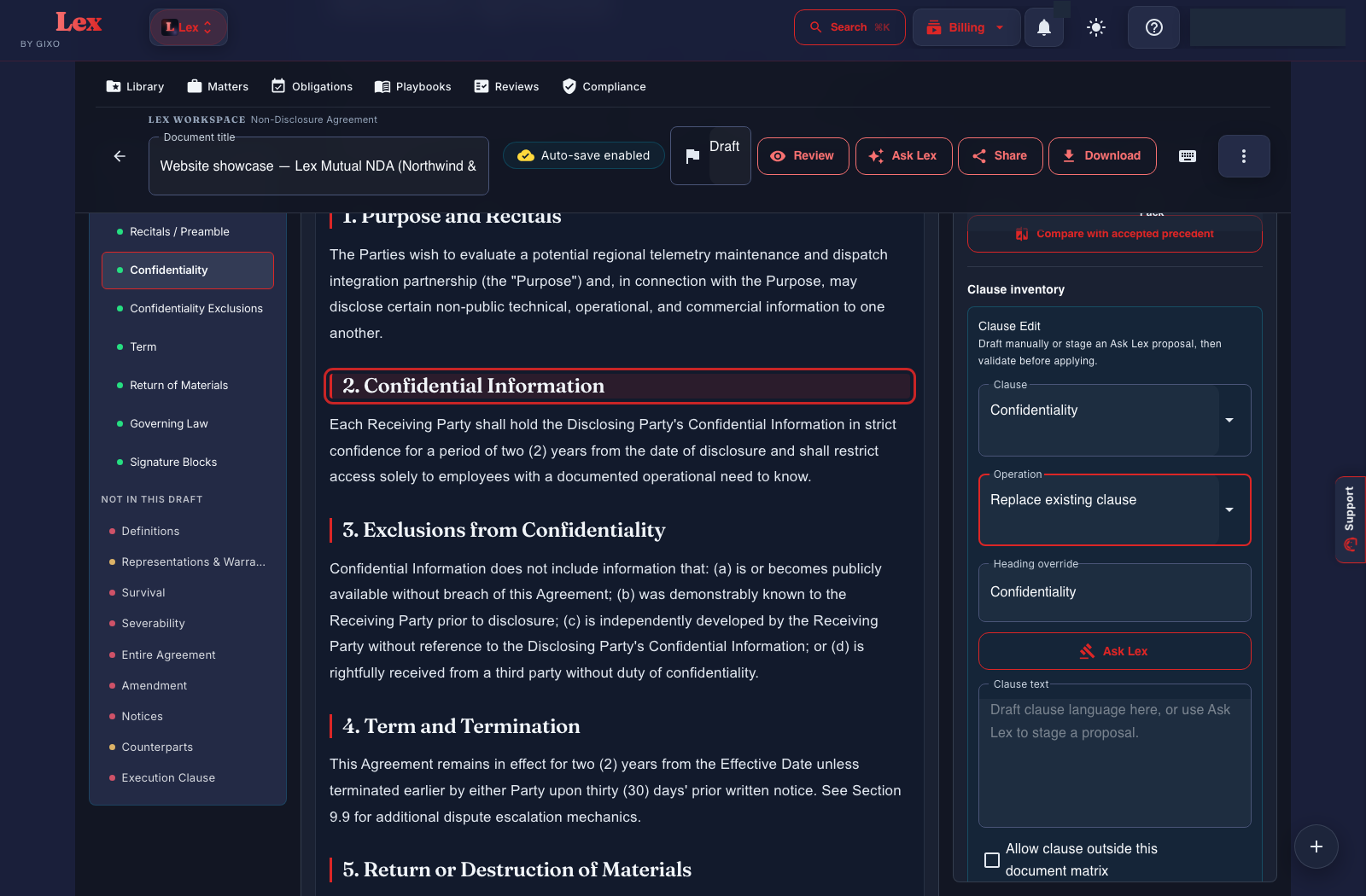
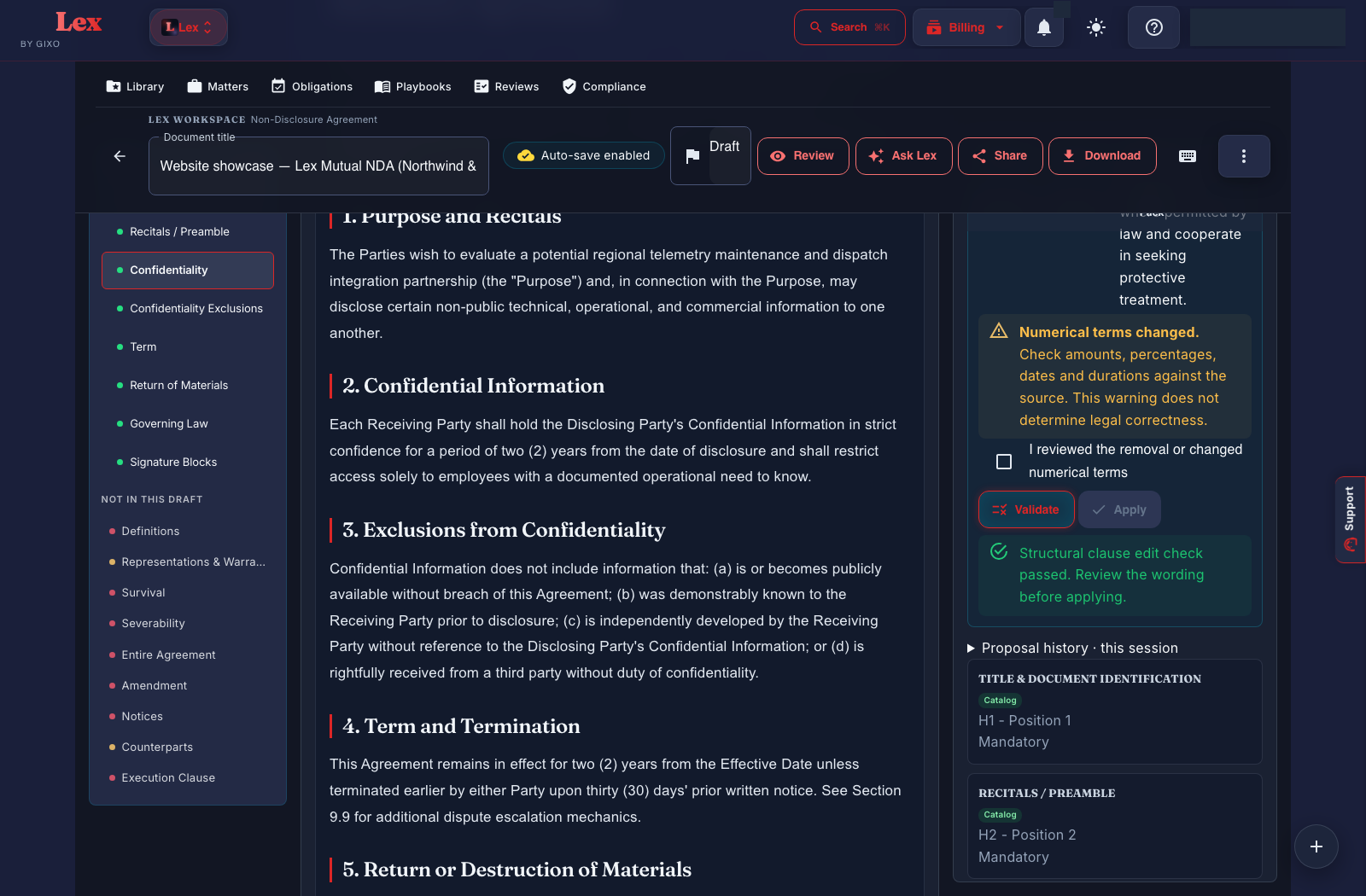
Actual confidentiality clause and Clause Edit controls before revision
Original supplied clause: a two-year confidentiality period. Open full size ↗
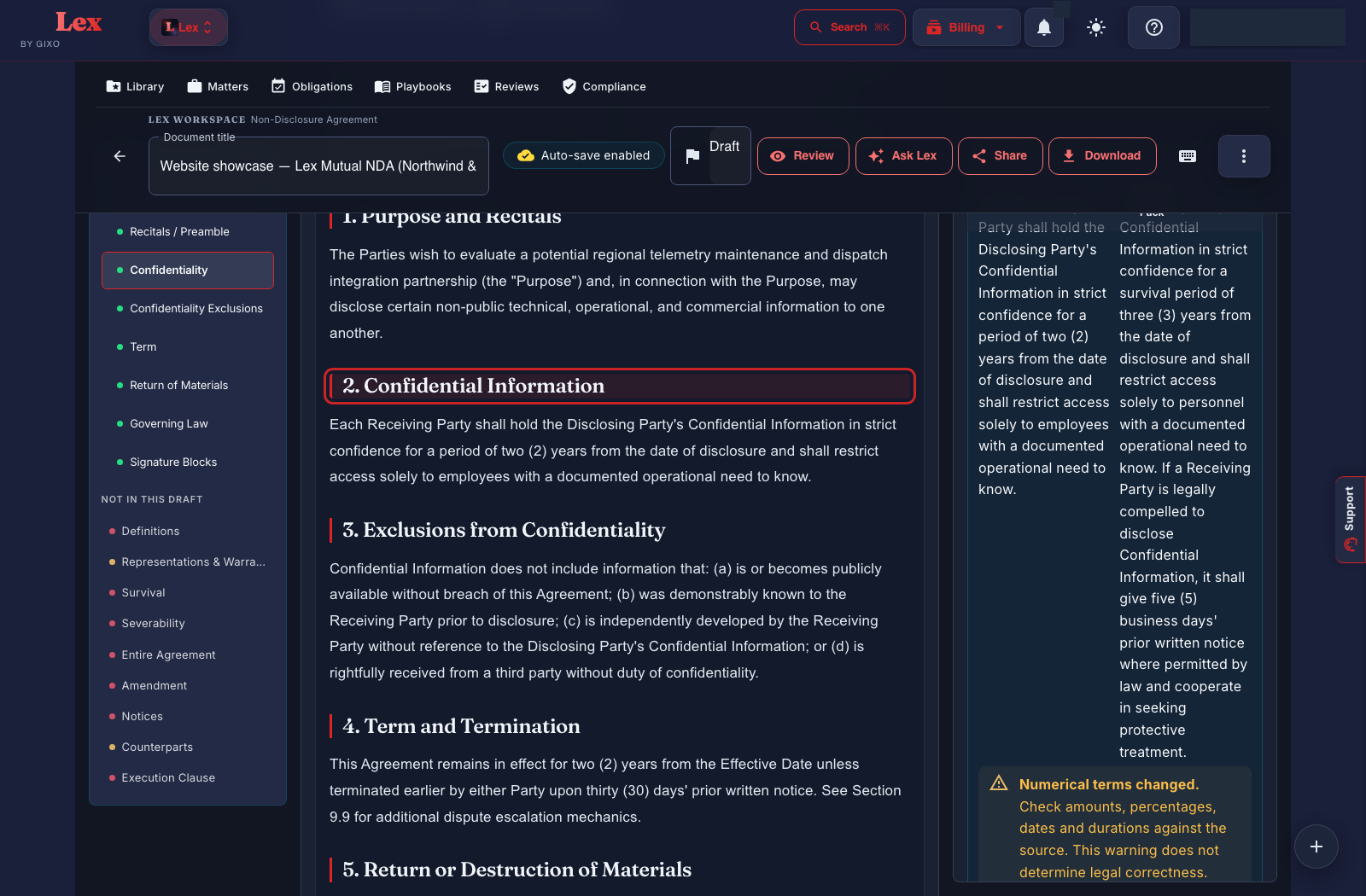
Actual proposed clause comparison with the changed numerical terms
The review proposal adds three-year survival and a five-business-day notice; it has not yet been applied at this step. Open full size ↗
Actual structural validation result before applying the proposed clause
A structural check is not legal approval. The reviewer must inspect the wording and unresolved worklist. Open full size ↗
Actual Lex editor carrying the applied clause revision
Saved version two; inspect the separate Word redline for the actual insertions and deletions. Open full size ↗
Actual Lex Versions dialog comparing saved version 1 with current version 2
Captured saved-version comparison. Open the Word redline to inspect the native tracked changes. Open full size ↗

The parties and instructions are fictional. The three-year period is the instruction in this run, not a position a playbook permits. Structural validation is not legal approval: five high-risk review items remained unresolved, including an intentionally broken Section 9.9 reference. Approval and signing were not completed. This capture does not establish a confirmed obligation or the legal suitability of the example terms.

The supplied brief

Original wording
The supplied fictional clause uses a twelve-month confidentiality period.
Requested change
Change the period to twenty-four months, with the reviewer’s reason and authority retained separately.
Version boundary
Compare the saved source and proposed draft versions; a later source change requires another comparison.
Export path
Original-Word tracked changes, saved-version redlines and a newly composed Word file are separate supported paths.
  1. Identify the actual source

    Open the imported document or saved draft and locate the clause to review.

    Inspect: Keep its source identity and version. A matching phrase alone does not prove that a proposal targets the intended clause.

  2. Review the bounded proposal

    Use Ask Lex or the supported clause-editing path and inspect before/after text, checks and any required override or reviewer decision.

    Inspect: The proposed wording must be visible before application. Do not treat a model suggestion as the matter’s approved legal position.

  3. Apply to the current version

    Apply only through the permitted versioned workflow and inspect the saved result.

    Inspect: If the draft has changed, resolve the version difference. An old proposal should not silently overwrite later work.

  4. Inspect tracked changes in Word

    Open the actual exported DOCX and inspect insertions, deletions, comments and surrounding structure.

    Inspect: The downloadable sample demonstrates a saved-version redline from supplied HTML. It does not prove preservation of arbitrary incoming Word layouts or unsupported edits.

Before approving the result

  • Check the exact period and every other affected reference.
  • Confirm reviewer authority and current source version.
  • Retain the delivery receipt for the actual downloaded file.

Fictional supplied wording and reviewer instruction, not a legal recommendation about duration. The sample export demonstrates the identified redline path only.

Product fit

Is Lex right for you?

Best for

Your team needs a legal-work lifecycle: structured intake, Draft Checks, versioned playbooks, Agreement Packs, negotiation records, simple electronic signature, and obligation follow-up, with professional review before action.

Not the right fit when

You need legal advice, independent certification, qualified or certificate-based signing, ongoing control surveillance, or a document that can be executed without qualified review.

What to expect

Reference files and governing context can shape the draft. Cited sources can show which draft sentences are supported by supplied reference files. This in-app support does not establish legal authority or statutory compliance and is not inserted into the contract or its exports; reviewers still check the facts and law independently.

What your team should review

Qualified reviewers must verify authority, jurisdiction, facts, clause choices, defined terms, cross-references, obligations, and execution readiness.

Important limitation

Supplied-file citations are an in-app review aid, stay out of contract exports and do not establish legal authority or replace counsel.

Plans and pricing

Professional legal workflow at published per-seat prices

Start with the limited $29/seat/month Solo Pilot. The $99/seat/month Solo plan is the professional default; higher tiers add firm collaboration, team operations, governance, and procurement support.

14-day no-card trial $29/seat/month limited Solo Pilot $99/seat/month professional Solo

Solo Pilot

Limited single-seat pilot for evaluating the core Lex workflow

Single-seat Solo pilot

$29/seat/month

  
Seats
Minimum 1
Seats
1 seat selected. Total $29/month.

Limited single-seat evaluation of Lex

Guided intake, drafting, and deterministic Draft Checks

Personal workspace and clean export

Pilot terms may change

Small Firm

Three-seat practice for collaborative document review and negotiation

Review and collaborate as a firm

$149/seat/month

  
Seats
Minimum 3
Seats
3 seats selected. Total $447/month.

Everything in Solo

Internal sharing, comments, and assignments

Collaborative review and negotiation across the firm

Minimum 3 seats

Growing Firm

Five-seat legal operations workspace for agreements and compliance work

Operate agreements across a team

$179/seat/month

  
Seats
Minimum 5
Seats
5 seats selected. Total $895/month.

Everything in Small Firm

Shared workspaces and team management

Minimum 5 seats

Marketplace

Ten-seat governed deployment through marketplace or private offer

Governed deployment and procurement

$229/seat/month

  
Seats
Minimum 10
Starts at 10 seats. Sold through Azure Marketplace or private offer.

Everything in Growing Firm

Azure marketplace or private offer

API access, plus a report of the AI providers and models that handle your work

Onboarding and enterprise rollout support

Minimum 10 seats

Get it on Azure Marketplace

Solo and higher Lex plans include guided intake, multi-party support, reference-file upload, deterministic Draft Checks, review playbooks, Agreement Packs, negotiation and obligation workflows, approval and execution records, and export. The support-routed Solo Pilot is the limited evaluation its card describes. Collaboration, team administration, and API access vary by plan; version history is on every plan. Agreement Packs include simple electronic signature, which is not a qualified or certificate-based signature. Gixo helps prepare work for qualified review; it does not give legal advice or certify compliance.

Updated