Skip to content
Sign In Try Free
Workflow-specific products Content, decks, briefs, proposals, legal, and sales each have a clearer buying path.
Review before delivery Draft, edit, collaborate, approve, and export in the same workspace.
Security + procurement path Security policy, support, and Azure Marketplace buying are public.

Workflow index

Choose the legal or compliance job before you choose a document page.

Start from any of the 22 named drafting types, inspect a contract without generating text, or enter the separate compliance-artifact workflow. Each named type has a direct selector. Use Custom when your document does not fit a named type.

Choose a document type, supply matter-specific facts, then review the draft. Public specimens are examples, not reusable legal templates or legal advice.

Inspect a matter-specific review

Read the fictional pilot intake, compare the draft clause with the reviewer’s corrections, then open the real tracked-change Word export.

Inspect the example and files →

Fictional, hand-authored demonstration inputs. The files were created by the actual product export services; this does not establish AI output quality or customer outcomes.

Choose a workflow

Three distinct ways to begin legal workflow automation.

Draft creation, contract completeness checking, and compliance artifact preparation are different workflows with different outputs.

Legal drafting

22 named choices, plus custom drafting

guided confidentiality/IP, services, corporate/equity, employment, real-estate, finance, and general legal documents, including custom drafting. Start from parties, terms, governing context, and optional references.

Start legal drafting

Contract checker

Run a deterministic completeness pass.

Paste contract text to check expected clause coverage and execution-readiness signals. The checker does not generate legal text or decide enforceability.

Open the free checker

Compliance artifacts

Prepare reviewable audit and policy work product.

Use the compliance flow for checklists, evidence matrices, working papers, filing support notes, and policy drafts. Reviewers verify every fact and conclusion.

Evaluate compliance workflows

More ways to begin inside Lex

Start from an existing contract, an Agreement Pack, or a matter.

Inside a Lex account, the dashboard and navigation offer three more starting points beside drafting from scratch. Each still ends in qualified review.

Review a contract

Import a contract you already have.

Lex can also start from a contract you already have. On the Review a Contract screen, paste the text or upload the file, choose the contract type, and Lex runs its deterministic review checks against it. A DOCX upload is kept privately so the edited contract can be exported back in its original Word format. A contract can also be imported directly from a connected Google Drive, OneDrive, SharePoint, or Dropbox account, which needs an active Lex subscription and records a source receipt.

Start a Lex trial to import a contract

Agreement Packs

Create or import an Agreement Pack.

Agreement Packs connect related documents, proposed party and obligation facts, version-bound approval receipts, and execution records on the same matter. Fields stay proposed until a reviewer confirms, disputes, or marks them inapplicable.

See Agreement Packs on the Lex product page

Matters

Open a matter and work from its sources.

Matters is a personal workspace for one client matter. Upload up to 200 source document versions, search their stored text, and record findings as exact quotations tied to the source version and character position, arranged by issue and in a chronology, then download a bundle of reviewed work products. That source link applies to matter findings only; drafted documents still do not show clause-level source provenance.

See what Lex added since the product tour

Direct selectors

22 named document types, plus Custom.

Common starting points: NDA, Master Services Agreement, Shareholder Agreement, Employment Agreement, or Custom drafting. The complete categories are below.

Direct selectors

Confidentiality & IP

Non-Disclosure Agreement, IP Assignment Agreement, License Agreement

Direct selectors

Services & commerce

Master Services Agreement, Statement of Work, Service Level Agreement, Consulting Agreement

Direct selectors

Corporate & equity

Shareholders Agreement, Share Purchase Agreement, Joint Venture Agreement, Partnership Agreement, Memorandum of Understanding

Direct selectors

Employment & HR

Employment Contract, Non-Compete Agreement, Invention Assignment Agreement

Direct selectors

Real estate & lease

Lease Agreement, Property Sale Agreement

Direct selectors

Finance & lending

Loan Agreement, Promissory Note

Direct selectors

General

Terms of Service, Privacy Policy, Power of Attorney, Custom Legal Document

Document-intent index

22 named drafting types and the facts to prepare.

Choose the matching type in the create flow. The index below lists the facts and terms to prepare, with a guide where a matching public page exists. For another document, choose Custom and describe its purpose, structure, parties, and governing context.

NDA Direct selector in the current create flow Prepare: parties, confidentiality purpose, disclosure direction, exclusions, survival period, and permitted disclosures.Read the NDA guide
IP Assignment Agreement Direct selector in the current create flow Prepare: assignor, assignee, covered IP, transfer scope, consideration, and residual rights.Read the IP Assignment Agreement guide
License Agreement Direct selector in the current create flow Prepare: licensor, licensee, licensed IP, territory, term, exclusivity, permitted uses, and fees.
Master Services Agreement Direct selector in the current create flow Prepare: customer, provider, services framework, payment model, IP treatment, data handling, and liability posture.Read the Master Services Agreement guide
Statement of Work Direct selector in the current create flow Prepare: project scope, deliverables, milestones, acceptance criteria, fees, dependencies, and assumptions.Read the Statement of Work guide
Service Level Agreement Direct selector in the current create flow Prepare: covered services, service levels, measurement windows, exclusions, reporting, and service credits.Read the Service Level Agreement guide
Consulting Agreement Direct selector in the current create flow Prepare: client, consultant, services, deliverables, payment terms, IP ownership, expenses, and confidentiality.Read the Consulting Agreement guide
Shareholders Agreement Direct selector in the current create flow Prepare: company, shareholders, equity structure, governance rights, transfer limits, reserved matters, and exit mechanics.Read the Shareholders Agreement guide
Share Purchase Agreement Direct selector in the current create flow Prepare: buyer, seller, target company, shares, price, completion conditions, warranties, and closing mechanics.
Joint Venture Agreement Direct selector in the current create flow Prepare: venture parties, purpose, contributions, governance, economics, reserved matters, and exit rights.
Partnership Agreement Direct selector in the current create flow Prepare: partners, business purpose, capital contributions, profit sharing, management rights, and withdrawal rules.Read the Partnership Agreement guide
Memorandum of Understanding Direct selector in the current create flow Prepare: parties, collaboration purpose, intended responsibilities, binding provisions, timeline, and next steps.Read the Memorandum of Understanding guide
Employment Contract Direct selector in the current create flow Prepare: employer, employee, role, compensation, benefits, working location, policies, and termination terms.Read the Employment Contract guide
Non-Compete Agreement Direct selector in the current create flow Prepare: restricted person, business interests, geography, duration, restricted activities, and consideration.Read the Non-Compete Agreement guide
Invention Assignment Agreement Direct selector in the current create flow Prepare: employee or contractor, company, covered inventions, excluded inventions, disclosure duties, and further assurances.
Lease Agreement Direct selector in the current create flow Prepare: landlord, tenant, premises, term, rent, deposit, permitted use, maintenance, and renewal terms.Read the Lease Agreement guide
Property Sale Agreement Direct selector in the current create flow Prepare: seller, buyer, property description, price, deposit, conditions, completion date, and title matters.
Loan Agreement Direct selector in the current create flow Prepare: lender, borrower, loan amount, interest, repayment, security, covenants, and events of default.
Promissory Note Direct selector in the current create flow Prepare: maker, payee, principal amount, interest, maturity date, repayment schedule, and default terms.
Terms and Conditions Direct selector in the current create flow Prepare: platform operator, user base, permitted use, account rules, content policy, payments, and liability boundaries.Read the Terms and Conditions guide
Privacy Policy Direct selector in the current create flow Prepare: controller, data categories, collection purposes, sharing, retention, security, and user rights.
Power of Attorney Direct selector in the current create flow Prepare: principal, agent, powers granted, effective date, duration, limitations, revocation, and witness/notary needs.Read the Power of Attorney guide

Why there is no template catalog

Lex starts from structured facts; it does not publish reusable legal templates.

The public examples show product structure and review surfaces. They are intentionally labelled as specimens rather than templates so a buyer is not encouraged to reuse draft language without matter-specific and jurisdiction-specific review.

Read the contract-reuse boundary

How does contract obligation management work in an Agreement Pack?

Contract obligation management starts by turning a proposed extraction into a record someone has checked. Lex Agreement Packs keep obligations with the related agreement; they are separate from the obligation-comment follow-up portfolio.

  1. Confirm the obligation. Read the operative words and supporting source, then record the disposition. Extraction is not proof that every commitment was found.
  2. Record responsibility and timing. Check the obligor, beneficiary, owner, trigger and supported due-date basis. Confirm any recurrence rather than inferring it from a plausible date.
  3. Keep review and completion evidence. Record review state and supporting completion evidence, retaining source/version history as records change.
  4. Review changes and hand off the register. Inspect source-revision proposals before accepting updates, then export the saved register and review the current-period calendar.

Executed packs need the appropriate amendment or new-pack path when commitments change. Reminder dispatch begins after execution; message acceptance is not inbox delivery. Calendar imports do not reliably remove earlier events or recurring series: remove the listed old entries and verify replacements. These are saved agreement records and explicit reviewer actions, not an enterprise-wide contract repository or unattended monitoring.

Inspect the contract review controls and read the drafting and Word-handoff guide.

Review contract changes against the saved version

Compare contract versions. Use Compare to inspect saved revisions. With Lex review access, Review mode keeps the document read-only while you inspect findings and record decisions; it does not certify legal correctness.

Review clause edits before applying them. A manual edit or staged Ask Lex proposal shows the before and after wording. Replacement normally keeps subsections unless you include them; removal and changed numerical terms need acknowledgement. Validate the proposed text again after changing it, then decide whether to Apply to the saved version it was previewed against.

Approve the version you reviewed. The contract approval workflow ties one approver's receipt to the exact saved version. Resolve findings and open items before approval; later text or source changes require fresh review. This is a reviewer decision, not a legal verdict or a chain of routed approvals.

Update obligations after source documents change. An Agreement Pack can compare prior obligations with current saved source versions. Pair changed clauses, confirm revised records and retain the history. An executed pack needs a new agreement or amendment pack.

Review upcoming and recurring obligations. Prepare a named-period worklist from saved owners, statuses and supported dates. Review the source snapshot and calendar replacements, then retain the accepted register, calendar and review summary. This preparation does not approve or execute an agreement and is not an unattended scheduler.

Before replacing a calendar, remove the listed old events and recurring series, import the reviewed replacement and verify the result. Importing a new calendar does not reliably cancel the previous events.

Structured first draft, accountable review

Test the workflow with your own matter context before you choose a plan.

Start the 14-day, no-card Lex trial to evaluate structured intake, drafting, deterministic Draft Checks, review, and export. Gixo prepares work for review; it does not provide legal advice, certify compliance, or replace professional judgment.

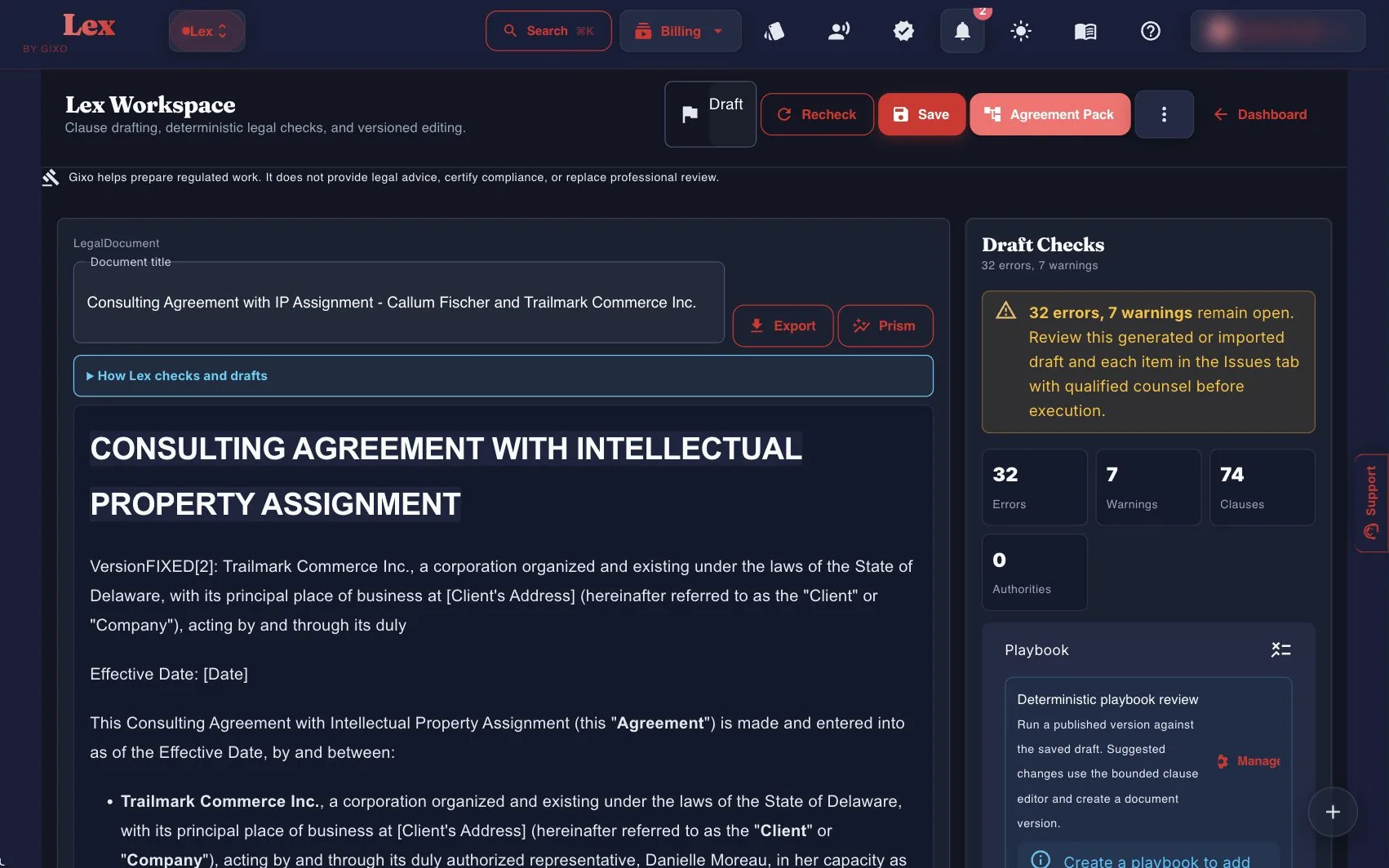
Current Lex workspace with Draft Checks, 74 clauses, and Agreement Pack on a consulting agreement
Current Lex UI: Draft Checks, playbooks, and Agreement Pack sit beside the draft — not a static specimen image.

Updated