
AI Legal Document Generator — Legal First Drafts From Structured Facts, Not Generic Prompts
Start with the parties, terms, governing law, and reference files. Gixo builds a structured legal first draft that counsel can review clause by clause. 22 named legal document types on the main create flow, plus custom drafting. Gixo helps prepare regulated work. It does not provide legal advice, certify compliance, or replace professional review.
An AI legal document generator is a workspace that turns structured facts — parties, terms, governing law, dates, and reference files — into a reviewable legal first draft instead of one-shot prompt text. Gixo starts with structured intake across 2 to 10 parties, accepts up to 5 reference or precedent files of 500 MB each in 6 formats (PDF, DOCX, DOC, TXT, MD, and HTML) as drafting input, and keeps the draft inside a clause-by-clause review workflow with comments and versions attached to the document, and each export is written to an audit log (who exported it, the format, and whether it succeeded) rather than stored with the document. Reviewers verify every fact, authority, and clause before use. It covers 22 named draft workflows plus custom drafting — guided confidentiality/IP, services, corporate/equity, employment, real-estate, finance, and general legal documents, including custom drafting — and exports as PDF, DOCX, HTML, and TXT. Gixo Lex starts at $29 per month on the Solo Pilot tier after a 14-day no-card trial. Gixo helps prepare regulated work. It does not provide legal advice, certify compliance, or replace professional review.
What is an AI legal document generator?
Built for in-house legal, legal ops, finance, audit, and compliance teams that need reviewable work product rather than generic AI answers.
Capture parties, terms, governing law, dates, and reference files in fields that map directly into the draft instead of hoping a free-form prompt covers the basics.
Handle up to 10 parties with distinct roles, entity types, and representative details so the draft can map obligations correctly.
Reference files and governing context can shape the draft. Lex does not show clause-level source provenance, so reviewers should verify authority and supporting facts independently.
Upload prior templates, playbooks, or agreements so the next first draft starts closer to your team’s real language and structure.
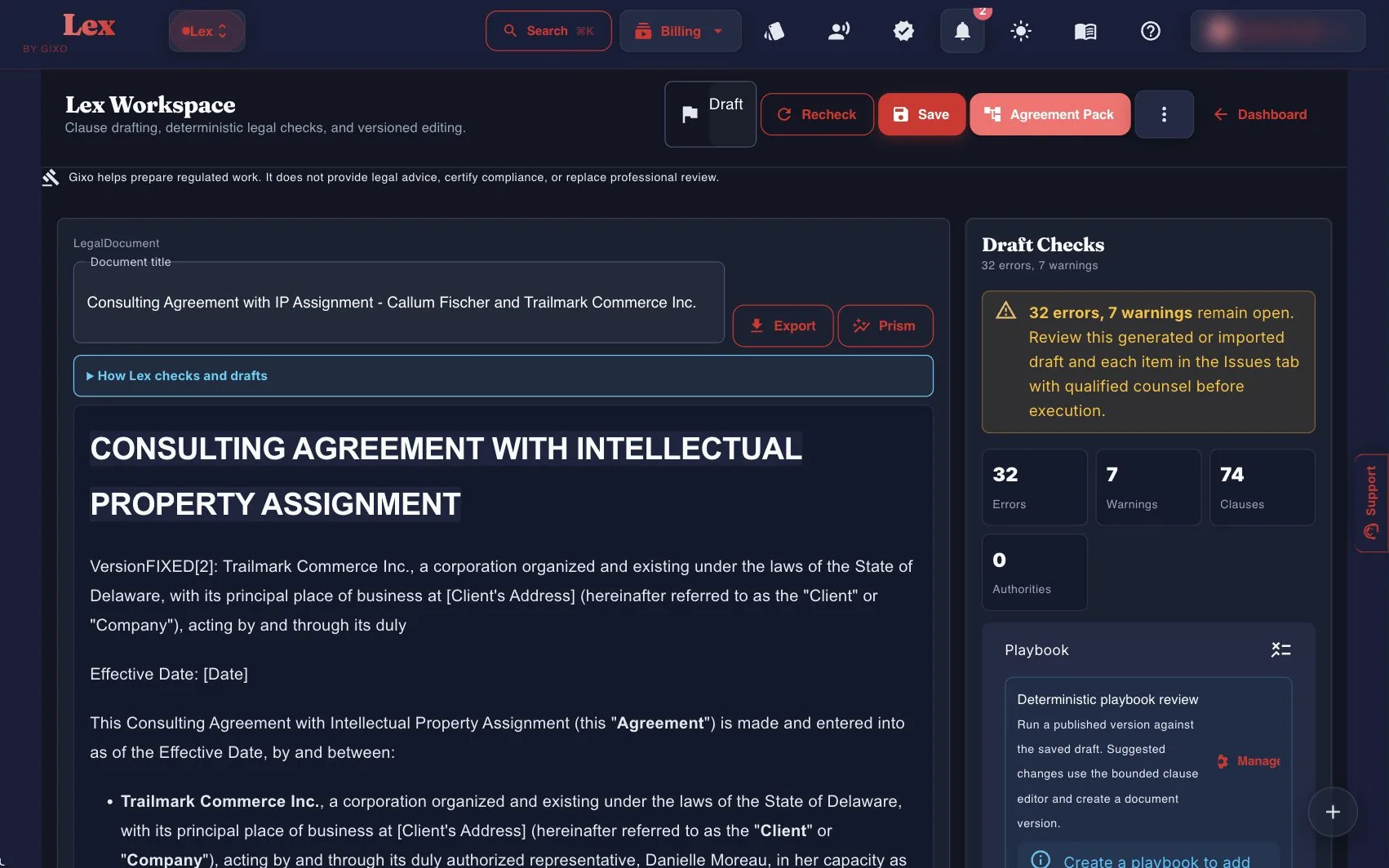
After the first draft, Lex can run a deterministic contract review: clause coverage against a versioned playbook, clause-conflict detection, and defined-term and cross-reference checks. Findings, tracked-change DOCX redlines, comments, review state, assignees, due dates, and version history all stay attached to the same document. A contract imported from Word can go back as that same DOCX, with the Lex edits shown as Word tracked changes; where Lex cannot track an edit faithfully, such as inside a field, an existing revision, a header or a footer, it refuses the export instead of altering the document. Reviewers still verify every clause and conclusion.
Export as PDF, DOCX, HTML, and TXT so the draft can leave the workspace without losing structure.
How does an AI legal document generator work?
Start with guided confidentiality/IP, services, corporate/equity, employment, real-estate, finance, and general legal documents, including custom drafting. Add parties, dates, commercial terms, governing law, and any draft instructions your team already knows.
Bring in existing forms, prior agreements, or client-specific language so the first draft starts from your context rather than a blank page.
Gixo builds the structure, clause flow, and defined-term scaffolding while leaving the reviewer a clear line of sight into what needs legal judgment.
Keep comments, edits, and versions attached to the same document, with each export is written to an audit log (who exported it, the format, and whether it succeeded) rather than stored with the document, before it moves to signature, through Lex's simple electronic signature or an external execution workflow.
How does Gixo compare to other AI legal drafting tools?
The job is not to ask AI for a legal answer. The job is to prepare a draft or artifact that a qualified reviewer can actually work with.
| Capability | Gixo Legal & Compliance | Template marketplaces | Consumer legal memberships | General AI chat tools |
|---|---|---|---|---|
| Main job | Structured first-draft preparation | Template distribution | Consumer legal access | Prompted text output |
| Party and term intake | Structured | Limited fields | Questionnaire | Manual prompting |
| Reference file input | Yes | Rare | Rare | Paste text only |
| Governing-law-aware drafting | Built in | Template dependent | Basic | Unreliable |
| Review workflow on the draft | Yes | Outside tool | Outside tool | No |
| Execution and advice | No legal advice; simple electronic signature and execution records included | Sometimes external | Sometimes external | No |
Legal AI: what an AI legal assistant does here, and what it does not
"Legal AI" covers several different products, and the differences matter more than the label. Gixo Lex is a drafting workflow: it turns intake, precedent you supply, clause requirements and review notes into a reviewable first draft, across 22 named document types plus a custom path for anything outside them. Used that way it is an AI legal assistant for the drafting step — the part that eats hours and rewards structure.
It is not the other things the phrase gets used for. It does not give legal advice, and it is not a substitute for counsel: every output is a draft for a qualified reviewer to check before it is relied on. It does not perform case-law research — precedent here means the prior documents you provide, not reported judgments. It does not negotiate for you. It does handle the step after agreement: from an Agreement Pack, Lex can collect simple electronic signatures, and once execution is recorded it sends in-app and email reminders for confirmed obligations with due dates. It does not provide witnessing, notarization, or qualified or certificate-based signatures. If you need those, you need a different tool alongside this one, and it is better to know that before you start than after. Contract drafting · Compliance documentation
Specifications and pricing
The published limits and prices behind the drafting workflow. Gixo figures are current as of August 2026 — confirm the terms that apply at purchase on the Lex plans page.
| Specification | Gixo Lex |
|---|---|
| Main draft workflows | 22 named on the main create flow, plus custom drafting: guided confidentiality/IP, services, corporate/equity, employment, real-estate, finance, and general legal documents, including custom drafting |
| Drafting guides behind the engine | 22 document-specific legal drafting guides behind the current engine, plus one for custom drafting |
| Parties per agreement | 2 minimum, 10 maximum, each with its own role, entity type, and representative details |
| Reference and precedent files | Up to 5 files, 500 MB per file, in 6 formats: PDF, DOCX, DOC, TXT, MD, and HTML |
| Export formats | PDF, DOCX, HTML, and TXT |
| Deterministic clause check | Deterministic checks flag every mandatory clause a document type's catalogue requires but the draft is missing, from 88 clause definitions across 22 named document types |
| Trial | 14 days, no card required. There is no standing $0 Lex plan — after the trial, continued generation needs a paid plan. |
| Solo Pilot | $29 per month, or $261 per year billed annually. 1 seat. Handled through a support request rather than instant self-serve checkout. |
| Solo | $99 per seat per month, or $999 per seat per year. 1-seat minimum. |
| Small Firm | $149 per seat per month, or $1,499 per seat per year. 3-seat minimum. |
| Growing Firm | $179 per seat per month, or $1,799 per seat per year. 5-seat minimum. |
| Marketplace | $229 per seat per month, or $2,299 per seat per year. 10-seat minimum, sold through Azure Marketplace or private offer. |
| Draft analysis pass | 5 automated checks before human review: clause inventory, missing-clause coverage, defined-term consistency, cross-reference validation, and execution-readiness |
| Signature and obligation reminders | Simple electronic signature from the Agreement Pack, with a sealed signed PDF and a downloadable evidence archive; in-app and email obligation reminders once execution is recorded |
| Not included | Qualified or certificate-based signatures, and legal advice. Gixo helps prepare regulated work. It does not provide legal advice, certify compliance, or replace professional review. |
Frequently Asked Questions
Legal drafting by document type and industry
Updated