
AI Contract Drafting Software for Reviewable First Drafts
Start with the parties, terms, governing law, and reference files. Gixo builds a structured legal first draft that counsel can review clause by clause. Learn how contract automation software converts structured deal facts, reference files, and drafting instructions into a first draft while keeping legal judgment and approval with qualified reviewers.
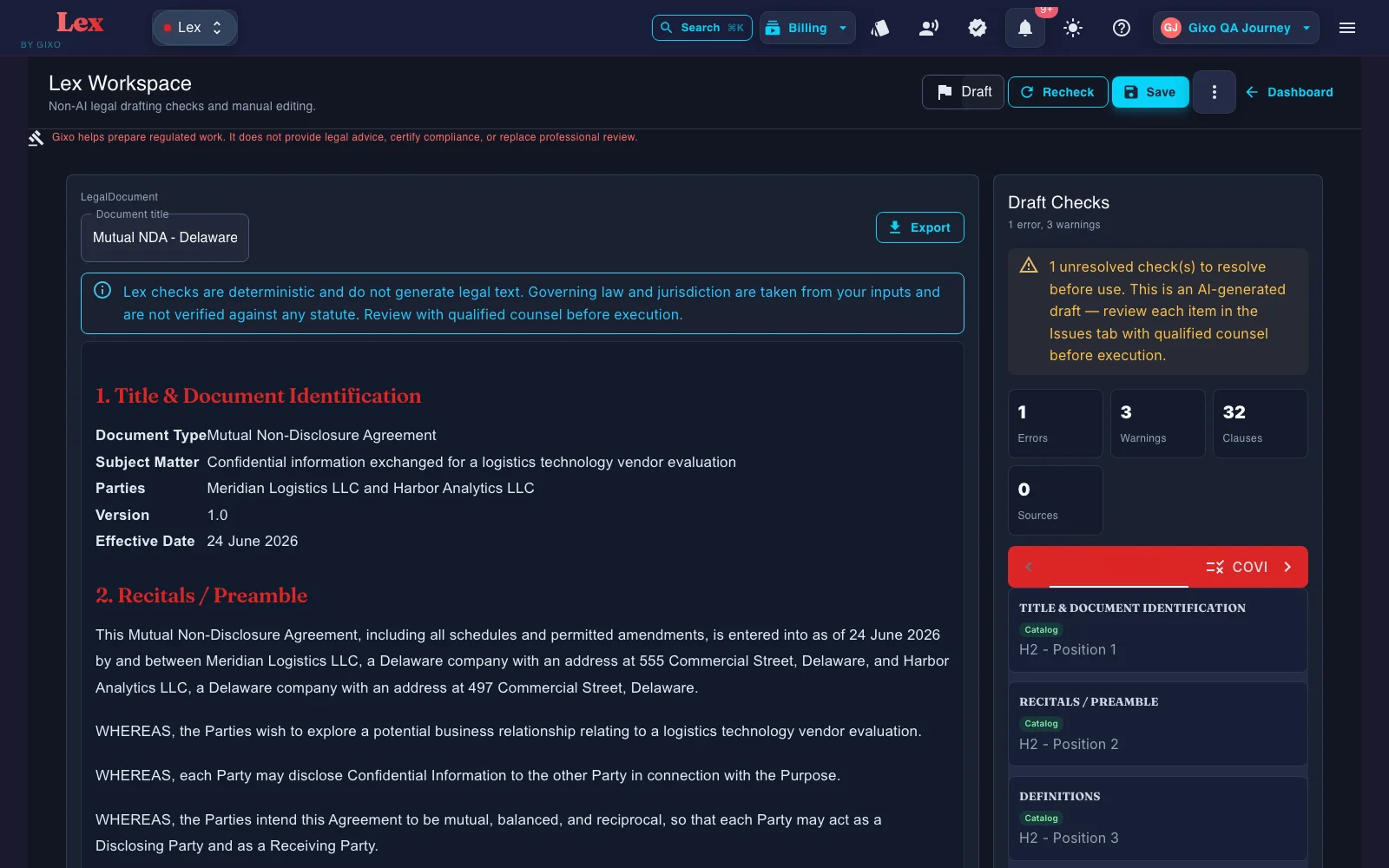
AI contract drafting software helps create agreement drafts from structured intake, templates, clauses, variables, drafting rules, approved source material, and constrained AI assistance. Unlike a one-shot AI contract writer, a reviewable workflow confirms transaction facts, preserves document structure, checks the assembled draft, and routes nonstandard issues to qualified reviewers. Gixo Lex covers 22 named draft workflows plus custom drafting on the main create flow (guided confidentiality/IP, services, corporate/equity, employment, real-estate, finance, and general legal documents, including custom drafting), backed by 22 document-specific drafting guides, plus one for custom drafting, in the current engine, and supports agreements with up to 10 parties in distinct roles. Before review it runs 5 deterministic draft checks — clause inventory, missing-clause coverage, defined-term consistency, cross-reference validation, and execution readiness — and flags every mandatory clause the catalogue requires for the selected document type but the draft is missing. Drafts export in PDF, DOCX, HTML, and TXT. Lex plans run $29–$229 per seat per month with a 14-day no-card trial. It does not provide legal advice, certify compliance, or replace professional review.
Why use an AI contract drafting tool instead of templates or ChatGPT?
The job is not to ask AI for a legal answer. The job is to prepare a draft or artifact that a qualified reviewer can actually work with.
Capture parties, commercial terms, dates, and governing law as distinct inputs so the draft has the facts it needs before generation starts.
Use prior agreements and internal precedent to steer the next first draft toward the language and clause patterns your team already trusts.
Reference files and governing context can shape the draft. Lex does not show clause-level source provenance, so reviewers should verify authority and supporting facts independently.
Define up to 10 parties with distinct roles and representative details for more complex agreements than a two-party template can handle.
After the first draft, Lex can run a deterministic contract review: clause coverage against a versioned playbook, clause-conflict detection, and defined-term and cross-reference checks. Findings, tracked-change DOCX redlines, comments, review state, assignees, due dates, and version history all stay attached to the same document. A contract imported from Word can go back as that same DOCX, with the Lex edits shown as Word tracked changes; where Lex cannot track an edit faithfully, such as inside a field, an existing revision, a header or a footer, it refuses the export instead of altering the document. Reviewers still verify every clause and conclusion.
Gixo helps prepare regulated work. It does not provide legal advice, certify compliance, or replace professional review.
How does an AI contract generator work?
A dependable contract automation tool uses a controlled sequence rather than jumping from a short prompt to a supposedly final agreement.
Choose the appropriate contract family and approved starting structure. In Gixo, the main create flow covers guided confidentiality/IP, services, corporate/equity, employment, real-estate, finance, and general legal documents, including custom drafting. If the transaction does not fit an approved path, escalate it instead of forcing inaccurate selections.
Capture parties and roles, entity details, commercial terms, dates, governing law, scope, special conditions, and required approvals as distinct inputs. Confirm extracted or user-entered facts before drafting.
Provide precedent agreements, clause language, negotiation guidance, or other permitted reference files. Retrieval should respect access and confidentiality boundaries, and reviewers should verify that the selected material fits the transaction.
Templates, variables, and conditional logic establish the agreement sections, party references, definitions, schedules, and required provisions. Deterministic rules are useful where the approved drafting path is known.
AI can organize supplied scope notes, assumptions, deliverables, or commercial background into a first draft. Good instructions preserve approved terminology, prohibit invented facts, and return questions when information is missing.
Verify parties, dates, amounts, definitions, clauses, cross-references, schedules, and unsupported assumptions. Use the editor, comments, versions, and review workflow; export in PDF, DOCX, HTML, and TXT only after the appropriate business and legal review.
What is contract automation software?
Contract automation software converts a repeatable drafting process into a controlled system: it captures transaction facts, applies decision rules, selects or retrieves approved content, fills variables, assembles document sections, and produces a draft for review. Legal contract automation software is broader than simple mail merge because the answers can change which clauses, schedules, and follow-up questions appear.
Drafting automation is not the same as contract management
Contract drafting software focuses on creating and revising agreement language before execution. Document assembly software combines reusable sections and data into a document; document assembly software for lawyers adds legal templates, clause controls, drafting instructions, and review requirements. Contract lifecycle management may also cover repositories, approvals, signatures, obligations, renewals, and post-signature reporting. A product can support more than one category, but buyers should evaluate the drafting workflow separately instead of assuming every CLM system provides controlled AI contract drafting.
The building blocks of legal document automation software
Reliable legal contract drafting software depends on the relationship among document structure, governed content, accurate data, decision logic, and accountable review.
The template defines the agreement's baseline sections, definitions, formatting, schedules, and execution mechanics. Optional modules must still assemble into one coherent document with valid numbering and cross-references.
A governed clause library records each clause's purpose, conditions, dependencies, approved variants, fallback positions, and escalation triggers. Reuse without that context is copying, not controlled automation.
Party names, dates, currencies, prices, notice details, governing law, deliverables, and repeatable lists turn a general template into a specific agreement. High-impact variables need stricter validation.
Rules connect facts to drafting outcomes: a service category may trigger privacy or insurance questions, while a pricing model may select a compatible payment structure. Reviewers should be able to inspect why a provision appeared.
Generative AI is most useful for transaction-specific sections such as scope, assumptions, deliverables, and schedules. Constraints should preserve supplied definitions and approved language while exposing gaps instead of guessing.
Automated checks can flag missing variables, undefined terms, inconsistent party names, empty schedules, or broken references. Qualified reviewers still assess legal effect, commercial intent, factual accuracy, and acceptable risk.
Template automation versus contract drafting AI
The strongest contract generator software uses the right method for each drafting task instead of treating deterministic rules and generative AI as interchangeable.
| Drafting need | Deterministic automation | Generative AI assistance |
|---|---|---|
| Best suited to | Repeatable, approved document paths | Transaction-specific language and unstructured notes |
| Typical input | Controlled fields, selections, and rules | Structured brief, supplied notes, and approved examples |
| Typical output | Predictable templates, clauses, variables, and schedules | Suggested wording, summaries, explanations, or organized scope |
| Main control | Approved logic and locked content | Grounding, task boundaries, constraints, and reviewer verification |
| Main failure mode | Outdated template or incorrect decision rule | Invented facts, unsupported assumptions, or inconsistent language |
| Human responsibility | Approve content, rules, variables, and exceptions | Validate sources, meaning, completeness, risk, and legal suitability |
Why combine the two approaches?
Deterministic automation provides repeatable control for agreement structure and approved language. Contract drafting AI provides flexibility where the transaction requires customized wording. Combining them lets an AI contract generator assist with the variable work while keeping mandatory content, escalation rules, and review obligations visible.
Structured intake and data quality in contract creation software
A contract creation tool is only as reliable as the facts it receives. Intake design should separate confirmed transaction data from legal or commercial judgments and ask only the questions relevant to the selected drafting path.
Validate these inputs before generating the contract
- Parties and authority: legal entity names, entity types, roles, addresses, representatives, and signing authority.
- Commercial terms: scope, products or services, pricing model, amounts, currency, billing dates, milestones, and acceptance criteria.
- Timing: effective date, commencement date, service term, renewal mechanics, notice periods, and termination dates.
- Legal context: governing law, locations, data handling, intellectual property model, insurance, regulatory requirements, and required approvals.
- Document relationships: the master agreement, statement of work, order form, schedules, exhibits, definitions, and incorporated policies.
- Unresolved issues: contradictory instructions, vague scope, nonstandard requests, missing approvals, and assumptions that require confirmation.
To automate contract creation responsibly, normalize equivalent inputs, reject impossible date or currency combinations, preserve uncertainty, and route unusual transactions to an exception path. An approximate deadline should not silently become a fixed legal commitment.
What does Gixo's AI contract drafting tool include compared to alternatives?
| Capability | Gixo | Template libraries | Consumer legal sites | General AI |
|---|---|---|---|---|
| Main job | Contract first-draft workspace | Static forms | Consumer document access | Prompt output |
| Structured intake | Yes | Partial | Questionnaire | No |
| Reference-file input | Yes | No | Rare | Paste only |
| Governing-law-aware draft | Yes | Template dependent | Basic | Unreliable |
| Clause review workflow | Yes | Outside tool | Outside tool | No |
| Legal advice or execution | No legal advice; simple electronic signature and execution records included | No | Sometimes external | No |
Gixo Lex contract drafting specifications
Compare supported inputs, outputs, limits, and the points where professional review remains essential.
| Specification | Gixo Lex |
|---|---|
| Named draft workflows | 22 named on the main create flow, plus custom drafting: guided confidentiality/IP, services, corporate/equity, employment, real-estate, finance, and general legal documents, including custom drafting |
| Drafting guides behind the engine | 22 document-specific legal drafting guides plus one for custom drafting, including NDA, MSA, SOW, SLA, employment, consulting, licensing, lease, loan, IP assignment, and partnership structures |
| Parties per agreement | Up to 10, each with entity details, representatives, and a distinct role — more than a two-party template can carry |
| Governing law | Chosen per draft; clause wording and structure follow the selected jurisdiction's conventions |
| Reference material | Upload existing agreements, precedents, and templates; the draft mirrors their clause structure and defined terms |
| Draft analysis checks | 5 deterministic passes: clause inventory, missing-clause coverage, defined-term consistency, cross-reference validation, execution readiness |
| Missing-clause check | Deterministic checks flag every mandatory clause a document type's catalogue requires but the draft is missing, from 88 clause definitions across 22 named document types. |
| Compliance work product | 20 compliance forms across 5 execution modes, producing checklists, evidence matrices, working papers, filing support notes, and policy drafts |
| Editing granularity | Clause by clause — rewrite, rephrase, or rescope one clause without touching the rest |
| Export formats | PDF, DOCX, HTML, and TXT — 4 formats, after review |
| Clause-level source provenance | Not shown. Reviewers verify authority and supporting facts independently |
| E-signature and execution | Simple electronic signature from the agreement's Agreement Pack: each signer gets an emailed link to a frozen PDF, and the completed copy is sealed with an audit certificate and a SHA-256 fingerprint. Not a qualified or certificate-based signature. Signature blocks also render in exported documents |
| Legal advice or compliance certification | Not provided. Lex prepares drafts for a qualified reviewer |
| Plans (per seat, per month) | $29 Solo Pilot (support-routed, not instant self-serve), $99 Solo, $149 Small Firm, $179 Growing Firm, $229 Marketplace |
| Seats included | 1 on Solo Pilot, 1 on Solo, 3 on Small Firm, 5 on Growing Firm, 10 on Marketplace |
| Trial | 14 days, no card required. There is no free tier |
Contract drafting automation use cases
The best candidates for automated legal document assembly are recurring agreements with understood inputs, approved starting language, visible exceptions, and a defined review path.
Structured questions can capture the parties, disclosure purpose, term, governing law, and mutual or unilateral structure. Residuals language, unusual disclosure rights, or nonstandard duration can trigger additional review.
An AI contract writer can organize supplied notes into objectives, deliverables, milestones, customer responsibilities, assumptions, fees, and acceptance criteria. Reviewers confirm that the scope aligns with the main agreement and actual delivery plan.
Controlled intake can distinguish internal-use, subscription, or evaluation rights and align usage limits, support, pricing, and data terms. Government use, regulated sectors, and unusual intellectual property positions may require specialist review.
Supplier identity, purchase category, delivery location, payment terms, insurance, on-site work, and data handling can determine which approved modules appear. Nonstandard supplier requests remain decisions for authorized legal and business reviewers.
Structured variables can populate the parties, role, compensation, start date, work location, confidentiality, and termination framework. Local requirements, worker classification, equity, restrictive covenants, and unusual benefits require qualified review.
The correct automation result may be an exception or targeted question rather than a generated agreement. High-value, regulated, cross-border, multilingual, contradictory, or novel transactions should not be forced through a routine template.
Review, versioning, and human legal oversight
A generated contract remains a draft. Review is the stage where reviewers test whether the document reflects the actual deal, approved risk position, applicable requirements, and intended relationships among clauses.
AI-generated contract quality assurance checklist
- Confirm every party, role, entity detail, address, representative, and signature block.
- Verify dates, amounts, currencies, pricing, payment mechanics, notice details, and schedules.
- Check defined terms, capitalized terms, numbering, cross-references, exhibits, and incorporated documents.
- Confirm that clause selections and fallback positions match the approved transaction facts and negotiation authority.
- Look for invented facts, silent assumptions, missing exceptions, contradictory obligations, and unsupported commitments.
- Compare revisions against an approved baseline and focus on legal effect, not only the volume of changed words.
- Apply the required business, legal, privacy, security, tax, regulatory, or specialist review before approval.
Version names should identify the agreement, date, revision, and review state instead of relying on repeated “final” labels. A small change such as replacing “may” with “shall” can matter more than a page of formatting edits, so comparison tools support judgment rather than replacing it.
How to evaluate the best contract drafting software for your team
“Best” depends on agreement volume, complexity, approved content, user roles, review requirements, and risk. An AI contract drafting software comparison should test inspectable controls rather than rely on a generic feature count. Contract drafting software for attorneys should also preserve professional review, confidentiality boundaries, and accountability.
Can the software handle templates, conditional sections, repeatable fields, definitions, schedules, formatting, numbering, cross-references, and usable export formats?
Can owners approve clauses, record drafting instructions, control variants, manage permissions, preserve locked language, and identify when a fallback requires escalation?
Are questions conditional and understandable? Does the system validate high-impact data, prevent incompatible choices, expose the reason for clause selection, and provide an exception path?
Can generation be grounded in permitted sources, constrained to a defined task, instructed not to invent facts, and separated visibly from approved or manually revised language?
Are comments, review status, versions, comparisons, assignments, due dates, and required approvals attached to the same matter so reviewers can see the drafting history?
Evaluate current vendor evidence for access controls, confidentiality, data handling, retention, integrations, support, and administrative oversight using your organization's requirements.
Measuring contract automation software ROI
Measure more than generation speed. Track intake completeness, time to first reviewable draft, reviewer effort, exception rate, drafting errors, approved-clause reuse, rework, turnaround time, and user adoption. The benefits of legal document automation software should be assessed against the same agreement types, risk tiers, and review standards.
Contract drafting or contract management software?
These are two products and buyers often start out looking for one while describing the other. Contract management software — also sold as a contract management system, contract management solutions, or CLM — is a repository: it stores executed agreements, tracks obligations and renewal dates over time, routes signatures, and alerts you before something auto-renews. Ironclad, Agiloft and their peers do that job.
Gixo Lex is the drafting half. It turns intake, precedent you supply, clause requirements and reviewer notes into a first draft, then runs a draft-analysis pass that surfaces missing clauses, inconsistent defined terms, broken cross-references, and the obligations and renewal terms actually written into the text — so a reviewer can see them before signature rather than discover them afterwards. For agreements in Lex, it also covers signing and follow-up: from the Agreement Pack, Lex can collect simple electronic signatures, and once execution is recorded it sends in-app and email reminders for confirmed obligations such as renewal and notice dates. What it is not is a repository built to hold and track an existing contract portfolio. If you are searching for the best contract management software because renewals across agreements you already hold keep surprising you, that is a repository problem and this is not the tool for it. If your problem is that first drafts take too long and arrive inconsistent, it is.
Teams commonly run both, and the handoff is clean: draft and review here, and keep the wider contract portfolio there. Legal document drafting · Compliance documentation
Common contract automation mistakes
A model does not know which email, note, or instruction is authoritative. Confirm extracted facts and make ambiguity visible before drafting.
Automation scales unclear clauses, obsolete references, inconsistent definitions, and hidden assumptions. Review and rationalize the source content first.
Unguided scope text can create vague commitments or conflict with the main agreement. Use structured prompts, examples, validation, and review triggers.
Polished language can still contain incorrect assumptions, missing exceptions, inconsistent definitions, or unintended obligations. Review meaning, not grammar alone.
Changes to payment, data, scope, acceptance, warranties, indemnities, termination, or liability can affect other provisions. Assess the agreement as a connected instrument.
Templates, clauses, rules, prompts, and review standards require named owners, testing, approval, maintenance, and a way to communicate substantive changes.
AI contract drafting and contract automation FAQs
Updated