
Jurisdiction-aware legal drafting that gives reviewers a better starting point
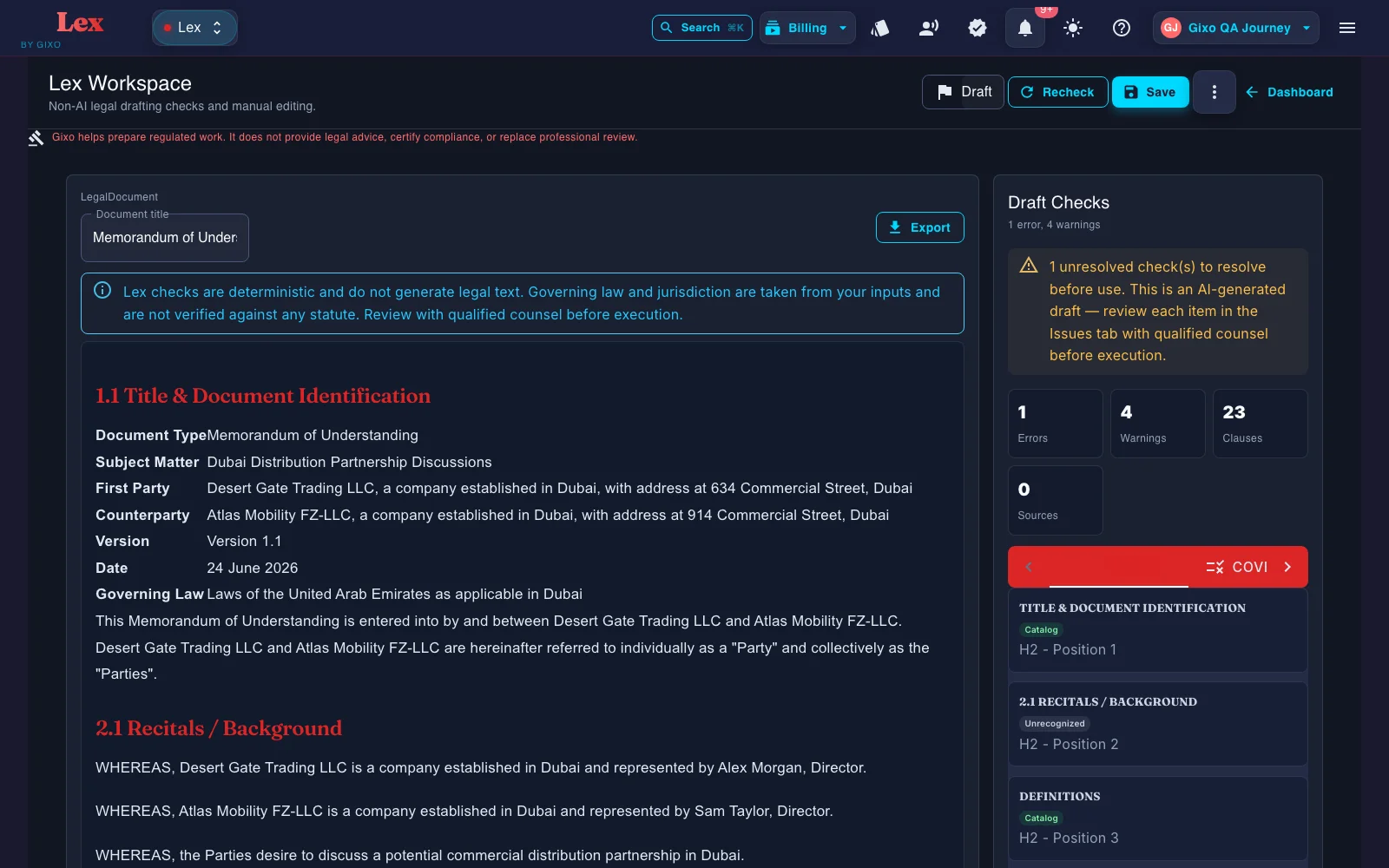
Governing law changes more than one clause. Gixo captures parties, terms, reference files, and authority context as drafting inputs. Lex does not show clause-level provenance, so reviewers still verify how those inputs shaped the draft and where legal judgment matters.
Jurisdiction-aware legal drafting means capturing governing law, venue, party locations, and reference-file context before the first draft is written — not bolting it on after a generic draft already exists. In Gixo, that means governing-law context, reference structure, and party details are captured up front so the reviewer starts from a more relevant draft, not a one-size-fits-all template. It does not replace jurisdiction-specific legal review: a qualified attorney in the relevant jurisdiction should still review and approve the output before it is signed.
Reviewed 2026 — reflects the current Gixo Lex drafting engine.
What does jurisdiction-aware legal drafting actually mean?
Reference files and governing context can shape the draft. Lex does not show clause-level source provenance, so reviewers should verify authority and supporting facts independently.
Start from the law and dispute context that matter to the agreement instead of bolting them on after a generic draft has already been produced.
Capture party locations, entity types, and dispute expectations so the draft reflects the commercial and jurisdictional shape of the matter.
Upload prior jurisdiction-specific agreements and internal precedent to keep local drafting norms closer to the next output.
Bring the governing-law and venue assumptions into the drafting process early so reviewers can focus on actual legal judgment and negotiation tradeoffs.
After the first draft, Lex can run a deterministic contract review: clause coverage against a versioned playbook, clause-conflict detection, and defined-term and cross-reference checks. Findings, tracked-change DOCX redlines, comments, review state, assignees, due dates, and version history all stay attached to the same document. A contract imported from Word can go back as that same DOCX, with the Lex edits shown as Word tracked changes; where Lex cannot track an edit faithfully, such as inside a field, an existing revision, a header or a footer, it refuses the export instead of altering the document. Reviewers still verify every clause and conclusion.
Gixo helps prepare regulated work. It does not provide legal advice, certify compliance, or replace professional review.
How teams use AI legal drafting across jurisdictions
Start from guided confidentiality/IP, services, corporate/equity, employment, real-estate, finance, and general legal documents, including custom drafting, then add the governing law, venue, and matter-specific instructions.
Capture the parties and upload prior agreements or clause banks that reflect the jurisdictional style your team expects.
Gixo prepares the structured draft so the reviewer is not starting from generic text that ignores the governing framework.
Keep review attached to the document, then export in PDF, DOCX, HTML, and TXT when the team is ready.
How does Gixo compare to templates and general AI for jurisdiction-aware drafting?
The job is not to ask AI for a legal answer. The job is to prepare a draft or artifact that a qualified reviewer can actually work with.
| Capability | Gixo | Template sites | General AI | Manual drafting |
|---|---|---|---|---|
| Governing-law-aware first draft | Yes | Template dependent | Unreliable | Yes |
| Reference-file input | Yes | Rare | Paste only | Yes |
| Multi-party jurisdiction context | Yes | Limited | Manual | Yes |
| Review workflow | Yes | Outside tool | No | Outside tool |
| Legal advice | Not included | No | No | Attorney judgment |
| Typical cost | Subscription — $29–$229 per seat/month | Per document | Consumer AI subscription | Roughly $500–$5,000+ per agreement |
Gixo Lex plans run from $29 to $229 per seat per month, with a 14-day no-card trial and no free plan. The manual-drafting figure is an illustrative market range as of mid-2026, not a quote — jurisdiction-specific work from outside counsel is priced per matter.
Why does governing law change more than one clause?
The United States has no single contract law. Federal law sits on top, but most everyday business agreements — employment, leases, services, partnerships — are governed first by state law, and counties and cities add another layer. A clause that is standard and enforceable in one state can be narrowed, rewritten by a court, or unenforceable in another.
That is why a single "nationwide" template is rarely as portable as it looks, and why a generic AI draft that ignores governing law can read fine and still fail where it counts. The rules also move — what was compliant last year may not be this year. The job is not to memorize every statute; it is to capture the governing-law context up front, draft from references that reflect it, and leave clear room for a qualified reviewer in that jurisdiction.
Where jurisdiction bites hardest
A few areas vary enough between states that a one-size draft is most likely to break. These are the places to slow down and confirm current local requirements.
Restrictive covenants (non-compete, non-solicit), required notices, and termination rules differ sharply state to state — some states sharply restrict non-competes while others enforce reasonable ones. This is the most fragmented area.
Lease remedies, a landlord's duty to mitigate, sublet and assignment rights, and default provisions turn on state property law and local precedent.
Entities are often formed in one state (commonly Delaware) but operate in others, so the state of formation and the state of operation can both shape the agreement.
Patents and copyrights are federal, but IP assignments, licenses, and trade-secret protection are interpreted under state contract law, which varies.
Common mistakes when AI drafts across jurisdictions
A general model produces plausible text, not legal judgment. It cannot weigh strategy or negotiate. Gixo prepares a structured first draft; a qualified reviewer still owns the outcome.
One-shot AI can mix rules from different states into a single clause that fits nowhere. Jurisdiction-specific references can inform the draft, but a qualified reviewer still verifies the result against current local law.
Law changes; a template that was fine a year ago may not be now. Treat governing-law and boilerplate clauses (choice of law, venue, severability) as live, not settled.
Common law vs civil law: the divide behind most cross-border surprises
The biggest reason a contract that is ironclad in one country is porous in another is the split between two legal traditions. A "global" or US-centric template ignores it at the drafter's peril. The points below are general tendencies, not rules — confirm specifics with counsel in the relevant jurisdiction.
| Common law — UK, Canada, Australia, Singapore, US | Civil law — much of the EU | |
|---|---|---|
| Primary source of law | Judicial precedent (case law) | Codified statutes |
| Contract style | Long, detailed, self-contained — tries to anticipate every eventuality | Shorter — the code supplies default rules and implied terms |
| Duty of good faith | Generally not implied (Canada is a notable exception) | Implied in virtually every contract |
| Penalty clauses | A penalty that is not a genuine pre-estimate of loss is usually unenforceable | Often enforceable, but a court can reduce one that is excessive |
| Pre-contract statements | Strong parol evidence rule — the signed document usually governs | Courts may weigh negotiations to find the parties' true intent |
| Primary remedy for breach | Monetary damages | Often the right to demand actual performance |
What changes when you cross a border
A few areas diverge enough that one template rarely travels well. These are the places to slow down and confirm local requirements before relying on a draft.
Common law asks for "consideration" — a bargained-for exchange. Many civil law systems instead ask whether the promise has a legitimate purpose ("causa"). A promise that binds in Paris may not bind in London without something given in return.
Oral contracts are often valid, but most systems require writing for specific types such as land and guarantees — and the exact list varies by country. Electronic signatures are widely recognized, but under different statutes (for example, the EU's eIDAS).
Civil law systems generally imply a duty of good faith across negotiation, performance, and termination. Most common law systems traditionally do not — so a party can walk away late in talks with no liability in London, yet face a bad-faith claim in a civil law forum.
A fixed "pay $X per week late" clause can be struck down entirely in common law jurisdictions if it looks like a penalty rather than a genuine estimate of loss. Many civil law courts instead reduce it to a reasonable amount. Labeling it "liquidated damages" does not settle the question.
Common law usually defaults to money damages and treats "make them perform" as exceptional. Many civil law systems start from the opposite premise — that you are entitled to the performance you bargained for.
Common law reads force majeure narrowly — only the listed events that truly prevent performance, not those that merely make it costlier. Some civil law systems add a "hardship" doctrine that lets a party seek renegotiation when performance becomes excessively onerous.
The clauses that decide everything
In a cross-border deal, the "boilerplate" at the back is often the most important text in the document.
Which country's law interprets the contract. Without it, the parties fall into unpredictable 'conflict of laws' rules — and the first fight becomes which law even applies.
Where a dispute is heard — a named court or arbitration. Arbitration awards are often easier to enforce across borders than court judgments, which is why cross-border deals so often choose it.
For cross-border sales of goods between businesses in signatory countries, the UN Convention (CISG) can apply automatically — unless the contract expressly excludes it. Many teams never realize it is the default. Membership changes over time, so confirm current status and decide deliberately whether to opt in or out.
This page is general information, not legal advice. Laws vary by jurisdiction and change over time — confirm current requirements with a licensed attorney in the relevant jurisdiction. Gixo helps prepare regulated work. It does not provide legal advice, certify compliance, or replace professional review.
Frequently Asked Questions
Updated