
Gixo Lex · User guide
Everything you need to draft and review legal work in Lex
Structured first drafts, draft checks, agreement packs, matters and compliance drafts, with a link to each screen.
Start here
What Lex is
Lex is a workspace for legal drafting and compliance work. You give it the facts — the document type, the parties, the jurisdiction, the terms that matter and any reference material — and it prepares a structured first draft. Every draft then runs through Draft Checks. Most of them are rules: which clauses are present or missing, whether defined terms and cross-references hold together, and what still stands between the draft and signature. Where a question needs the clause read rather than matched, an AI clause review rules on it and quotes the passage its answer rests on: whether two related clauses contradict each other, and whether a playbook position is met. Neither the rules nor the AI review is a legal opinion.
Around each document, Lex keeps the rest of the work in one place. Agreement packs turn an agreement and its family into a matrix of key fields to review, a register of parties and signatories, and a list of obligations with owners and dates. Review playbooks hold your preferred positions and fallbacks. The matter office gathers sources, findings and work products for a client question, researches authorities for and against an issue, and revises a Word draft in rounds. And compliance drafts cover checklists, evidence trackers, working papers and registers.
What Lex is not
Lex shows this line on every legal and compliance document: “Gixo helps prepare regulated work. It does not provide legal advice, certify compliance, or replace professional review.” Jurisdiction and governing law steer how a draft is written, but they are taken from what you type and aren't checked against any statute. Plan on a qualified reviewer reading every draft before anyone relies on it.
Your Lex dashboard
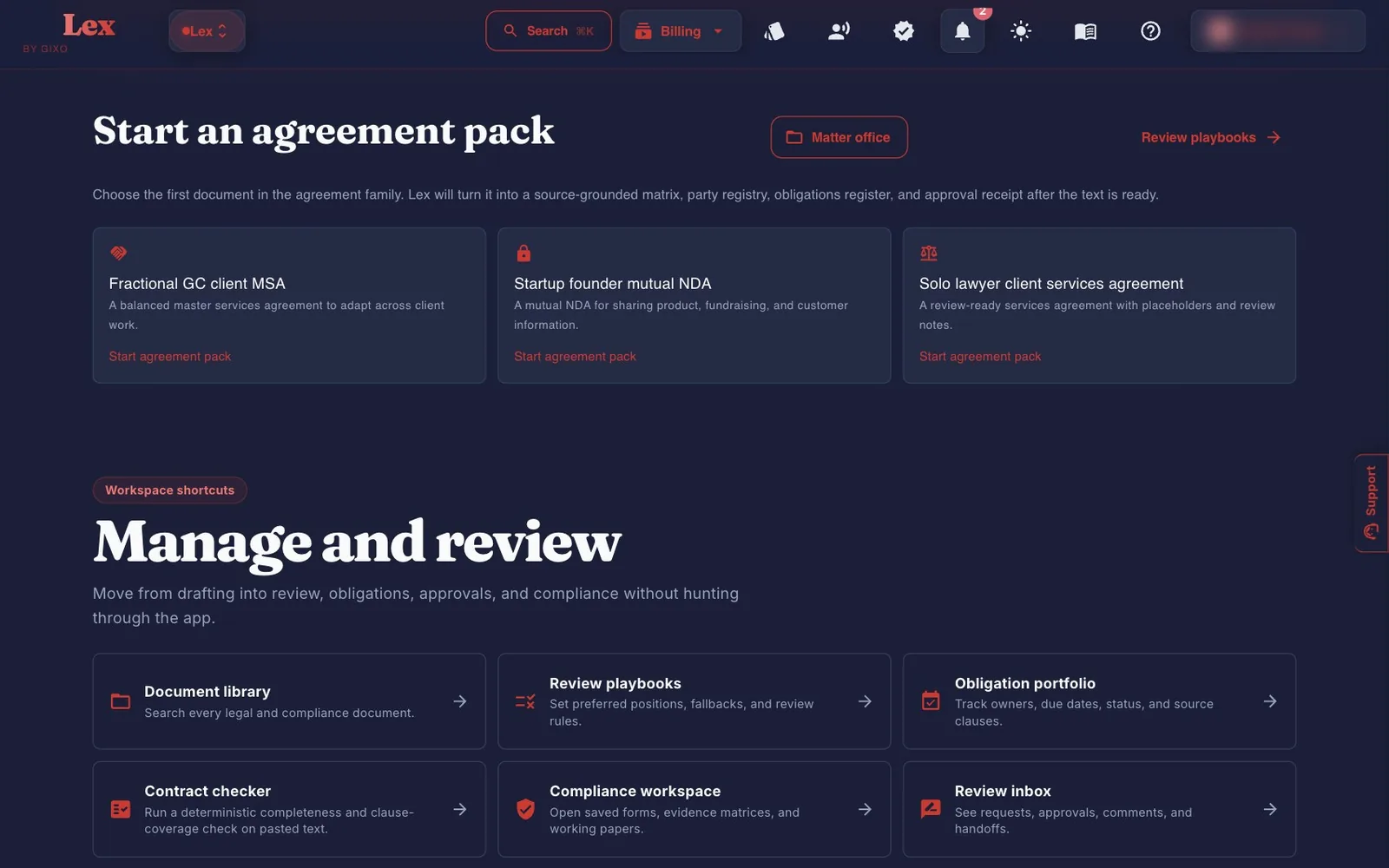
The dashboard is your Lex library and where every Lex job starts. New document at the top offers four starting points, and the same four sit as tiles under it. A row of links on every Lex page goes to Library, Matters, Obligations, Playbooks, Reviews and Compliance.
| Part of the page | What it gives you |
|---|---|
| New document | Draft an agreement (an NDA, MSA, SOW or other commercial contract), Review a contract you already have, Compliance document and Start a matter. The three drafting examples are on the drafting form itself, under Start from an example. |
| Drafts in progress | Shown while Lex is still writing a draft you started. Resume opens it; it doesn't start another draft. |
| Recent matters | Your latest matters, once you have any. |
| Your documents | Your library of legal and compliance documents, with search. Once it holds more than six documents, Filter narrows it by type (legal or compliance), contract kind, lifecycle stage, open findings and date modified; each filter you set shows as a chip you can remove. A card opens the document in the Lex Workspace. |
| Foot of the page | Links to the free Lex tools; Saved compliance work, which filters the library to compliance documents; New compliance draft from a template; and a note on what your team shares and what stays personal. |
Drafting a document
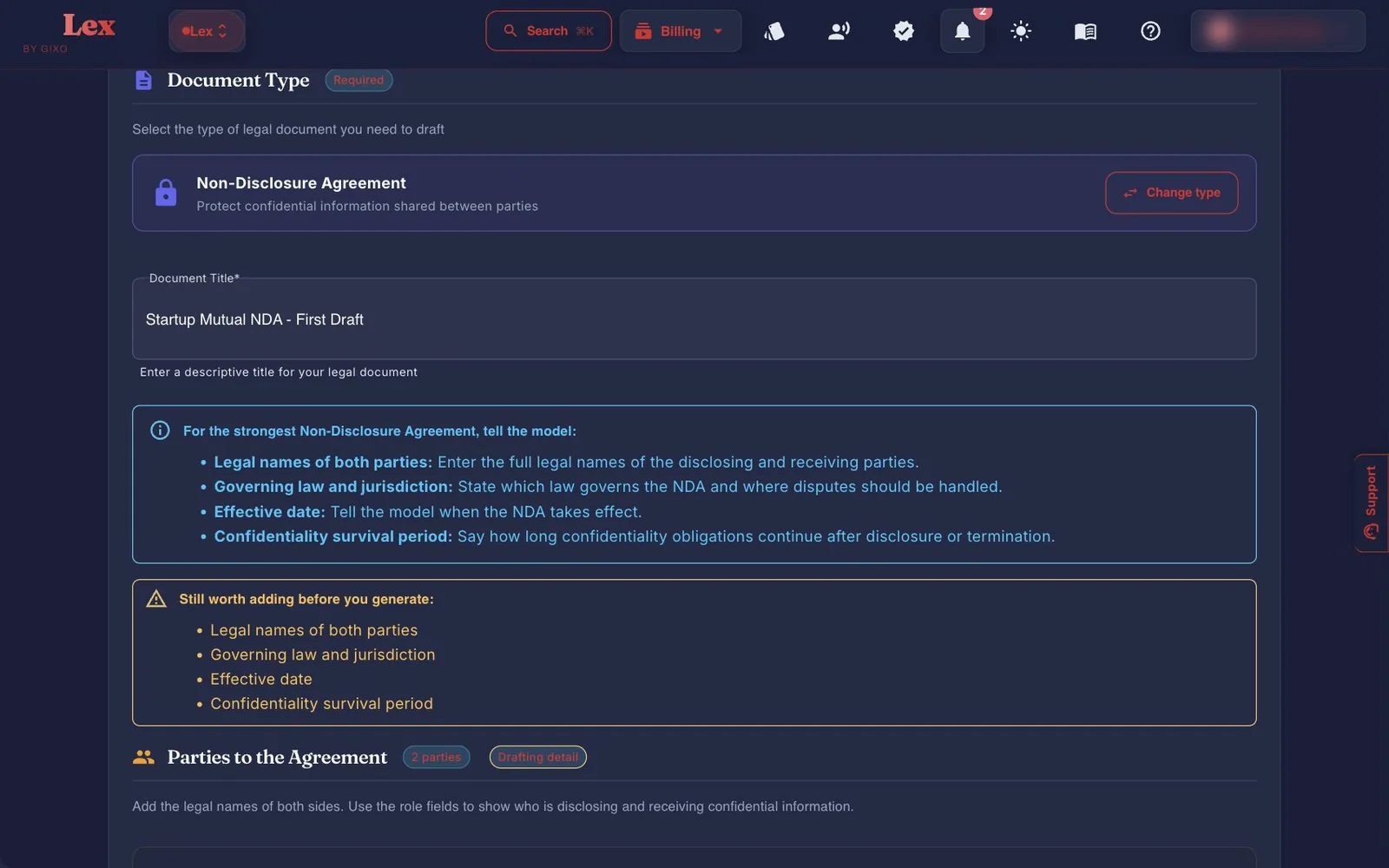
One form drafts either a single document or the first document of an agreement pack. It needs a document type, a title, the legal name of each party, and the facts the document type requires — or your go-ahead to leave those facts open. Everything else you add makes the draft better.
- Start from an example (optional)Three examples sit above the document types: Fractional GC client MSA, Startup founder mutual NDA and Solo lawyer client services agreement. Each fills in the type, title and instructions for you to change, and never overwrites anything you've already typed. Nothing is drafted until you confirm the scope.
- Document typeSearch, or browse 23 cards in seven groups: 22 named document types plus Custom Legal Document. Once you pick one, the list folds to the chosen card; Change opens it again. If you're unsure, open Not sure which one fits?, describe the transaction and click Suggest instrument for up to three matches. The matches come from keyword routing rather than AI, so confirm the instrument yourself. For a letter or a notice, the form points you to Matters, which drafts a notice from a matter's findings.
- Document TitleRequired.
- Party namesDirectly under the title, one legal-name field per party, labelled with the role the document type gives it. Add another party adds more, up to 10.
- Clause factsLex asks for just the facts the chosen type's clauses use, and the required ones sit in the main form. If required facts are missing, you can still go ahead: tick Generate an incomplete first draft, mark these facts for review, and do not invent values.
- Important Terms & InstructionsFree-text instructions. This field shapes the draft more than any other.
- More details (optional)One panel holds the rest. Party details: role, entity type and address for each party, plus registration number and authorised representative for organisations. Jurisdiction, dates & term: jurisdiction and governing law are free text, then the effective date, the term and — for the document types that use one — a confidentiality period. Drafting posture sets the balance: Standard, Explicitly mutual, Favor Party A, Favor Party B or Lightweight / plain-language. More clause facts holds the optional ones. Reference documents: up to five files (PDF, DOCX, DOC, TXT, MD or HTML) plus pasted excerpts. Lex uses them as style and precedent references, not as legal authority. Together they share a 40,000-word budget, and longer material is trimmed evenly. The panel opens by itself when it holds something you haven't seen.
- Review drafting scopeThe button reads Review first pack document scope in pack mode. It shows a summary to confirm: the type and title, the parties, jurisdiction and governing law, how many required facts are missing and how many reference files can be used. Click Confirm scope and start drafting. If you change the form after reviewing, Lex asks you to review the scope again. Drafting uses plan capacity.
Lex starts drafting in the background and opens the workspace, which shows Generating legal draft until the text arrives. You can leave the page while you wait; no time estimate is shown. In pack mode, Lex moves you to the agreement pack once the draft is ready.
Before the draft reaches you, Lex checks it. An AI clause review reads whether each mandatory clause for the document type does its job, in any wording and under any heading; an AI review checks party facts, governing law and amounts against what you supplied; and Lex looks for numbers that none of your material states. A missing section or clause, or a number nothing supports, gets one more drafting attempt. Lex keeps any draft with words in it: what is still open is summarised under Generation diagnostics at the top of the workspace, and Draft Checks then runs on the draft as usual.
What Still needed tells you
The Still needed list beside the button names everything that stops the draft: a document type, a title, a legal name for each party, a required fact, or a reference file that is still being read or failed to read. Click an item to go to its field; pressing the button with something missing does the same. Choosing a document type fills in roles for the first two parties, so name both, or remove the second row.
Reviewing a contract you already have
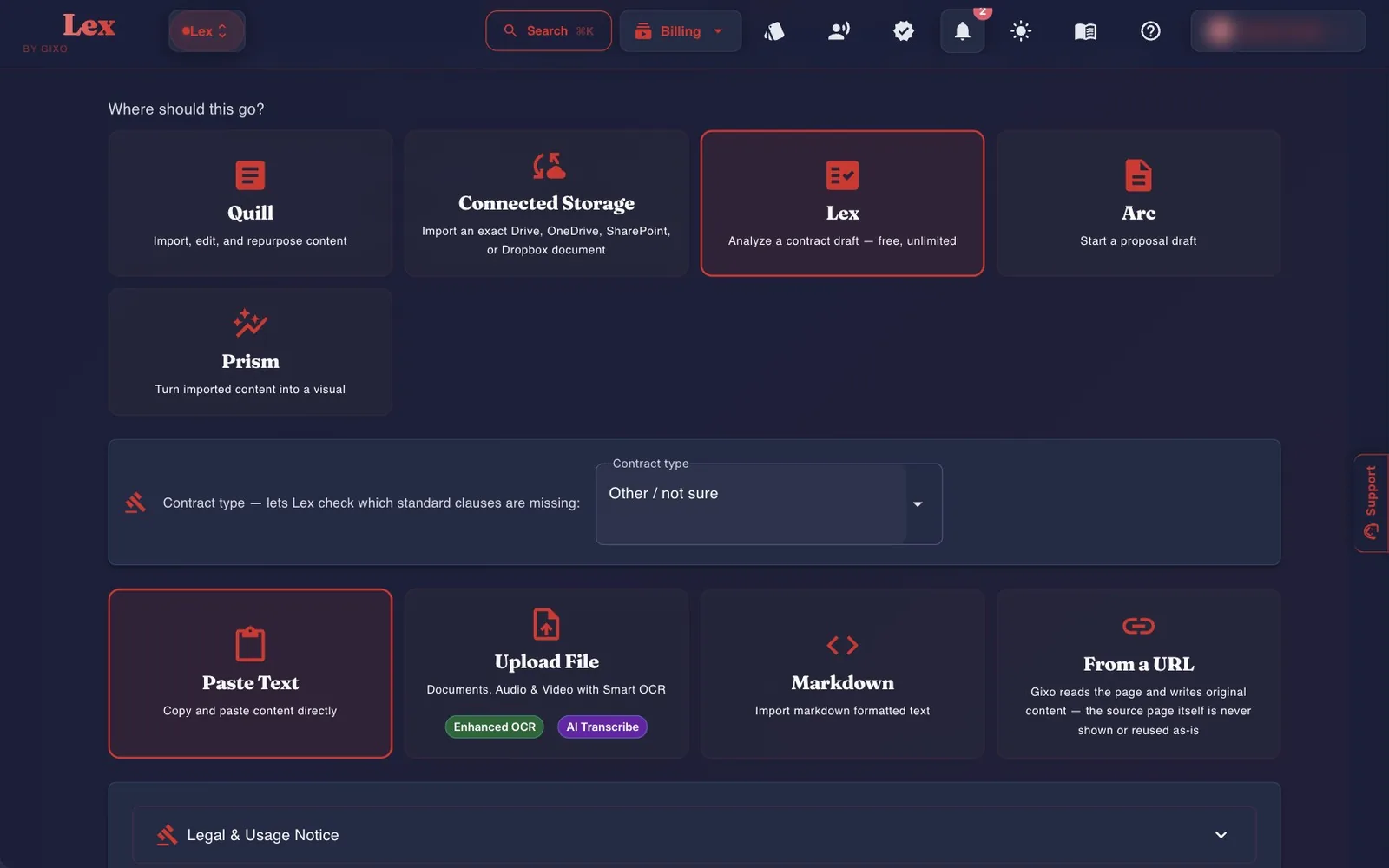
Bring in an existing agreement, keep its text as it is, and run the same checks as a Lex draft. Lex reads the contract type from the contract's title or file name, so it knows which standard clauses to look for. Check it under Contract type and change it if it's wrong; a contract that names no known type stays Other / not sure.
| Method | How it works |
|---|---|
| Drop a file | One file at a time: PDF, Word (.docx or .doc), text, Markdown, HTML, or a scan as JPEG, PNG or TIFF. Word (.docx) and text files are read directly. PDFs, scans and .doc files are read with cloud OCR, which needs an active Lex plan. Large documents keep processing in the background. When you import a DOCX, Lex keeps the original so you can later export in its formatting. |
| Paste the text | The box under the drop zone takes plain text, HTML or Markdown; there's no separate Markdown method. Smart formatting, on by default here, rebuilds headings, lists and paragraphs without using AI and keeps every word of the contract. |
| Connected storage | Import from Google Drive, OneDrive, SharePoint or Dropbox appears under the paste box once you've connected the account. |
| Import options | Smart formatting for pasted text; for a file read with OCR, the choices to preserve formatting and table structure, extract and describe images, and use enhanced OCR. |
After the import finishes you land in the Lex Workspace with the checks already run. Importing and checking don't draft anything, so neither uses drafting capacity.
Two things to know
Import an Agreement Pack uses the completed import to open the pack through a one-time navigation intent. A typed or replayed agreementPack query does not create one. If you opened a single document instead, open the Agreement Pack tab in Draft Checks (or ⋮ → Agreement Pack), then Create Agreement Pack. And a document with no contract type has no Clause Edit or Ask Lex until you confirm a type with Use this contract type, which leaves the text unchanged.
The Lex Workspace
Every legal and compliance document opens here: an outline of its clauses on the left, the editor in the middle, Draft Checks on the right, and a bar across the top with the title, the save state (click it to save), the review status, Review, Ask Lex, Share, Download and a ⋮ menu. The ⋮ menu holds Recheck draft, Agreement Pack, Insert diagram, Versions, the Word exports, Copy link and Delete. The editor toolbar covers formatting, tables, lists, comments and blocks. Click + or type / to insert a clause structure block.

Draft Checks
Six tabs group the checks: Checks, Review, Clauses, Authorities, Negotiation and Obligations. An agreement has a seventh, Agreement Pack. The table below describes the sections inside them. The checks run each time the document loads and after you save or choose ⋮ → Recheck draft. None of them draws on plan capacity.
| Tab · section | What it tells you |
|---|---|
| Checks · Coverage | The mandatory and recommended clauses for the contract type, each shown as present, present only in body text, or missing. A missing mandatory clause is an error; a missing recommended one is a warning. |
| Checks · Terms | Defined terms used inconsistently, and capitalized terms used more than once but never defined. |
| Checks · Cross-refs | References to a section or schedule that doesn't match a heading in the document. |
| Checks · Conflicts | Pairs of clauses in the draft that share a topic, such as arbitration and court jurisdiction. On a legal document, the AI clause review reads each pair and marks it Conflict, Consistent or Not reviewed, quoting the passage it rests on from each clause. A pair the review couldn't finish keeps the rule-based flag, and says so. Advisory only. |
| Review · Validator notes | Shown when the automated checks recorded notes as the draft was generated: each says how serious it is, which section or clause it concerns, and what to do. |
| Review · Issues | Every finding in one worklist, where you record decisions. |
| Review · Comments | Review, assign, resolve and reply to comments on the document. |
| Clauses · Playbook | Runs one of your review playbooks against the draft. |
| Clauses · Precedent | Compares clause patterns with your own approved documents of the same contract type. When more than 25 qualify, the newest 25 are compared and older references are excluded; the panel states the sample scope. |
| Clauses · Clause inventory | Every clause heading Lex detected, each marked Catalog or Unrecognized. The mark says where a clause came from, not whether it's legally sound. Clause Edit is on this tab too. |
| Authorities | Legal authorities attached to the draft, shown for relevance. Usually empty. |
| Negotiation | A ledger of positions and turns, each tied to a document version. |
| Obligations | Who has committed to what, and by when, found from operative wording such as “shall” and “must”. |
| Obligations · Execution | Named parties, effective date, governing law, signature blocks and open placeholders such as TBD. |
| Agreement Pack | Agreements only. How many matrix fields, parties and obligations are confirmed, each opening its section of the pack, and Open Agreement Pack. |
Where Lex uses rules, and where it uses an AI review
Rules decide coverage, defined terms, cross-references, obligations, execution items and blanks. An AI clause review is used in three places: while Lex drafts (does each mandatory clause do its job), on clause pairs under Conflicts, and when you run a playbook. Each verdict must quote the draft, and Lex checks the quote is really there. A verdict it can't check, or a review that doesn't finish, shows as Not reviewed, never as a pass. The review runs on documents saved in Lex; the free Contract Completeness Check stays rule-based. It doesn't draw on plan capacity.
Deciding on findings
In Issues, filter by severity, review state or category, then record a decision for each finding: Open, Accept risk, False positive or Resolved. Accept risk and False positive need a written rationale. After you edit, save (Ctrl/Cmd+S or the save state) or choose Recheck draft first, because decisions can't be saved while the analysis is out of date.


Editing clauses, and Ask Lex
Clause Edit, on the Clauses tab, is for legal documents with a contract type. Pick a clause and an operation — insert after, insert before, replace or remove — then write the text. Inspect the Before and After preview, including the words replaced and the subsections kept. Include subsections expands the target explicitly. Removal or changed numerical terms needs acknowledgement. Validate checks structure without changing anything; Apply makes the change against the current saved version. Neither decides legal correctness.
Ask Lex, in the bar, writes proposed wording for one clause from your instruction, marking missing facts as [●] rather than inventing them. Click a clause in the outline to choose it; the button's tooltip names the clause it will work on. It never edits the document on its own. Stage the proposal, validate it, then apply it. Ask Lex needs a plan that includes drafting.


Read-only review, saving, versions and approval
Review in the bar makes the draft body read-only while you inspect findings and record decisions; Exit review ends it. Versions, in the ⋮ menu, opens the saved-version dialog, where you compare versions. These are review controls, not a legal verdict. A stale proposal needs the current draft saved and checked again before it can be applied.
- Autosave runs about two seconds after you stop typing, and no later than about fifteen seconds after your first unsaved change. Ctrl/Cmd+S or a click on the save state saves straight away, and the browser warns you before you leave with unsaved changes.
- Versions also lists earlier saved versions so you can restore one.
- The review status — Draft, In review and Superseded — is a label only and doesn't lock anything. Choosing Approved, or Approve this version in the Signatures panel, records an approval receipt for that exact saved version. Before you can approve, every finding needs a decision, every finding's review thread must be resolved, and the draft can't hold a blank such as [●] or [___]. A blank can't be accepted as a risk, because signers would sign it: fill it in or remove it. If the agreement has a pack, its matrix fields, parties and obligations must be settled first. Any later edit invalidates the receipt.
- The ⋮ menu also holds Tracked-change DOCX, Original-format DOCX and Original format with tracked changes (for documents imported from Word), Insert diagram, Copy link and Delete. Share is in the bar.

Agreement packs
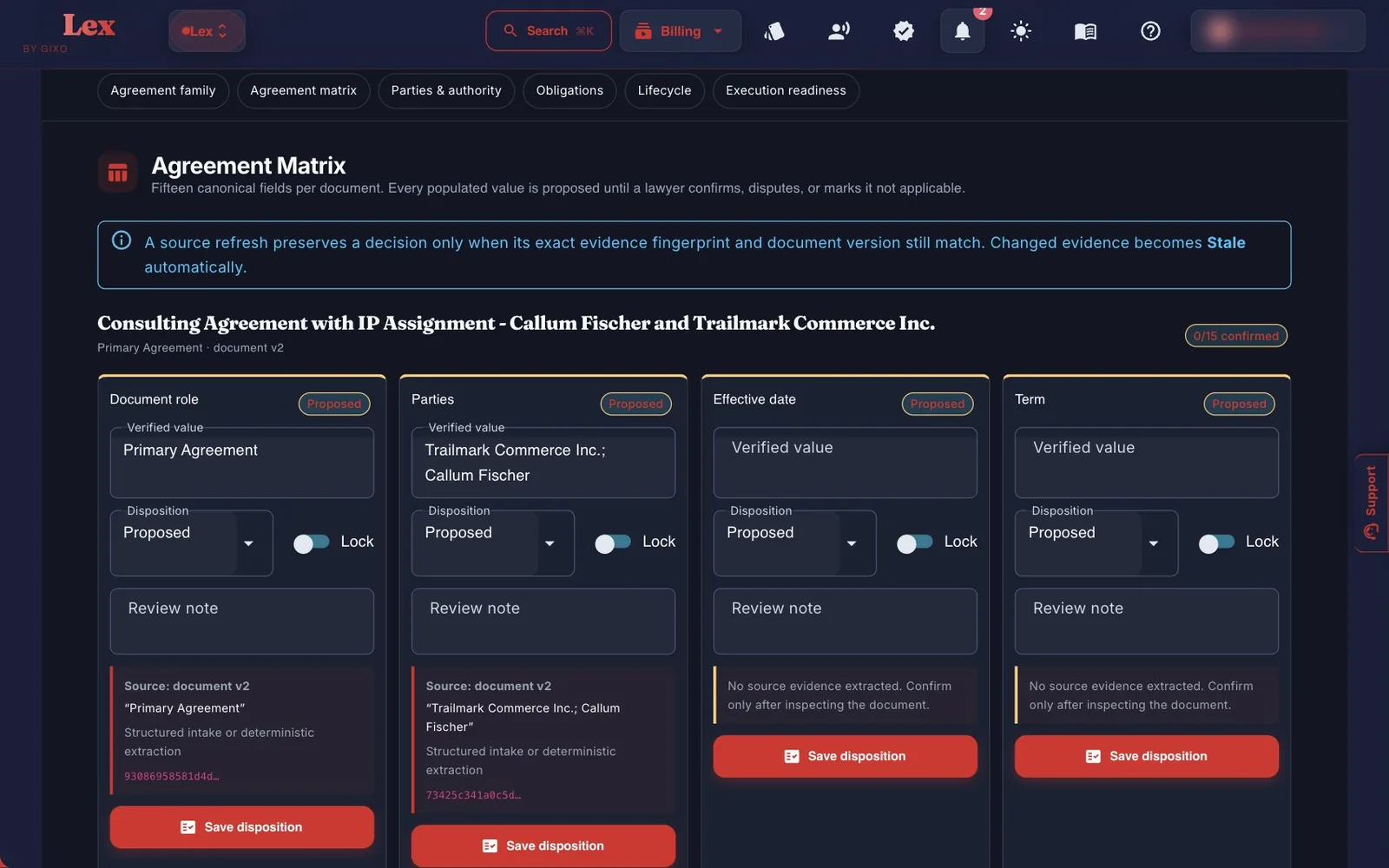
An agreement pack turns a document and the agreements around it into records you can work from. Open it from the workspace's Agreement Pack tab in Draft Checks, which shows how far its matrix, parties and obligations are confirmed, or from ⋮ → Agreement Pack. If the document doesn't have a pack yet, Create Agreement Pack builds one. Every value Lex extracts starts as a proposal until someone confirms it.
| Section | What you do there |
|---|---|
| Agreement family | Link amendments, statements of work, data processing agreements, SLAs, schedules, purchase orders and side letters, each with a precedence order. |
| Agreement matrix | Fifteen fields per document. Lex reads some values from the text, such as the parties, effective date and governing law. For others, such as term, renewal, the notices clause, payment terms, liability cap and signature requirements, it only shows that the clause is there, so you type the actual term before you confirm the field. Mark each field confirmed, disputed or not applicable. |
| Parties & authority | Canonical legal names, registration details and authorised signatories. |
| Obligations | An extracted commitment becomes a tracked obligation once it has an owner, a trigger, due logic, a beneficiary and evidence. |
| Lifecycle | Dated events, a calendar download (.ics), and a record of where the signed copy lives, tied to the approved version. |
| Execution readiness | Approval blockers and warnings, then an approval receipt for the exact version that was reviewed. |
Reminders start at execution
Once you record execution on a pack, Lex reminds obligation owners of their due dates in the app and by email. An obligation nobody has been assigned is reminded to the agreement's owner. Until then, dates are planning data. Each person can switch the emails off with Email me Lex obligation reminders on the pack page; it applies to every agreement where they own an obligation, and in-app reminders continue.
Reviewing changed sources and repeating the worklist
Preview source revisions compares the previous obligations with the current saved agreements before a pack refresh. Pair changed clauses explicitly and review which owner, trigger and recurrence records should carry forward. New or changed obligations still need disposition; removed and modified records remain in history. An executed or superseded pack is immutable, so use a new agreement or amendment pack.
Review replacement of a prior calendar export accepts the original Lex .ics for that pack. Preview removals and replacements, acknowledge the instructions, remove listed old event UIDs and their recurring series, then import the current calendar and verify it. Importing a PUBLISH file does not reliably cancel the old events.
Repeat an agreement worklist prepares a named period and written as-of date from the saved owners, statuses and supported dates. Review the source snapshot and any calendar changes before accepting the retained register, calendar and review summary. Saved runs are recovered from their accepted output bytes; preparing or accepting one does not approve, execute or send the agreement, and it does not schedule itself.
Sending for signature
Lex collects simple electronic signatures: each signer types their name and agrees to sign electronically. It is not a qualified or certificate-based signature, and it does not witness, notarise or register a document.
- Approve first. A document can be sent only while its current saved version is approved (the Approved stage). Until then Request signatures is unavailable, the panel says why, and Approve this version sits beside it. If something blocks approval, the panel lists each blocker; one that names a finding, the review threads or a pack section opens it. An edit after approval means approving again.
- One document. In the workspace, below the draft, find Signatures and click Request signatures. Add each signer's name and email (up to 10, each with its own valid address) and an optional message, then click Freeze document & send. Lex freezes the approved version as a PDF, records its SHA-256 fingerprint and emails each signer a personal link to that exact PDF.
- A whole pack. On the Agreement Pack page the same panel can send every document in the pack as one PDF, once the pack's approval receipt is current.
- Formalities notice. Some documents are commonly witnessed, notarised or registered: a power of attorney, a promissory note, a property sale agreement, and the kinds Lex drafts with witness blocks (employment contract, non-compete, invention assignment and lease). Before you send one for signature, or record its execution, Lex shows a notice that such formalities may apply and asks you to confirm you have read it. It doesn't stop you sending, and your confirmation is recorded. Check the requirements where the document will be used.
- Following up. The panel shows who has signed and whether each invitation email was accepted for delivery. A signer who lost their link can be sent a replacement, which needs a reason and stops the old link working. Void withdraws a request after you confirm it; if the answer doesn't come back, refresh to see whether it was voided. There are no automatic reminders and no signing order.
- When everyone has signed. Lex makes the signed copy by adding a signature certificate (each signer's typed name, email, time, consent and an event log) after the frozen PDF, and records the SHA-256 fingerprint of both files. The PDF has no embedded digital signature, so on its own it cannot show that it is unaltered: compare a copy's SHA-256 with the value Lex shows. The contract's own signature and witness blocks are not filled in; the certificate is the record of who signed. You can also build an evidence archive (ZIP).
- Recording execution. On the Agreement Pack page, choose Use as execution evidence on the signed request, or give a reference to a copy signed elsewhere. Every party in the Party & Authority Registry needs a selected signatory, or a note recording that it is not a signing party or that it signed outside Lex.
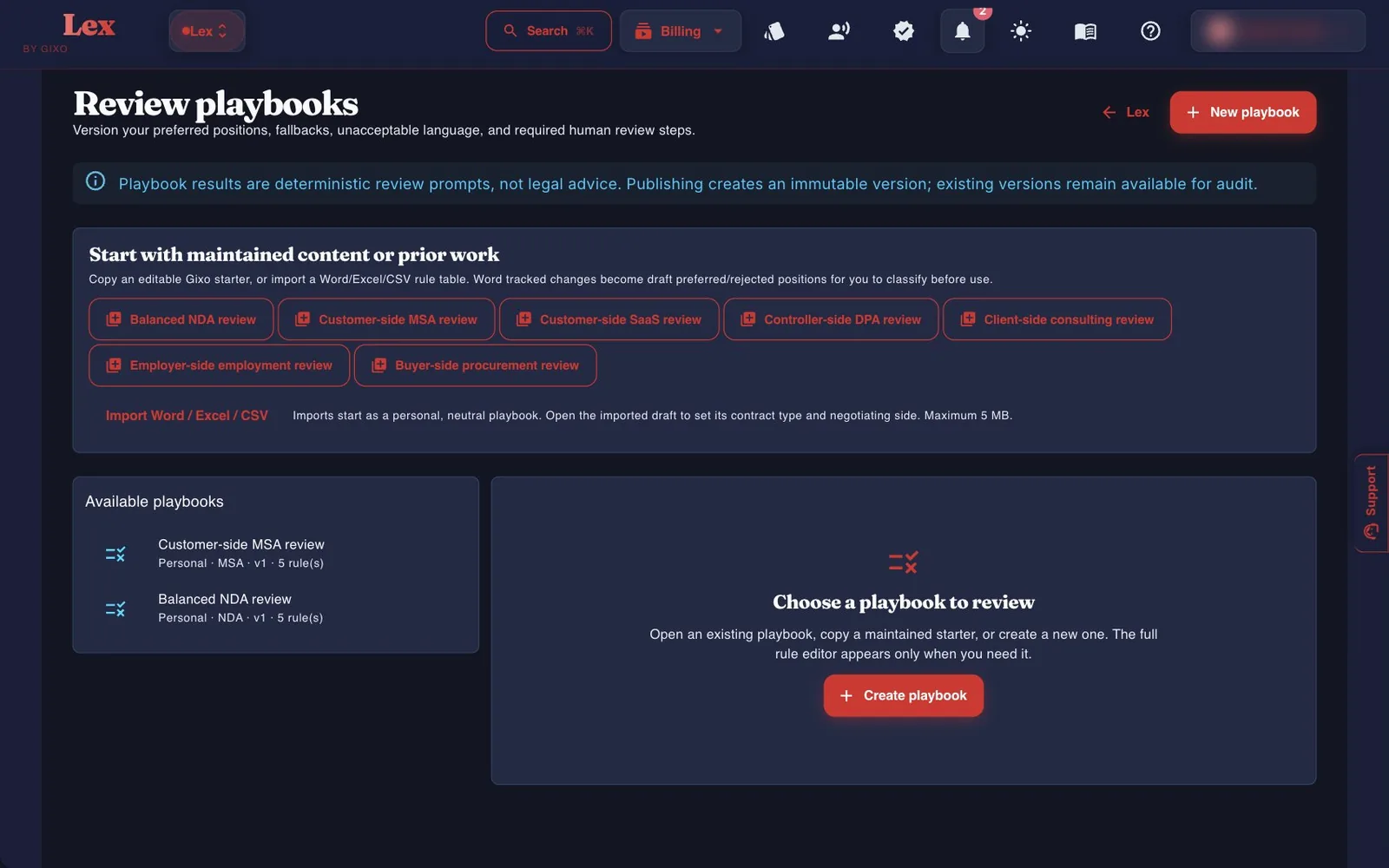
Review playbooks
A playbook records how you negotiate a contract type: preferred positions, fallbacks, language you won't accept, and steps that need a human. Publishing creates a new version, and every earlier version stays available.
- Start from a maintained starter. There are seven: Balanced NDA review, Customer-side MSA review, Customer-side SaaS review, Controller-side DPA review, Client-side consulting review, Employer-side employment review and Buyer-side procurement review. Clicking one makes an editable copy for you. The starters are general commercial starting points, not jurisdiction-specific positions.
- Or import your own. Import Word / Excel / CSV takes files up to 5 MB. Tracked changes in a Word file become draft preferred and rejected positions for you to classify.
- Write the rules. Each rule is a required clause, a forbidden phrase, preferred language or a human review step, with a severity, fallback language and guidance for the reviewer.
- Use it. In the workspace, open the Clauses tab in Draft Checks, choose the playbook under Playbook and click Run. A finding can apply a bounded edit, which saves as a new document version. The list shows playbooks for the document's contract type, plus any set to Custom.
How a playbook run decides
Wording and headings find the candidates: a forbidden phrase wherever its words appear, a preferred position the clause doesn't state word for word, and a required clause no heading names. The AI clause review then reads each one. A forbidden phrase in a sentence that rules it out, such as one that starts “in no event”, is cleared; a preferred position put another way counts as met; a required clause done under another heading counts as present. A finding that stays gives the review's reason. If the review can't finish, the finding stays and says it rests on the wording alone. The note on the playbook pages says the same. Read each finding against the clause, and treat a run with no findings as a review aid, not a legal review.
The matter office
A matter brings together the documents, facts, findings and work products for one client question. Matters are personal to you, and sources are checked against your current permissions each time you open them.
A matter's tools sit in six groups: Documents, Findings, Authorities, Drafts, Tasks and Settings.
- Documents → Files — up to 200 documents per matter: PDF, Word, spreadsheets, slides, images, emails (.eml and .mbox) and WhatsApp chat exports (.zip or _chat.txt), up to 500 MB per file. Drop files or choose a whole folder. Originals are kept intact, and you can arrange documents by issue, party and document family.
- Compare retained sources (under Files) — compare two retained text windows with their source versions and linked findings. Each window is limited to 12,000 characters; the panel discloses whether the whole texts were compared and whether alignment was limited.
- Documents → Search — search stored text across the matter's sources for a question or phrase. Automated investigation is not currently enabled; this is not a licensed legal-research service.
- Findings → Evidence — findings with their quotations and source versions, shown as recorded or ordered by date (the chronology), plus conflicts between dates. Shared facts and Decisions, with their rationale, sit beside it.
- Authorities → For and against — state one issue, your client's position and the court. Lex searches the web for judgments that support the position and, separately, for those the other side will cite, then reads each judgment and quotes only passages it found in the judgment's own text. The note sorts them into For the client, Expect against the client, and the answer, Cautions: do not cite as they stand and Found but not weighed, with a list to confirm before citing, and you can download it. A run takes about five minutes and continues if you leave the page. It uses plan capacity and needs an active Lex plan. Check every authority against the official report before citing it.
- Drafts → Work products — fifteen profiles, from engagement letters and advice notes to diligence reports and board minutes. Prepare draft uses plan capacity and needs findings saved against the current source versions. A reviewed delivery bundle packages up to ten lawyer-reviewed versions as a ZIP of Word files, printable HTML, source-linked text and an integrity manifest.
- Drafts → Revision rounds — upload the Word draft of a pleading or note (.docx up to 25 MB; your comments and formatting are kept), then write an instruction. Each round comes back as a new Word version with every change tracked and a comment giving its reason and the evidence it rests on, a change log, and a check that no date, sum, provision, reference or quotation was lost. Choose Use in next revision on an authority to let the next round cite it. A round takes a minute or two and continues if you leave. It uses plan capacity and needs an active Lex plan.
- Tasks — workflow tasks for the matter. Settings holds the matter details and its activity.
Obligations and your review inbox
- Obligations (in the row of Lex links) lists what your agreements commit to, soonest due first, grouped by agreement. It brings together the obligations recorded on your agreement packs and the obligations you track from a document's Draft Checks → Obligations → Track / manage. Counts at the top show Open, Overdue, Due in 30 days and Done, and each row opens its pack or document. Check dates and renewals against the signed contract. gixo.ai/legal/obligations
- Lex Review Inbox collects comment threads assigned to you, your mentions, and anything due soon. It includes threads from all your Gixo products. Its Approve button sets a comment's review state; it doesn't approve the document. gixo.ai/legal/reviews
Compliance drafts
Compliance drafts open in the same workspace and get their own readiness checks. There are two ways to start one.
Where saved compliance work lives
Your saved compliance documents are in the dashboard library. Saved compliance work at the foot of the dashboard shows the library filtered to compliance documents; you can also set Type to Compliance under Filter yourself. New compliance draft from a template starts a new draft and never opens saved work. Compliance in the row of Lex links opens a new compliance document.
Getting your work out
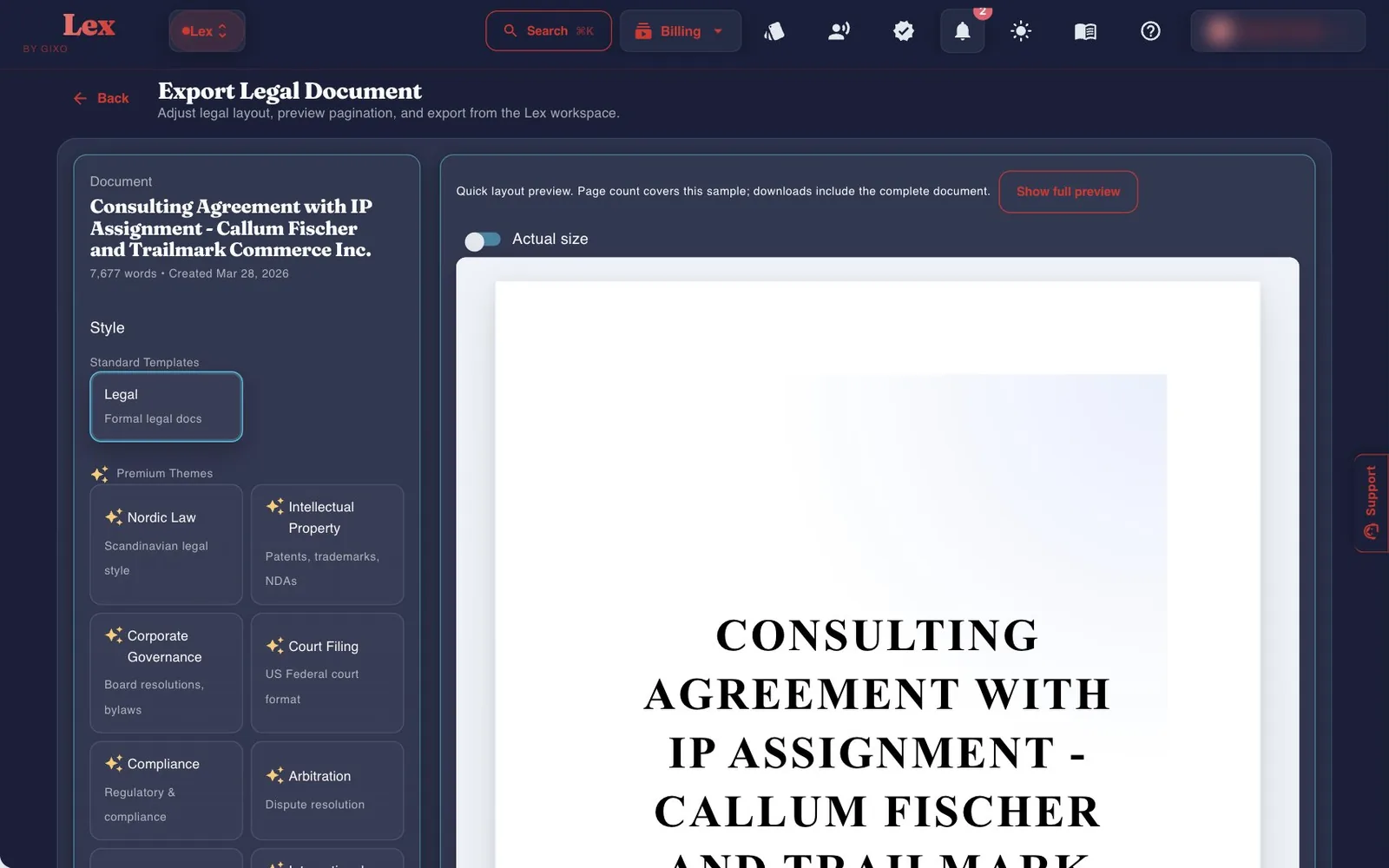
Download in the workspace bar opens the export workspace, where you can preview pagination before downloading. If the saved draft or its source context changes, refresh the preview. A delivery receipt identifies the draft and downloaded bytes; marking a file inspected records your own report, not legal approval.
| Option | What you get |
|---|---|
| Formats | Download DOCX comes first, then Download PDF. More formats holds a web page (HTML), Markdown, JSON and plain text; the text formats can also be copied. |
| Look | Under Style, the Legal theme or one of eight legal themes: Nordic Law, Intellectual Property, International Treaty, Corporate Governance, Court Filing, Compliance, Arbitration and Real Estate. The general themes are under More themes. |
| Layout | Switches for a cover page and table of contents; under Page setup, paper size (A4, Letter, A5, Legal, Tabloid), orientation, header, footer and page-number position. |
| Tracked-change DOCX | A Word redline against an earlier saved version, from the ⋮ menu. It needs at least one earlier saved version to compare against. |
| Original-format DOCX | For contracts imported from Word: an export that keeps the formatting of the file you brought in. Original format with tracked changes marks supported Lex edits inside that package; an edit that cannot be represented faithfully is refused rather than approximated. Both are in the ⋮ menu. |
| Share | Share in the workspace bar: a public link to the document, or sharing with named people or a team. See Plans below for which plans include which. |

Good to know
Lex exports carry no watermark, and after a trial ends you can still export everything you made during it.
Plans and your trial
Lex is priced per seat, in US dollars. Every paid Lex plan includes drafting capacity that resets each month; your subscriptions page shows a usage bar rather than counts.
| Plan | Per seat, monthly | Per seat, annual | Minimum seats |
|---|---|---|---|
| Solo Pilot | $29 | $261 | 1 |
| Solo | $99 | $999 | 1 |
| Small Firm | $149 | $1,499 | 3 |
| Growing Firm | $179 | $1,799 | 5 |
| Marketplace | $229 | $2,299 | 10, through Azure Marketplace or a private offer |
What changes between plans
- Every paid Lex plan: drafting, Draft Checks, Ask Lex, review playbooks, agreement packs, the matter office (with authorities research and revision rounds), compliance drafts, exports and public share links.
- Small Firm and up: comments, and sharing with named people or a team.
- Growing Firm and up: creating teams and adding members.
- Marketplace: API access and provider governance.
What your team shares, and what stays personal
Shared: Lex documents in a team workspace or shared with named people, the comments on them, and team review playbooks. Personal on every plan: matters, which only the person who created them can open; precedent comparison, which looks only at your own approved documents; and approval, which records a single approver, with no routing to several approvers.
Your 14-day trial
- No card is needed, and the 14 days start when you click Start my 14 days. Each email address gets one Lex trial.
- The trial works like Solo, so comments and sharing with named people aren't included.
- When the trial ends, you can still open, check and export everything. Drafting pauses until you choose a plan.

Free tools, no account needed
These tools need no sign-in and use deterministic rules rather than AI drafting. Their processing paths differ: Contract Completeness Check sends the pasted text to Gixo for formatting and analysis, without saving a contract document. Read each tool's processing notice; do not assume every tool runs offline in the browser.
| Tool | What it does |
|---|---|
| Contract Completeness Check gixo.ai/lex/contract-check | Pick one of 22 contract types and paste the text. It reports clause coverage, contradicting clauses, execution readiness, defined terms and cross-references. |
| Contract Clause Checklist gixo.ai/tools/contract-clause-checklist | Checks whether a draft has the clause families expected for its agreement type. |
| Contract Compare gixo.ai/tools/contract-compare | Compares two versions of a contract section by section. |
| Key Terms Abstract Sheet gixo.ai/tools/contract-abstract | Pulls out parties, term, dates, governing law, payment, notice and liability language for review. |
| Obligations & Dates Extractor gixo.ai/tools/obligation-extractor | Lists explicit “shall”, “must”, deadline and notice statements, without judging them. |
| DPA Article 28 Check gixo.ai/tools/dpa-check | Checks a data processing agreement against the ten GDPR Article 28 topics. It gives no legal verdict. |
| Policy Set Gap Check gixo.ai/tools/policy-gap-check | Compares a list of your policies with a maintained baseline. |
| Compliance Readiness Scorer gixo.ai/tools/compliance-readiness-check | Scores evidence statements against a baseline of common programme controls. |
| Company Policy Template Builder gixo.ai/tools/policy-builder | Builds an internal policy with ownership, approval, review dates, exceptions and revision history. |
| RoPA Builder gixo.ai/tools/ropa-builder | Builds a GDPR Article 30 records-of-processing structure and flags missing transfer, safeguard and retention details. |

Tips from the checks
- Coverage looks for headings. A clause that only appears inside another section's text shows as a warning, so give it a heading of its own.
- An empty obligations list isn't proof there are none. Lex finds obligations from wording such as “shall” and “must”, so commitments phrased any other way won't appear. Read the draft.
- Precedent compares your own approved documents of the same contract type. Team documents aren't included.
- Compliance output modes are chosen for you from the type or format you pick.
- Before you record decisions or approve, save or recheck. Findings made against an older version are marked stale.
Quick links
| Lex dashboard | gixo.ai/dashboard/lex |
| Create an Agreement Pack | gixo.ai/legal/create?agreementPack=true |
| Draft a single document | gixo.ai/legal/create |
| Review a contract | gixo.ai/legal/import |
| Review playbooks | gixo.ai/legal/playbooks |
| Matter office | gixo.ai/legal/matters |
| Obligations | gixo.ai/legal/obligations |
| Lex Review Inbox | gixo.ai/legal/reviews |
| Create a Compliance Document | gixo.ai/compliance/create |
| Start from an Existing Template | gixo.ai/compliance/workspace |
| Contract Completeness Check | gixo.ai/lex/contract-check |
| All free tools | gixo.ai/tools |
| Lex plans | gixo.ai/products/legal#plans |
| Help and support | gixo.ai/support |
The text was checked against the Lex code on 24 October 2026 at commit 9c3e18153e. The screenshots were not retaken after the screens changed on 19–22 October, so some show earlier controls: the drafting, import and export illustrations were captured in July 2026, and the Free review-console, finding-detail and editing-access figures on 10 October 2026. Editing-access images show manual changes and unsubmitted Ask instructions, with no new AI output. If a screen doesn't match what you see, the product has moved on — tell us at gixo.ai/support and we'll update this guide.