
How to compare legal AI pricing without paying enterprise prices for a drafting chat
Pricing only makes sense once you know what legal work the product actually carries. Compare the path from intake to drafting, review, negotiation, obligations, approval, and execution records—not just model access or the headline plan price.
Legal-software prices cannot be compared reliably from market-range estimates: packaging, minimum seats, implementation, usage limits, support, and security terms change the effective price. Compare current written quotes on the same users and workflow. Gixo Lex publishes a limited $29/seat/month Solo Pilot and a $99/seat/month professional Solo plan, followed by collaboration, legal-operations, and governed-deployment tiers. Lex has a 14-day no-card trial and no free plan.
No third-party price estimates are presented as vendor quotes. Confirm current commercial terms directly with every seller; Gixo's own current prices remain on the linked Lex plan page.
What does the published Lex seat arithmetic look like?
Use the same user count when comparing offers. These are Gixo's current per-seat list-price calculations; they do not include annual discounts, support-routed pilot details, implementation, or workflow limits.
| Seats | Solo at $99/seat | Small Firm at $149/seat | Growing Firm at $179/seat |
|---|---|---|---|
| 1 | $99/mo | Plan minimum is 3 seats | Plan minimum is 5 seats |
| 3 | $297/mo | $447/mo | Plan minimum is 5 seats |
| 5 | $495/mo | $745/mo | $895/mo |
| 10 | $990/mo | $1490/mo | $1790/mo |
The 14-day no-card trial follows the Solo-level workflow. Check the current plan page for the paid tier's review, collaboration, administration, and support terms before comparing a team total.
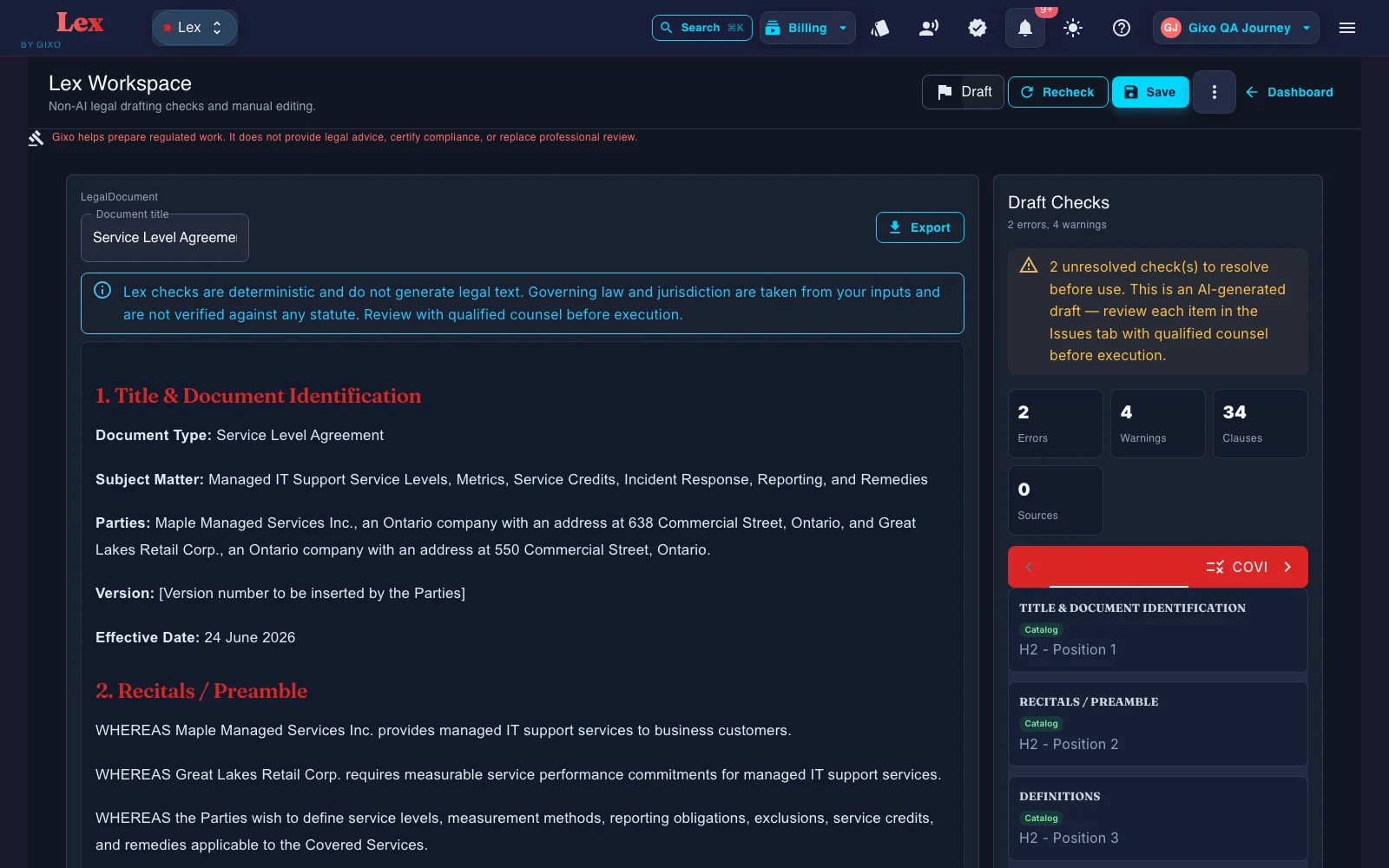
Lex prices a professional workflow, not just generated text
Lex is a legal-work lifecycle workspace, not a generic drafting chat. Move from structured intake and reference-informed drafting through deterministic checks, playbooks, negotiation, obligations, approvals, and execution records, with professional review before action.
At $99/seat/month, Solo includes the individual workflow: Draft Checks, review playbooks, issue decisions, Agreement Packs, negotiation positions, obligations, version history, approval and execution records, and export.
Small Firm and Growing Firm add the seats, sharing, comments, assignments, team workspaces, and administration needed to move the same legal record across reviewers and operators.
The Marketplace tier is for ten-seat procurement, provider governance, API access, onboarding, and rollout support. It does not turn Lex into legal advice or a citator, and it does not add qualified or certificate-based signatures; Lex's built-in signing is a simple electronic signature.
What are you actually paying for in legal drafting software?
The job is not to ask AI for a legal answer. The job is to prepare a draft or artifact that a qualified reviewer can actually work with.
Simple template-fill tools price differently from systems built for guided confidentiality/IP, services, corporate/equity, employment, real-estate, finance, and general legal documents, including custom drafting, with structured intake for up to 10 parties per agreement and reference-informed first drafts, not just a blank-field form.
After the first draft, Lex can run a deterministic contract review: clause coverage against a versioned playbook, clause-conflict detection, and defined-term and cross-reference checks. Findings, tracked-change DOCX redlines, comments, review state, assignees, due dates, and version history all stay attached to the same document. A contract imported from Word can go back as that same DOCX, with the Lex edits shown as Word tracked changes; where Lex cannot track an edit faithfully, such as inside a field, an existing revision, a header or a footer, it refuses the export instead of altering the document. Reviewers still verify every clause and conclusion.
Reference files and governing context can shape the draft. Lex does not show clause-level source provenance, so reviewers should verify authority and supporting facts independently.
How should you compare legal-software prices?
Normalize each seller's current written offer to the same user count, contract term, workflow, implementation scope, data terms, support level, and expected usage. A headline number without those terms is not comparable.
What price evidence should you collect?
| Buying model | Who it can fit | What to test | Price evidence |
|---|---|---|---|
| Template or entry plan | Individuals with occasional, bounded needs | Template scope, updates, export, storage, and review controls | Current public plan plus usage and renewal limits |
| Team subscription | Teams with recurring drafting or review work | Seat roles, playbooks, collaboration, Word handoff, and integrations | Written quote normalized to active users and expected usage |
| Custom agreement | Organizations with procurement, security, or deployment requirements | Implementation, integrations, administration, support, and data terms | Itemized proposal including one-time, recurring, renewal, and exit costs |
Which legal drafting software pricing model fits your team?
Vendor packaging changes, so use this table to compare commercial models alongside the ranges above. Request current terms directly from each vendor.
What should you verify in each pricing model?
| Pricing model | Who it can fit | What to verify | Main budget risk |
|---|---|---|---|
| Public self-service subscription | Individuals and teams that want to evaluate without procurement | Included workflows, generation limits, exports, support, and trial terms | Outgrowing an entry plan or paying for unused limits |
| Per-seat license | Stable teams with recurring use | Minimum seats, role permissions, annual commitment, and inactive-seat policy | Paying for seats that are rarely used |
| Usage-based or per-document | Variable workloads or occasional users | Unit definition, overage rate, minimum spend, and reset period | Cost spikes during busy periods |
| Custom enterprise agreement | Organizations with procurement, security, or deployment requirements | Implementation, support, data terms, integrations, and renewal mechanics | Opaque add-ons and long commitments |
What usually changes the price
An NDA and a multi-party agreement are not the same buying decision. The more structured the drafting workflow, the more likely price will reflect that depth.
If the tool supports uploaded references, precedent reuse, OCR intake, or authority-aware drafting, expect the price to reflect that additional capability.
Clause-level editing, reviewer handoff, and exports in PDF, DOCX, HTML, and TXT are materially different from a generate-and-download tool.
Larger teams often pay for stronger admin controls, compliance posture, onboarding support, and enterprise procurement terms rather than just model access.
Is per-seat or per-document pricing cheaper for legal drafting software?
This is the comparison most teams get wrong. Per-seat means a fixed fee per named user, whatever their volume. Per-document means you pay per contract processed, usually with unlimited users. The right answer depends on whether your volume is steady or spiky.
| Per-seat | Per-document | |
|---|---|---|
| Cost structure | Fixed fee per user | Variable fee per document |
| Predictability | High — fixed budget | Low — moves with workload |
| Best for | Stable teams, consistent volume | Variable workload, occasional users |
| Main risk | Paying for inactive seats | Bill spikes in busy months |
A 15-person team on a $250-per-seat plan pays 15 × $250 = $3,750 a month, about $45,000 a year — the same whether they process 500 contracts or 5,000. Substitute the seat rate you were actually quoted, then add the minimum seat count, commitment period, implementation, and unused-seat assumptions.
The same team on a $30-per-document plan at 150 contracts a month pays about $4,500 a month (~$54,000 a year). A busy month of 250 contracts costs $7,500; a slow month of 80 costs $2,400. That swing is the model's whole character. These are illustrative rates for the arithmetic, not vendor quotes — substitute your own and include minimum spend, overages, and seasonal spikes.
The real number is total cost of ownership
The subscription is the tip of the iceberg. A fair comparison projects every cost over a three-to-five-year horizon — the lowest sticker price is often not the lowest total cost.
The visible monthly or annual fee — usually the only number buyers compare, and rarely the largest over time.
One-time setup, template configuration, and moving existing contracts and clauses into the new system. Can range from negligible to substantial.
Vendor-led sessions plus the internal time your team spends learning the tool. The most expensive software is the software no one uses.
Often bundled, but premium support tiers are a common upsell that only appears after the demo.
Connections to your document store, CRM, or e-signature tool — sometimes a paid add-on, sometimes developer time you supply.
Internal administration, user management, and the indirect cost of upgrades over the life of the contract.
The costs that hide in the fine print
These rarely appear on the price sheet but routinely change the total. Ask about each one before you sign.
API access is often a priced add-on with call limits — and even a "free" API costs developer time to build and maintain against tools like Salesforce or a document-management system.
Anything beyond a logo — new workflows or rebranding the tool as your own — is usually a one-time engineering fee, and buyer's guides commonly report figures reaching tens of thousands of dollars. Ask for the current scope, fee, timeline, and ownership terms in writing.
Hosting in a specific region (e.g. the EU for GDPR), SSO, enhanced audit logs, or ISO 27001 / HIPAA alignment are often reserved for higher-priced tiers.
Do not pay twice for workflow already covered. Lex includes Agreement Packs, negotiation, version-bound approval, obligations, and execution records, plus simple electronic signature and in-app and email obligation reminders once execution is recorded. If you also need a central enterprise repository, renewal automation beyond those reminders, portfolio analytics, qualified or certificate-based e-signature, or licensed legal research, price those separate requirements explicitly.
How to justify the spend: a simple ROI model
Frame the tool as an investment, not a line item. ROI = (financial gain − cost) ÷ cost. Quantify the gain in three places.
The easiest to measure: time saved per draft × annual draft volume × your own blended hourly rate. As an illustration, saving 30 minutes on 1,000 contracts a year at a $400 blended rate is roughly $200,000 in recovered time. Use your own pilot data rather than a vendor estimate.
Harder to quantify, high impact: the value of standardized, pre-approved clauses and of catching errors before they become a dispute. Even a conservative estimate is large.
For in-house teams, faster contract turnaround speeds the sales cycle. Work with sales and finance to value the deals that close days sooner.
How to compare plans more usefully
Use the workflow first, then compare the price. A cheaper tool that leaves the team rewriting everything can easily cost more in counsel and ops time.
22 named legal document types on the main create flow, plus custom drafting. Verify the workflows your team actually needs rather than buying based on a generic AI label.
20 compliance forms with 5 execution modes. If audit, policy, or evidence work matters, price the artifact layer too.
Gixo helps prepare regulated work. It does not provide legal advice, certify compliance, or replace professional review.
Frequently Asked Questions
Your buyer's checklist
Six steps to choose without overpaying.
Saving time, reducing risk, standardizing language, or speeding deals? List your top three to five must-solve problems before you watch a single demo.
How many people need access, in what roles, and how many contracts do you process a month? Is the volume steady or spiky? This decides per-seat vs per-document.
Pick three to five vendors from the right tier. Include at least one per-seat and one usage-based option so you can compare the economics directly.
Ask each vendor to break out every one-time and recurring cost, then build a three-year total-cost-of-ownership model for each.
Have a small group test your top two on real work. A pilot is the single best way to tell which tool actually fits your workflow.
Use your TCO model and pilot data to set a target price. Multi-year commitments often earn a discount, and there is usually room to negotiate beyond the headline rate.
Compare pricing against the legal workflow you actually need
Lex is a legal-work lifecycle workspace, not a generic drafting chat. Move from structured intake and reference-informed drafting through deterministic checks, playbooks, negotiation, obligations, approvals, and execution records, with professional review before action.
Updated