Gixo Business — a suite of grounded business tools
Built on your own sources, not generic summaries
Upload your contracts, reports, and research, then pick the tool for the job — a Consultant recommendation, a brief, a deck (made in Gixo Lumen), or a decision page (a Gixo Prism artifact).
Every tool works from your own evidence and is built for review — not quick topic-in/topic-out answers.
Free, unlimited — run 5 scored readiness diagnostics (fundraising, GTM, product-market fit, due-diligence, and more) and 4 operating playbooks, with deterministic scoring and what-to-fix guidance. AI generation — turning your source packs into briefs, recommendations, and the decision logic inside them — is included in the 14-day free trial and on paid plans. Decks need a Gixo Lumen plan and standalone decision pages a Gixo Prism plan.
Workflow-specific productsContent, decks, visuals, briefs, proposals, legal, books, and project delivery each have a clearer buying path.
Review before deliveryDraft, edit, collaborate, approve, and export in the same workspace.
Security + procurement pathSecurity policy, support, and Azure Marketplace buying are public.
Generated by Gixo Business on 3 October 2026 from public NIST and FTC publications and exported unedited, so you can open the artifact instead of trusting the description. Samples, not verified advice. Decision and framework artifacts are made in the separate Gixo Prism product.
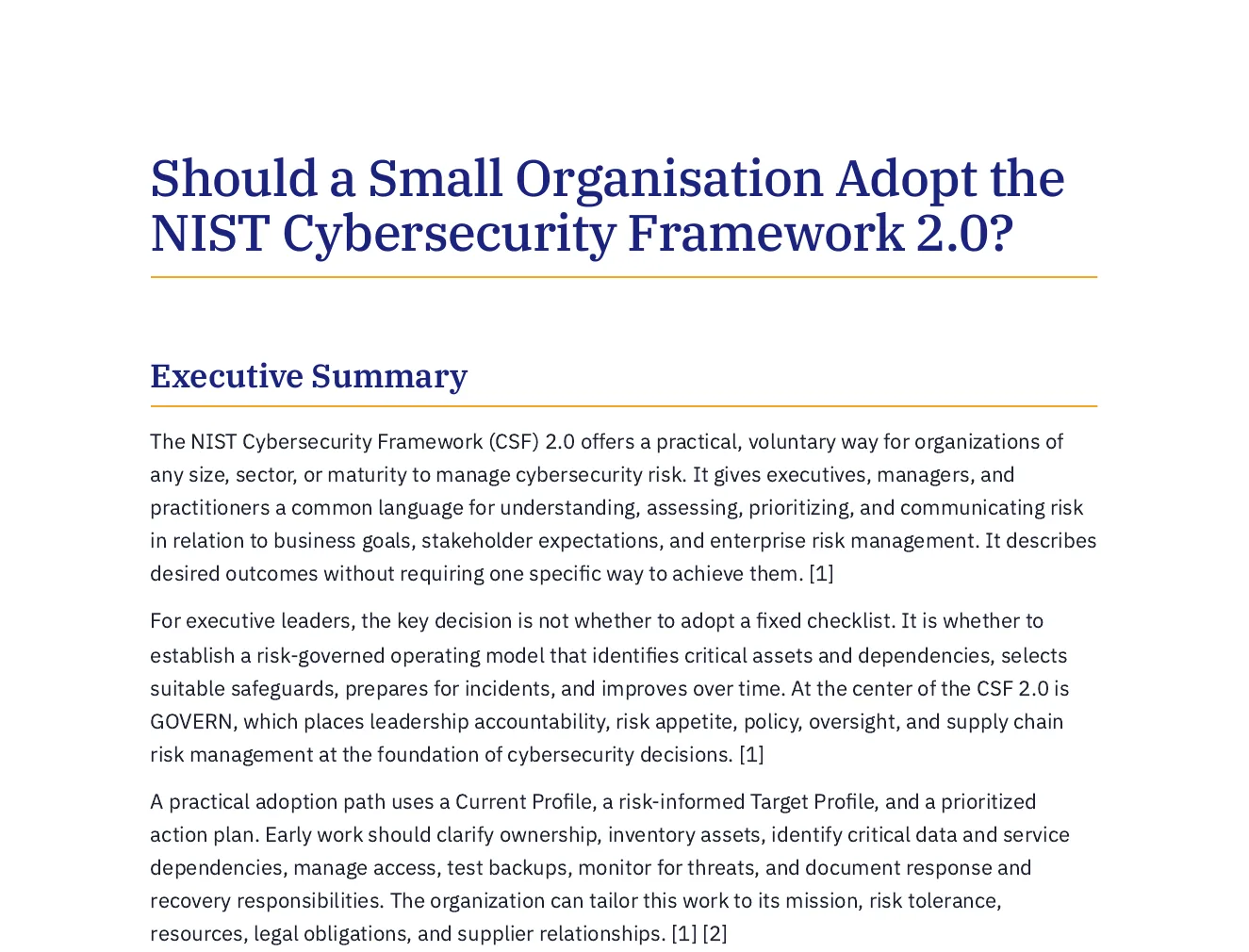
Executive brief · 9 pages
Cited to its two sources by number. Where they hold no financial figures, the brief says so instead of estimating. PDF · Word
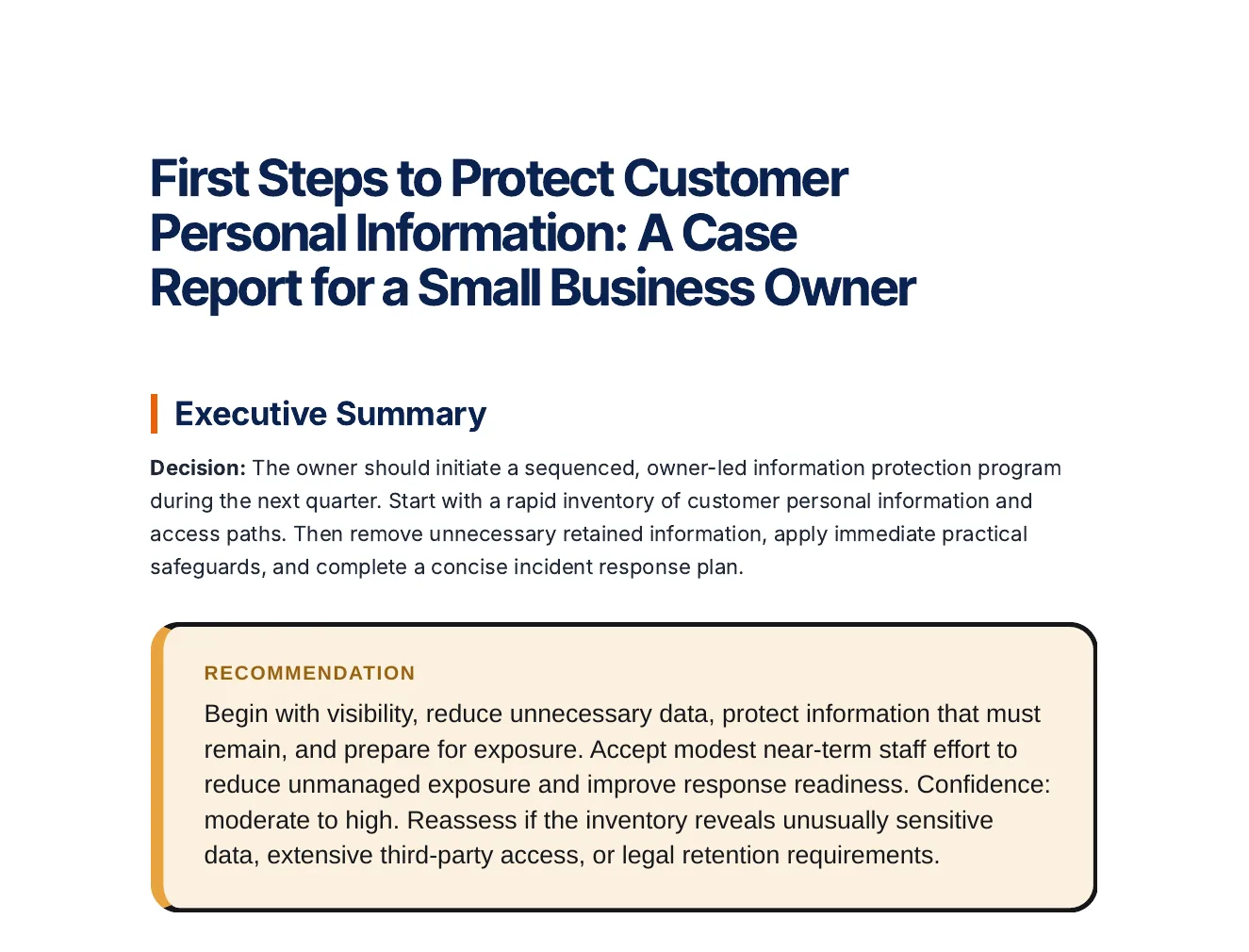
Consultant case report · 15 pages
Statements in the analysis labelled Fact, Inference or Assumption, with options compared on stated criteria. PDF · Word
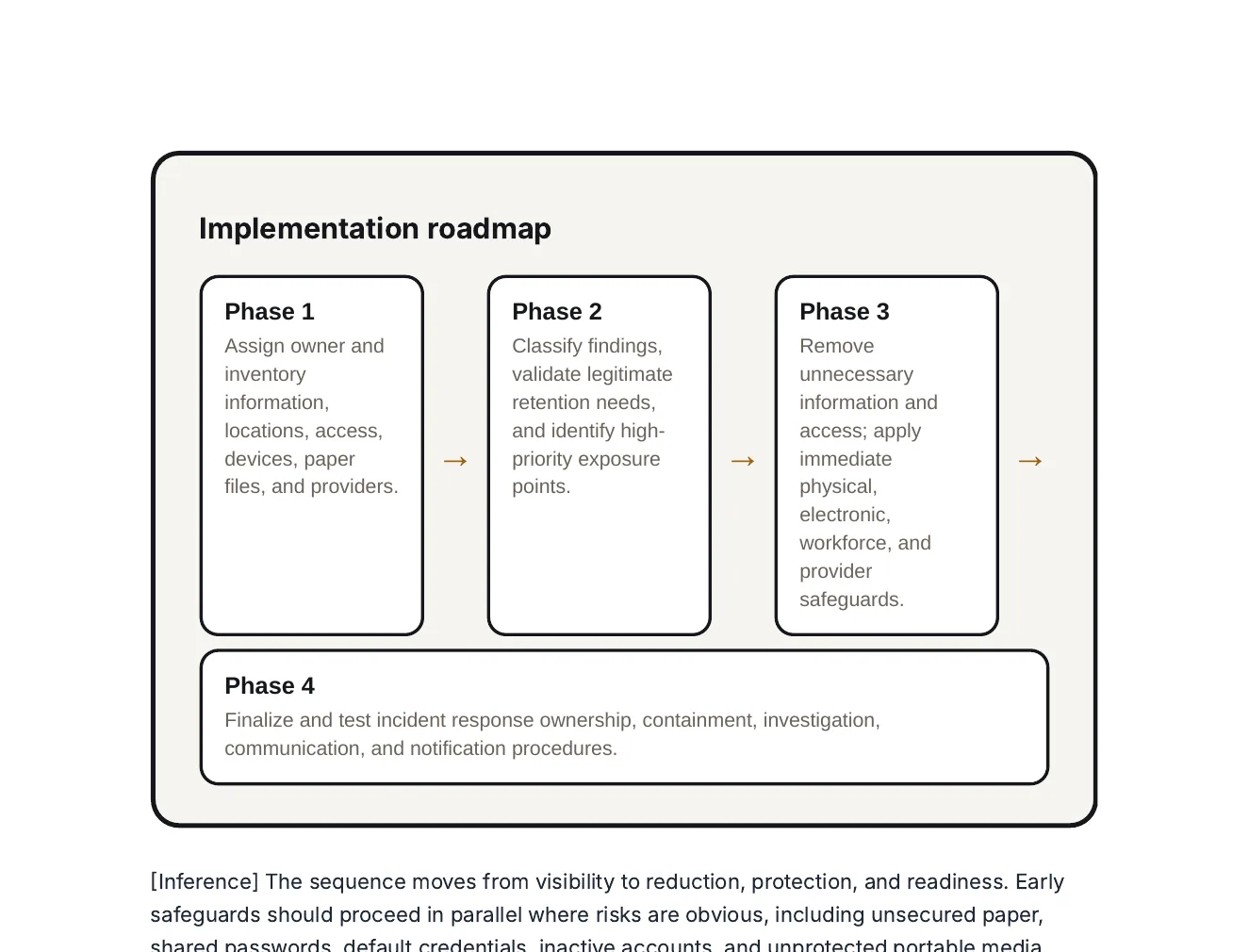
Roadmap, from the same report
Four phases from an inventory to a tested incident response plan, drawn in the report itself.
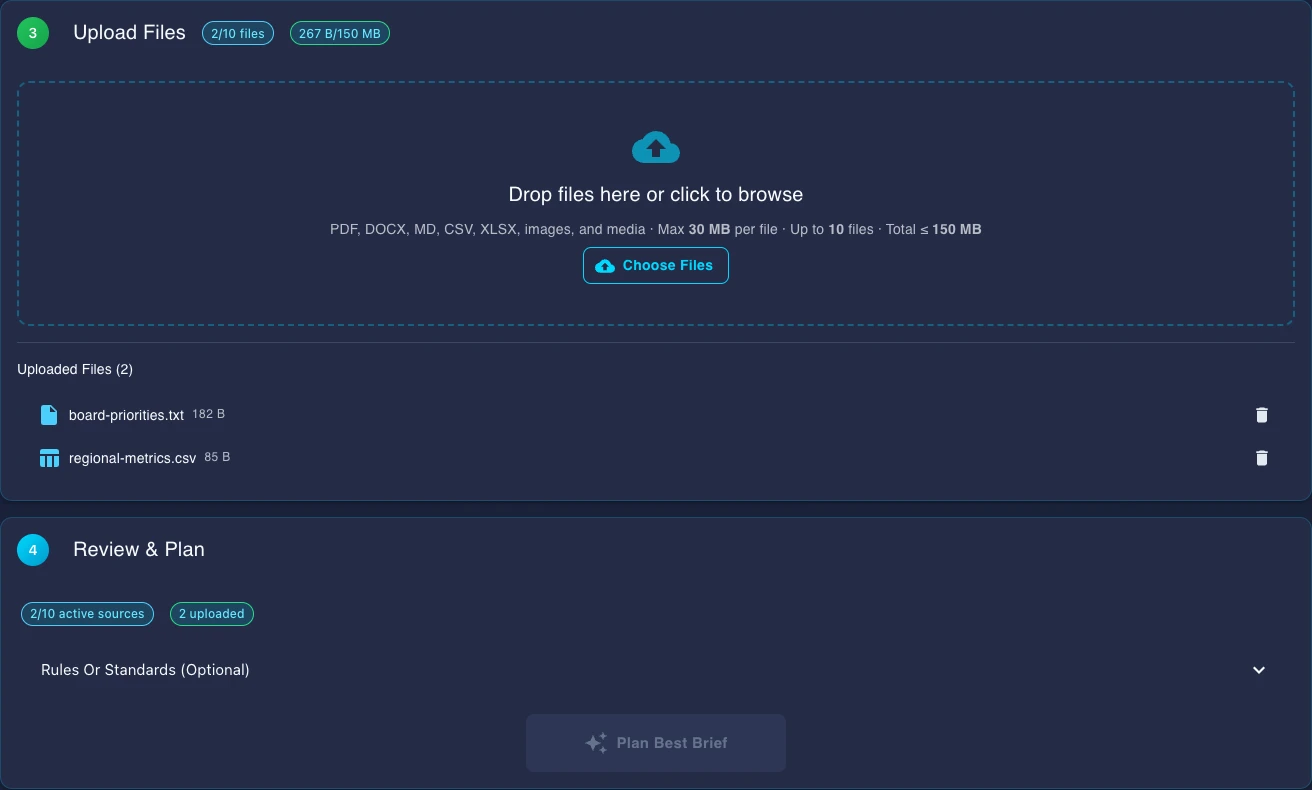
Where they start: source-pack intake
Upload the working material first, then plan the brief around the actual files instead of improvising from a blank prompt.
6Suite Tools
ForecastSource Quality
GateVerification
Inside the Gixo Business suite
Start with the business job and source pack. Gixo can route the request into a checked brief or Consultant workflow in Gixo Business, a briefing deck in Gixo Lumen, or a structured decision artifact in Gixo Prism.
Brief Mode
Describe the business question and intended audience, add the sources you want to use, and review the proposed outline and missing evidence before generating.
Briefing Decks in Gixo Lumen
Turn the same evidence pack into leadership slides and board-ready briefings with a Gixo Lumen plan
Consultant
Frame options, criteria, trade-offs, missing inputs, and recommendation drafts
Decision Artifacts in Gixo Prism
Keep scores, confidence, and reversal conditions connected to the case with a Gixo Prism plan; inside a Consultant report the decision table sits in the report itself
How Gixo Business works
1
Describe the business job
Start with the work itself: a brief, a deck, a recommendation, or a decision artifact tied to the same business question. Decks continue in Gixo Lumen and standalone decision artifacts in Gixo Prism.
2
Attach your source documents
Upload files or pick from saved work. PDFs, Word docs, spreadsheets, and images are supported, including scanned files.
3
Gixo forecasts source quality
Gixo checks whether the source pack is strong enough, shows missing inputs, and makes review risk visible before queuing work.
4
Pass the verification gate
Required checks, approval warnings, and business-pack dependencies stay attached to the output so the team can review the path, not just the prose.
Checks Built Into Every Brief
Each brief is checked so your team can review, edit, and use it with confidence. Checks that compare a brief with its sources run only when it has sources; a brief written from the request alone has nothing to compare against.
1
Ask
Describe the business job, audience, deadline, and source pack before choosing an output.
2
Route
Gixo maps the request to Brief Mode or Consultant, or routes it to Briefing Decks in Gixo Lumen or decisions in Gixo Prism.
3
Forecast sources
Evidence strength, missing inputs, and review risks are visible before generation starts.
4
Plan the pack
When one request needs multiple outputs, Gixo maps dependencies before work fans out.
5
Generate
Create the brief or recommendation from the connected source pack, or carry it into a deck in Gixo Lumen or a decision artifact in Gixo Prism.
6
Verify gate
Required checks, unsupported claims, approval warnings, and review notes stay attached to the workflow.
7
Review
Edit the artifact while keeping the plan, sources, and verification warnings close.
8
Extend
Move from one business artifact to the next without rebuilding context in another tool.
A Full Editor, Not Just Output
Every brief opens in a rich editor with semantic blocks and selected-text AI editing. Comments and named sharing require Business Professional or higher and an authorized content role; review the saved version and resolve save conflicts before distribution.
Block-Based Editor
Insert 20+ semantic blocks with slash commands: KPIs, Checklists, Steps,
Pros/Cons, CTAs, Comparison Tables, Definitions, and more.
Each block has AI-powered field generation.
Inline AI Editing
Select text and use Quick AI for instant rewrites, simplification, expansion,
grammar fixes, or tone changes. Open Power Edit for a full AI chat dialog
with document context and voice input.
Number Verification
Where a brief has sources - files you upload or connect, pages you add, or the search results web research drew on - a repair stage compares the figures in the paragraphs, lists and table body cells of the draft with the numbers in those sources, and rewrites any sentence or cell whose figure it cannot find there, substituting the source value or dropping the claim. A table heading or row label is read as context, not as a figure, and a total, difference or share the table works out from its own cells is never rewritten. That is reconciliation against your own sources, not an independent fact-check, and it is silent: nothing is marked up in the delivered brief, and a sentence it cannot repair, or a draft it cannot finish, keeps its original figures.
A brief written with no sources has nothing to compare against, so it is not checked, and Consultant reports skip this stage. The match is on the digits, not a fact-check.
Automatic Citations
When you upload source files, Gixo writes the brief to cite them with numbered [1], [2] markers and adds a Sources section listing those files. The writing model places the markers, so a sentence can go uncited; a brief written without uploaded files has nothing to cite, and marketing formats such as social posts and email campaigns carry no visible citations.
Authorized Team Review
On Business Professional or higher, named sharing and comments require an authorized content role. Review the saved brief with colleagues and resolve save conflicts before sharing; presence does not establish automatic merging of simultaneous text edits.
Brand Compliance
After generation, Gixo runs your Brand Dictionary over the brief: terms you have banned are replaced with your preferred wording or removed. It is a whole-word term check, not a review of tone. Saved Brand Voice writing-style profiles are a separate feature on Professional plans and above.
What Gixo Business Works From, and What It Checks
Sources are optional, web research is your choice, and every check below is a review aid rather than a verdict.
Optional Files
Upload or connect up to 10 source files for a brief, or write one from the request alone. A brief with no sources has nothing for the number check or citations to work from.
Opt-In Web Research
Web research is off unless you turn it on: a new brief starts on Only my sources, and choosing My sources + the web lets it search, optionally limited to trusted domains you name. In Ask Gixo Business you can also connect up to 5 public webpages as sources.
Evidence Tab
For a brief written from sources you upload or from the search results web research drew on, the Evidence tab under Checks in the brief editor lists up to five sentences or table cells whose wording or figures it could not match to those sources, for you to check. It matches wording and exact figures, not meaning: a faithful paraphrase, or $8.1M where the source says 8,100,000, can fail to match while being true, so an unmatched sentence is a place to look, not an error, and a matched one is not confirmed either, because this is a comparison with your own sources, not a fact-check. It reads only part of a long source (24 passages of up to 1,600 characters) and at most 12 sources, files first. Of web research it reads the title and snippet of each search result, not the page, so a figure taken from the page alone does not match, and if it could not read every result the list is advisory. It reads a table cell with its row and column, and a total the table works out from its own cells passes when the arithmetic holds. It checks the draft as generated, not your later edits.
Question-led brief planning
Describe the question, audience and outcome you need, then review the proposed outline and evidence gaps before generation.
Business Case Workspace
A Consultant recommendation can become a Business Case with governance and approval controls, up to 5 financial scenarios, and, once approved, a decision memo you can download as a PDF or open in the browser.
Evidence Review
Analyst dossiers and Business Cases carry a claim-level evidence review: each claim, metric, quote and conflict from the evidence pack is listed for a reviewer to decide, and open claims and conflicts block a case from approval. The source forecast and verification gate are review aids, not independent fact-checking. Reviewers must confirm important claims, figures, assumptions, and recommendations against authoritative sources.
Upload Anything. Export Everywhere.
Broad file support with intelligent content extraction. Export to professional formats ready for distribution.
PDF
Word / DOCX
Excel / CSV
PowerPoint
Images (OCR)
Plain Text
PDF
HTML
TXT
A worked workflow
A variance calculation that stays separate from its explanation
A fictional operating table reports a GBP 100,000 quarterly cost budget and GBP 120,000 actual cost. A related note says staffing was higher, but supplies no evidence that staffing caused the whole variance.
Trace a scenario from source cells to a reproducible result
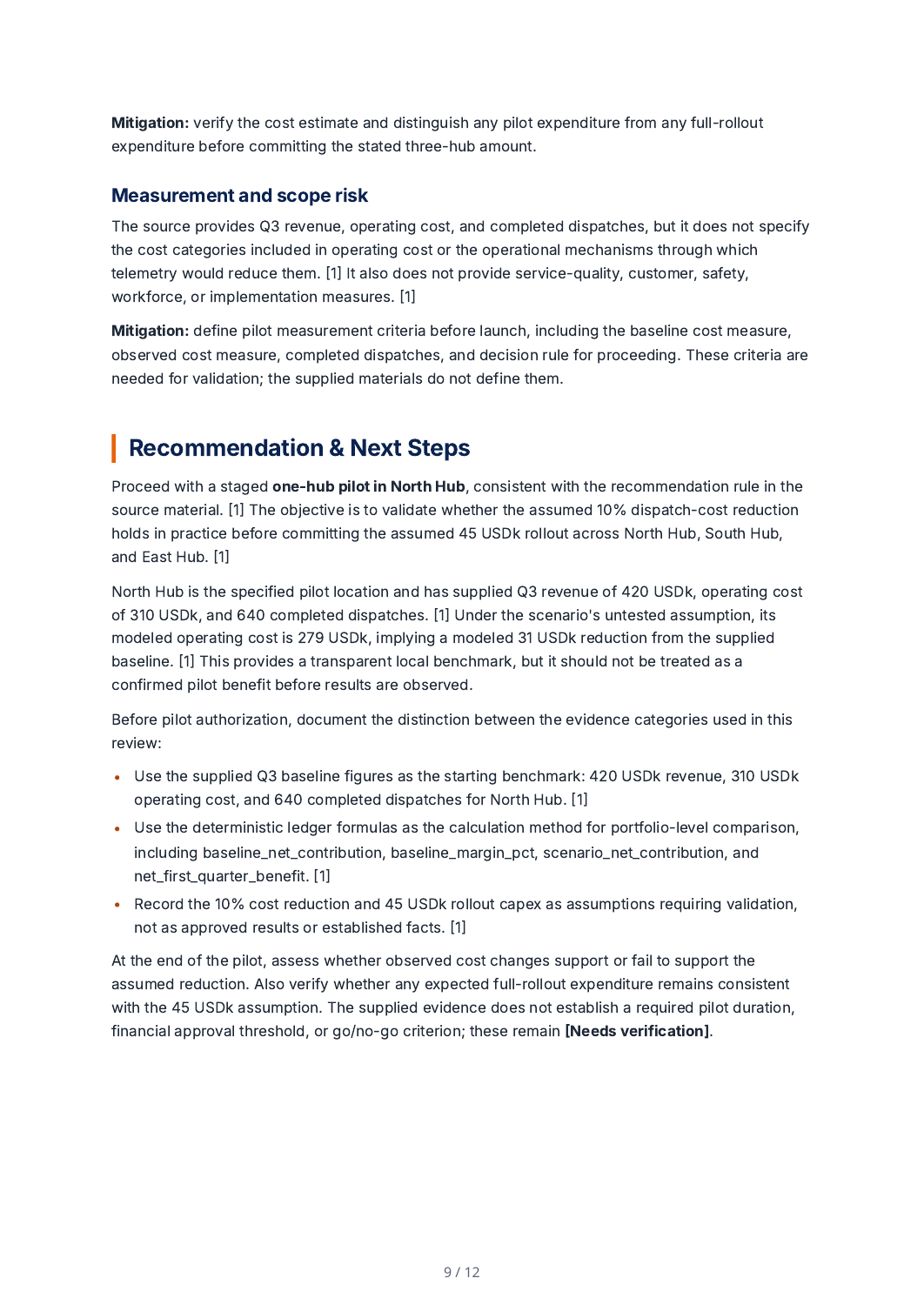
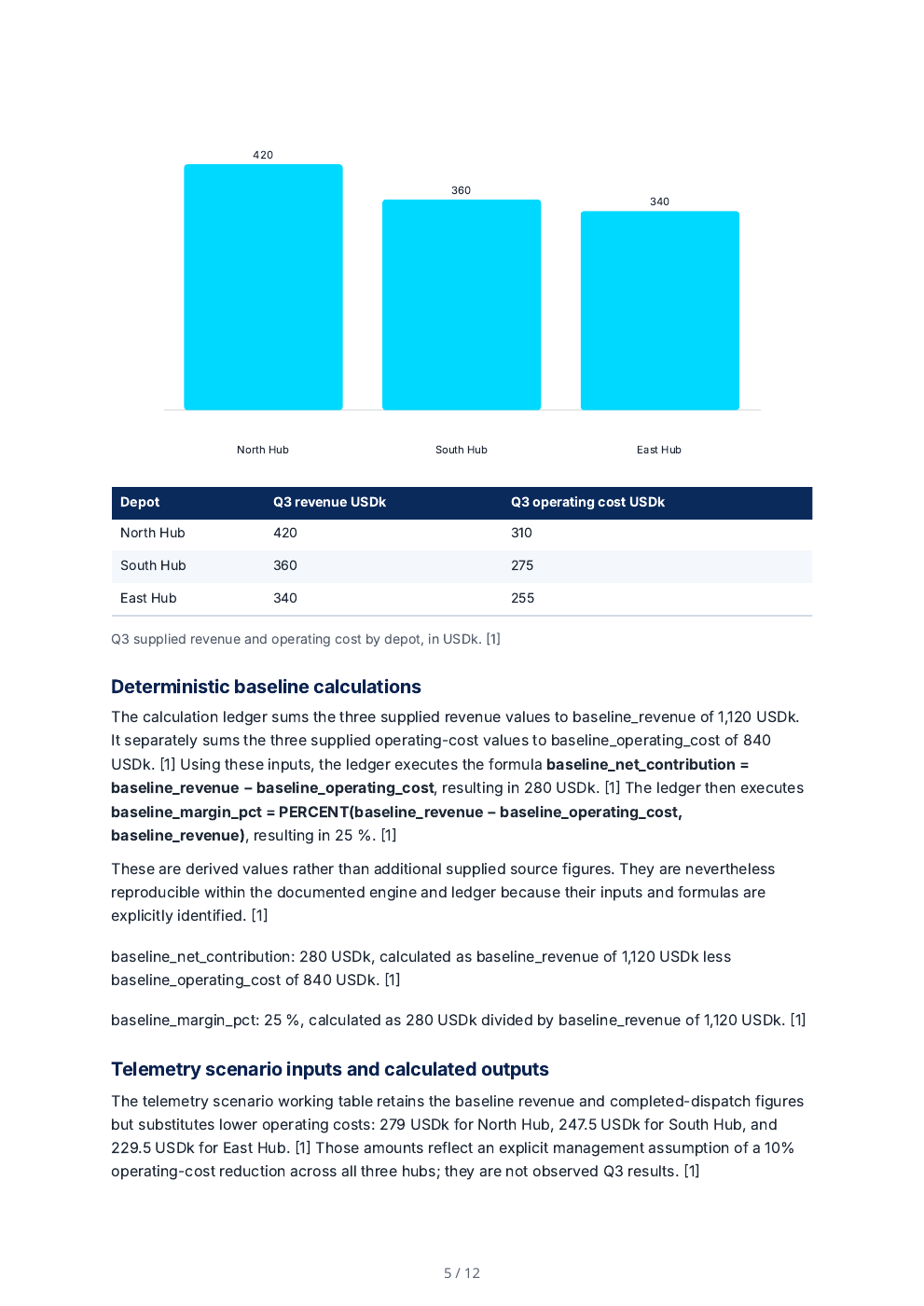
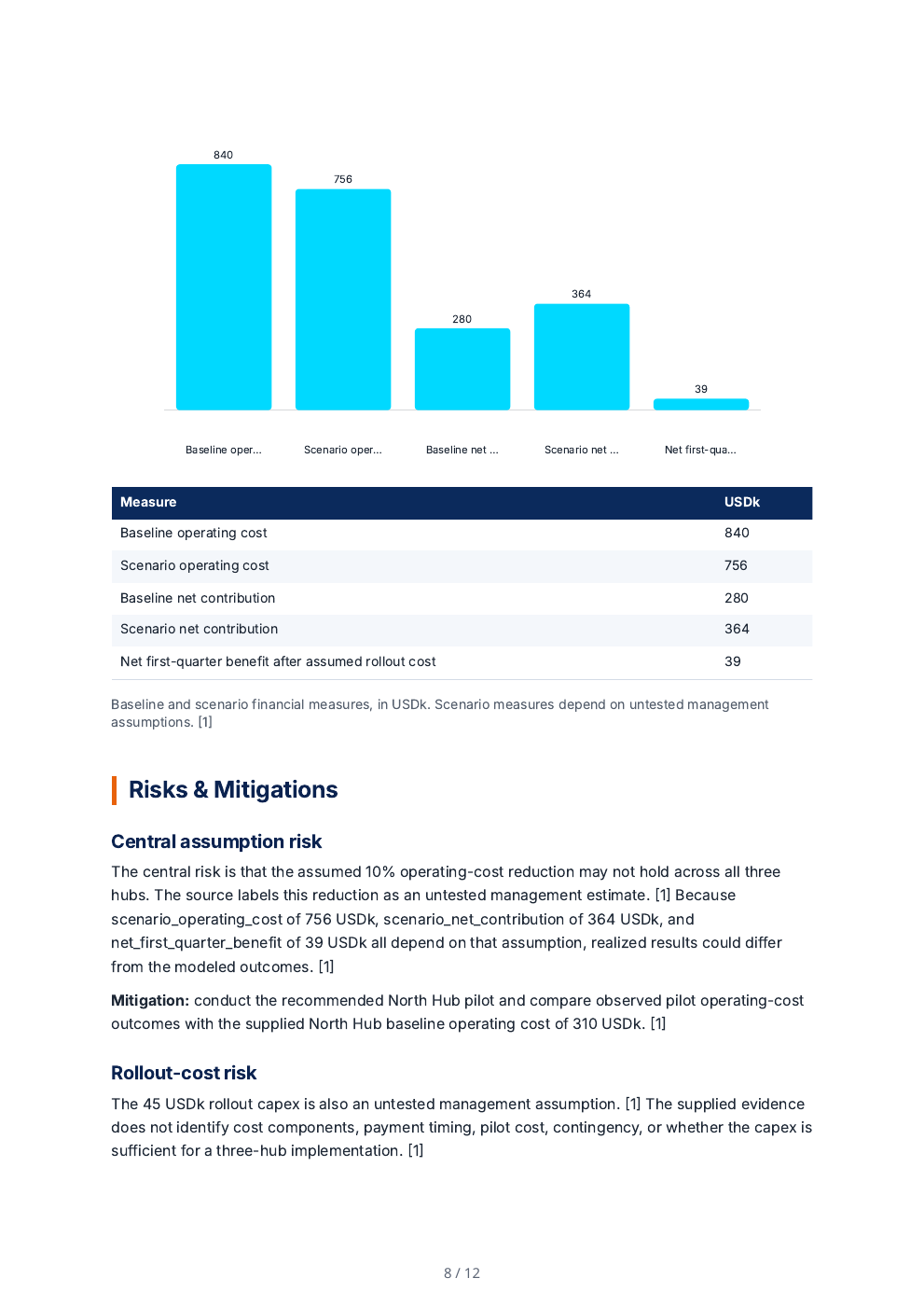
The supplied fictional depot table totals USD 1,120k revenue and 840k operating cost. A manually entered 10% cost-reduction scenario totals 756k cost. Reviewed selections feed the model; the replay computes baseline contribution 280k, baseline margin 25%, scenario contribution 364k and first-quarter benefit 39k after an assumed 45k rollout cost. The generated report keeps those assumptions distinct from supplied figures.
Retained production mapping review. Compare the selected source columns with the exported calculation workbook. Open full size ↗Actual PDF page: a one-hub pilot is proposed, while duration, approval threshold and go/no-go criteria still need verification. Open full size ↗Rendered from the actual saved dossier PDF. Open full size ↗The scenario reduction and rollout cost are assumptions, not observed savings. Open full size ↗
A passed calculation replay checks arithmetic for the supplied definition; it does not validate the source figures or establish that a 10% reduction will occur. Working-table XLSX import/export stores typed literal values; define formulas in the calculation model. This operational dossier is not a board-approved result.
The supplied brief
Baseline
Budget GBP 100,000 for the same quarter, business scope and cost measure.
Actual
Actual GBP 120,000; supplied source-table ID FIN-01.
Calculation
Actual minus budget: +GBP 20,000. Divide by the nonzero budget: +20%.
Unresolved explanation
The staffing note is a proposed explanation. Reconcile its amount and other cost movements before asserting causation.
Reconcile the source table
Inspect extracted rows, headers, units, period and source location. Resolve conflicting totals or keep the conflict visible.
Inspect: A calculation over a mismatched period or a thousands-versus-units error can be mechanically correct and still answer the wrong question.
Review the mapping and formula
Map the approved actual and baseline values, inspect the computation and retain calculation evidence.
Inspect: For cost, +20% is an overrun in this convention. For a revenue measure, the same arithmetic may have a different business interpretation.
Test the interpretation
Compare component movements and any supported explanation before drafting the narrative.
Inspect: Do not turn a note mentioning staffing into proof that staffing explains all GBP 20,000. Retain the unsupported portion as an open question.
Inspect the workbook and decision artifact
Open the calculation/workbook handoff and the resulting report paragraph separately. Review scenario assumptions before selecting a scenario.
Inspect: Changing a numeric input should affect the computed result; it does not automatically approve a new narrative or establish the input’s accuracy.
Before approving the result
Match currency, units, period and measure.
For a zero baseline, state the absolute change instead of reporting an ordinary percentage variance.
Keep supplied facts, computed values, assumptions and recommendations visibly distinct.
Fictional financial inputs and arithmetic illustration. Business provides decision support; replayable calculation does not constitute audit assurance, source verification or investment advice.
Keep the report and its calculations open to review
Plan the research before creating the dossier
On Make something from your documents, choose Research dossier and Plan to inspect what will be read, the intended length and whether the sources can carry it. Connected app documents are not read by this dossier path. Creating starts only after the current plan; the separate New research dossier form keeps its own direct-create workflow.
Show how a reported figure was calculated
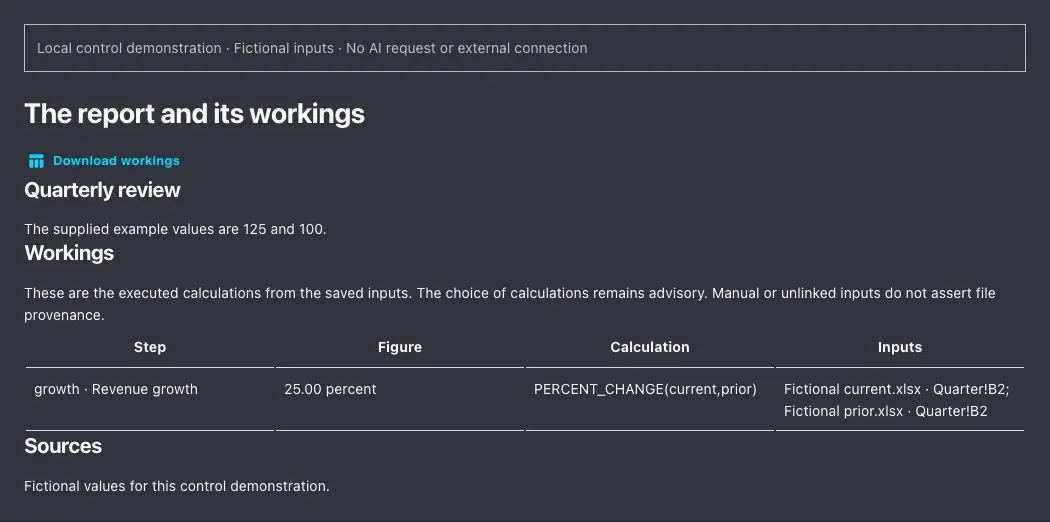
When an eligible saved brief or report retains a current calculation run, its Workings section lists the executed steps, figures and available source-cell references. Download workings provides an Excel file with editable inputs and supported live formulas. Change an input to explore the calculation, then compare it with the exact saved-run values and recorded source cells.
Update the source without losing the earlier report
A Business room can show that a saved output is out of date when its retained source revisions change. Update this output starts a new output while the previous one stays saved. Review the new sources and conclusions before using it. These are explicit updates, not scheduled synchronization or automatic publication.
Keep the figures and calculation beside the saved report. Fictional 125 and 100 inputs run through the actual calculation and workbook writers; no AI-generated report. Captured locally on 2 November 2026. Open full-size example.
The readiness diagnostics and operating playbooks are always free and unlimited — deterministic scoring from your own inputs, no credit card. AI generation — briefs, recommendations, and the decisions inside them from your source pack — is included in the free 14-day trial (no card required) and on paid plans; after the trial it requires a paid plan. Decks are made in Gixo Lumen and standalone decision pages in Gixo Prism, each with its own plan.
Free tools
Free diagnostics
5 scored readiness diagnostics — decision quality, fundraising, GTM and launch, product-market fit, and due-diligence
4 operating playbooks and checklists — data room, board prep, launch runbook, and pricing changes
Deterministic 0-100 scores with readiness bands and what-to-fix guidance — re-run any time from your own inputs
Paid plans add
AI generation at scale from your source pack — briefs, recommendations, and the decision logic inside them (decks come with Gixo Lumen, standalone decisions with Gixo Prism)
Consultant recommendation reports and their decision tables after the trial (included in the 14-day Starter-tier trial); standalone decision artifacts are a Gixo Prism feature
Upload and export are in the trial too (downloads are never plan-gated); bulk generation, team workspaces, and higher capacity come with paid plans
Diagnostics and playbooks are structured guidance to help you prepare — not a substitute for professional advice.
From selected evidence to a reviewed business decision
Plan the question before the draft
The Business planner proposes the route, source forecast, planned sections and review checks. Brief Mode builds the outline from your goal and selected material. Review the plan; changed inputs need a fresh plan before queuing. Private source selection needs eligible Business access, and connected app sources need configured permissions.
Inspect candidate evidence and conflicts, generated-draft Evidence findings and current recorded source decisions. Extraction and matching can miss important claims. A recorded rejection or stale decision is still a decision, and clearing those checks does not establish truth or automatically satisfy formal case approval. Recheck material claims after editing.
Analyst combines source tables, reviewed cell mappings and deterministic calculation workbooks with a dossier and its faithfulness review. Reuse a saved workbook for another period only after reviewing source differences and changed mappings. Supported calculations and exported snapshots are narrower than a full Excel or automatic accounting workflow.
Consultant develops the options, criteria and trade-offs inside a written recommendation. Formal Business Cases add staged review, case-local approval rules, financial scenarios, approved-revision memo checks and manually recorded actions and outcomes. Recorded inputs and approvals still need accountable people to check the evidence and assumptions.
Use manual editing, selected-text Quick AI and Power Edit, and the shared proposal assistant currently labelled Ask Quill in the editor. The Business planner is the separate workflow planner. Preview, compare or restore saved body versions, then review the export. Comments and named sharing require Business Professional or higher and the current content role.
Business packs coordinate briefs and recommendation memos with saved progress; eligible retries need a retained resume key. Optional proposals need Arc access. New standalone decision pages and frameworks belong to Prism, and decks belong to Lumen. Team and enterprise controls have their own plan and organization boundaries.