
Evidence-Bound Writing — Keep Source Review Connected to the Draft
Write a business brief from supplied evidence, then examine the claims that need review. Gixo connects source-file references, number reconciliation and an Evidence tab; it does not turn a draft into independently verified facts.
Compare Business plansEvidence-bound writing means keeping the source material and the claims made from it reviewable together. In Gixo Business, uploaded text can support numbered references in evidence-oriented briefs. A separate check compares draft claims with selected source passages and reports review findings in the editor. Traceability depends on the retained citation and source; fluent wording alone is not evidence.
What to supply before generation
Start with evidence you can inspect
Upload the original report, notes, spreadsheet or document behind the intended claims. Give each file a meaningful name and specify its reporting period. A short summary of a source is not equivalent to the full source.
Set the purpose and sourcing mode
Choose the brief recipe and the decision it supports. If web research is enabled, distinguish that external context from the uploaded-file evidence. Do not assume numbered file markers also cover web discoveries.
Review the meaning, not just the marker
A cited sentence can still overstate its source. Check whether the passage supports the actual claim, whether figures share the same unit and period, and whether an inference has been presented as an observation.
What to expect and how to review it
Numbered uploaded-file references
Where the recipe requests citations, the writing model places markers such as [1] and [2]. The source-file list helps locate evidence; missing markers still need to be corrected by the author.
A bounded review aid
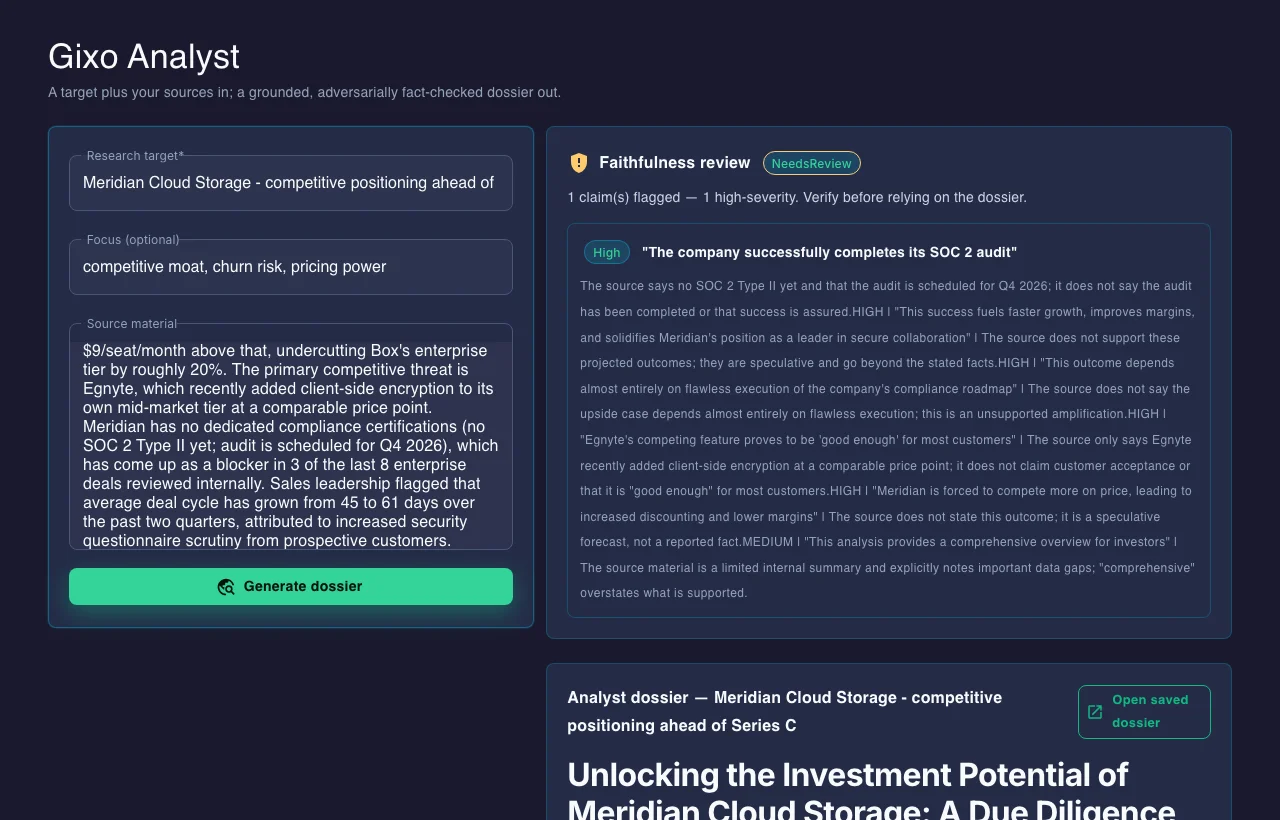
The Evidence tab identifies sentences that could not be matched and missing citations. It reads selected passages and exact figures rather than understanding every source in full. Your edits are not automatically rechecked, and its findings do not become annotations in the exported document.
A finished document with explicit uncertainty
Keep assumptions, conflicting data and unresolved questions in the brief. Add the missing citation or qualify the claim before exporting. Do not hide an open question by replacing it with more confident prose.
What the evidence workflow can and cannot establish
The useful question is not whether a draft looks sourced. It is whether a reviewer can trace each important claim to the right material and see what remains unresolved.
| Review area | What Business can surface | What the reviewer still decides |
|---|---|---|
| Uploaded citations | References to selected source files and passages | Whether the passage actually supports the sentence as written |
| Numbers | Conflicting figures, units, or reporting periods to inspect | Which figure is authoritative and whether the comparison is valid |
| Web research | Separate provenance for enabled external research | Whether the source is current, credible, and applicable to the decision |
| Export | A reviewable brief with open questions retained | Final approval, edits, and the decision to publish or share |
From a source sentence to a reviewed claim
Illustrative source: A supplied pilot report says: “18 of 24 invited teams completed the four-week pilot. No commercial renewal decision has been made.”
Draft sentence to inspect: “18 teams completed the pilot [1], demonstrating strong renewal demand.” The marker can lead to the report, but the report does not support the renewal conclusion. Keep the observed completion count; replace the unsupported inference with “Renewal intent remains untested.”
In Checks → Evidence: Inspect the claim-matching and citation findings, open the source, and edit the sentence in the brief. A missing-marker finding does not insert a reference for you. Even a matched sentence needs review of its meaning. This is a worked review example with invented data, not a customer result or a claim that this exact draft was generated.
See the Business editor and Evidence workflow · Review the product and plan boundaries
Questions to settle before you use the output
How do uploaded-file citations differ from web-source provenance?
How are citations to my uploaded files created?
What do number checks and the Evidence tab actually establish?
How are regulatory references handled?
Does a passed check remove the need for review?
Updated