
Skip to content
Sign In Try Free
Workflow-specific products Content, decks, briefs, proposals, legal, and sales each have a clearer buying path.
Review before delivery Draft, edit, collaborate, approve, and export in the same workspace.
Security + procurement path Security policy, support, and Azure Marketplace buying are public.

Stop Writing Briefs from Scratch

Stop spending hours writing business briefs from scratch. Explore your options for automating brief creation — from AI-powered tools and templates to outsourcing and hybrid approaches.

Automate Your Briefs View Gixo Business

The main alternatives to manual brief writing are AI-generated pipelines, static templates, freelancers/outsourcing, and general-purpose chatbots like ChatGPT. Gixo's approach is a multi-stage pipeline (drafting, word-count and structure checks, your Brand Dictionary terms, number repair when the brief has sources, readability optimization, a chart-data check, citations and a Sources section when you upload files, a normative references appendix when you name rules or standards, and an evidence check after generation) built from 59 curated recipes and 20+ semantic blocks like KPIs, Checklists, Steps, and Comparison Tables. Unlike templates (empty fields, manual formatting), freelancers (2-5 days, variable citation quality), or ChatGPT (no source checks, unreliable citations), it produces a brief in about 3 minutes with numbers checked against the source documents you uploaded before you see it.
6+Pipeline Stages
20+Semantic Blocks
59Curated Recipes
LiveCollaboration
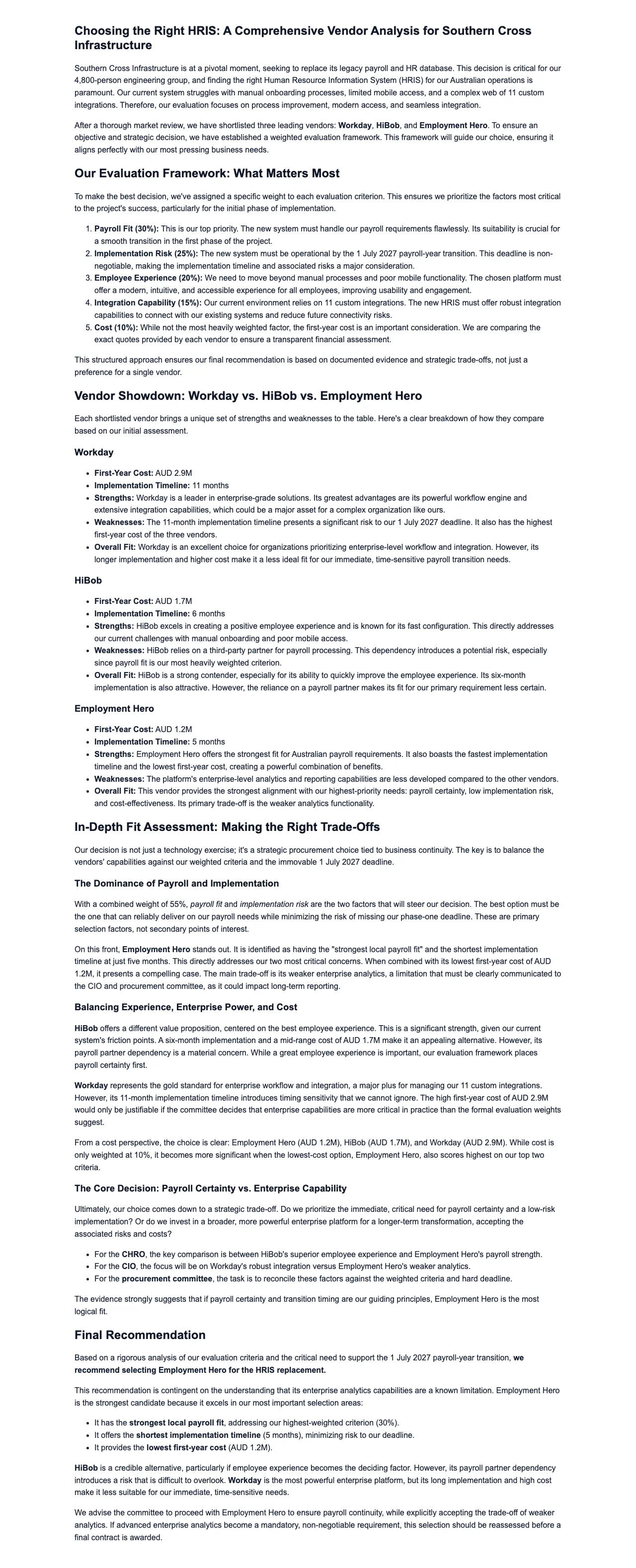
Gixo Business workspace showing a real Business Brief — a weighted vendor comparison evaluating HRIS platforms
A real Gixo Business workspace — a Business Brief — a weighted vendor comparison evaluating HRIS platforms. Generated from uploaded source material for review, not a final or certified recommendation.

What Are the Alternatives to Manual Brief Writing?

We compared every approach to brief creation. Here is what makes a multi-stage pipeline with 20+ semantic blocks the most powerful option for modern business teams.

Multi-Stage Pipeline

Every brief flows through a series of stages: drafting, word-count and structure checks, your Brand Dictionary terms, number repair when the brief has sources, readability optimization, a chart-data check, citations and a Sources section when you upload files, a normative references appendix when you name rules or standards, and an evidence check after generation. No other alternative runs this many structured checks before you see it.

Automatic [1],[2] Citations

Unlike templates that give you empty fields, Gixo asks for inline [1],[2] citations on the claims it takes from your uploaded files and appends a full Sources section. Unlike freelancers who may not verify their sources, the cited claims point to their origin.

20+ Semantic Blocks

Structure briefs with KPIs, Checklists, Steps, Pros/Cons, CTAs, and Comparison Tables. Use Quick AI for 6 instant actions or Power Edit for an AI chat dialog to refine any block on the fly.

59 Curated Recipes

Choose from 59 curated brief recipes spanning strategy, market analysis, compliance, and more. Each recipe applies domain-specific frameworks so you get analyst-grade output instead of generic text.

Real-Time Collaboration

Work on briefs with your team simultaneously. Real-time collaboration with saved workspaces means everyone edits the same document without version conflicts, email chains, or last-minute merges.

Brand Compliance Built In

The pipeline applies your Brand Dictionary's preferred and banned terms to every brief; it checks terminology, not tone or style. Outsourced writers cannot enforce these term constraints automatically, but Gixo does it on every generation.

Why Manual Brief Writing Is Becoming Unsustainable

Business teams are expected to produce more strategic documents than ever while headcount stays flat. Analysts spend entire days gathering data, formatting sections, and chasing citations for a single brief. Manual workflows cannot check numbers against your uploaded sources, cannot insert inline citations automatically, and cannot enforce brand compliance at scale. When the same effort repeats across departments, the cumulative cost in salary hours, delayed decisions, and opportunity loss is staggering -- and most organizations have never measured it.

The Shift Toward Pipeline-Driven Writing

The most productive teams are not choosing between human writers and AI. They are using pipeline-driven tools that run every brief through a series of pipeline stages -- from generation and word-count checks through Brand Dictionary terms, number checks against the source documents you uploaded and automatic [1],[2] citations when you supply them, and an evidence check after generation. Gixo's 20+ semantic blocks (KPIs, Checklists, Steps, Pros/Cons, CTAs, Comparison Tables) give authors the structure of a professional consulting framework while Quick AI's 6 instant actions and Power Edit's AI chat dialog let them refine any section without starting over. Real-time collaboration and saved workspaces mean the whole team works in one place.

How to Switch from Manual to AI Briefs

1
Pick a recipe from 59 curated options

Browse recipes by domain -- strategy, market analysis, compliance, financial due diligence, and more. Each recipe applies the right frameworks and semantic blocks for that brief type.

2
Let the multi-stage pipeline run

Gixo generates the brief and then checks it: word count and structure, Brand Dictionary terms, number checks against your sources when it has them, optimization, a chart-data check, automatic [1],[2] citations with a Sources section when you upload files, normative references when you name them, and an evidence check after generation.

3
Refine with Quick AI or Power Edit

Use Quick AI for 6 instant actions (shorten, expand, rephrase, formalize, simplify, translate) or open Power Edit for a full AI chat dialog to reshape any semantic block.

4
Collaborate, save, and export

Invite colleagues into the workspace for real-time collaboration. Save the brief to your workspace library and export a polished PDF when ready.

Which Alternative to Manual Brief Writing Is Fastest and Most Reliable?

FactorGixoTemplatesFreelancersChatGPT
Time to produce3 minutes1-2 hours2-5 days30 min
Pipeline checksMultiple stagesNoneManual reviewNone
Number checksAgainst sourcesNoIf requestedNo
Auto citations [1],[2]Built-inEmpty fieldsVariableUnreliable
Semantic blocks20+ typesFixed layoutCustom each timePlain text
Brand complianceAutomaticManualManualNo
Real-time collaborationYesNoNoNo
Curated recipes59GenericN/APrompt-dependent
PDF exportYesManualUsuallyNo

Who Benefits Most from Alternatives to Manual Brief Writing?

Any team that writes recurring business documents can reclaim hours each week by switching to AI-assisted brief creation.

Strategy and Consulting Teams
Replace days of manual research and formatting with AI-generated first drafts. Focus analyst time on strategic interpretation and client-specific recommendations instead of data gathering and slide formatting.
Marketing and Communications
Produce competitive briefs, market landscapes, and campaign summaries at the pace your business moves. Eliminate the bottleneck of waiting for a single writer to produce every internal document from scratch.
Small Business Owners
Access the kind of structured business analysis that previously required hiring a consultant or dedicating an employee full-time. Generate investor-ready briefs, partnership proposals, and market assessments without specialized staff.
Corporate Development and M&A
Produce target screening documents, industry overviews, and due diligence summaries faster than outsourcing to a research firm. Keep sensitive deal information internal while still getting cited, structured analysis.

How to Make the Transition Smoothly

Start with a curated recipe. Browse the 59 recipes and pick the one closest to the brief you produce most often. The recipe pre-loads the right semantic blocks (KPIs, Checklists, Steps, Comparison Tables) and the pipeline enforces quality automatically.
Trust the pipeline, then add judgment. The multi-stage pipeline handles brand compliance and, when you upload sources, number checks against them and automatic [1],[2] citations. Your role shifts from data gathering to strategic interpretation -- the highest-value work.
Use Quick AI and Power Edit to iterate. Quick AI gives you 6 instant actions for fast refinement. Power Edit opens an AI chat dialog for deeper restructuring. Together they let you polish a brief in minutes without regenerating from scratch.
Collaborate in saved workspaces. Invite your team into a shared workspace for real-time collaboration. Everyone sees the same blocks, the same source-checked numbers, and the same citations. No more emailing drafts back and forth or merging conflicting versions.

Frequently Asked Questions

What is the multi-stage pipeline?
Every Gixo brief passes through a series of stages: drafting, word-count and structure checks, your Brand Dictionary terms, number repair when the brief has sources, readability optimization, a chart-data check, citations and a Sources section when you upload files, a normative references appendix when you name rules or standards, and an evidence check after generation. This runs structured checks before you review a single word.
What are semantic blocks?
Semantic blocks are structured content components like KPIs, Checklists, Steps, Pros/Cons, CTAs, and Comparison Tables. Gixo offers 20+ block types that give your briefs visual structure and make them easier for stakeholders to scan and act on.
How do number checks work?
Where a brief has sources - files you upload or connect, pages you add, or the search results web research drew on - a repair stage compares the figures in the paragraphs and lists of the draft, not its tables, with the numbers in those sources, and rewrites any sentence whose figure it cannot find there, substituting the source value or dropping the claim. That is reconciliation against your own sources, not an independent fact-check, and it is silent: nothing is marked up in the delivered brief, and a sentence it cannot repair, or a draft it cannot finish, keeps its original figures. For a brief written from sources you upload, the Evidence tab under Checks in the brief editor lists up to five sentences whose wording or figures it could not match to those sources, for you to check. It matches wording and exact figures, not meaning: a faithful paraphrase, or $8.1M where the source says 8,100,000, can fail to match while being true, so an unmatched sentence is a place to look, not an error, and a matched one is not confirmed either, because this is a comparison with your own sources, not a fact-check. It reads only part of a long source (24 passages of up to 1,600 characters), cannot see web research, so for a brief with web research turned on the list is advisory, and it checks the draft as generated, not your later edits. Treat every figure as needing review until you have confirmed it at the source.
What is the difference between Quick AI and Power Edit?
Quick AI provides 6 instant actions -- shorten, expand, rephrase, formalize, simplify, and translate -- for fast, one-click refinement. Power Edit opens a full AI chat dialog where you can have a conversation with the AI to reshape content more deeply.
Can I maintain brand consistency across AI-generated briefs?
Yes. The brand compliance stage in the pipeline applies your Brand Dictionary's preferred and banned terms to every brief; it keeps terminology consistent but does not check tone or style. Unlike rotating freelancers, the output applies your terms automatically on every generation.
How does real-time collaboration work?
Invite team members into a saved workspace. Everyone edits the same brief simultaneously, sees changes in real time, and works with the same blocks and citations. No more emailing drafts or merging conflicting versions.
Will AI-generated briefs sound generic?
No. Choose from 59 curated recipes that apply domain-specific frameworks and language. Then use Quick AI or Power Edit to adjust tone, and rely on brand compliance to apply your preferred terminology. The result reads like your team wrote it.
How do I convince my manager to switch from manual writing?
Run a side-by-side pilot. Produce the same brief manually and with Gixo, then compare citations, number accuracy, brand compliance, and time invested. Most managers are convinced when they see a multi-stage brief delivered in minutes instead of hours.
Can I combine multiple approaches?
Absolutely. Use Gixo's pipeline for the structured foundation, customize with your internal data using the block editor, and invite a colleague into the workspace for real-time review. This hybrid approach captures pipeline rigor with human judgment.
What are the alternatives to manual brief writing?
The main alternatives are AI-generated pipelines, static templates, freelancers or outsourced writers, and general-purpose chatbots like ChatGPT. Templates leave fields empty and require manual formatting; freelancers take 2-5 days with variable citation quality; ChatGPT has no source checks and unreliable citations. Gixo's alternative is a multi-stage pipeline that generates a brief in about 3 minutes, checks your figures against the source documents you uploaded, and inserts automatic [1],[2] citations.
Is switching from manual brief writing to an AI pipeline reliable?
Reliability depends on whether the tool checks its output against your sources, and on knowing exactly what that check does. Where a brief has sources - files you upload or connect, pages you add, or the search results web research drew on - a repair stage compares the figures in the paragraphs and lists of the draft, not its tables, with the numbers in those sources, and rewrites any sentence whose figure it cannot find there, substituting the source value or dropping the claim. That is reconciliation against your own sources, not an independent fact-check, and it is silent: nothing is marked up in the delivered brief, and a sentence it cannot repair, or a draft it cannot finish, keeps its original figures. For a brief written from sources you upload, the Evidence tab under Checks in the brief editor lists up to five sentences whose wording or figures it could not match to those sources, for you to check. It matches wording and exact figures, not meaning: a faithful paraphrase, or $8.1M where the source says 8,100,000, can fail to match while being true, so an unmatched sentence is a place to look, not an error, and a matched one is not confirmed either, because this is a comparison with your own sources, not a fact-check. It reads only part of a long source (24 passages of up to 1,600 characters), cannot see web research, so for a brief with web research turned on the list is advisory, and it checks the draft as generated, not your later edits. Treat every figure as needing review until you have confirmed it at the source. Whether another route - a template, a freelancer or a general assistant - reconciles figures the same way is a question to put to it directly.

Replace Manual Brief Writing Today

Multi-stage pipeline. 20+ semantic blocks. Automatic citations. 59 recipes. Real-time collaboration.

Ask Gixo Business

Updated