
Gixo Business · User guide · 24 October 2026
Everything you need to turn documents into decisions in Gixo Business
Plan a brief, build a recommendation or research dossier, review the evidence and calculations, and record the case decision. Work from your own sources and keep the questions that remain open visible.
Start here
Choose the work you need to do
Start with the question and the person who must act on it. A short update, a recommendation with alternatives, a diligence dossier and a governed approval case need different evidence and review steps.
| Your job | Where to start | What to review |
|---|---|---|
| A written brief or report | The Brief tile on Make something from your documents, or New brief when it should also search the web or follow named rules: question, audience, sources and a reviewed outline. | Coverage, citations, figures, assumptions and the final saved wording. |
| A recommendation | The Recommendation tile, or New recommendation for the full form: choices, criteria, constraints and case evidence. | The analytical working paper, options, trade-offs and proposed recommendation. |
| Research or diligence | The Research dossier tile, or New research dossier: target, focus and up to 10 sources; working tables and calculations where needed. | Faithfulness findings, source-cell mappings, model inputs and the next reporting period. |
| A formal approval | A Business Case around eligible saved work. | Recorded evidence status, financials, stage approvals, governance and the exact approved revision. |
| A readiness check | A free diagnostic, playbook or focused tool, under Tools on the Business home. | Your answers, rule-based findings and the evidence still needed. |
Your work lists everything Business made for you (briefs, recommendations, dossiers and diagnostic results), newest first, each marked Writing…, Ready or Needs your review. Its Sources tab holds your saved source sets, the packs of files you reuse.
The Business home shows Your work with All work, which opens the full list with search and sort, and Recently deleted. Each row's ⋯ menu holds Labels and Delete. Tools on the home opens the calculators and source tools, the diagnostics and the playbooks.
Make something from your documents: plan before you create
One page makes a brief, a recommendation or a research dossier from your documents. Say what you need, add what it should draw on, pick what to make and choose Plan. Planning is free, and nothing is created until you choose Create. Planning with pasted text works before sign-in; creating needs sign-in, appropriate product access and available capacity.
- Describe the outcomeUnder What do you need?, state the question, intended reader, decision or deliverable, timing and constraints, in up to 8,000 characters. For a revision or comparison, Revise an existing draft adds a box for the current draft.
- Supply the evidenceUnder What should it draw on?, choose Upload files, Paste text, Web page (up to five), From library, Saved set or Connected apps. Without Business access only Paste text works, and each other choice says why. The page says when a source is not read or is cut short.
- Choose what to makePick a tile: Brief, Recommendation or Research dossier. After planning, the planner's pick is marked Suggested. Something else lists a Business Pack, a Prism decision or framework, a Lumen deck and an Arc proposal. A recommendation can take optional options, criteria and constraints. A research dossier has no plan step: choose Create research dossier.
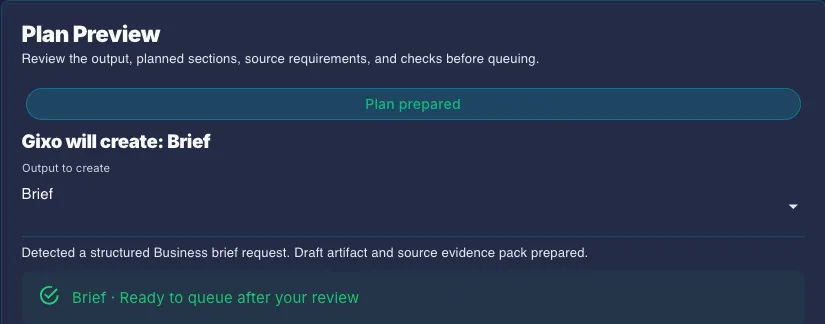
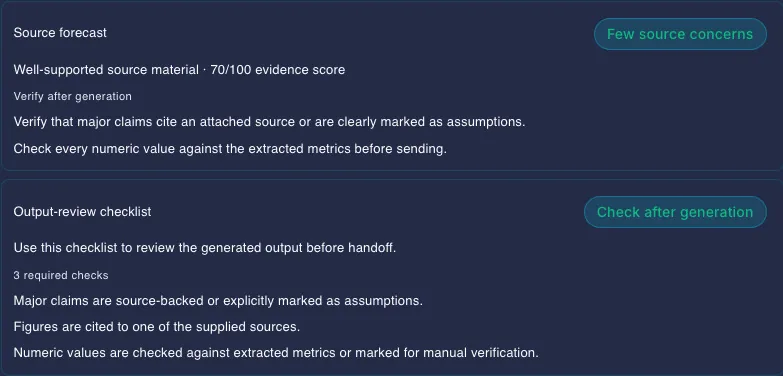
- Inspect the planReview what Gixo will create, the brief outline and its evidence requirements, the source forecast, missing inputs and checks. A comparison can need more than one source. An evidence score describes the planner's rules and available material; it is not a prediction of success. If your request or sources change, plan again.
- Create only the reviewed workThe button names what it makes, such as Create brief or Create recommendation. When the plan needs review, decide its claims with Review claims and tick I've read the review warnings and approve creating this. Planning and that tick do not approve the final document, and nothing is created by itself.
What stops a plan, and what only flags it
Only exact facts refuse creation: sign-in, plan readiness, a blocked plan and an exact check that failed. Wording checks and model-judged checks are flags. A plan that fails one is held for your review and the approval tick, not refused. Rejected claims, metrics and quotes are kept out of the source text Gixo writes from.
Bring the right sources
Use material you can inspect: dated reports, notes, spreadsheets, transcripts and source documents. Meaningful file names, reporting periods and definitions help you trace the final claim back to its evidence.
- Uploads and saved source sets. Every Business create page uses the same source picker. Uploads take PDF, Word, Excel, CSV, text, images, audio and video, up to 10 sources, 500 MB each and 2 GB together. Wait for Extracting text to finish before planning. Reuse selected files from a saved set, kept on the Sources tab of Your work, and add current material for the next assignment. A research dossier does not read connected apps; upload those items or add them as a saved set.
- Selected app documents. Where a supported connection is configured and authorized, choose the specific Google Drive, OneDrive/SharePoint or Dropbox documents, or Slack messages, to read as source text. Available adapters do not establish that every connection is live. Selection does not start a whole-account crawl, synchronize later changes or write back to the app.
- Web scope. On New brief, Where Gixo can look starts on Only my sources. Choose My sources + the web when external context is needed, and specify trusted domains where appropriate. Public pages you attach and search-result evidence remain distinct from uploaded-file citation markers.
- Long or complex sources. Extraction can omit content or truncate a long source. On Make something from your documents, inline source text is capped at 24,000 characters per source; the evidence pack reads at most 12 sources and a bounded set of relevant passages. Check warnings and the original file when a conclusion depends on omitted text.
A source is not automatically a fact
A statement can accurately repeat a source that is wrong, out of date or inapplicable. Confirm the source date, units, scope and authority, and keep competing figures or unresolved assumptions visible.
Write a brief from a reviewed outline
A brief plans from the goal, intended reader and source scope, whether you start from the Brief tile or from New brief. Use New brief when the brief should research the web where your sources are silent, or follow rules or standards you name. Review the proposed sections and evidence needs rather than treating an old fixed menu of brief types as the current workflow.
- Set the question and audienceExplain what the reader needs to understand or decide. Include the period, geography, options and any required format.
- Choose the sources and sourcing policyAdd the selected source set, uploads and context you want used. A request-only draft has no supplied evidence for number reconciliation or uploaded-file citations.
- Review the outlineCheck section order, intended depth and evidence requirements. Refine the request and plan again if the outline misses the actual decision or supporting material.
- Create the draftChoose Plan, then Create brief from the accepted plan while its inputs still match; if they change, the page asks you to plan again. Planning is distinct from generation; an outline gives drafting direction and does not establish completeness or correctness.
- Review before deliveryInspect the draft's sources and Evidence findings, revise the passages that need work, then check the saved output before export.
In Rules or standards (optional) on New brief, you can name the jurisdiction, laws, standards and specific references that should shape the document. The normative appendix lists what you supplied. It does not look up clauses, map requirements to legal provisions or supply factual proof.
Check figures, citations and candidate evidence
Business provides several review aids. Keep their purposes separate: silent number repair, the generated-draft Evidence findings and recorded decisions on extracted evidence items answer different questions.
| Review aid | What it does | Your next step |
|---|---|---|
| Number reconciliation | Attempts to match figures in a sourced brief's prose, lists and table body cells with supplied files, pages or search-result material. Table headings and row labels provide context; derived totals are treated separately. | Check material figures and calculations against the originals. Repair is silent and can keep an original figure when it cannot finish. It supplies no list of every repair and is not an independent fact-check. |
| Uploaded-file citations | Where the reviewed plan and evidence policy call for citations, the writing model places numbered markers and a Sources section. Customer-facing formats can omit visible citations. | Check missing markers and whether a cited source supports the adjacent wording. A marker alone does not validate the claim. |
| Checks → Evidence | Lists up to five generated-draft sentences or table cells whose wording, exact figures or citation coverage need inspection. | Open the source, correct or qualify the passage yourself, and review later edits separately. Findings do not become annotations in the exported document. |
| Candidate evidence pack | Extracts possible claims, metrics, quotes, tables and conflicts, with source identifiers and available locations. | Check extraction and omissions. A candidate is not a confirmed fact, and absence from the pack does not prove absence from the source. |
Figures in lakh and crore, with or without ₹, and Indian digit grouping such as ₹12,00,000 are read as the same figure by number repair and the review checks, so ₹12 lakh in a source matches ₹12,00,000 in the draft.
When two sources give different values for what looks like one figure, a model check rules on each pair. Only a pair it confirms as the same metric over the same period is a conflict the brief must disclose. Related but different measures are not treated as conflicts, and a pair the check could not rule on stays listed as not checked rather than dropped.
How to read the Evidence list
The check compares wording and exact figures, rather than meaning. A faithful paraphrase, or $8.1M where a source says 8,100,000, can fail to match while true; a match does not confirm truth. It reads at most 24 relevant passages of up to 1,600 characters and at most 12 sources. Web-research checks read search-result titles, snippets and descriptions, rather than full webpages. Partial or unavailable checks are advisory. It checks the draft as generated, rather than your later edits.
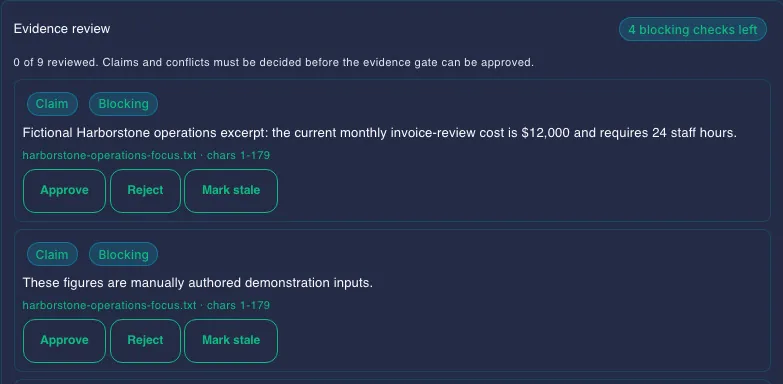
In the evidence review workbench, record a decision beside each current item where you have artifact ownership and current workspace access. Where the plan needs your approval, every claim and conflict is decided before it can be approved; rejected claims, metrics and quotes are kept out of the source text Gixo writes from. Earlier decisions remain distinguishable when the reviewed content changes. A decision can reject or mark an item stale; clearing an undecided-item check does not mean every claim was approved. These records do not automatically satisfy the formal Business Case approval gate.
Build a Consultant recommendation
Use Consultant when the question needs alternatives, criteria, trade-offs and a reasoned point of view. The workflow first builds an analytical working paper, then a recommendation report from that structure.
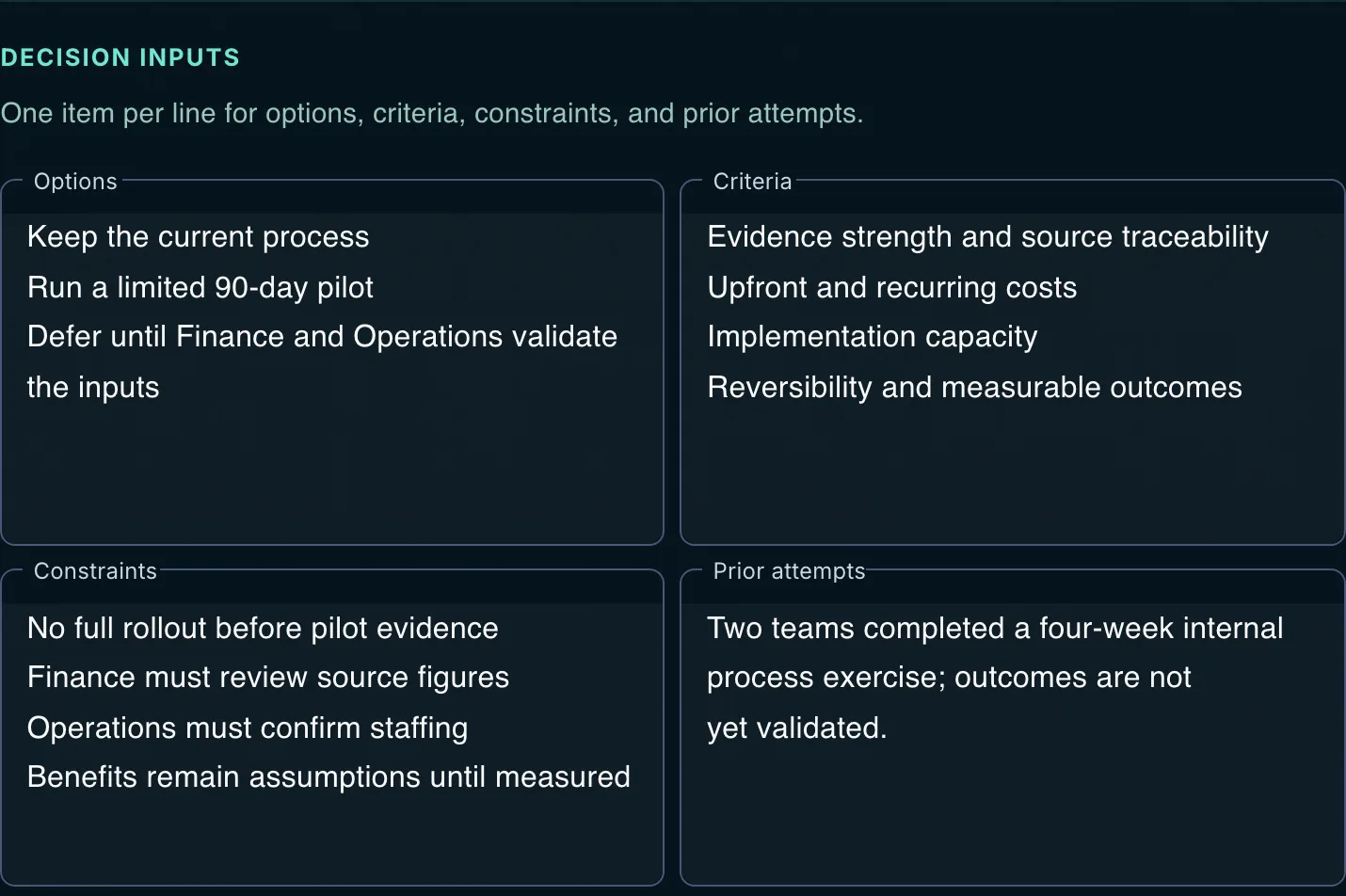
The Recommendation tile on Make something from your documents takes options, criteria and constraints. New recommendation is the full form, with who decides, a deadline and background.
- Frame the decisionUnder What do you need to decide?, state the business question, who decides, the date to decide by and the background. Under What are the options?, add viable alternatives, including the status quo where relevant, with criteria, constraints and what was tried before; or start from a common decision. Left empty, Gixo works out options and criteria.
- Attach the case evidenceUnder What should it draw on?, use the source picker: a saved set, uploads, pasted text and explicit working assumptions. Imported primary text is capped at 18,000 characters, each uploaded source at 12,000 and combined case material at 90,000. Inspect truncation warnings.
- Review the case planChoose Plan and check the analytical path and missing inputs before you choose Create recommendation. Consultant requires Business Starter or higher, its workflow access and available generation capacity; plan allowances are shown in your account.
- Inspect the reasoningReview the working paper, findings and final report. Model review and revision attempts can leave unresolved findings, unequal evidence or biased reasoning. Supply the missing evidence and edit the recommendation before using it.
The options, criteria and decision table can sit inside the Business report. New standalone decision pages and visual frameworks belong to Gixo Prism and require Prism access.
Research with Analyst, then inspect the evidence
On New research dossier, give a research target, an optional focus and up to 10 sources, then choose Create research dossier. Gixo writes a research or diligence dossier, then runs an AI faithfulness review against those same sources. Read the findings and original evidence before relying on the result.
Working tables, calculations, the next-period review and approved case facts sit in one collapsed section, Numbers & calculations (optional). It opens by itself when the dossier you continue has any. You can leave the page while the dossier is written; it appears in Your work.
A saved dossier can provide continuity for a later review, but its prior narrative is not fresh evidence. Supply current sources when returning to the company, market, vendor or reporting period. Faithfulness review does not check the sources independently or make a diligence investigation complete.
Work from source tables
- Preview the table you intend to useSupported XLSX, CSV or TSV previews accept files up to 5 MB, up to 10 sheets, 200 rows and 26 columns. Read the omission warnings. Excel formula cells supply stored values; they are not recalculated.
- Check the working cellsEdit the working table and confirm row labels, column labels, units and periods. Manual edits can detach an old source binding, so inspect which values remain tied to source cells.
- Review the input mappingChoose the cells, or sum/average/minimum/maximum selections, that become calculation inputs. Inspect the mapping before applying it. If the source or model has changed, refresh the preview rather than apply a stale projection.
Calculate and replay a workbook
Build a calculation workbook with explicit named inputs and formulas, then inspect the results and calculation steps. The supported expression engine handles arithmetic and functions including ABS, ROUND, MIN, MAX, SUM, AVG, IF, PERCENT, CHANGE and PERCENT_CHANGE. Identical definitions and engine versions replay to the same values and recorded hashes.
A workbook supports up to 50 inputs and 50 formulas, with expressions up to 500 characters and bounded depth and decimal precision. Supported XLSX exchange retains the required Inputs, Formulas, Results and Readme structure. Result sheets are informational snapshots: they do not update in Excel, execute Excel formulas or run macros or external links. Review input accuracy, units and formulas before exporting calculated metrics.
Repeat the next reporting period
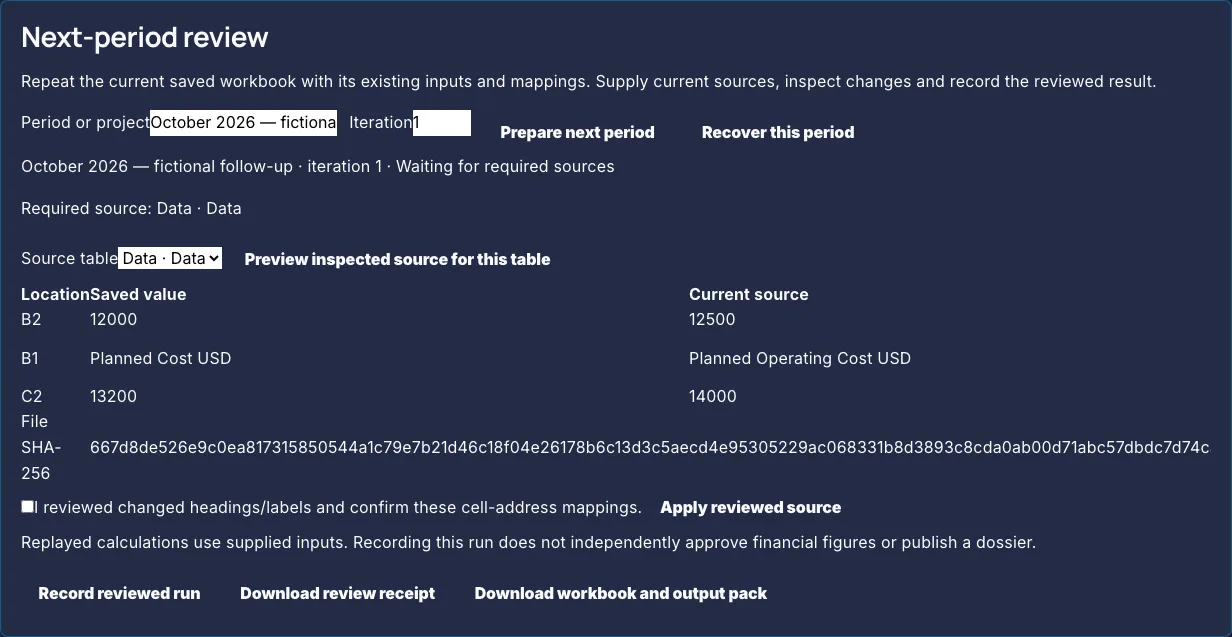
- Prepare the next periodStart from the saved review recipe and identify the new period and required source roles.
- Compare the source cellsReview differences, new headings or labels and the input mappings. Confirm any changed mapping rather than assume last period's cells still represent the same metric.
- Replay and record the reviewed runInspect the calculations and accept the current run before downloading its receipt or output pack. A later change makes the accepted review stale or requires a new iteration.
Where eligible, select exact facts from a particular approved Business Case revision. Keep its approval receipt with the calculation inputs and reload the source if the checked revision or facts no longer match. Author-attested values remain distinct from server-recomputed results. A recorded Analyst review does not approve a new case, schedule updates or publish the output.
Coordinate a Business pack
A larger request can coordinate a source-backed brief and dependent recommendation. On Make something from your documents, choose Business Pack under Something else, or let the planner suggest it, then Create business pack. Inspect the proposed children, dependencies and product access before starting.
Saved progress distinguishes completed, running, waiting and failed steps after reconnect. Eligible failed steps can resume when the run retains a resume key, reusing completed work; older unkeyed runs cannot safely retry. Missing product children and dependents can be skipped with reasons. A pack does not make completion or output quality certain.
Standalone decks, decisions and frameworks route separately to Lumen or Prism. An optional proposal or RFP child needs Arc access. Recheck each child's sources and final output, even when the same source pack was reused.


Formalize a Business Case
Use a formal case when the work needs a recorded owner, objective, financial assumptions and staged approval. Start from eligible saved source-family work with full-edit access to the focus and root documents.
- Initialize the caseRecord its business owner, objective and linked work. Check that the case is attached to the intended saved document and source family.
- Complete the recorded review inputsSupply evidence status, assumptions, financials, options and the proposed decision. Check the readiness screens; they evaluate recorded inputs and approvals, rather than independently establish truth.
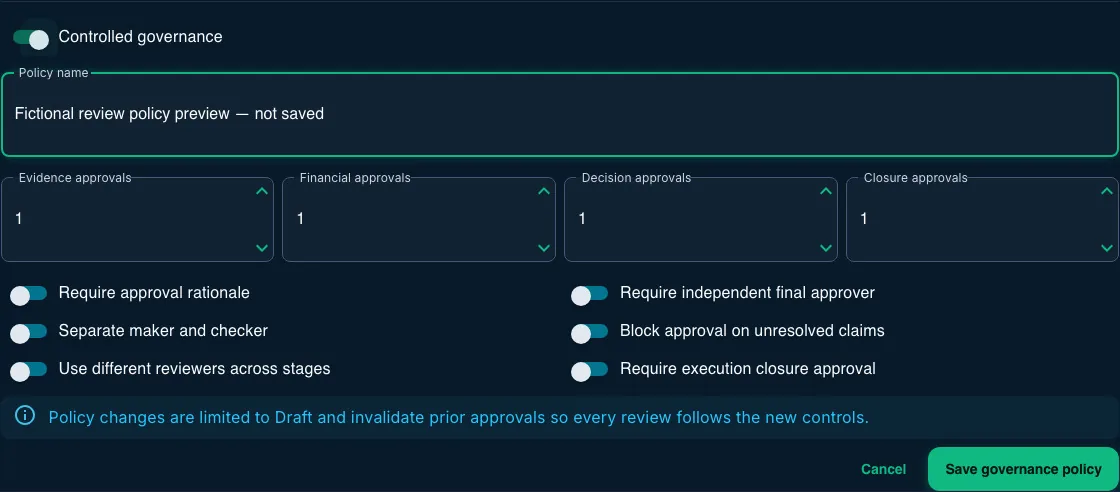
- Set the case policy while in DraftChoose the rationale, required stage approvals and reviewer separation appropriate to the case. A policy change invalidates earlier approvals. The policy is case-local and does not grant anyone content or tenant access.
- Move through the review stagesReview evidence, financials and the decision before the final approved, rejected, on-hold or archived state. Use the current revision and inspect the recorded review and activity history.
Claim review and case approval are separate
Decisions on individual extracted evidence items do not automatically enforce the formal case gate. The case uses its separately recorded evidence status, financials and approval history. Bring important findings into that process and inspect the current case readiness before approving it.
Compare financial scenarios
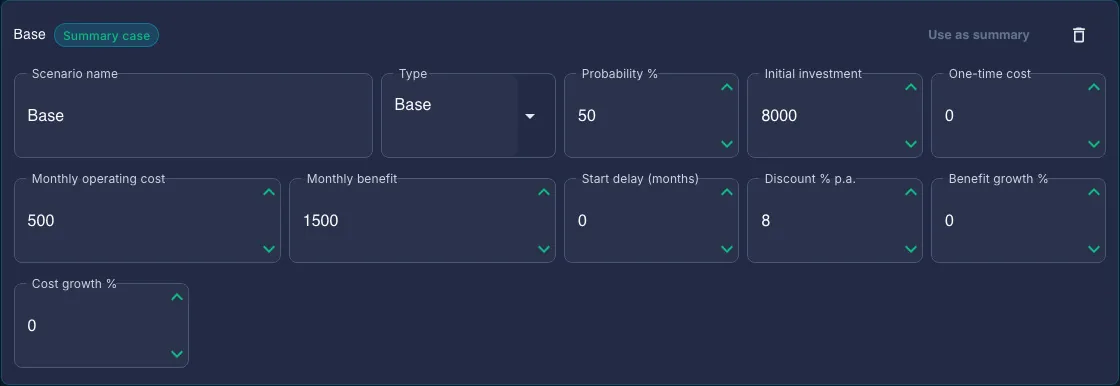
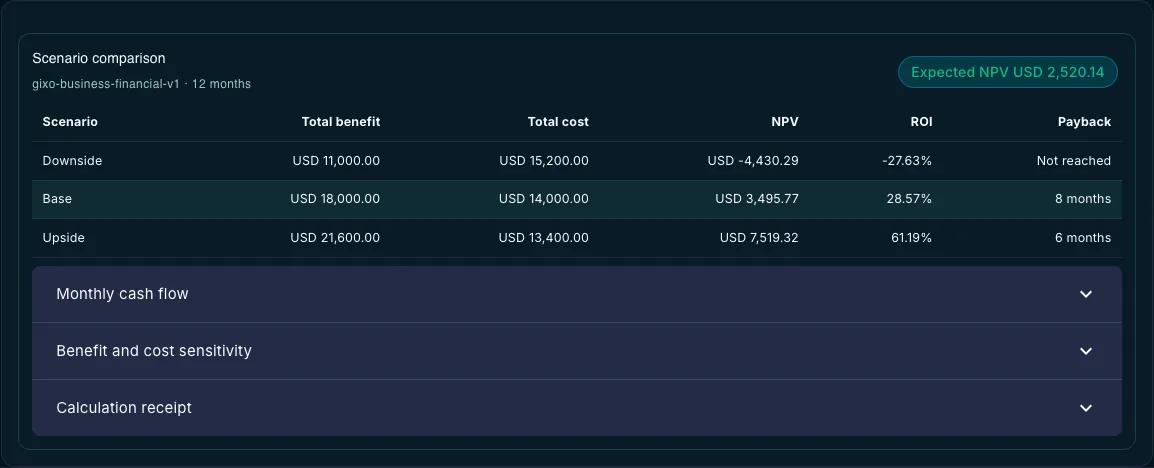
Enter explicit downside, base, upside or custom assumptions. The case supports at most five scenarios and a horizon of one to 240 months. Review monthly cash flows, NPV, ROI, payback, whether break-even occurs within the chosen horizon, and the three-by-three benefit/cost sensitivity comparison.
Probability-weighted expected NPV is available only when all scenario probabilities are present and total 100%. Those probabilities are your assumptions, rather than predicted likelihoods. This model does not calculate IRR or run Monte Carlo simulation. Manual totals remain available as author-attested values, separate from server-recomputed scenarios.
Inspect governance and retained receipts
Controlled policy can require one to five approvals per stage, approval notes, maker/checker separation, different stage reviewers, an independent final approver, a recorded unresolved-claim check and closure approval. Review the case's recorded history and retained chain check. Audit receipts keep a rolling window of 200; they are not a lifetime archive, independent timestamp or notarized signature.
Download the approved revision memo
The governed memo is separate from an ordinary brief export. Approval attempts to capture a frozen revision snapshot. Export authorizes access and checks the recorded state, approval receipt, audit chain and financial results before producing memo HTML or a configured PDF.
Snapshot capture is best effort: a case can be approved while its missing snapshot prevents memo export. Unavailable or irreconcilable snapshots are refused. A successful reconciliation confirms consistency of stored facts and results, rather than external financial accuracy. The memo labels manual figures as attested rather than recomputed.
Record the follow-through
After approval, record the execution owner, action priorities and due dates, outcome baselines and targets, current values and health check-ins. Review completion evidence and required closure approval before closing the case. Current bounds are 100 actions, 50 outcome metrics and 100 check-ins. These are explicit records, rather than automatic monitoring, ERP synchronization, delivered reminders or independently measured benefits.
Edit the draft and keep the reviewed version clear
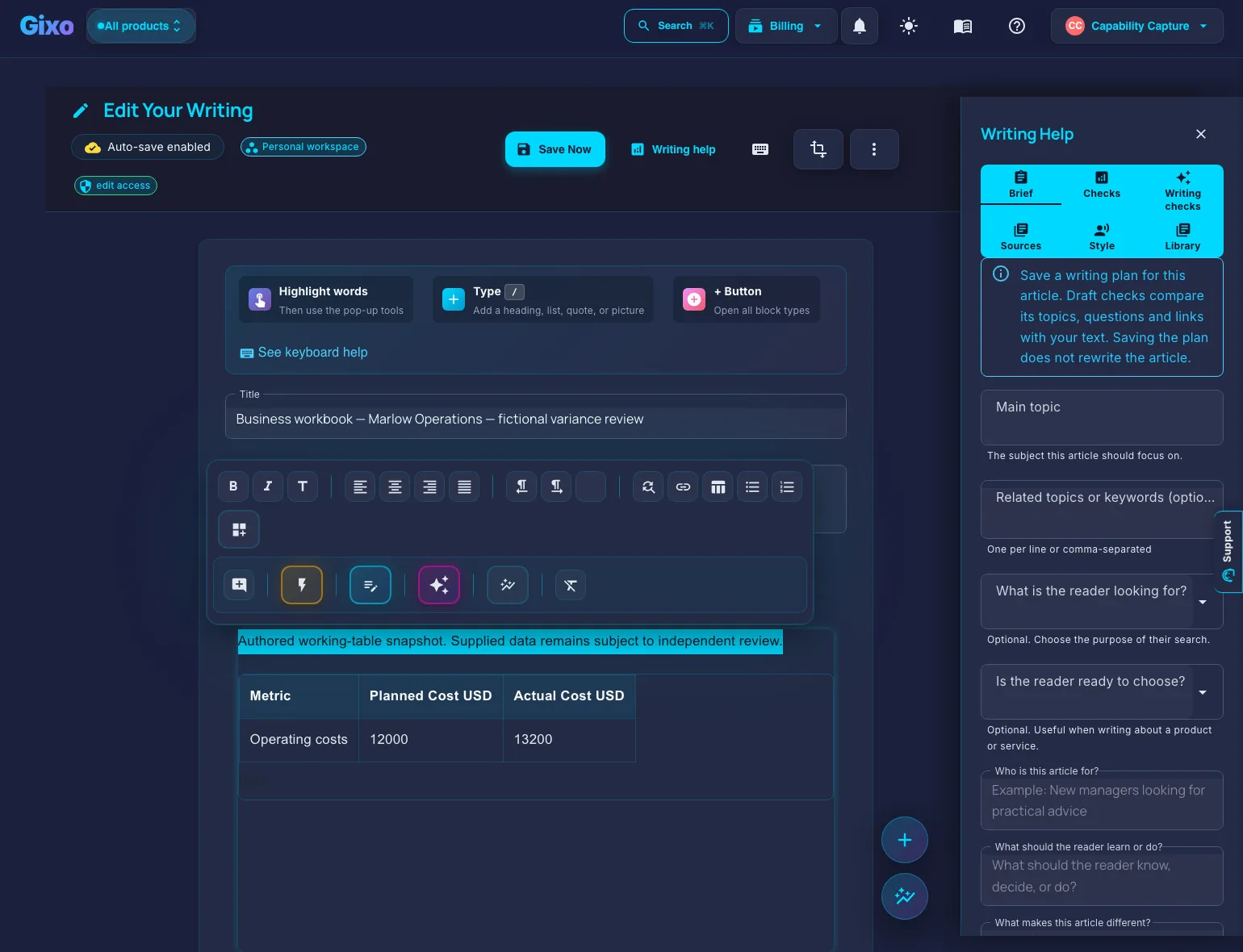
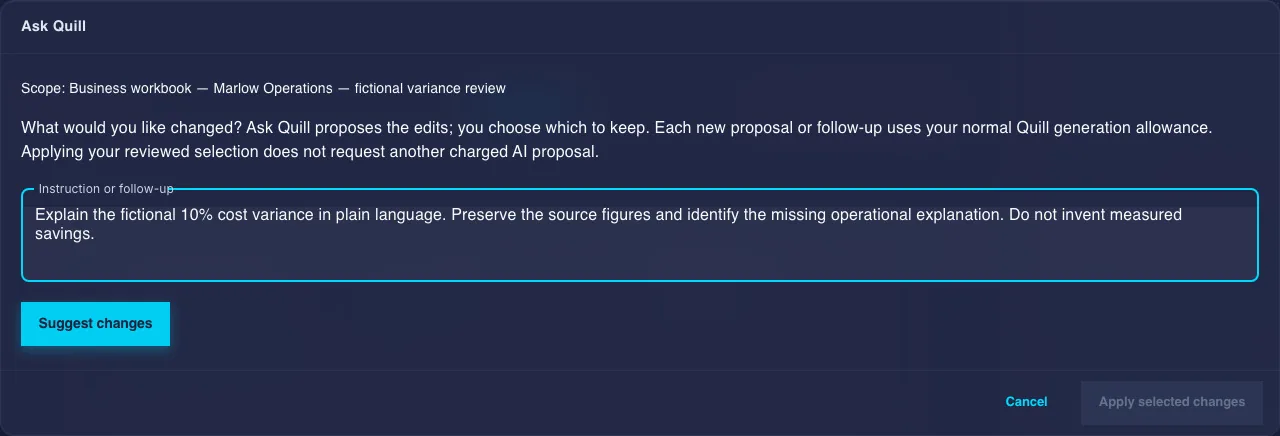
Open the saved Business brief or report in the shared editor. Make direct changes or review an AI proposal before replacing text. Recheck changed evidence, figures and citations because the generated-draft checks do not rerun on later edits.
| Control | Use it for | Review before keeping the result |
|---|---|---|
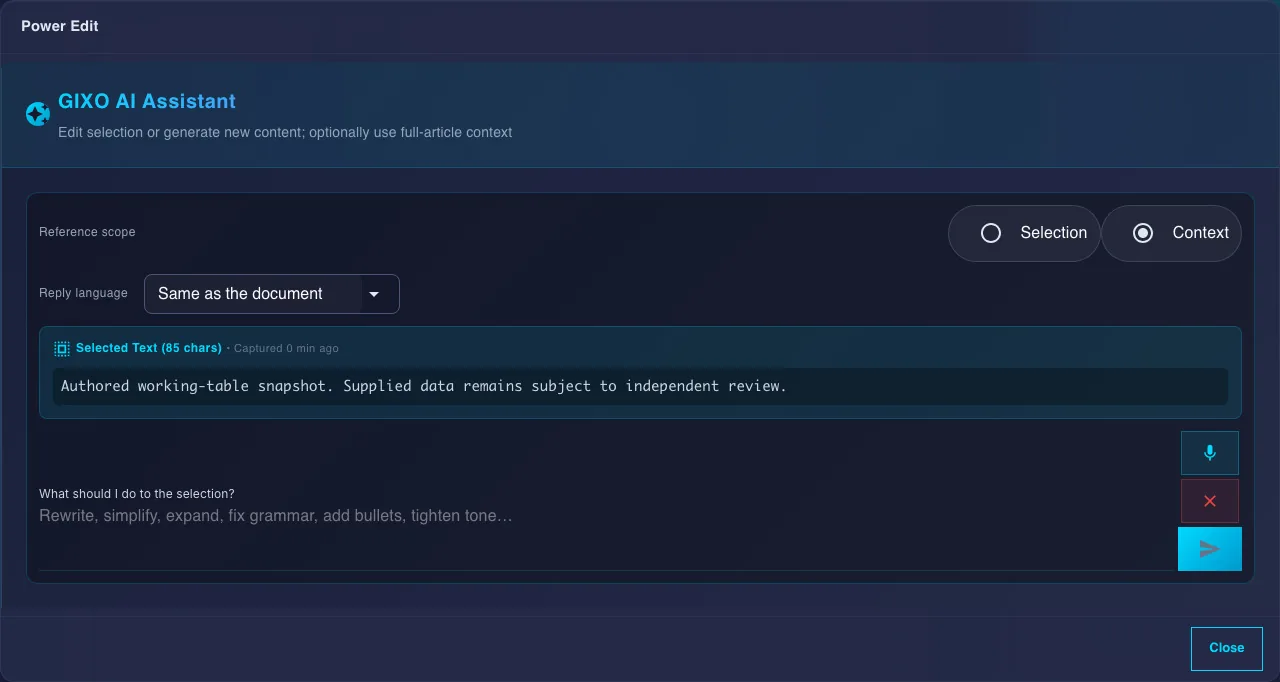
| Rewrite… | Select text and choose Rewrite… in the selection bar for Rewrite, Simplify or Expand. A grammar fix or a change of tone is a Power edit instruction. | Inspect the proposed change, then choose Replace or Discard. An edit can change facts or references. |
| Power edit | In the same panel: a longer instruction with document context for the selected passage. | Confirm the selected scope, changed meaning and source support. |
| Ask Quill | In the editor's More menu: the shared editor assistant, which proposes document changes. | Review the proposal before keeping it. This is distinct from planning on Make something from your documents. |
| Save a Version / Versions | In the editor's More menu: save a version, then preview and compare saved body wording and restore a chosen version as a new save. | History retains the newest 50 body versions. Comparison reads visible words; it is not a complete source-set, layout or case-state backup. Check the current saved body before restoration. |
Editing and AI assistance need full-edit permission, active access for the owning product and its assist bounds. Do not infer concurrent-safe restoration from another product's dialog behavior. On Business Professional or higher, comments and named sharing also depend on the current content role. Confirm access and resolve save conflicts before distribution; presence does not establish automatic merging of simultaneous text edits.
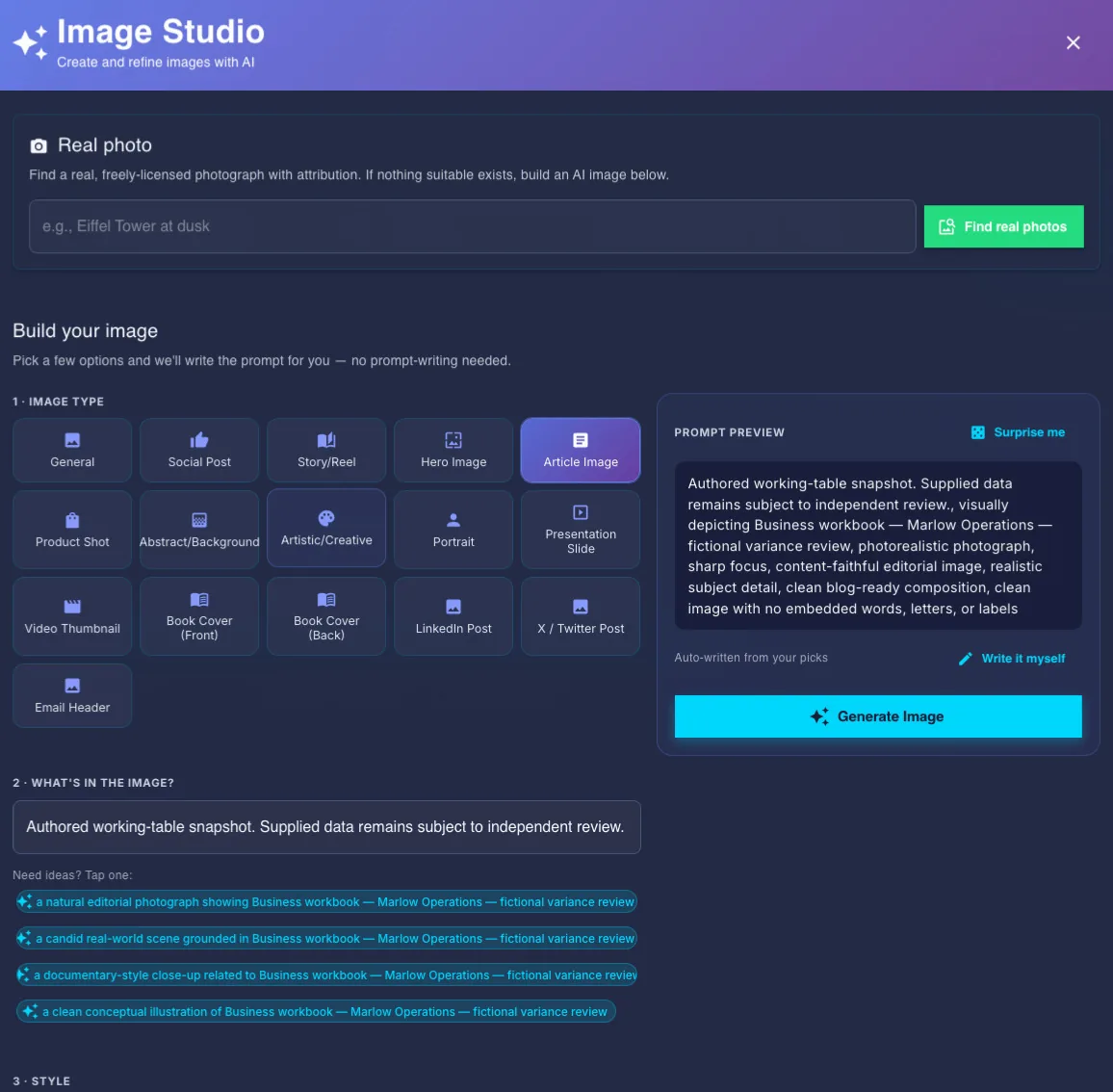
For an image in the document, open Image Studio from the editor. Review the subject, image type and prompt preview; the dialog also exposes photo search and upload. Before insertion, check the chosen image, any required attribution and its use in the document. Opening the dialog is separate from requesting generation or inserting a picture.
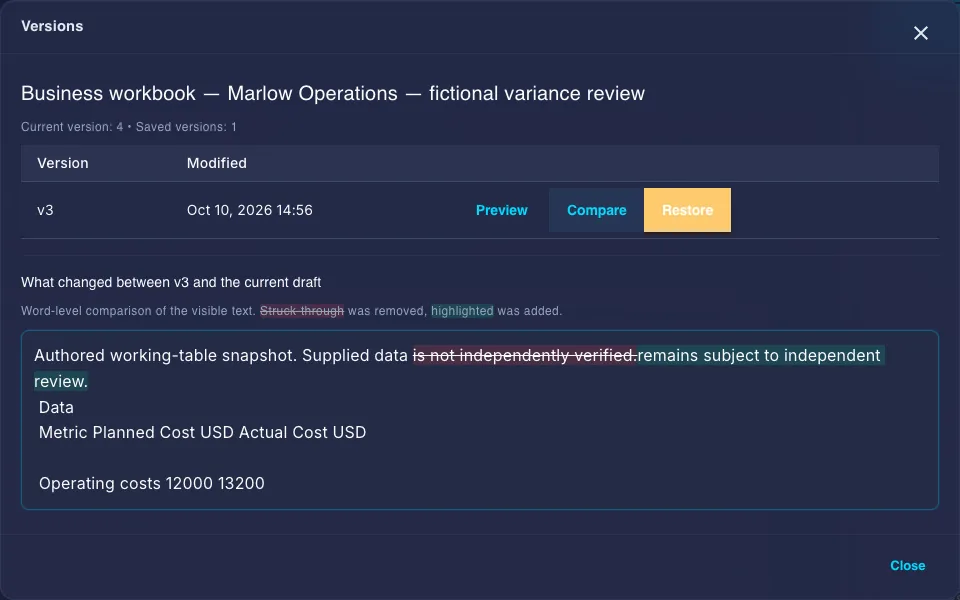
Export the saved document
A saved brief or report offers Download PDF, Download Word, Share and Make a deck. More → More formats opens the full export page: set the document style and page details, inspect the preview and download the reviewed saved version. Permission to view and download the content is distinct from buying new generation.
| Output | What to expect | What to check |
|---|---|---|
| Ordinary PDF | Designed export of the saved brief or report; configured rendering is required. | Page breaks, tables, citations and final wording. Download does not record an approval. |
| Editable Word | DOCX export for editing and review. | Fonts, backgrounds, page breaks and supported structures can differ from the preview/PDF. Contents is static and needs eligible headings. |
| HTML, Markdown, text or JSON | Supported web/text output of the saved content. | Text formats lose visual layout. Inspect the actual file and its source references before sharing. |
| Governed case memo | HTML or configured PDF from a reconciled approved revision snapshot. | Export can be unavailable after approval if the snapshot is missing. Attested manual totals are distinct from recomputed scenarios. |
| Analyst calculation outputs | Supported workbook, metric pack or current reviewed-run receipt. | Schema, source mappings, units and accepted-run freshness. XLSX result sheets are snapshots rather than live Excel formulas. |
Continue in Lumen, Prism or Arc
Keep the same decision context where the handoff supports it, and check access for the product that owns the output.
| Next output | Product and link | Boundary |
|---|---|---|
| A briefing deck | Make a deck on the saved brief, or Deck from Documents in Gixo Lumen | A Lumen plan is required; without one the button reads Make a deck with Gixo Lumen. Review its slide editing and PDF/PowerPoint output in Lumen. |
| A standalone decision page or framework | Create in Gixo Prism; Prism dashboard | New standalone decisions and frameworks need Prism access. The options and decision logic inside a Business report remain report content. |
| A proposal or operational RFP response | Gixo Arc | Arc access is required for its requirement ownership, response review and delivery workflow. A Business RFP response map is an editable planning brief. |
Earlier decision artifacts made through Business remain subject to their stored access and current product routing. Open the Prism dashboard to locate them; check the current Prism guides before editing or regenerating rather than follow an old image-only workflow description.
Free diagnostics and playbooks
Five deterministic readiness diagnostics, listed under Tools on the Business home and on the diagnostics page, use fixed questions and rules rather than AI generation. Their scores reflect your self-reported answers; a Ready band is a prompt for detailed review, rather than certification, funding probability or an independent evaluation.
| Diagnostic | Review focus |
|---|---|
| Fundraising Readiness | Narrative, traction, market, economics and diligence. |
| GTM / Launch Readiness | Positioning, audience, channels, sales motion and launch operations. |
| Product-Market-Fit Signal | Demand, retention, usage, customer pain and expansion. |
| Due-Diligence Readiness | Corporate, finance, commercial, legal and security/operations preparation. |
| Decision Quality Audit | Inversion, base rates, reversibility, pre-mortem and process versus outcome. |
The score bands are Not ready (0–39), Emerging (40–59), Close (60–79) and Ready (80–100). Review the dimension scores and suggested gaps, then supply evidence for any follow-on brief or recommendation. Sign in for supported saved runs and report downloads; an anonymous session is not durable history.
Four operating playbooks, also under Tools, cover Data-Room Checklist, Board-Meeting Prep, Launch Runbook and Pricing-Change Checklist. Tick only the items you have completed and inspect critical items still open. A tick records your report of progress rather than proof of execution or approval. Sign in to retain supported progress.
Free focused tools
Use a rule-based analysis or a structured builder for a smaller job. Analysis needs no account or AI generation; downloadable takeaways have separate sign-in requirements. The three tools below also open from Tools → Calculators and source tools on the Business home. Review the supplied inputs and findings before carrying them into a Business draft.
| Tool | Use it for | Input boundary |
|---|---|---|
| Scorecard Maker | Compute a weighted ranking from your criteria and scores. | Two to eight options and criteria; the result depends on your judgments and weights. |
| Case Calculator | A simple financial case from annual recurring assumptions: NPV, payback, discounted payback, internal rate of return and an NPV sensitivity grid that varies the discount rate and the annual benefit. Signed in, download a PDF report or the model as XLSX. | One to ten years. It is distinct from the governed monthly case scenarios. |
| Evidence Extractor | Inspect candidate claims, figures, quotes and possible conflicts from pasted sources. | Heuristic and partial extraction, rather than a fact check. |

Other available checks and builders help you inspect the document structure or assemble the information you enter. Their output does not replace source review or the governed case process.
| Tool | What it does |
|---|---|
| Business Case Checker gixo.ai/tools/business-case-check | Checks a business case for the problem, options, costs, benefits, risks, dependencies, recommendation and ownership. |
| Board Paper Check gixo.ai/tools/board-paper-check | Checks decision framing, recommendation, alternatives, material risks, financial impact and resolutions. |
| Executive Summary Check gixo.ai/tools/executive-summary-check | Checks for a decision, a recommendation, quantified evidence, risk, the ask and reading length. |
| Figure Consistency Check gixo.ai/tools/figure-consistency-check | Finds labels that repeat across a document with conflicting numbers or units. |
| Evidence Label Auditor gixo.ai/tools/evidence-label-check | Checks whether claims separate sources, estimates, assumptions and management judgement. |
| Decision & Action Extractor gixo.ai/tools/decision-action-extractor | Pulls explicit decisions, owners, actions and dates out of meeting notes or papers. |
| Document Version Diff gixo.ai/tools/document-diff | Compares two versions section by section and writes a short change log. |
| Decision Memo Builder gixo.ai/tools/decision-memo-builder | Compares alternatives, states the decision plainly and records the next steps. |
| Business Case Builder gixo.ai/tools/business-case-builder | Turns costs, benefits, options, risks and implementation assumptions into a decision package you can review. |
| Board Paper & Decision Log Builder gixo.ai/tools/board-paper-builder | Prepares a board paper with a clear decision header and a reusable decision-log record. |
| Executive Summary Template Builder gixo.ai/tools/executive-summary-builder | Builds a situation, complication and resolution summary that fits the format you choose. |
| Project Brief Template Builder gixo.ai/tools/project-brief-builder | Defines scope, measurable objectives, milestones, deliverables and owners. |
| Risk Register & Heat Map Builder gixo.ai/tools/risk-register-builder | Scores inherent and residual risk, flags missing owners and mitigations, and draws a 5×5 summary. |
Plans and your trial
Gixo Business is priced per seat in US dollars. Each paid plan includes monthly generation capacity; your subscriptions page shows usage and current allowances. Planning and generation are distinct actions, and additional products have their own access.
| Plan | Per seat, monthly | Per seat, annual | Minimum seats |
|---|---|---|---|
| Starter | $19 | $190 | 1 |
| Professional | $49 | $499 | 3 |
| Business | $59 | $599 | 5 |
| Enterprise | $79 | $799 | 10, through Azure Marketplace |
- Every paid plan: eligible briefs, Consultant recommendations, Analyst dossiers, Business Cases and body version history. Check current feature access and available capacity for the action you need.
- Professional and higher: comments, named sharing and brand kit. Comments and sharing also depend on the current content role.
- Business and higher: team creation and member management.
- Enterprise: API access. Published minimums and the marketplace purchasing path remain as listed above.
Your 14-day trial
No card is needed. The trial starts when you click Start my 14 days; each email address receives one Business trial with Starter features. After it ends, existing saved work remains viewable under its content permissions and new generation needs an active plan. A trial does not include unlimited free AI generation or other product plans.

Quick links
| Business dashboard | gixo.ai/dashboard/business |
| Make something from your documents | gixo.ai/business/ask |
| Your work | gixo.ai/business/library |
| New brief | gixo.ai/briefs |
| New recommendation | gixo.ai/consultant/create |
| Create Decision Page (Gixo Prism) | gixo.ai/decisions/create |
| New research dossier | gixo.ai/analyst/create |
| Deck from Documents (Gixo Lumen) | gixo.ai/decks/create/advanced |
| Readiness diagnostics | gixo.ai/business-diagnostics |
| All free tools | gixo.ai/tools |
| Business plans | gixo.ai/products/briefs#plans |
| Help and support | gixo.ai/support |
Text checked against the Gixo Business code on 24 October 2026 at commit 9c3e18153e. The screenshots, captured on 10 October 2026, show actual local controls on fictional material: planning, source review, deterministic calculations, Draft case settings, unsubmitted editing dialogs and a saved wording comparison; where a screen has changed since, the text describes the current one. No AI draft, independent check, completed approval or governed memo is presented as a completed capture. If your screen differs, check Gixo support and the current product guides.