Sign In Try Free
Workflow-specific products Content, decks, briefs, proposals, legal, and sales each have a clearer buying path.
Review before delivery Draft, edit, collaborate, approve, and export in the same workspace.
Security + procurement path Security policy, support, and Azure Marketplace buying are public.

AI Internal Brief Generator — Keep Your Whole Team on the Same Page

Create internal company briefs through an 8-stage pipeline with real-time collaboration, saved workspaces, and brand compliance enforcement. Generate team updates, project summaries, and departmental communications with 20+ semantic blocks and automatic citations.

Generate Internal Brief View pricing

An AI internal brief generator is a tool that turns raw notes, Slack threads, and meeting bullet points into structured internal communications -- status updates, project summaries, and department announcements -- through an automated pipeline rather than manual drafting. Gixo's version runs an 8-stage pipeline (generation, word count calibration, brand compliance, number checks against source documents, optimization, automatic [1],[2] citations with a Sources section, normative references, and final validation) and structures output using 20+ semantic blocks like KPIs, Checklists, Steps, Pros/Cons, and Comparison Tables. It supports real-time collaboration with remote cursors, saved workspaces for recurring reports, and draws from 59 curated recipes.

8Pipeline Stages
20+Semantic Blocks
59Curated Recipes
Real-TimeCollaboration
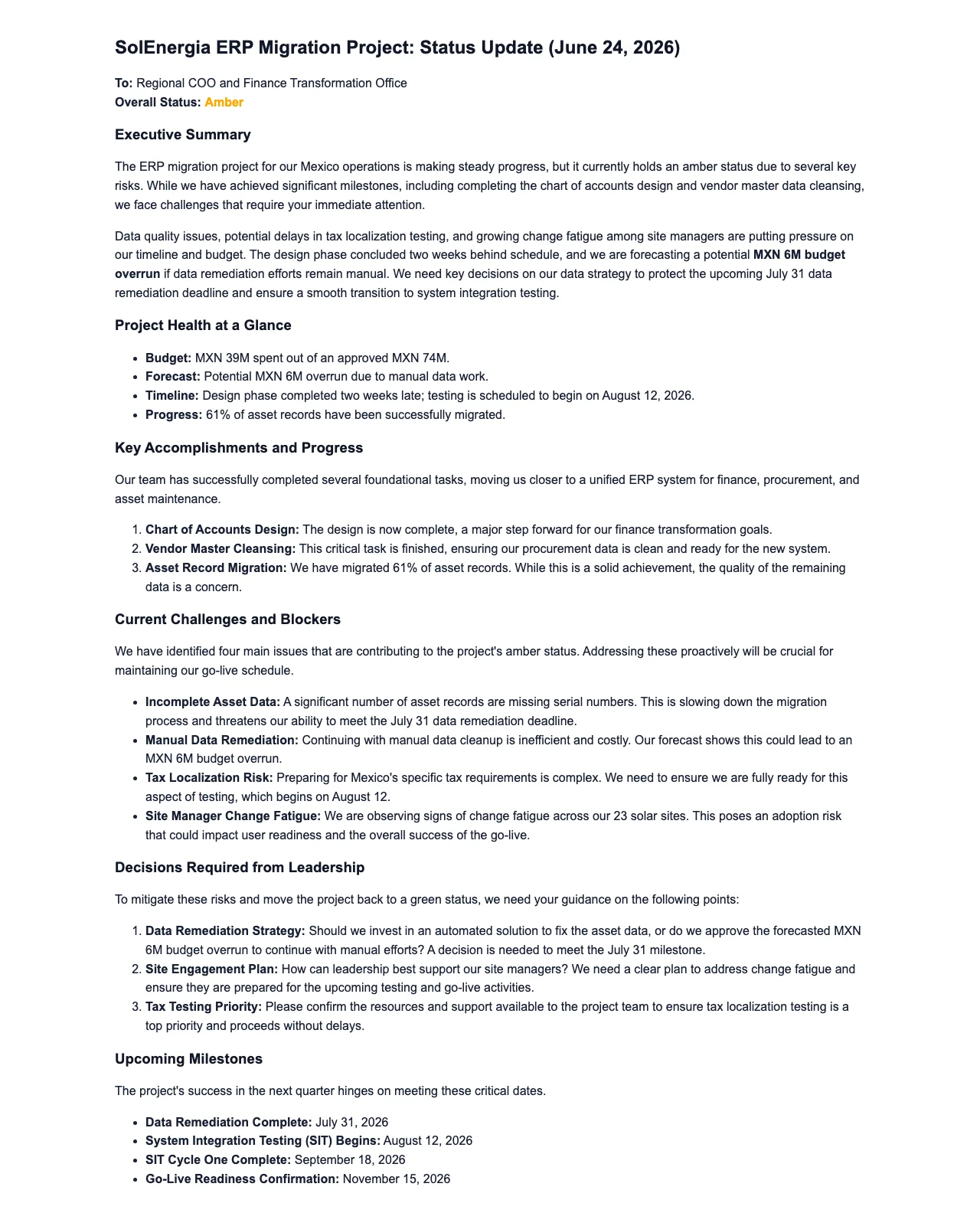
Gixo Business workspace showing a real Business Brief — a project status update on an ERP migration
A real Gixo Business workspace — a Business Brief — a project status update on an ERP migration. Generated from uploaded source material for review, not a final or certified recommendation.

What Is an AI Internal Brief Generator?

Stop spending hours crafting internal documents. Gixo structures your information into clear, actionable briefs that leadership and teams actually read.

Real-Time Collaboration

Multiple team members contribute to internal briefs simultaneously with remote cursors. Engineering writes the technical section, marketing adds the positioning, finance provides the budget analysis -- all in the same document at the same time, with changes visible instantly.

Saved Workspaces

Save your weekly standup, monthly review, or quarterly report setup as a workspace. Source documents, recipe selection, block layout, and brand compliance settings carry over -- next cycle's brief starts from a proven template, not a blank page.

Brand Compliance Enforcement

Upload your organization's terminology preferences, formatting standards, and tone guidelines. The 8-stage pipeline checks every brief automatically so different departments produce updates with the same voice, language, and professional quality.

20+ Semantic Block Editor

Structure internal briefs with KPI blocks for performance metrics, Checklist blocks for action items, Steps blocks for processes, Pros/Cons blocks for decision analysis, CTA blocks for next steps, and Comparison Table blocks for vendor or option evaluations.

Quick AI and Power Edit

Quick AI's six instant actions -- summarize, expand, simplify, formalize, shorten, rephrase -- let any contributor polish their section with one click. Power Edit opens a full AI chat dialog for deeper rewrites. Both preserve the 8-stage pipeline's source-checked numbers and citations.

8-Stage Pipeline

Every brief passes through generation, word count calibration, brand compliance, number checks against source documents, optimization, automatic [1],[2] citations with Sources, normative references, and final validation. Choose from 59 curated recipes to match your internal communication context.

Why Internal Briefs Matter More Than Ever

As organizations grow, the cost of miscommunication compounds. A missed status update can derail a product launch. A vague project summary can lead to duplicated work across departments. Internal briefs serve as the connective tissue between teams, ensuring that everyone from individual contributors to C-suite executives operates from the same set of facts. The challenge is that writing these documents manually is time-consuming and inconsistent. Different managers use different formats, varying levels of detail, and conflicting terminology. Brand compliance enforcement solves the consistency problem by checking every brief against your organization's standards automatically, while real-time collaboration with remote cursors lets cross-functional teams co-author simultaneously.

From Raw Notes to Source-Grounded Communication

Most internal communicators start with a collection of bullet points, Slack threads, and meeting notes. Gixo's 8-stage pipeline transforms this raw material through generation, word count calibration, brand compliance, number checks against source documents, optimization, automatic [1],[2] citations with a Sources section, normative references, and final validation. The block-based editor with 20+ semantic blocks -- KPIs, Checklists, Steps, Pros/Cons, CTAs, Comparison Tables -- structures the output exactly the way leadership expects. Save recurring report setups as workspaces for instant reuse. Quick AI's six instant actions handle rapid edits, while Power Edit opens a full AI chat dialog for deeper refinements. Choose from 59 curated recipes to match your internal communication context.

How Does an AI Internal Brief Generator Work?

1
Select your brief type

Choose from status update, project summary, department announcement, quarterly review, or custom format. Each type has a tailored structure optimized for internal communication.

2
Provide key information

Enter the topic, key points, metrics, and context. The AI structures your raw information into a polished brief with clear sections and logical flow.

3
Review and customize

Edit the generated brief to add confidential details, adjust tone, and incorporate team-specific context. Every section is fully editable to match your organization's communication style.

4
Distribute to your team

Export as PDF or copy the formatted content directly into your internal communication channels. Share consistent, professional updates across the organization.

Built for Every Team Across Your Organization

Teams across every function rely on structured internal communications to keep projects moving and stakeholders aligned.

Engineering Leaders
Communicate sprint progress, technical debt status, infrastructure changes, and release timelines to non-technical stakeholders in a format they can act on without an engineering glossary.
Operations Managers
Summarize operational KPIs, supply chain updates, capacity planning changes, and process improvements for leadership reviews and cross-functional coordination meetings.
HR and People Teams
Draft org-wide announcements for policy changes, benefits updates, headcount plans, and culture initiatives with consistent tone and clear calls to action for employees.
Project Managers
Produce weekly project status briefs that track milestones, flag risks, document decisions, and outline next steps so sponsors and stakeholders stay informed without lengthy meetings.

How Does Gixo Compare to Notion AI and ChatGPT for Internal Briefs?

CapabilityGixoNotion AIChatGPTManual Writing
Multi-stage pipeline8 automated stagesNoneNoneNone
Real-time collaborationRemote cursorsYesNoSequential
Saved workspacesReusable setupNoNoStart over
Brand complianceAutomatedNoNoManual
Source citations[1],[2] + SourcesNoFabricatedManual
Semantic blocks20+ block typesBasicPlain textManual
Inline AI editingQuick AI + Power EditBasicRe-promptManual
Number checksChecked vs sourcesNoUncheckedManual
Time to produce3 minutes20 min15 min1-3 hours

Write Updates People Actually Read

Lead with the bottom line. Busy executives read the first two sentences and decide whether to continue. State the key takeaway or request at the top of every brief so readers immediately understand what matters and what action is needed.
Quantify progress wherever possible. Replace vague language like "good progress" with specific metrics. Numbers give leadership a clear picture of where things stand and make it easier to compare performance across reporting periods.
Tailor depth to your audience. A brief for your direct manager can include technical details. A brief for the executive team should focus on outcomes, risks, and decisions. Generate one brief and then edit the level of detail for each distribution list.
Maintain a consistent cadence. Internal communications are most effective when they arrive on a predictable schedule. Weekly updates, monthly summaries, and quarterly reviews build organizational rhythm and reduce the number of ad-hoc information requests.

Frequently Asked Questions

How does real-time collaboration work for internal briefs?
Multiple team members work on the same brief simultaneously with remote cursors. Engineering writes the technical section, marketing adds positioning, finance provides budget analysis -- all in the same document. Each contributor can use Quick AI's six instant actions or Power Edit's AI chat dialog within their blocks.
How do saved workspaces help with recurring reports?
Save your weekly standup, monthly review, or quarterly report setup as a workspace. Your source documents, recipe selection, block layout, and brand compliance settings carry over. Next cycle's brief starts from a proven template -- update the data and generate, instead of rebuilding from scratch every time.
How does brand compliance standardize briefs across departments?
Upload your organization's terminology preferences, formatting standards, and tone guidelines. The 8-stage pipeline checks every brief automatically. Whether engineering or marketing produces the update, the resulting document uses the same voice, structure, and professional quality that leadership expects.
What are the 20+ semantic blocks?
Structured content types that replace plain paragraphs: KPI blocks for performance metrics, Checklist blocks for action items, Steps blocks for processes, Pros/Cons blocks for decision analysis, CTA blocks for next steps, Comparison Table blocks for alternatives. Each maintains professional formatting in PDF exports.
Can non-writers produce quality internal briefs?
Absolutely. The 8-stage pipeline handles structure, formatting, number checks, and citations automatically. Quick AI's six instant actions let any contributor polish their section with one click -- summarize, expand, simplify, formalize, shorten, or rephrase. No writing skills required.
How do number checks help internal briefs?
Where your uploaded sources allow, the pipeline runs a repair step that checks the metrics, percentages, and figures in your brief against those source documents. When the quarterly review cites revenue growth or headcount numbers, those figures are checked against your sources -- not just generated. Because the check compares against your uploaded material rather than ground truth, treat the numbers as unverified until you review them.
How do automatic citations work in internal documents?
The pipeline inserts inline [1],[2] references throughout your brief with a complete Sources section. When a VP questions a market trend or competitive claim, the source is embedded in the document. This is especially valuable for cross-functional briefs where multiple departments need to trust the underlying data.
What makes Gixo different from copying a template in Google Docs?
Templates give you an empty structure. Gixo runs an 8-stage pipeline that fills that structure with source-grounded content, cited sources, and brand-compliant language. You start with a complete, cited draft using 20+ semantic blocks -- not a blank outline. Then real-time collaboration lets your team refine it together.
How many recipes are available?
59 curated recipes across business domains. For internal briefs, choose from status updates, project summaries, department announcements, quarterly reviews, executive briefings, cross-functional alignment documents, and more. Each recipe applies the appropriate structure and tone for its audience.
What is an AI internal brief generator?
An AI internal brief generator is a tool that structures raw notes, key points, and metrics into a polished internal document -- like a status update, project summary, or department announcement -- through an automated pipeline. Gixo's version runs an 8-stage pipeline (generation, word count calibration, brand compliance, number checks, optimization, automatic citations, normative references, and final validation) and organizes the result into 20+ semantic blocks such as KPIs, Checklists, and Comparison Tables, chosen from 59 curated recipes.
How is Gixo's AI internal brief generator different from just asking ChatGPT?
Per Gixo's own comparison, ChatGPT has no multi-stage pipeline, no real-time collaboration, no saved workspaces, and produces citations the page describes as fabricated rather than sourced. Gixo runs every brief through an 8-stage pipeline, checks your figures against the source documents you uploaded, and inserts automatic [1],[2] citations with a Sources section -- taking about 3 minutes versus roughly 15 minutes for a ChatGPT-drafted brief, per the page's own comparison table.
What generative AI tools are available for writing project briefs?
Gixo's generative AI internal brief generator writes project summaries through an 8-stage pipeline -- generation, word count calibration, brand compliance, number checks against source documents, optimization, automatic [1],[2] citations with a Sources section, normative references, and final validation. Project-summary output uses 20+ semantic blocks like Steps, KPIs, and Pros/Cons, drawn from 59 curated recipes, with Quick AI's six instant actions and Power Edit available for further generative edits.

Streamline Internal Communications

8-stage pipeline. Real-time collaboration. Saved workspaces. Brand compliance. 20+ semantic blocks. Professional internal briefs in minutes.

View pricing