
Gixo Analyst
Evidence-grounded research & diligence — adversarially reviewed against your sources
Give Analyst a target and your source pack. It produces a structured research or diligence dossier grounded in your evidence — then a skeptical reviewer re-reads it against the sources and flags any claim they don't support. The difference from a generic AI answer is the verification. That reviewer is an AI faithfulness review, a review aid rather than independent fact-checking, so confirm important claims and figures against authoritative sources before you rely on them.
Use variance analysis software with a reviewable calculation trail
Use this variance analysis software workflow to calculate the gap between planned and actual values from reviewed inputs. In Business Analyst, inspect the supplied spreadsheet or CSV table, then map reviewed cells or aggregates to named calculation inputs. Confirm the labels, period, units and planned-versus-actual basis before applying the mapping. Working tables can be edited, but a changed table or model can make an earlier projection stale and require another review.
Define the arithmetic in the bounded decimal calculation workbook and replay it from the selected inputs. For example, a fictional monthly cost plan of $12,000 and an actual cost of $13,200 produce a $1,200 adverse cost variance, or 10 percent of plan. A zero plan needs an explicit reporting rule instead of an invented percentage. The calculation does not explain the cause of the variance; the author supplies that interpretation and checks the underlying records.
For the next reporting period, reuse the saved review recipe, compare changed source cells and confirm changed mappings before recording the replayed review. The current workbook and review receipt can be downloaded. This is an explicit review workflow, not an automatic ERP or accounting reconciliation feed. Analyst uses supported expressions and stored source-cell values; it does not execute imported Excel formulas, macros or external links, and exported result sheets are snapshots.
Explore Analyst source tables and calculations · See the mapping, replay and repeated-review steps
See the Business controls before you use them
Actual controls captured on 10 October 2026 with fictional, manually supplied material. These examples show planning, review and editing actions, plus deterministic calculations. Each caption states what was completed. Paid controls require current Business access and the appropriate content role.
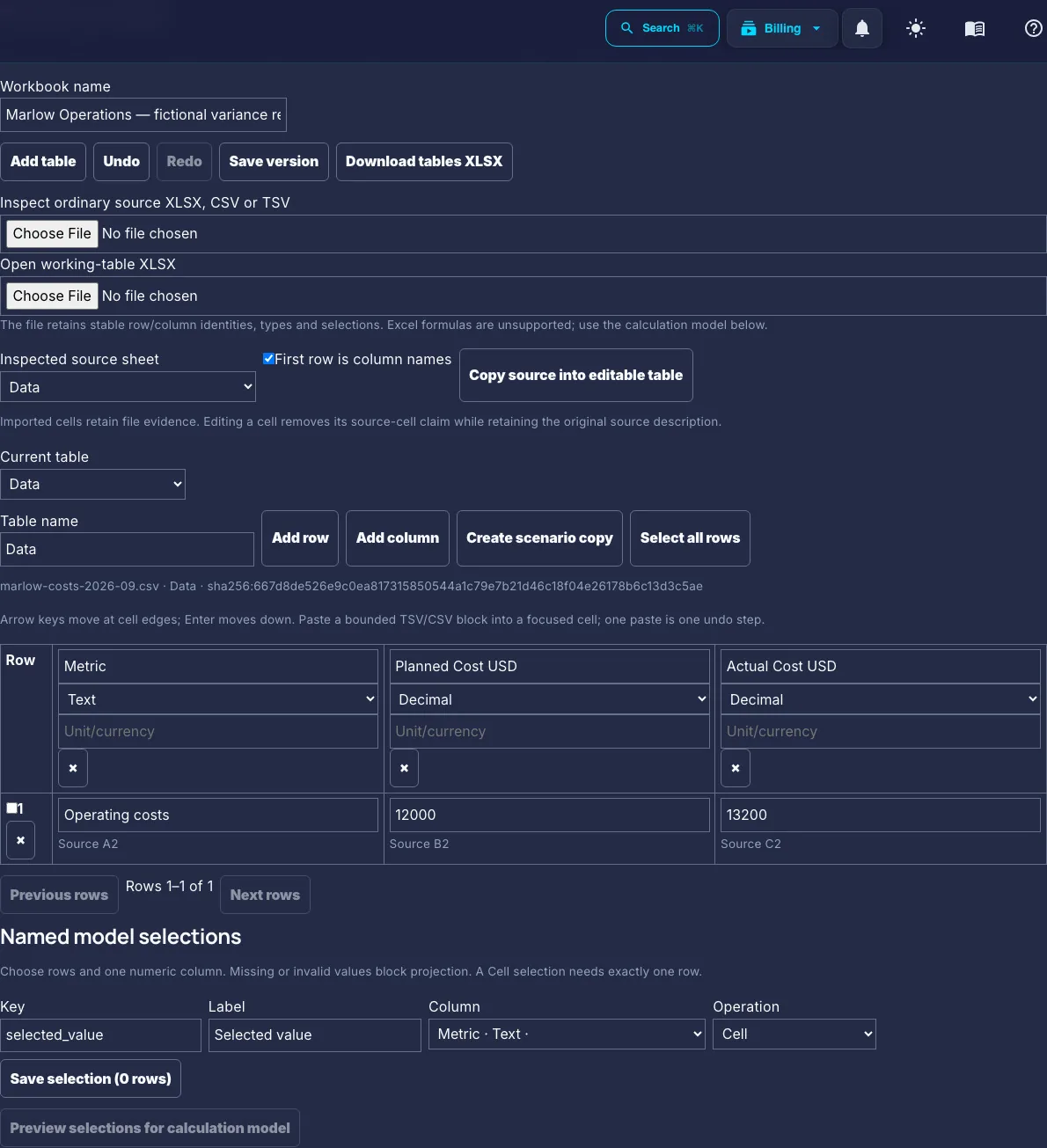
Inspect a source table before using its cells
An actual fictional CSV is copied into the Analyst working table. Saved source-cell values are visible; imported Excel formulas are not executed.

Review the selected calculation inputs
The real projection shows planned_cost = 12000 and actual_cost = 13200 before applying the reviewed selections. Supplied figures are not independently verified.

Replay the variance calculation
Actual deterministic results: 13200 minus 12000 is 1200 USD adverse variance, or 10% of plan. The workbook was saved; no narrative dossier was generated.
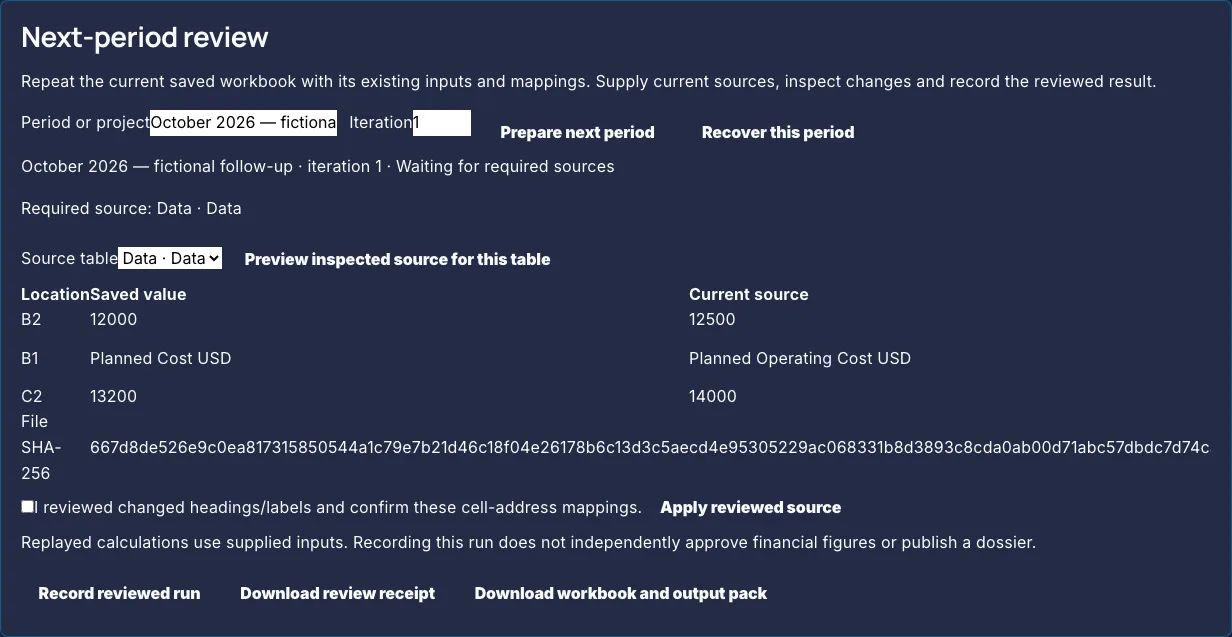
Check changes before a period review
New fictional values 12500/14000 and a changed heading appear beside saved values. The mapping checkbox was later confirmed; changes were not applied and no period review was accepted.
Follow the complete Business guide · Understand the source and approval boundaries