
Consultant
Decision-support workflow inside Gixo Business for recommendation drafts, built with decision-making discipline.
Best fit
For business teams turning sources, decisions, diagnostics, and playbooks into executive-ready work.
Start path
Start by making something from your documents: Business routes the request to the right brief, diagnostic, playbook, decision, or deck workflow.
Trial or free path
Business separates free diagnostics, playbooks, and source forecasting from paid execution and scale.
Paid unlock
Paid Business unlocks execution depth, larger source-backed workflows, and scale beyond free diagnostics.
Recommended
Starter
Good for one person turning a business question into a structured advisory case
Best for one person doing real work
$19/seat/month
Seats
Minimum 1
Case planning from a business question
Follow-up questions and framework selection
Recommendation output with its decision table
Monthly paid checkout
Professional
Good for teams reviewing recommendations and their decision logic together
Best for small teams that review together
$49/seat/month
Seats
Minimum 3
Everything in Starter
Internal sharing and comments
Review-ready advisory collaboration
Minimum 3 seats
Business
Good for advisory workflows with shared review and decision discipline
Shared workflows, team management, and admin setup
$59/seat/month
Seats
Minimum 5
Everything in Professional
Shared team workspaces
Team review workflows
Minimum 5 seats
Enterprise
For Azure and private-offer deployments
Security review, procurement, and private offers
$79/seat/month
Seats
Starts at 10 seats. Sold through Azure Marketplace or private offer.
Minimum 10
Everything in Business
API access, plus a report of the AI providers and models that handle your work
Azure Marketplace or private offer
Onboarding and enterprise rollout support
Consultant sits inside Gixo Business and works from the same source packs as Brief Mode and Briefing Decks (made in Gixo Lumen). The Business planner can route the job first and forecast source quality before consultant work is queued.
Gixo Business
Consultant for higher-stakes business work.
Start with the business question, source pack, and constraints. Gixo routes the job, forecasts source quality, frames the case, surfaces missing information, keeps facts, assumptions, and trade-offs separate, and helps your team build a decision-ready recommendation draft from the same source pack Gixo Business uses for decision work, with standalone decision and framework artifacts made in Gixo Prism.
Consultant workflow
Source forecast before output
Discipline scorecard
Decision tables inside the Gixo Business report
Decision artifacts with a Gixo Prism plan
Framework work with a Gixo Prism plan
What the workflow produces
Consultant is not just a report generator. The live workflow keeps the route, source forecast, case plan, and discipline scorecard visible, and the same case can be carried into a separate decision or framework artifact, both made in Gixo Prism with a Prism plan; inside the Consultant report, the options, criteria, and decision logic sit in the report itself.
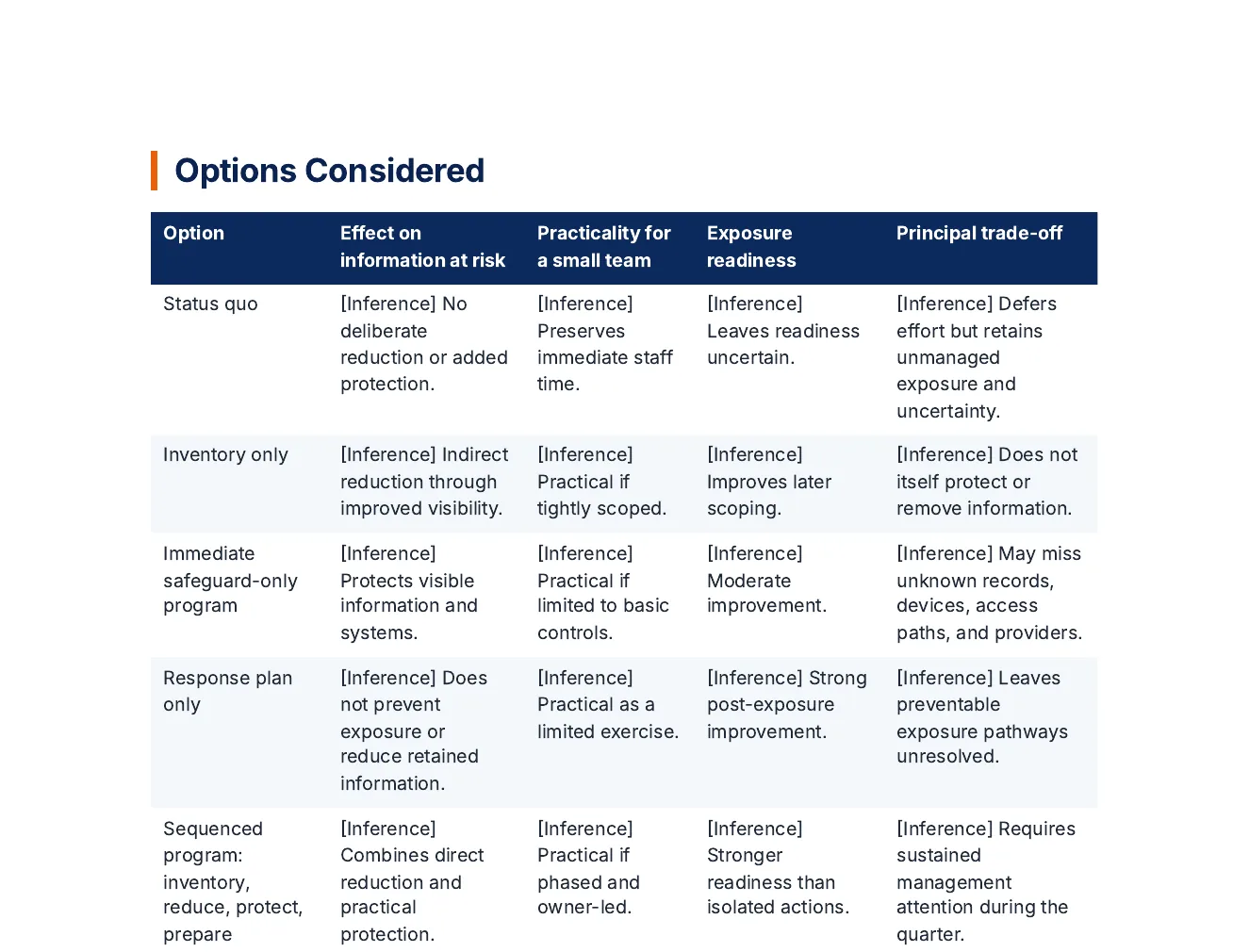
Options compared on stated criteria
In this report the status quo is one of the options, and each option is compared on the criteria the case named, so the trade-off is on the page instead of in a paragraph.
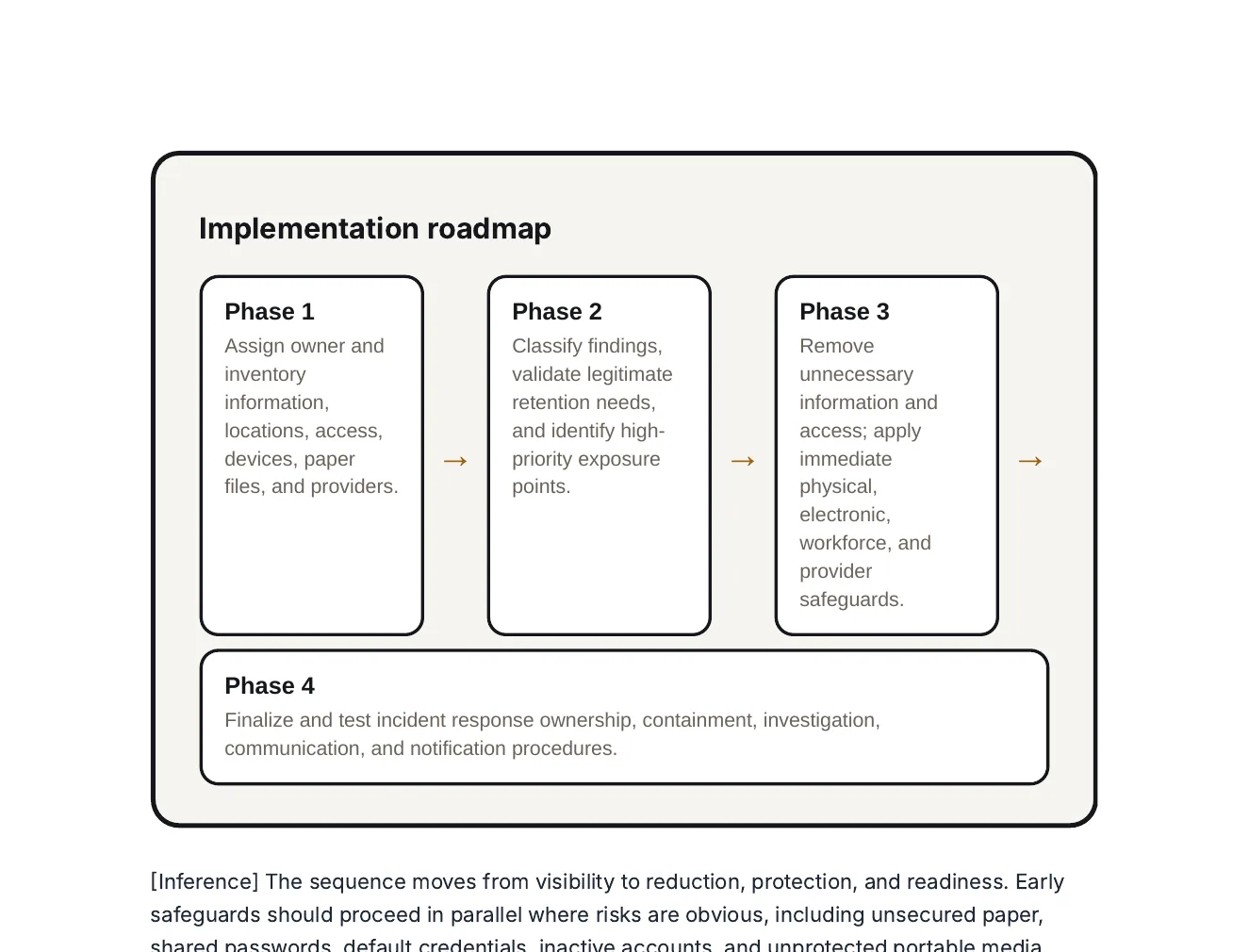
A roadmap in the same report
Four phases from an inventory to a tested incident response plan, with the risks and dependencies that could stop them on the pages around it.
What it does
Turns a business problem into a structured Consultant workflow: route, source forecast, missing inputs, analytical path, discipline scorecard, and a recommendation draft.
Why it is different
It is not just another summary flow. The runtime starts from a decision, selects the reasoning surface, and keeps facts, assumptions, inferences, and recommendations separate.
What it outputs
A decision-ready recommendation draft built from an analytical working paper. Carry the same case into a separate decision or framework artifact in Gixo Prism when you need one.
From business question to Consultant workflow
Gixo Business uses separate reasoning and delivery layers so decisions, frameworks, and recommendation drafts stay connected without collapsing into generic prose, with the decision logic and supporting framework set out inside the report.
Frame the case
Start from the business question, decision-maker, timing, context, constraints, and explicit options when available.
Choose the reasoning path
Gixo infers the decision intent, picks the decision layout, and selects a supporting framework aligned to the case shape.
Surface gaps early
Missing criteria, evidence, or alternatives become follow-up questions instead of hidden assumptions or fabricated certainty.
Generate recommendation work
Build a recommendation draft from the same case, sources, and review flow — then reuse them for a separate decision or framework artifact in Gixo Prism if you need one.
Decision guide invariants
- Options and criteria must be explicit.
- Status quo is treated as a real baseline.
- Confidence, trade-offs, and reversal conditions stay visible.
Report guide invariants
- No marketing tone or decorative persuasion.
- Facts, assumptions, and inferences are separated.
- Disclaimers and evidence gaps are first-class content.
Best-fit use cases
- Go/no-go decisions
- Vendor and market-entry choices
- Portfolio prioritization and operating model trade-offs
Learn the workflow before you open a case
Consultant is one part of Gixo Business. Use it alongside Brief Mode, Briefing Decks, decision artifacts, and framework work (Briefing Decks are made in Gixo Lumen with a Lumen plan, and decision and framework artifacts are a Gixo Prism feature, available with a Prism plan).
Advisory
AI consultant report generator
Case planning, working-paper logic, and recommendation drafting in one business workflow.
Framework
AI decision matrix generator
Compare options, weight criteria, and keep the trade-offs explicit.
Decision
AI tool for decision briefs
Generate structured decision documents with options analysis, risks, and recommendations.
Brief Mode
AI briefs for consultants
Start from checked brief work when the case needs consultant-style deliverables built from source files.
Start a Consultant workflow
Start with the business question, upload the supporting context, and use Consultant to build a recommendation draft — reuse the same case for decision work in Gixo Business, where the decision logic sits inside the report, or for standalone decision and framework work with a Gixo Prism plan.
Make something from your documentsUpdated
More from Gixo