
Criteria weighting
Document the factors that matter most, whether that is speed, cost, risk, strategic fit, reversibility, or implementation effort.
Learn how to compare options, define criteria, assign weights, calculate scores, test fragile assumptions, and document trade-offs. Then use Gixo Business to turn that decision matrix into a reviewable recommendation workflow.
What is a decision matrix? A decision matrix is a table that compares the same alternatives against the same criteria. A weighted decision matrix also assigns relative importance to each criterion, multiplies each performance score by its weight, and adds the results. The matrix makes judgment visible and reviewable; it does not make the final decision automatically.
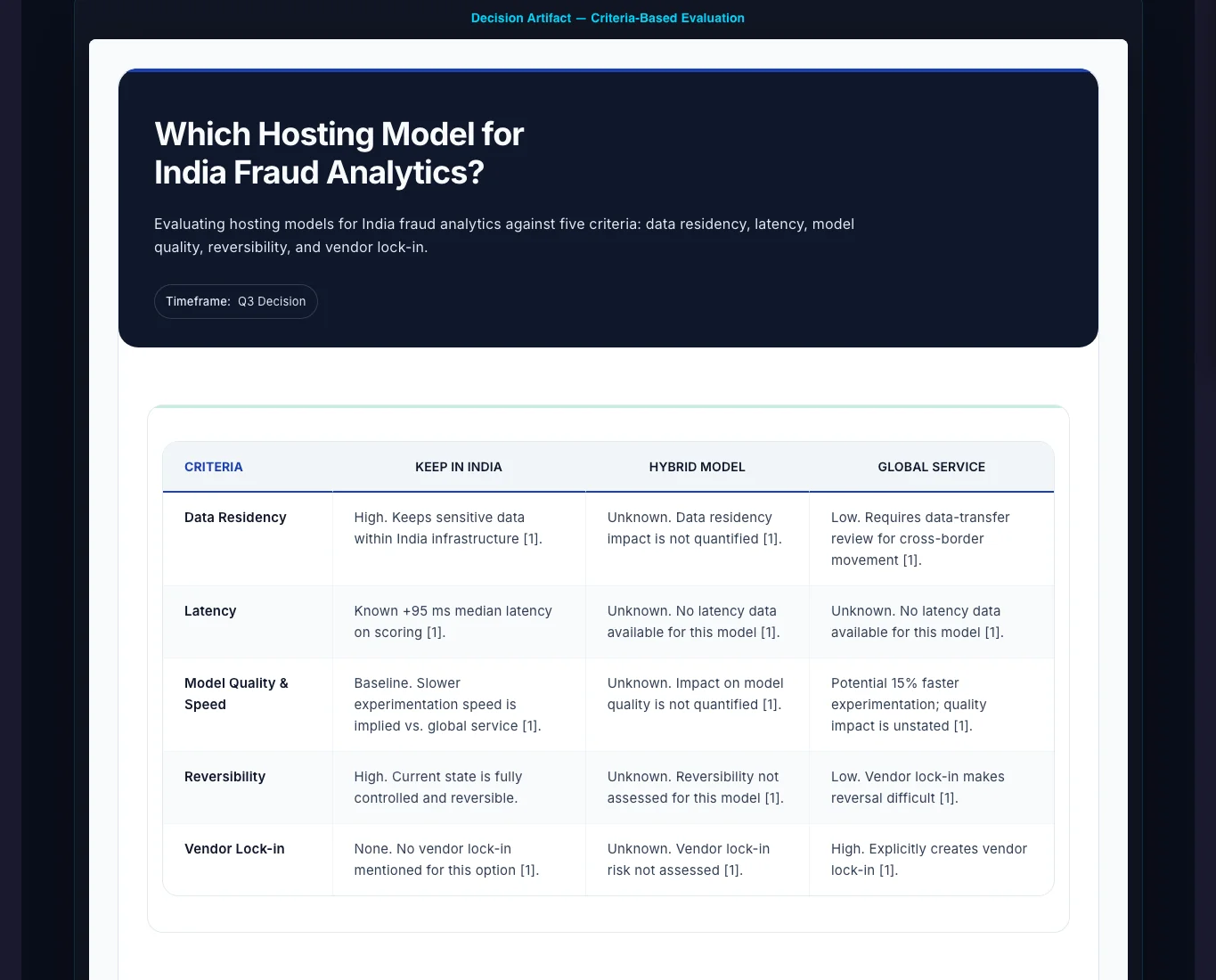
A decision matrix is useful when the options, criteria, and trade-offs need to be inspectable by other people instead of being implied inside a recommendation paragraph.
Document the factors that matter most, whether that is speed, cost, risk, strategic fit, reversibility, or implementation effort.
Compare multiple options side by side so the status quo, fallback path, and higher-risk alternatives are all part of the same evaluation surface.
Keep the matrix connected to the recommendation so readers understand not just who “won,” but what was sacrificed and what assumptions drive the outcome.
The strongest decision matrix examples involve discrete alternatives, several genuinely different criteria, and a recommendation that must remain understandable after the meeting ends.
Build a supplier or vendor decision matrix across capability, total cost, rollout risk, support, security, and contract fit without losing the rationale behind each score.
Use a software decision matrix to compare platforms or build-versus-buy alternatives across time to value, implementation effort, maintenance burden, capability, and strategic control.
Rank initiatives across expected upside, complexity, dependency risk, and organizational readiness so trade-offs stay explicit.
Compare operating cost, workforce access, customer proximity, resilience, expansion potential, and implementation constraints before committing capital.
Evaluate surveys, interviews, observation, diary studies, or experiments against validity, reach, speed, ethics, cost, and fit with the research question.
Translate role requirements or partnership objectives into consistent criteria while keeping mandatory qualifications separate from weighted preferences.
Learning how to create a decision matrix starts with process, not software. Whether you begin with a decision making matrix template or an AI decision matrix generator, move from a clear decision statement to evidence, scoring, sensitivity testing, and accountable review.
Name the choice, owner, scope, timeframe, affected stakeholders, and approval boundary. “Choose the best platform” is vague; “select a CRM for the regional sales team within the approved implementation budget” is testable.
Describe each option with the same level of detail, including services, migration, training, staffing, and timing. Include the status quo or a fallback path when it is a real choice.
Test non-negotiable requirements first: legal obligations, safety, security, deadline, interoperability, or an absolute budget ceiling. An option that fails a mandatory rule should not compensate with strengths elsewhere.
Define the factors that express the decision’s objectives. Avoid overlapping criteria such as cost, affordability, and budget impact unless each has a clearly different meaning.
Explain what 1, 3, and 5 mean for every criterion. Observable ranges—for example implementation in under three months versus more than a year—produce more consistent scores than labels such as “good” or “poor.”
Allocate importance across criteria before final scoring is visible. This limits outcome-driven weighting, where stakeholders quietly tune the model toward a preferred option.
Use financial models, demonstrations, tests, references, surveys, historical performance, contract terms, or expert review. Note the source, date, version, and confidence behind material scores.
Have evaluators score independently where practical, discuss material gaps, then multiply each agreed score by its criterion weight and verify that weights total 100 percent.
Change uncertain weights or scores within reasonable ranges. A small change that reverses the ranking means the result is fragile and needs deeper analysis.
Keep the matrix, exclusions, evidence, disagreements, scenarios, recommendation, approval conditions, and review date together so the decision can be explained and updated.
The right framework depends on the shape of the choice. A decision matrix tool is most useful when several discrete alternatives must be compared across multiple criteria; it is not a replacement for every other decision method.
| Method | Best used when | How it works | Important limitation |
|---|---|---|---|
| Simple decision matrix | Criteria genuinely have similar importance and the decision is low risk. | Score every option against the same criteria and add the scores. | Equal weighting can hide the organization’s actual priorities. |
| Weighted decision matrix | Cost, risk, capability, speed, or other criteria have different importance. | Multiply each score by the criterion weight, then add the weighted scores. | The result is only as defensible as the criteria, weights, anchors, and evidence. |
| Mandatory eligibility screen | An option must satisfy a legal, safety, security, technical, deadline, or budget requirement. | Apply pass-fail rules before weighted scoring begins. | Too many veto rules can eliminate every practical alternative. |
| Cost-benefit analysis | Material impacts can be estimated in monetary terms. | Compare expected costs and benefits over a defined period. | Qualitative, ethical, strategic, or distributional effects may resist monetization. |
| Decision tree | The choice unfolds through sequential events with uncertain outcomes. | Map branches, probabilities, consequences, and follow-on decisions. | It answers a different question from comparing fixed alternatives across criteria. |
A useful decision matrix template is more than a blank grid. A reviewable weighted decision matrix template preserves the definitions, sources, formulas, confidence, and governance needed to understand how the result was produced.
This illustrative decision matrix example compares three software options. It shows the arithmetic and the interpretation; it is not a recommendation about any real product.
| Criterion | Weight | Option A | Option B | Option C |
|---|---|---|---|---|
| Functional capability | 30% | 5 | 3 | 4 |
| Total cost of ownership | 25% | 2 | 5 | 3 |
| Implementation effort | 20% | 3 | 5 | 2 |
| Security and compliance | 15% | 4 | 3 | 5 |
| Vendor support and viability | 10% | 4 | 3 | 5 |
| Weighted total | 100% | 3.60 | 3.90 | 3.60 |
A weighted score describes the result under one set of assumptions. Sensitivity analysis tests whether the ranking survives reasonable changes to uncertain weights, scores, costs, timelines, or scenarios.
Move a disputed weight or uncertain score through a plausible range and recalculate. Record the point at which the ranking changes rather than testing only an extreme case.
Test coherent futures such as rapid growth, budget reduction, regulation change, supply disruption, or delayed implementation. An option that ranks second in the baseline may be more resilient across scenarios.
An option can have a high performance score supported by weak evidence. Show confidence beside the score and require mitigation for high-impact, low-confidence assumptions instead of hiding uncertainty inside a precise number.
The structure is simple — options as rows, weighted criteria as columns, scored evidence in the cells — but the rigor comes from how you weight, score, and vet what goes in. Decision matrix criteria examples include total cost of ownership, implementation effort, security, reliability, strategic fit, accessibility, resilience, and customer impact, provided each term is defined for the decision at hand.
Not every factor matters equally. Set a weight on each criterion before scoring — a factor that is twice as important to the decision carries twice the weight — so the result reflects strategy, not just an average. A practical range is five to seven criteria; fewer oversimplifies, and many more and everything looks average.
Behind each cell is evidence of differing strength. A rough ladder: 5 = a controlled test or peer-reviewed study; 4 = a credible analyst report; 3 = an internal report or small survey; 2 = anecdotal team feedback; 1 = an unverified opinion. Scoring strength keeps a confident guess from outweighing a measured fact.
Before evidence enters the matrix, check it: how current it is, how relevant to this decision, who produced it and why, and whether it can be corroborated. Conflicting evidence is a signal to investigate, not a number to average away.
Behind every cell in a decision matrix is evidence of differing strength. Scoring that strength directly — instead of just scoring the option — keeps a confident guess from outweighing a measured fact.
| Score | Evidence type |
|---|---|
| 5 | A controlled test or peer-reviewed study |
| 4 | A credible analyst report |
| 3 | An internal report or small survey |
| 2 | Anecdotal team feedback |
| 1 | An unverified opinion |
A standard weighted model assumes that criteria, scores, and arithmetic behave cleanly. Higher-stakes decisions need explicit checks for measurement differences, interaction effects, governance, thresholds, and model instability.
Cost may be measured in currency, delivery in months, reliability as a percentage, and emissions in kilograms. Convert raw values using documented target ranges or anchored scores. Avoid relative formulas that award a 5 merely because an option is best in the current set.
Lower cost may reduce support; stronger security may increase implementation effort; more capability may increase training needs. Combine overlapping criteria, document dependencies, or test complete scenarios when a simple additive model would double count the same effect.
State who defines weights, who scores each criterion, who validates the evidence, and who approves the result. Average scores can conceal disagreement; forced consensus can amplify hierarchy. Preserve material dissent when it affects the recommendation.
A strong total can hide a score of 1 on cybersecurity, safety, accessibility, or resilience. Apply a documented minimum score or veto rule only to risks that truly cannot be offset by strengths elsewhere.
If adding or removing an option changes the order of existing choices, inspect the normalization method and scoring anchors. Stable anchors tied to external requirements reduce dependence on the current comparison set.
Supplier, portfolio, and technology decisions can change as prices, risks, regulations, or performance evidence change. Keep prior versions and define a review trigger or cadence instead of treating the first matrix as permanent.
Most failures are not arithmetic failures. They come from vague definitions, hidden constraints, overlapping criteria, weak evidence, or changing the rules after the preferred result becomes visible.
The leading score describes the best fit under the stated model. Approval may still require financial validation, legal or technical review, stakeholder consultation, a pilot, or explicit risk acceptance.
Replace “best,” “modern,” “easy,” or “high quality” with observable indicators such as task completion, training time, standards compatibility, service levels, or update frequency.
Cost, affordability, and budget impact may represent the same concern. Quality, reliability, and performance may overlap. Define boundaries before scoring so one theme does not gain accidental extra weight.
Weights describe how much a criterion matters. Scores describe how an option performs. A criterion does not deserve a higher weight because a favored option performs well on it.
A genuine modeling error can justify a revision, but document the reason and recalculate every option consistently. Quietly tuning weights or anchors to favor one result undermines the decision record.
Record ranges, confidence, scenarios, or assumptions when costs, timelines, demand, or performance are uncertain. A precise-looking score should not disguise weak evidence.
Updated