
Skip to content
Sign In Try Free
Workflow-specific products Content, decks, briefs, proposals, legal, and sales each have a clearer buying path.
Review before delivery Draft, edit, collaborate, approve, and export in the same workspace.
Security + procurement path Security policy, support, and Azure Marketplace buying are public.

AI Briefs for Consultants — Deliver Sharper Client Work in Half the Time

Accelerate your consulting deliverables with AI-generated business briefs. Every brief passes a multi-stage pipeline with brand compliance, and when you upload sources that pipeline also checks the figures in its paragraphs and lists against them and cites those files — so your client deliverables start polished and grounded in your sources, ready for your review.

Generate Client Brief View pricing

An AI brief for consultants is a client-ready market analysis, competitive intelligence, or strategy brief generated by AI and run through a multi-stage pipeline — including Brand Dictionary term checks and, when you upload sources, number checks and automatic inline citations — before it reaches you. Gixo builds these briefs from 59 curated business recipes spanning strategy, operations, finance, marketing, and compliance, using a block-based editor with 20+ semantic blocks (KPIs, checklists, steps, pros/cons). Evidence-oriented briefs can contain inline [1], [2] references to uploaded files and a Sources section. The model can omit markers, so inspect the cited passage and add missing references before delivery. That makes the review faster; it does not remove it. The source forecast and verification gate are review aids, not independent fact-checking. Reviewers must confirm important claims, figures, assumptions, and recommendations against authoritative sources.
6+Pipeline Stages
59Business Recipes
20+Semantic Blocks
PDFClient Ready
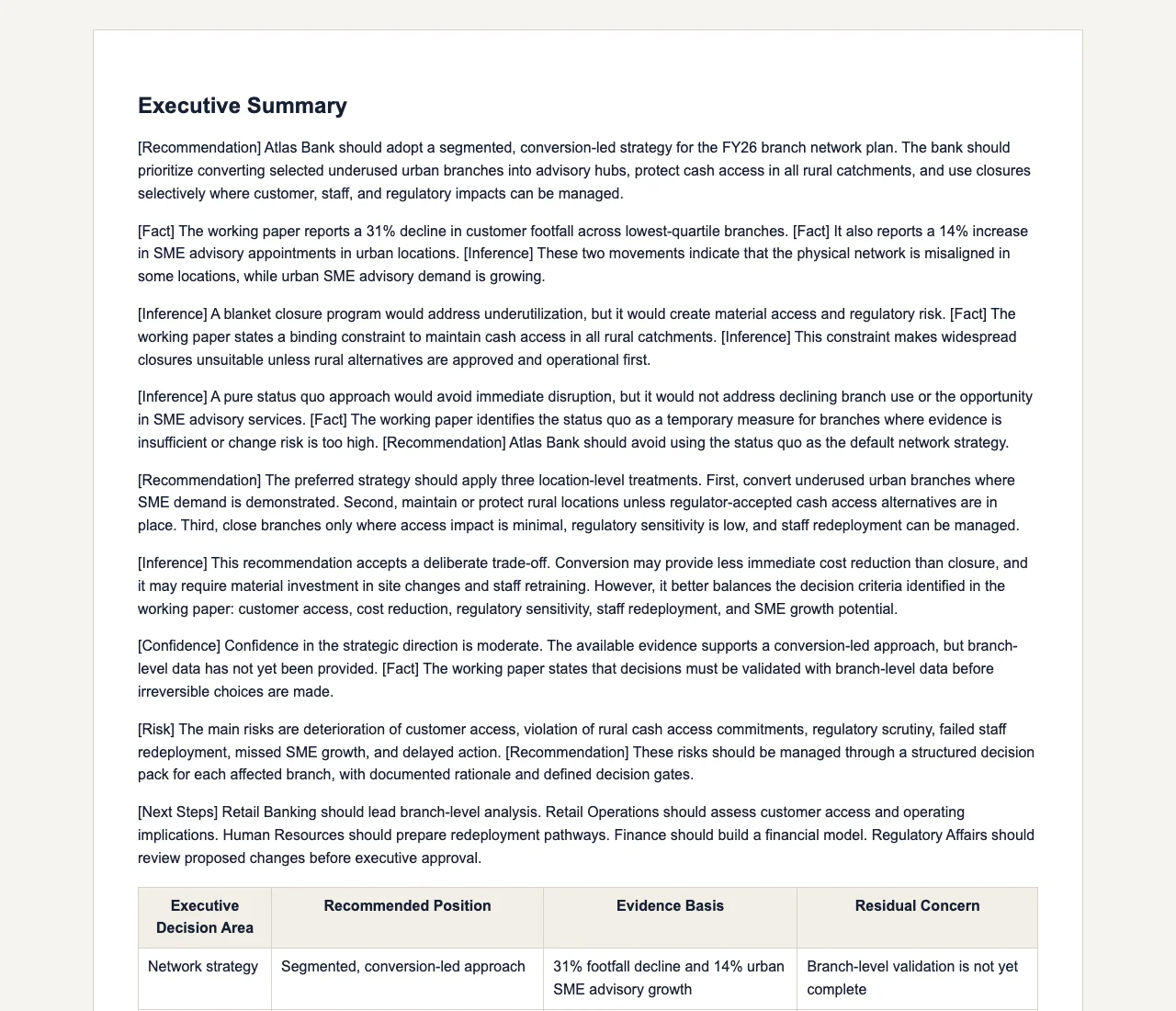
Gixo Business workspace showing a real Consultant report on bank branch strategy, with labeled Fact / Inference / Recommendation reasoning
A real Gixo Business workspace — a Consultant report on bank branch strategy, with labeled Fact / Inference / Recommendation reasoning. Generated from uploaded source material for review, not a final or certified recommendation.

What Is an AI Brief for Consultants?

Deliver more value to more clients. Every brief passes a multi-stage pipeline, with number checks whenever it has sources, and lands in a block-based editor where you refine with inline AI tools.

Number Checks

Your figures are checked against the source documents you uploaded before delivery. Market sizes, growth rates, and financial figures are cross-checked against your sources so your client deliverables stay traceable.

Brand Compliance Checking

Add your client's or your firm's preferred and banned terms to your Brand Dictionary. After generation, Gixo replaces banned terms with your preferred wording across the brief; it is a whole-word term check, so review tone and formatting against client expectations yourself before you deliver.

Block-Based Editor

Structure deliverables with 20+ semantic blocks — KPIs, checklists, steps, pros/cons, CTAs, and more. Consistent formatting applied across every brief — headings, tables, callouts and citations in the same places each time.

59 Curated Business Recipes

Choose from 59 pre-built recipes spanning 6 domains — strategy, operations, finance, marketing, and compliance. Serve clients across industries without needing specialist teams for each domain.

Inline AI Editing

Refine any section with Quick AI (6 instant actions like expand, shorten, and rephrase) or Power Edit for full AI dialog. Polish deliverables without leaving the editor.

Real-Time Collaboration

Work on briefs simultaneously with team members using real-time multi-user editing with remote cursors. Co-author client deliverables across offices without version conflicts.

Why Consultants Need More Than Just AI-Generated Text

Generic AI tools produce plausible-sounding text that falls apart under client scrutiny. A market size figure that cannot be traced to a source, a growth rate that does not match the cited report, or formatting that ignores the client's brand guidelines — any of these erodes trust. Gixo addresses this with a multi-stage pipeline: drafting, word-count and structure checks, your Brand Dictionary terms, number repair when the brief has sources, readability optimization, a chart-data check, citations and a Sources section when you upload files, a normative references appendix when you name rules or standards, and an evidence check after generation. A brief written from the source documents you upload reaches your editor with the figures in its paragraphs and lists already checked against them, and the claims it takes from them linked to inline [1], [2] citations with a full Sources section. That is the difference between output you have to chase sources for and output whose cited claims already point to their sources — which is where your review starts, not a substitute for it.

From Research Tool to Competitive Advantage

The most forward-thinking consulting practices treat AI-generated briefs not as a shortcut but as a force multiplier. With 59 curated business recipes spanning strategy, operations, finance, marketing, and compliance, a single consultant can serve clients across domains without specialist teams. The block-based editor with 20+ semantic blocks — KPIs, checklists, steps, pros/cons — gives deliverables the structured formatting clients expect from top firms. Add inline AI editing with Quick AI for rapid adjustments and Power Edit for deeper rewrites, real-time collaboration so multiple team members can co-author simultaneously, and saved workspaces to reuse source documents across engagements. The firms that adopt these tools early are positioning themselves to serve more clients at higher margins.

How Consultants Use Gixo

1
Pick a recipe and upload sources

Choose from 59 business recipes across 6 domains. Upload client documents or industry reports into a saved workspace so you can reuse them across engagements.

2
Multi-stage generation

Your brief passes through word-count and structure checks, Brand Dictionary terms, readability optimization, and a chart-data check automatically, plus number checks and citation linking when you upload sources. Figures in paragraphs and lists are cross-checked against your sources; the claims taken from them get inline references.

3
Refine in the block editor

Structure your deliverable with 20+ semantic blocks. Use Quick AI for instant edits or Power Edit for deeper rewrites. Collaborate with colleagues in real time with remote cursors.

4
Export and deliver

Export to PDF with your branding. The inline citations and checked numbers (when you uploaded sources) and your Brand Dictionary terminology mean your deliverable is ready to review and deliver.

How Does an AI Brief Compare to Your Current Workflow?

PhaseWith Gixo AITraditional Workflow
Initial researchMinutes1-2 weeks
Number checksChecked against your sourcesManual spot-checks
CitationsInline [1],[2] + Sources sectionManual sourcing
Brand compliancePost-generation Brand Dictionary term checkingManual style review
Document structure20+ semantic blocksHours of formatting
Editing and revisionQuick AI + Power EditDays of rewriting
Team collaborationReal-time with remote cursorsSequential reviews
Domain coverage59 recipes, 6 domainsHire specialists

Where Do Consultants Get the Most Value from AI Briefs?

From boutique advisories to Big Four engagement teams, AI briefs fit into every consulting workflow.

Strategy Consulting
Produce market entry analyses and growth strategy briefs with your figures checked against your sources and inline citations throughout. Use KPI blocks, pros/cons blocks, and step blocks to structure findings the way top firms present them.
Due Diligence Support
Generate preliminary market assessments where the multi-stage pipeline checks your figures against the source documents you uploaded. Automatic citations create an evidence trail that deal teams can follow back to source documents during deeper analysis.
Boutique and Solo Practices
Access 59 business recipes across 6 domains to serve clients in strategy, operations, finance, marketing, and compliance — without specialist teams. Save source documents in workspaces to reuse across engagements and build institutional knowledge.
Proposal Development
Include cited, source-grounded market analyses in your RFP responses. Brand compliance checking applies your Brand Dictionary's preferred and banned terms to each deliverable. Real-time collaboration lets multiple partners co-author the proposal simultaneously.

Get Better Results from Every Brief

Trust but verify. The number checks stage checks your figures against the source documents you uploaded. Before sending to clients, spot-check the inline citations to confirm the data trail. Checking figures against your sources saves hours of manual fact-checking.
Set up brand compliance before you generate. Add the terms your firm or client prefers and bans to your Brand Dictionary so the brand compliance stage swaps banned terms automatically. The dictionary holds one set of terms for your account, so firms managing multiple concurrent engagements with different brand standards should update it between engagements and still review tone themselves.
Reuse sources with saved workspaces. Upload a client's key documents once and reuse that workspace across multiple briefs for the same engagement. This builds consistency and reduces setup time as the engagement deepens.
Polish with inline AI editing. Use Quick AI to expand thin sections, shorten verbose paragraphs, or rephrase for the client's preferred tone. For deeper changes, open Power Edit to have a full AI dialog about the content direction.

Frequently Asked Questions

Will clients know I used AI?
The AI generates a starting framework that passes through several pipeline stages. You refine the output in the block-based editor, add proprietary insights, and apply your firm's brand compliance standards. The final deliverable reflects your consulting value — the AI accelerates the analytical foundation.
How do number checks work?
Where a brief has sources - files you upload or connect, pages you add, or the search results web research drew on - a repair stage compares the figures in the paragraphs and lists of the draft, not its tables, with the numbers in those sources, and rewrites any sentence whose figure it cannot find there, substituting the source value or dropping the claim. That is reconciliation against your own sources, not an independent fact-check, and it is silent: nothing is marked up in the delivered brief, and a sentence it cannot repair, or a draft it cannot finish, keeps its original figures. For a brief written from sources you upload, the Evidence tab under Checks in the brief editor lists up to five sentences whose wording or figures it could not match to those sources, for you to check. It matches wording and exact figures, not meaning: a faithful paraphrase, or $8.1M where the source says 8,100,000, can fail to match while being true, so an unmatched sentence is a place to look, not an error, and a matched one is not confirmed either, because this is a comparison with your own sources, not a fact-check. It reads only part of a long source (24 passages of up to 1,600 characters), cannot see web research, so for a brief with web research turned on the list is advisory, and it checks the draft as generated, not your later edits. Treat every figure as needing review until you have confirmed it at the source. A wrong figure in a source passes both checks, which is why the review stays yours.
What is brand compliance checking?
Add your firm's or client's preferred and banned terms to your Brand Dictionary, and after generation Gixo replaces each banned term in the brief with your preferred wording, or removes it. It is a whole-word terminology check, not a review of tone or formatting, so a manual review pass for style still belongs to you.
How do the automatic citations work?
Upload source files and Gixo writes the brief to cite the claims and figures it takes from them, with numbered markers such as [1] and [2] and a Sources section listing those files. The writing model places the markers, so a sentence can go uncited: the Evidence tab in the brief editor lists up to five sentences that have none, for you to check, and adds nothing to the brief itself. A brief written without uploaded files has nothing to cite. Marketing and customer-facing formats such as social posts, press notes and email campaigns are written from your files without visible citations.
Is this useful for solo consultants?
Especially for solo consultants. With 59 business recipes across 6 domains and saved workspaces to reuse source documents, you get the analytical capacity and domain coverage of a larger team without the overhead.
What about confidentiality with client data?
Generate briefs using industry and market topics without entering confidential client data. Add client-specific information after generation in the block editor within your secure environment. Saved workspaces keep source documents organized per engagement.
Can multiple team members work on a brief simultaneously?
Yes. Real-time collaboration with remote cursors lets multiple consultants co-author a deliverable simultaneously. Combined with inline AI editing tools — Quick AI for fast adjustments and Power Edit for deeper rewrites — your team can produce polished output faster than sequential review cycles.
How does this compare to hiring junior analysts?
The multi-stage pipeline handles drafting, number checks and citation linking when you upload sources, and the formatting that junior analysts typically perform. Your team focuses on primary research, client interviews, and strategic synthesis. The block editor and inline AI tools make refinement faster than building from scratch.
Can I generate briefs for industries I have no prior experience in?
Yes. Choose from 59 curated recipes spanning strategy, operations, finance, marketing, and compliance. Generate preliminary industry analyses with figures checked against your sources and citations, then refine with your strategic perspective using the inline AI editing tools.
What is an AI brief for consultants?
It is a structured market analysis, competitive intelligence, or strategy brief generated by AI and passed through a multi-stage pipeline (drafting, word-count and structure checks, your Brand Dictionary terms, number repair when the brief has sources, readability optimization, a chart-data check, citations and a Sources section when you upload files, a normative references appendix when you name rules or standards, and an evidence check after generation). The figures in its paragraphs and lists are checked against the source documents you uploaded and the claims it takes from them carry inline [1], [2] citations with a full Sources section, then it lands in a block-based editor for you to refine before client delivery.
What makes Gixo's AI briefs different from generic AI-generated text?
Generic AI tools produce plausible-sounding text with untraceable figures. Gixo's briefs go through number checks (your figures checked against the source documents you uploaded) and brand compliance checking (your Brand Dictionary's preferred and banned terms applied to the draft, not a review of tone or formatting) before you ever see the draft, plus inline citations and a Sources section so the claims taken from your files have a traceable evidence trail.

Accelerate Your Consulting Deliverables

Multi-stage pipeline. Number checks against your sources. Automatic citations from your files. 59 business recipes.

View pricing

Updated