
AI Visuals for Consultants
Build client-ready frameworks, process diagrams, and charts for your decks — fast and on-brand. Gixo Prism's deterministic makers preserve the values you supply, and optional source text adds a visible numeric-verification verdict before client review.
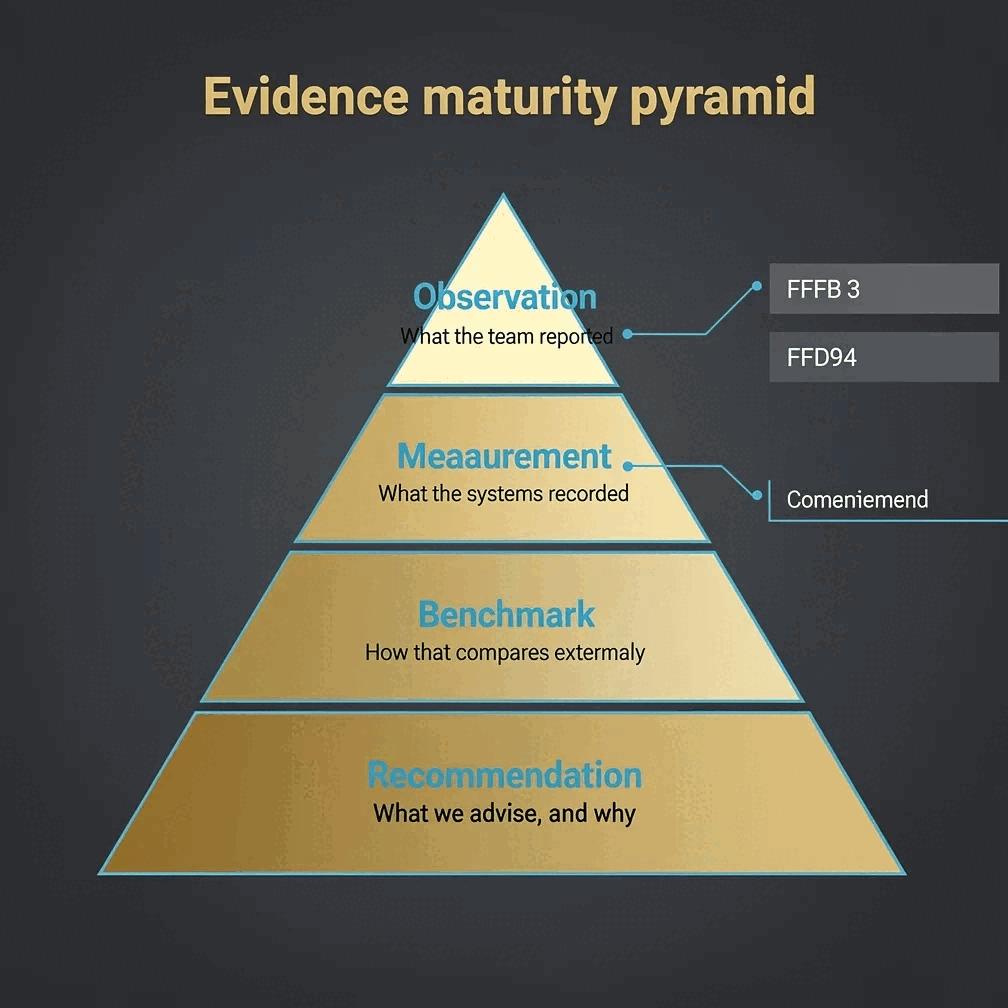
Gixo Prism is a deterministic visual maker for consultants: it renders client-ready frameworks, process diagrams, and data-exact charts to SVG from your own numbers, so the value you enter is the value the client sees. Unlike image-only AI tools (ChatGPT, DALL·E, Midjourney), which redraw charts and labels as pixels and can garble or invent figures, Prism computes every chart, diagram, framework, and card from your data with no model in the number path. It covers 10 framework/diagram layouts and 16 chart types, applies your firm's brand palette across every visual, and exports as HTML, SVG, PNG, PDF, or PPTX you can drop into a deck. The makers need no account to render, preview or take a badged copy; a 14-day free trial with no credit card, or a paid plan, removes the badge. From there, Gixo Prism starts at $10/month for Starter (one seat) and rises through Professional, Business and Enterprise; the Brand Kit, which applies your own colours and typeface, is a Business-plan feature.
What visuals does a consulting deck actually need? Frameworks, process diagrams, and charts
Frameworks, matrices, process flows, and exact charts — the workhorse visuals behind a client recommendation. Prism's deterministic makers render them text-perfect, every time.
Build a prioritization matrix, a pyramid, or pillars to structure your recommendation. 11 diagram geometries cover the frameworks consultants reach for most.
Turn steps into a clean process, cycle, tree, funnel, Venn, concentric, stack, or graph diagram — the structure visuals an engagement runs on.
Paste your analysis and get a bar, line, area, pie, donut, or scatter chart rendered to SVG. The numbers are correct because they're never redrawn as pixels.
Map a decision tree or a swimlane across owners and Prism lays it out with exact labels and consistent spacing — readable at a glance in the room.
Turn the one number that matters — a savings figure, a benchmark, a key finding — into a sharp stat, quote, callout, or definition card for the executive summary.
The makers are deterministic: the same input always produces the same exact output. No garbled labels, no invented figures — nothing that puts your credibility at risk.
Prism applies your brand palette across every chart, framework, and diagram, so a deck full of visuals looks like one firm produced it — not five different tools.
A number changed overnight? Edit the data, labels, or layout and the makers re-render exactly. Export framework and chart visuals as clean HTML/SVG into your deck.
Shape a topic or a draft into a structured, content-backed infographic for a one-pager or leave-behind, then edit and export it as PNG or HTML.
How do you go from analysis to a client-ready slide?
Four steps from your numbers to a framework or chart you can drop into the deck.
Paste your figures, a CSV, or the steps of a process. Sign in to use the makers.
Choose a matrix, pyramid, process, decision flow, swimlane, or one of 16 exact chart types — whatever carries the recommendation.
Adjust labels and layout. Prism keeps every value exact and applies your brand palette so the slide matches the rest of the deck.
Take the framework or chart as clean HTML/SVG into your presentation, or export an infographic one-pager as PNG or HTML.
Why do AI visuals for consultants have to be exact?
A wrong number in a client deck isn't a typo — it's a credibility hit. Here's the line between visuals you can stake an engagement on and ones you can't.
- Image-only AI tools (ChatGPT, DALL·E, Midjourney) draw charts and labels as pixels. They garble figures and invent numbers that look plausible — exactly the failure a consultant cannot afford in front of a client.
- Gixo Prism's makers are deterministic. Charts, diagrams, frameworks, and cards are computed from your data and rendered to SVG, so the value you enter is the value on the slide — every time, with no AI in the number path.
- Frameworks and matrices are first-class. 11 geometries — process, cycle, pyramid, funnel, tree, pillars, matrix, Venn, concentric, stack, graph — cover the structure visuals consulting decks lean on, with exact labels and even spacing.
- Edits stay exact. When a figure changes the night before a readout, you update the data and the maker re-renders precisely — no manual redraw, no drift between versions.
- One firm, one look. Brand-palette governance keeps a deck full of visuals consistent, so the client sees a coherent point of view, not a patchwork of tools.
- Honest trade-off. Dedicated design suites like Canva, Venngage, Piktochart, and Visme still win on template breadth, polish, and asset libraries. Prism's edge is exactness and brand control — pair it with your design tool when you need decorative range.
What does Gixo Prism include for consulting visuals, and how does it compare?
For consulting visuals, Gixo Prism includes 11 framework and diagram layouts, 16 chart types built straight from a CSV, deterministic rendering so every number stays exact, brand-palette governance across the whole deck, and export as HTML, SVG, PNG, PDF, or PPTX — from the $10/month Starter plan, after a 14-day free trial with no card.
| What matters in a client deck | Gixo Prism | Image-only AI | Design tools |
|---|---|---|---|
| Numbers stay exact | Yes — deterministic | No — redrawn | Manual entry |
| Frameworks & matrices | 11 layouts | No | Manual |
| Charts from your analysis | 6 types, from a CSV | No | Some |
| On-brand across the deck | Palette-governed | No | Manual |
| Editable before the meeting | Yes — re-renders exactly | No | Yes |
| Template breadth / polish | Focused | N/A | Extensive |
| Price | $10/month, 14-day free trial, no card | — | — |
| Best for | Frameworks & charts where the data must be right | Illustration & mood | Marketing design |
Frequently Asked Questions
Explore the Prism visual toolkit
Updated