
AI Diagram Generator
Describe a process or paste your steps and get a clean, editable diagram from text. Gixo Prism lays out the shape — process, cycle, matrix, funnel, and more — and keeps every label exactly as you wrote it. No redrawn, garbled text. Edit the boxes, apply your brand, and export.
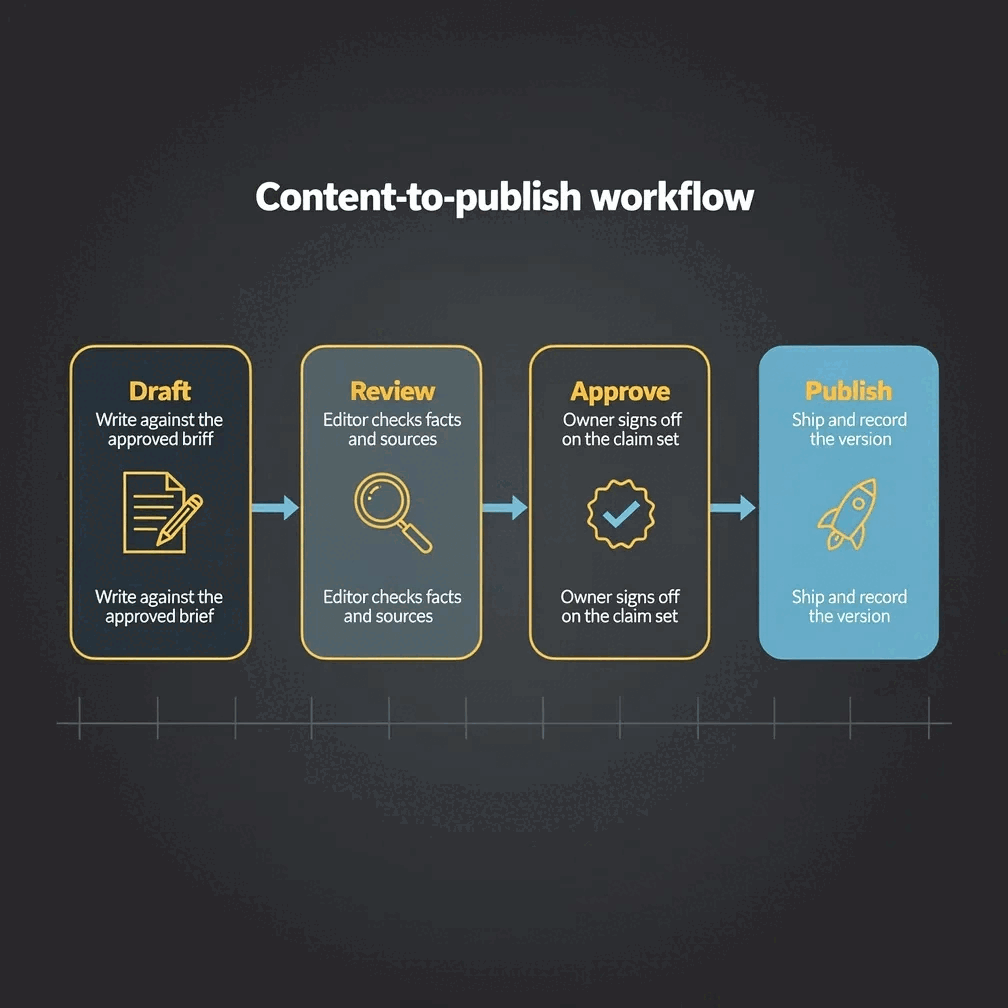
An AI diagram generator turns a text description or a list of steps into a structured diagram automatically. Gixo Prism reads your structure, lays out one of 11 geometries — process, cycle, pyramid, funnel, tree, pillars, matrix, Venn, concentric, stack, or graph — and places your labels exactly, instead of drawing the diagram as an AI image where the text can come out garbled. It's editable after generation and exports as clean, self-contained HTML/SVG.
What does Gixo Prism's AI diagram generator include?
Gixo Prism's AI diagram generator includes 11 diagram geometries, text-to-diagram generation with verbatim labels, palette-governed brand styling, full editing after generation, and clean HTML/SVG export — from the $10/month Starter plan, after a 14-day free trial with no card.
| What matters | Gixo Prism | Image-only AI | Design tools |
|---|---|---|---|
| Labels stay exact | Yes — verbatim | No — redrawn | Manual entry |
| Diagram from text | Yes | Picture only | Manual |
| Layouts to choose from | 11 geometries | N/A | Many shapes |
| On-brand across a set | Palette-governed | No | Manual |
| Editable after generating | Yes | No | Yes |
| Export format | Clean HTML/SVG | N/A | Varies |
| Price | $10/month, 14-day free trial, no card | — | — |
What is an AI diagram generator, and which diagram types does it make?
Prism's diagram maker is deterministic: you describe the structure, it draws the layout, and your labels render exactly — never as an AI image that garbles the words.
Pick the shape that fits the idea: process, cycle, pyramid, funnel, tree, pillars, matrix, Venn, concentric, stack, or graph.
Describe a process or paste a numbered list of steps. Prism reads the structure and lays out the diagram for you.
Your text is placed verbatim into each node. The word you typed is the word that appears — no rephrasing, no garbling.
Rename a box, add a step, switch the geometry, and the diagram re-renders cleanly with consistent spacing every time.
Prism applies your brand palette to the diagram, so it matches your charts, cards, and the rest of your deck.
Export the diagram as self-contained HTML/SVG and drop it into a slide, doc, or page — crisp at any size.
Need branching logic or lanes? The flowchart maker handles decision flows and swimlanes with the same exact-label guarantee.
Prism also makes data-exact charts and stat/quote/callout cards, so a whole visual set stays consistent and correct.
The same description always produces the same diagram. There is no AI image step to invent boxes or scramble your text.
How do you make a diagram from text with AI?
From a description to a finished, on-brand diagram in four steps.
Type the process or paste your steps — "onboarding: invite, set up, verify, launch" or a numbered list.
Choose process, cycle, pyramid, funnel, tree, pillars, matrix, Venn, concentric, stack, or graph — whichever fits the idea.
Rename boxes, add or reorder steps, and Prism applies your brand palette while keeping every label exact.
Take the diagram as clean HTML/SVG into your slide, document, or web page.
Why does a deterministic AI diagram generator matter?
Three ways teams turn text into diagrams today — and what each is actually good at.
- Image-only AI tools (ChatGPT, DALL·E, Midjourney) can sketch a diagram-like picture, but they draw the labels as pixels — so boxes come out with misspelled or invented text. Fine for a concept image, not for a diagram people will read.
- Design tools (Canva, Venngage, Visme, Lucidchart) give you a canvas and shapes, with strong template breadth and polish. But you place every box and retype every label yourself, and matching your brand across a set is manual work.
- Gixo Prism sits in between: you describe the structure in text, it lays out one of 11 geometries deterministically, your labels render exactly, and your brand palette is applied automatically. The trade-off is fewer decorative templates than a dedicated diagramming suite.
The 11 geometries cover the shapes most decks actually need: process and cycle for steps and loops, pyramid and funnel for hierarchy and narrowing stages, tree and pillars for breakdowns, matrix for two-axis quadrants, and Venn, concentric, and stack for overlaps, nesting, and layered models, plus graph for explicit node networks. For branching logic or lanes, the flowchart maker adds decision-flow and swimlane modes.
| What matters | Gixo Prism | Image-only AI | Design tools |
|---|---|---|---|
| Labels stay exact | Yes — verbatim | No — redrawn | Manual entry |
| Diagram from text | Yes | Picture only | Manual |
| Layouts to choose from | 11 geometries | N/A | Many shapes |
| On-brand across a set | Palette-governed | No | Manual |
| Template breadth / polish | Focused | N/A | Extensive |
| Editable after generating | Yes | No | Yes |
| Best for | Diagrams where the labels must be right | Concept imagery | Freeform diagramming |
Tree diagram maker and block diagram maker use cases
Choose Prism's tree geometry when you need a tree diagram maker for a hierarchy or breakdown: start with the parent idea, add its branches, and keep the labels short enough to scan. For decision paths with branching questions, use the dedicated flowchart maker instead.
For a simple block diagram maker job, use the process layout to place named blocks in sequence, the pillars layout for parallel components, or the stack layout for layers. Prism is designed for structured explanatory blocks with exact labels; it is not an electrical schematic or freeform engineering-CAD tool.
Frequently Asked Questions
Explore the Prism visual toolkit
Updated