
AI Chart Maker
Paste a CSV or a few numbers and get a clean, data-exact chart in seconds. Gixo Prism's chart maker is deterministic, not an image model — the number you put in is the number that comes out, never a garbled AI value. Bar, line, area, pie, donut, and scatter, rendered to crisp SVG and ready to edit.
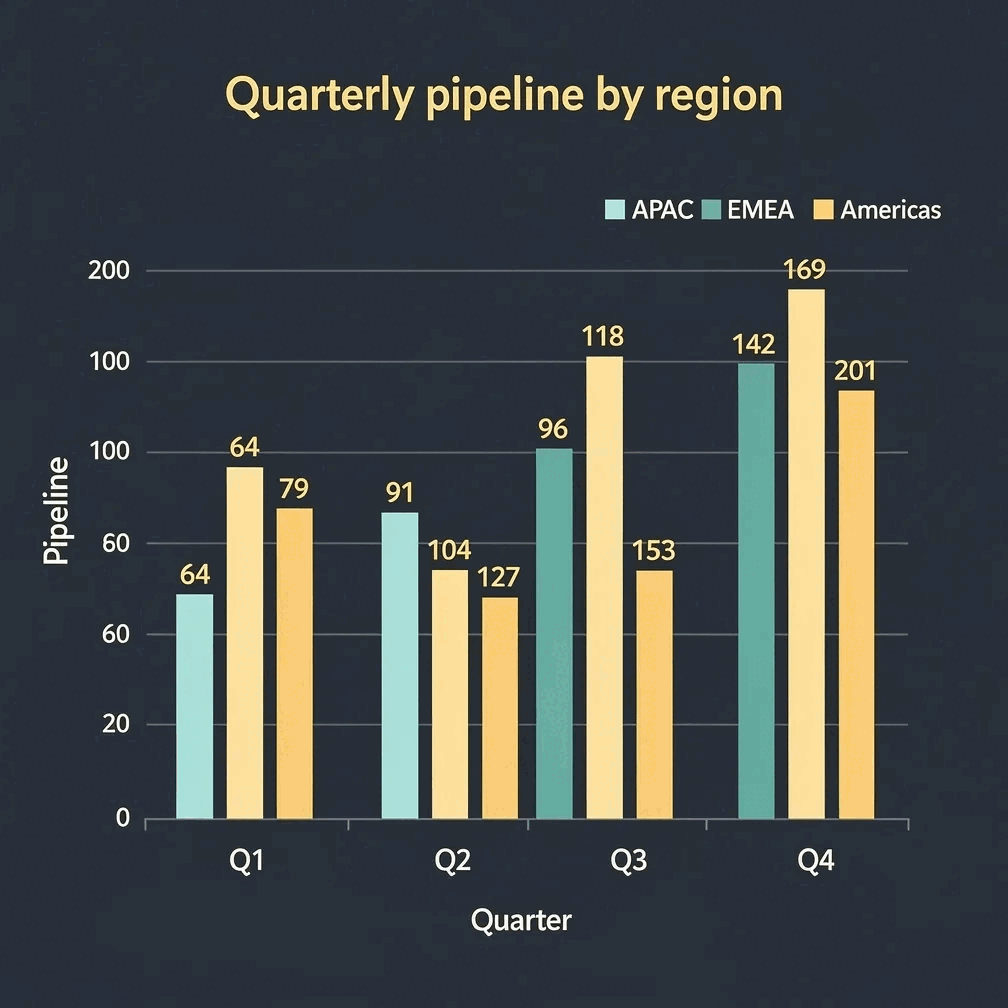
An AI chart maker turns a pasted table or Excel worksheet into a finished chart without manual plotting. Gixo Prism's chart maker is deterministic rather than an image model, so the value you enter is the value rendered to SVG — no AI step redraws or garbles a digit. It covers 16 chart types (bar in three variants, line, area, pie, donut, scatter, radar, waterfall, funnel, Gantt, combo, heatmap, treemap and symbol map), handles up to 8 categories by 4 series per chart, applies your brand palette automatically, and exports as HTML, SVG, PNG, PDF, or PPTX.
A chart maker that gets the numbers right
Prism renders your data deterministically — same input, same exact chart, every time. No AI image step where digits get redrawn and garbled.
Drop in a CSV or type your numbers and labels. Prism reads the data straight into a chart — no manual plotting, no re-keying.
Bar, line, area, pie, donut, and scatter — the workhorse types that cover most business and report charts. Pick the one that fits the point.
The maker is deterministic — no AI in the loop. The value you enter is rendered to SVG exactly, so a chart never invents or rounds your figures.
Compare several series at once — practical up to about 8 categories by 4 series, which keeps a chart readable instead of crowded.
Change a number, a label, or the chart type and Prism redraws instantly with the same fidelity. Edit as many times as you like.
Prism applies your brand palette across every chart, so a set of charts in one report looks like it came from one team.
Export each chart as self-contained, scalable HTML/SVG you can drop into a deck, doc, or web page — or as PNG, PDF, or PPTX. Sharp at any size.
The same exact-by-construction approach powers Prism's diagram, flowchart, and card makers — so a whole visual set stays consistent.
The chart maker runs inside Gixo Prism. Start a 14-day trial with no credit card — card at the gate, not the door.
How to make a chart with the AI chart maker
From raw numbers to a finished, on-brand chart in four steps.
Drop in a CSV or type your categories, labels, and values. Prism reads them in exactly as written.
Choose among grouped, horizontal or stacked bars, line, area, pie, donut, scatter, radar, waterfall, or Gantt — whichever fits the relationship you're showing.
Tweak labels, swap the chart type, or adjust series. Prism keeps every value exact and applies your brand palette.
Take the chart as clean, scalable HTML/SVG into your deck, doc, or page — sharp at any size, with the data intact.
Why a deterministic AI chart maker beats an image model
When the numbers have to be right, how the chart is built matters more than how it's prompted.
- The wedge is determinism. Prism's chart maker renders your data with code, not an image model. The value you enter is the value drawn to SVG — there is no step where a model redraws digits and quietly garbles them.
- The 16 chart types cover comparison, trend, composition, relationship, bridge, and schedule work. They are grouped bar, horizontal bar, stacked bar, line, area, pie, donut, scatter, radar, waterfall, funnel, Gantt, bar + line combo, heatmap, treemap, and symbol map.
- The honest cap is about 8 categories by 4 series. Beyond that a chart gets crowded and hard to read; Prism is built for clear, presentation-ready charts rather than dense data dumps.
- Charts export as HTML, SVG, PNG, PDF, or PPTX. HTML/SVG is scalable and stays crisp at any size; chart PPTX comes through as editable vector shapes rather than a flattened image. Export needs an active trial or paid plan.
- Image-only AI tools (ChatGPT, DALL·E, Midjourney) are great for illustration and mood, but they draw charts as pixels — labels come out garbled and figures get invented. Not safe when the data has to be right.
- Spreadsheets and design tools (Excel, Sheets, Canva, Visme) give you full control and far more chart types, but you build and check every chart yourself, and staying on-brand across a batch is manual. Prism trades breadth for exactness and brand governance by default.
| What matters | Gixo Prism | Image-only AI | Spreadsheets |
|---|---|---|---|
| Numbers stay exact | Yes — deterministic | No — redrawn | Yes |
| Chart from a CSV | Yes | No | Yes |
| Chart types | 6 core types | N/A | Many |
| On-brand across a batch | Palette-governed | No | Manual |
| Editable after generating | Yes | No | Yes |
| Clean SVG output | Yes | No | Varies |
| Price | $10/month, 14-day free trial, no card | — | — |
| Best for | On-brand charts where data must be right | Illustration & mood | Heavy data analysis |
Frequently Asked Questions
Explore the Prism visual toolkit
Updated