
Prepare the structure
List the nodes, labels, decisions and outcomes. Check ownership and end states; review imported Mermaid structure before editing the graph.
Prism · worked guide
A decision tree maker turns a sequence of conditions into a branching diagram. Start with one question, label each branch with an answer, and end every path with an action. Use Prism’s flowchart maker for decision flows; a statistical decision-tree classifier is a different tool.
Open the flowchart maker →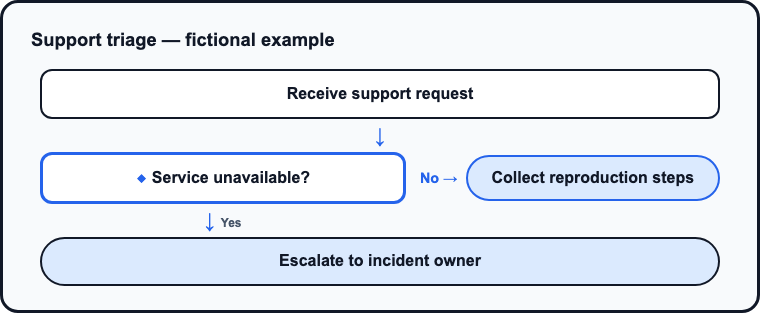
Inspect an actual output, then use the appropriate maker for your own data shape. Structured charts, diagrams and composed artwork offer different editing tools and export options.
A current Prism render from explicitly supplied fictional inputs. Inspect the full-size output, original request and rendered HTML together.
[{"label": "Receive support request", "stepType": "step"}, {"label": "Service unavailable?", "stepType": "decision", "no": "Collect reproduction steps"}, {"label": "Escalate to incident owner", "stepType": "outcome"}]
Fictional demonstration data, not customer results. Check labels, units, branches and all supplied values before reuse.
List the nodes, labels, decisions and outcomes. Check ownership and end states; review imported Mermaid structure before editing the graph.
Choose legible type, deliberate colors, labels and units. Bold is the default for new visuals; a saved or explicitly selected theme remains yours. Check figures against your source and inspect retained data after a chart-type change.
Read the chart data table or diagram labels, add appropriate alternative text and inspect the actual export. Review and publication permissions are separate from clean-output download rights.
Inspect an imported workbook's sheet and cells, edit the data grid and choose series and category mappings. Chart-specific shape checks, axes, numeric formatting, labels and legends affect the reading. Review alternative text, long descriptions and the data table. A changed chart type can retain data that needs reshaping.
Review nodes and branches, Mermaid interchange and saved revision comparisons for structured diagrams. Compositions can combine visual blocks with brand type and colors. Their editing tools differ from those used for structured charts. Connected data controls offer bounded filtering, sorting, column selection, row limits and supported calculated columns; inspect a refresh before accepting changed source values.
Campaign kits support channel choices, sized artwork, photos and crops, captions, selected-channel regeneration and review of edited copy. Print controls cover copy, layout, photo placement, fit, density and proof checks. Print supports English, Germanic, Latin, Cyrillic, Arabic, Indian, Chinese, Korean and Japanese language/script groups. Inspect the actual export and destination requirements.
Color and preflight options are checks with defined scope, not accessibility certification. Structured SVG editability does not imply that composed raster artwork has the same editing model.
This filled example is an editorial explanation of the structure. The related real product output above is separately identified.
| Part | Example and review point |
|---|---|
| Start | Is the service unavailable? |
| Yes | Escalate to the incident owner and record the incident reference. |
| No | Can the customer reproduce the issue? |
| Reproducible | Collect the reproduction steps and route to technical support. |
| Not reproducible | Ask for the time, environment and observed result before assigning a cause. |
Walk through one realistic case on each path. Check that a question has an observable answer, a branch condition is unambiguous and each endpoint names an action. If both answers can be true, change the question or use a process with explicit parallel paths. Add a short note for conditions the tree does not cover. A decision matrix instead compares options against common criteria; it does not model a sequence of questions.
Updated