
Prepare the structure
Paste CSV/TSV or import an Excel workbook, choose its sheet and inspect the grid. Map categories and series, then check the shape required by the selected chart family.
Prism · worked guide
A stacked bar chart divides each category’s bar into component series. The complete height shows the category total; each colored segment shows one contribution. Keep the same series order across bars and display units clearly. Use a 100% stacked chart when the question is proportional mix rather than absolute size.
Make a chart from your data →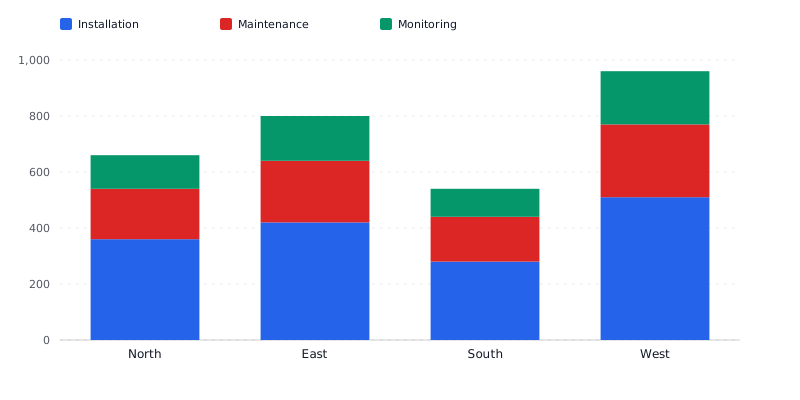
Inspect an actual output, then use the appropriate maker for your own data shape. Structured charts, diagrams and composed artwork offer different editing tools and export options.
A current Prism render from explicitly supplied fictional inputs. Inspect the full-size output, original request and rendered HTML together.
Region,Installation,Maintenance,Monitoring North,360,180,120 East,420,220,160 South,280,160,100 West,510,260,190
Fictional demonstration data, not customer results. Check labels, units, branches and all supplied values before reuse.
Paste CSV/TSV or import an Excel workbook, choose its sheet and inspect the grid. Map categories and series, then check the shape required by the selected chart family.
Choose legible type, deliberate colors, labels and units. Bold is the default for new visuals; a saved or explicitly selected theme remains yours. Check figures against your source and inspect retained data after a chart-type change.
Read the chart data table or diagram labels, add appropriate alternative text and inspect the actual export. Review and publication permissions are separate from clean-output download rights.
Inspect an imported workbook's sheet and cells, edit the data grid and choose series and category mappings. Chart-specific shape checks, axes, numeric formatting, labels and legends affect the reading. Review alternative text, long descriptions and the data table. A changed chart type can retain data that needs reshaping.
Review nodes and branches, Mermaid interchange and saved revision comparisons for structured diagrams. Compositions can combine visual blocks with brand type and colors. Their editing tools differ from those used for structured charts. Connected data controls offer bounded filtering, sorting, column selection, row limits and supported calculated columns; inspect a refresh before accepting changed source values.
Campaign kits support channel choices, sized artwork, photos and crops, captions, selected-channel regeneration and review of edited copy. Print controls cover copy, layout, photo placement, fit, density and proof checks. Print supports English, Germanic, Latin, Cyrillic, Arabic, Indian, Chinese, Korean and Japanese language/script groups. Inspect the actual export and destination requirements.
Color and preflight options are checks with defined scope, not accessibility certification. Structured SVG editability does not imply that composed raster artwork has the same editing model.
This filled example is an editorial explanation of the structure. The related real product output above is separately identified.
| Part | Example and review point |
|---|---|
| North | Installation 360 + maintenance 180 + monitoring 120 = 660. |
| East | 420 + 220 + 160 = 800. |
| South | 280 + 160 + 100 = 540. |
| West | 510 + 260 + 190 = 960. |
| Units | Every figure is USD thousands; all values are fictional sample data. |
The West bar is tallest because its total is 960; installation is its largest component at 510. A segment that starts above the baseline is harder to compare precisely across categories. If the main question is which region has more maintenance revenue, a grouped bar or a direct value table may be clearer. Keep a readable data table beside the chart, use series labels consistently and inspect how zero or negative values behave before sharing.
Updated