
Skip to content
Sign In Try Free
Workflow-specific products Content, decks, briefs, proposals, legal, and sales each have a clearer buying path.
Review before delivery Draft, edit, collaborate, approve, and export in the same workspace.
Security + procurement path Security policy, support, and Azure Marketplace buying are public.

Gixo Business brief mode guide

Brief Mode is the checked-summary workflow inside Gixo Business. Upload a source pack, choose the brief format you need, create a grounded draft with source notes, and keep the work ready for later deck (in Gixo Lumen) or recommendation flows.
Open Gixo Business All Guides
Gixo Business source pack workflow
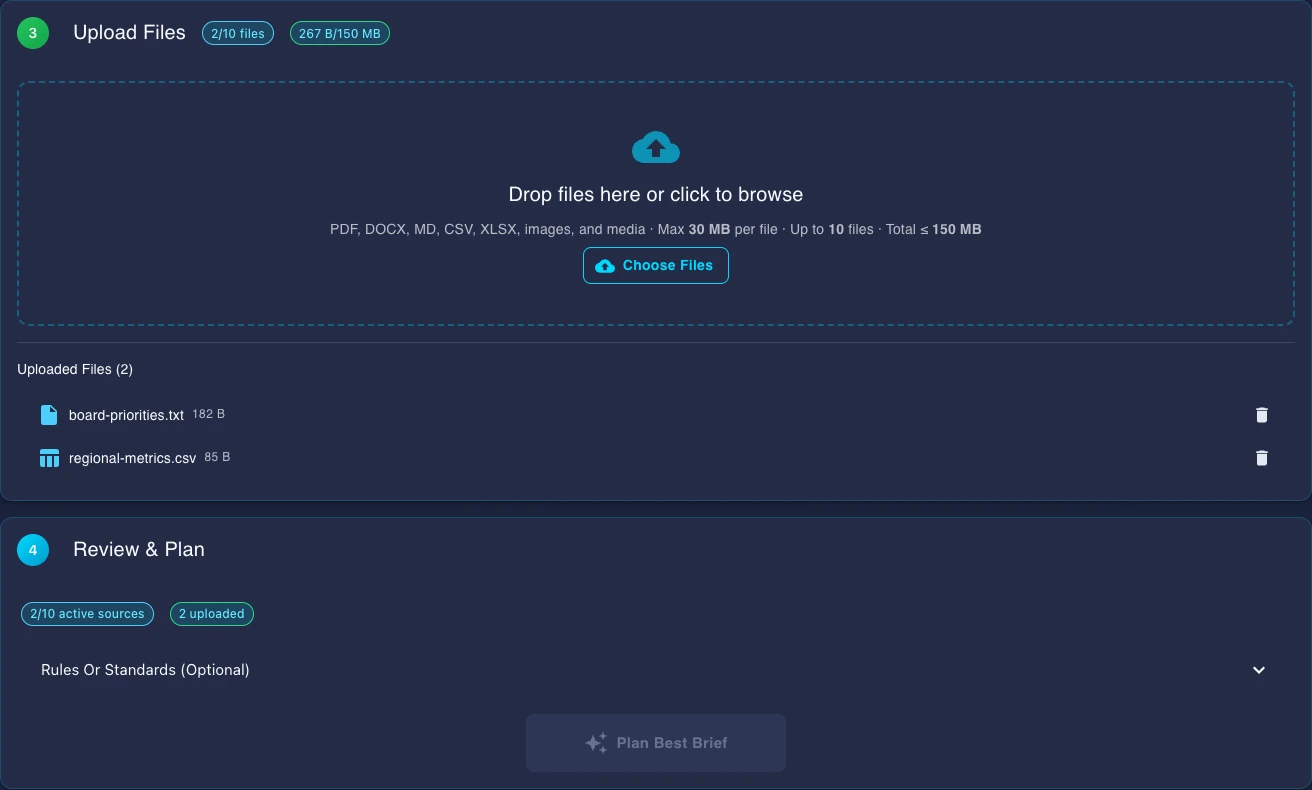
Upload Source Files
Multi-Stage Checks
PDF Export

How It Works

From a source pack to a checked brief in six steps.

1
Upload Source Files

Drag and drop PDFs, DOCX files, or paste URLs. These become the source material the AI reads to build your brief.

2
Review the Brief Outline

State the question, audience and source scope, then review the proposed outline before generating.

3
Configure Settings

Set your audience, detail level, brand voice, and any additional context. These settings tell the AI exactly how to frame and present the information from your sources.

4
Create the Brief

Gixo drafts the brief from the reviewed outline and selected source material, then surfaces supported source-number and citation findings. Repair can retain original figures and source markers can be missing; inspect the original passages and final wording before use.

5
Edit the Brief

Refine the brief in the editor. Move sections, rewrite paragraphs, add notes, or use AI help to adjust tone and detail without remaking the whole brief. Under Checks, the Evidence tab lists sentences the finished draft could not match to your sources, so start your review there.

6
Export or Share

Export as PDF with professional formatting, share a read-only link with stakeholders, or publish internally for team review and collaboration.

Pro Tip
PDFs usually give the clearest source notes because their text and headings extract cleanly. A source note points to the whole file, not a page, so a PDF with page numbers and headings is easier for a reader to check against.
Team Tip
Use Brief Mode for recurring team work. Review the saved draft and its source context before continuing into a deck in Gixo Lumen or a Consultant workflow. Comments and named sharing require Business Professional or higher and an authorized current content role; resolve save conflicts before distribution.

Frequently Asked Questions

What source file formats can I use?
Briefs accepts PDF, DOCX, TXT, and web URLs. PDF and DOCX usually give the clearest source notes because Gixo can read their structure more reliably. URLs are fetched and turned into text automatically.
How many source documents can I upload per brief?
You can upload multiple source files for one brief. Gixo reads all of them and compares facts across them. More sources usually help, but they also add a little more processing time.
Can my team work on the same brief together?
On Business Professional or higher, team members with the required content role can comment on and review the saved brief. Check current sharing permissions, confirm the saved version and resolve save conflicts before distribution; presence does not guarantee instant merging of concurrent text edits.
What are the 8 checks?
The pipeline can organize selected sources, draft the reviewed sections, apply supported terminology and structure checks, and surface bounded number-reconciliation and citation findings. Original figures can remain after unsuccessful repair, and model-generated markers need review. The generated-draft Evidence check is a review aid; inspect the sources and final wording yourself. For a brief written from sources you upload or from the search results web research drew on, the Evidence tab under Checks in the brief editor lists up to five sentences or table cells whose wording or figures it could not match to those sources, for you to check. It matches wording and exact figures, not meaning: a faithful paraphrase, or $8.1M where the source says 8,100,000, can fail to match while being true, so an unmatched sentence is a place to look, not an error, and a matched one is not confirmed either, because this is a comparison with your own sources, not a fact-check. It reads only part of a long source (24 passages of up to 1,600 characters) and at most 12 sources, files first. Of web research it reads the title and snippet of each search result, not the page, so a figure taken from the page alone does not match, and if it could not read every result the list is advisory. It reads a table cell with its row and column, and a total the table works out from its own cells passes when the arithmetic holds. It checks the draft as generated, not your later edits.
What export formats are available for briefs?
Business offers PDF export, read-only sharing and formatted HTML copy. Inspect the downloaded PDF, including its source notes, headings and layout, before delivery.

Start in Brief Mode

Upload a source pack and create a checked brief with clear source notes in minutes, then keep the work connected to the rest of Gixo Business.

Open Gixo Business

Updated