
How to respond to an RFP with AI
Upload the RFP, add the source material your team trusts, and use AI to create a response draft that follows the buyer's requirements. Then review coverage, tighten claims, and export only after the team is comfortable with the submission.
Responding to an RFP with AI means uploading the RFP document (PDF, DOCX, or plain text) along with your trusted source material, letting AI extract requirements, evaluation criteria, and submission instructions, then generating a source-grounded draft covering the executive summary, technical approach, qualifications, timeline, pricing narrative, and compliance answers. A human reviewer checks requirement coverage before the draft is edited and exported as PDF or DOCX. Gixo's Arc structures this around requirement-by-requirement compliance rather than a generic proposal outline.
See what Arc helps your team review
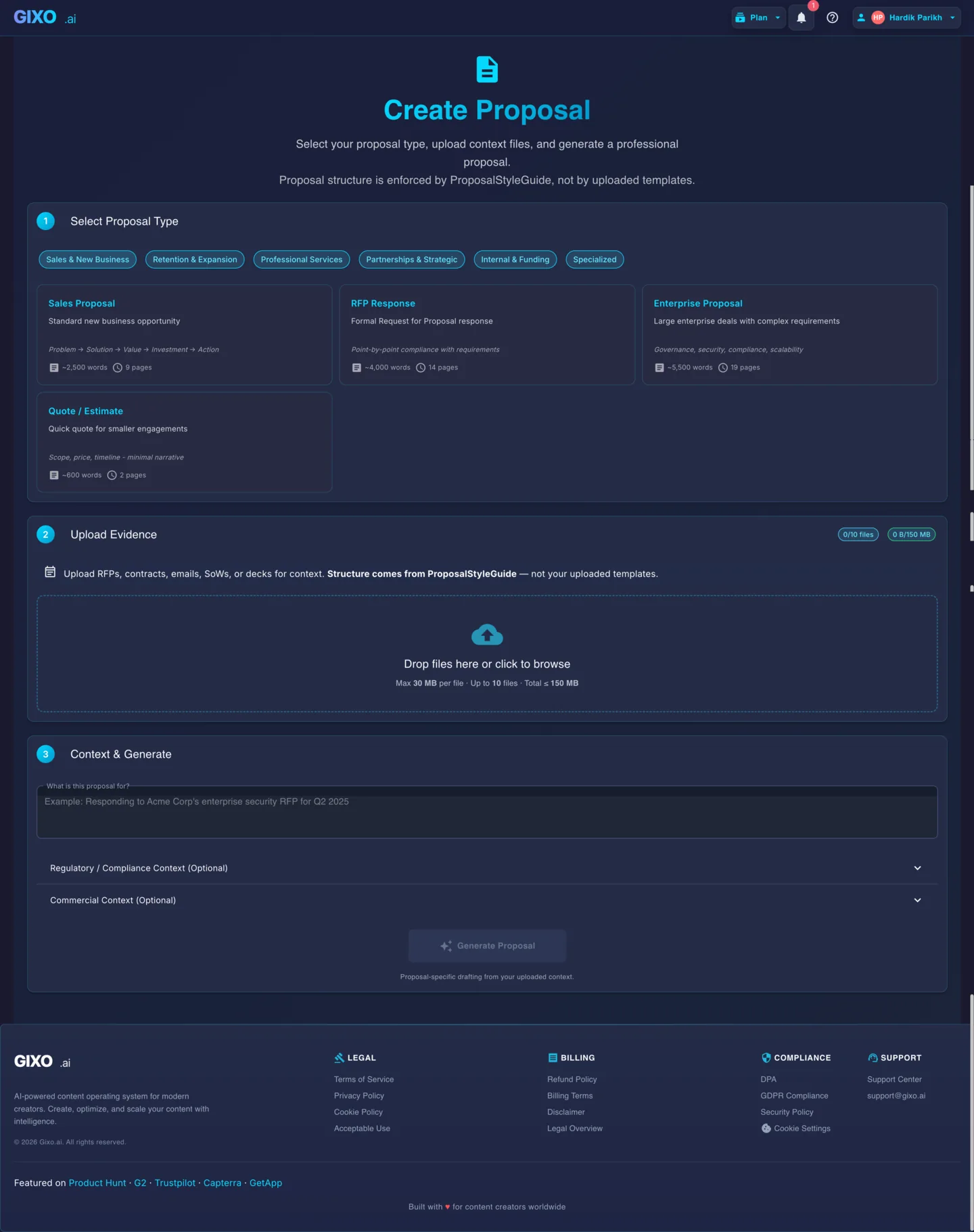
Choose the proposal type, add the RFP, brief, notes, or prior work, then review a structured first draft before it reaches a client.
- 1Add source materialRFPs, briefs, notes, decks, and prior work
- 2Draft to the proposal typeSections and structure follow the real opportunity
- 3Review before deliveryYour team checks facts, scope, pricing, and commitments
How Do You Respond to an RFP with AI in Six Steps?
Turn a dense RFP document into a structured review draft. Gixo helps identify the response targets, but your team still owns requirement coverage, pricing, legal commitments, and final submission quality.
Download the RFP
Save the RFP document from your client or procurement portal. Gixo accepts PDF, DOCX, and plain text formats.
Upload to Gixo
Upload the RFP along with any supplementary files -- past proposals, capability statements, or scope documents that provide context for your response.
Select RFP Response Type
Choose the RFP Response proposal type. This tells Gixo to structure the output around requirement-by-requirement compliance and response sections.
Review the requirement map
Use the extracted requirements, evaluation criteria, and submission instructions as a working map. Confirm the critical requirements before you rely on the draft.
Generate a source-grounded response draft
Draft the executive summary, technical approach, qualifications, timeline, pricing narrative, and compliance answers from the RFP and supporting source files.
Edit and Export
Refine the draft in the editor. Adjust sections, add specifics, then export as PDF or DOCX for submission.
What Does an AI-Assisted RFP Response Workflow Include?
| Step | What happens | Output |
|---|---|---|
| 1. Download the RFP | Save the RFP from the client or procurement portal | PDF, DOCX, or plain text file |
| 2. Upload to Gixo | Add the RFP plus supporting files (past proposals, capability statements, scope docs) | Source context for drafting |
| 3. Select RFP Response type | Tells Gixo to structure output around compliance | Requirement-by-requirement structure |
| 4. Review the requirement map | Confirm extracted requirements, evaluation criteria, submission instructions | Working requirement map (human-checked) |
| 5. Generate source-grounded draft | AI drafts from the RFP and supporting files | Executive summary, technical approach, qualifications, timeline, pricing narrative, compliance answers |
| 6. Edit and export | Team refines sections, adds specifics | Final PDF or DOCX for submission |
Frequently Asked Questions
What RFP file formats does Gixo accept?
Gixo accepts PDF, DOCX, and plain text files. You can upload the RFP itself along with any supporting documents like past proposals or capability statements.
Can AI help identify RFP requirements?
Yes. Arc uses the uploaded RFP to identify requirements, evaluation criteria, and submission instructions. Treat that map as a review aid, not as a substitute for a human compliance pass.
Can I upload supplementary documents alongside the RFP?
Absolutely. Upload past proposals, case studies, capability statements, or any reference material. The AI uses all uploaded context to produce a more relevant and detailed response.
How is this different from a generic proposal generator?
The RFP Response type starts from the buyer document and supporting files. It structures the draft around compliance sections, technical approach, evaluation criteria, and source-backed proof rather than a general proposal outline.
Can multiple team members collaborate on the response?
Yes. After generation, team members can access the editor to refine sections, add domain-specific detail, and review the response before export.
Is there a limit on RFP document size?
Gixo handles standard RFP documents of typical length. For very large multi-volume RFPs, you can upload the most relevant sections to keep the AI focused on what matters most.
How do you respond to an RFP with AI?
Upload the RFP (PDF, DOCX, or plain text) along with any supporting source files, let AI identify the requirements, evaluation criteria, and submission instructions, then generate a source-grounded draft covering the executive summary, technical approach, qualifications, timeline, pricing narrative, and compliance answers. Review the requirement coverage as a team, edit the draft, and export as PDF or DOCX before submission.
What is a source-grounded RFP response?
A source-grounded RFP response is a draft generated from the actual RFP document and the supporting files you upload -- past proposals, capability statements, or scope documents -- rather than generic AI-written content. Gixo's RFP Response type structures the draft around compliance sections and the buyer's own requirements instead of a general proposal outline.
Respond to your next RFP with a reviewable draft
Upload the RFP, add the sources your team trusts, generate a structured response, and check coverage before export.
Start Your RFP ResponseUpdated