
Skip to content
Workflow-specific products Content, decks, briefs, proposals, legal, and sales each have a clearer buying path.
Review before delivery Draft, edit, collaborate, approve, and export in the same workspace.
Security + procurement path Security policy, support, and Azure Marketplace buying are public.

Long-form guides with structure, evidence, and review workflow

Gixo helps content, research, and product teams build long-form guides, resource hubs, and cited explainers from a strong outline first. Search visibility can benefit, but the product is built around reviewable depth and editorial control. Built for teams that need format-first drafting, visible source context, structured editing, review workflow, export, and publishing in one place.
Generate Long-Form Content Explore Gixo Quill
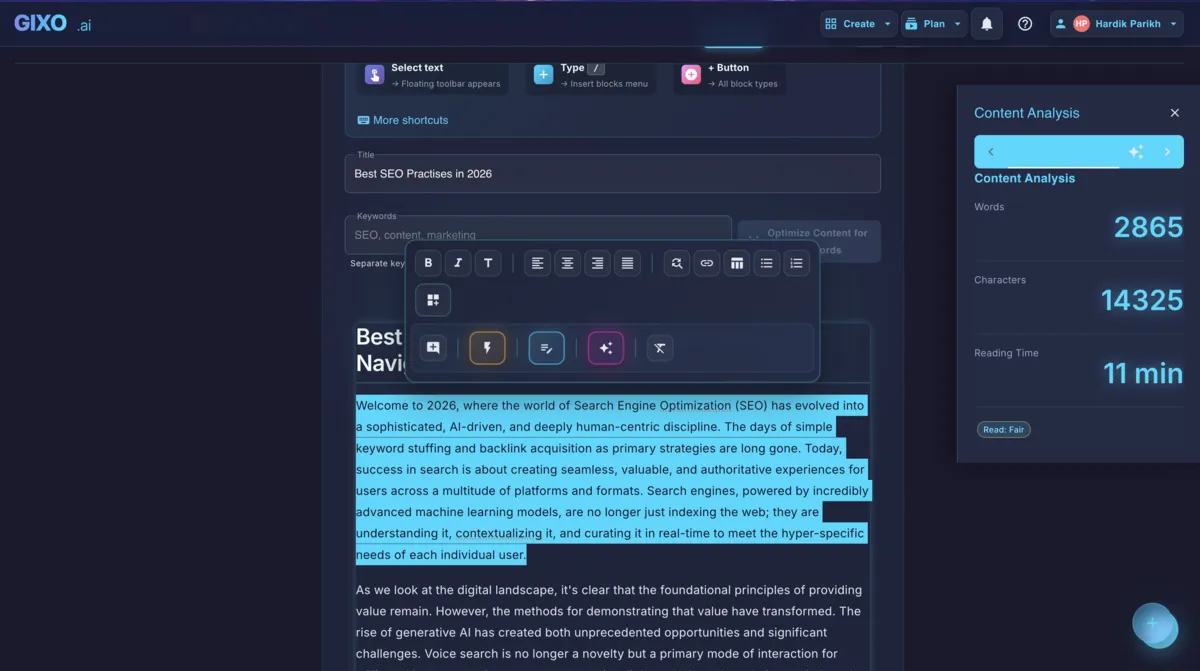
Gixo Quill editor toolbar for editing long-form article sections
Long-form pieces are built section by section in this same editor — expand or revise one part without losing the rest.

An AI long-form content generator turns a detailed brief, outline, and source set into an extended structured draft. Gixo Quill accepts a target up to 10,000 words, grounds generation in retrieved and supplied sources, attaches citations, and supports section-level editing and deterministic review checks. Editors still verify depth, coherence, repetition, and claim support.

Up to 10KTarget word count
OutlineEditable outline first
SectionSection-level editing
Citedsource-grounded draft

How does Gixo handle a long-form target?

Quill accepts a target up to 10,000 words, uses a reviewable outline and format guide to shape generation, and lets editors expand or rewrite selected sections afterward. A target is drafting guidance, not a guarantee that the first response reaches the exact length or required depth.

Workflow factorGixo QuillGeneric promptManual workflow
Target lengthUser-set, up to 10,000 wordsTool- and model-dependentSet in the brief
Outline reviewReviewable structure before full generationPrompt-dependentEditor creates it
Section editingExpand or rewrite selected contentTool-dependentEditor rewrites
Grounding and citationsretrieved source set and citations attachedTool- and mode-dependentResearcher manages them
Post-generation checksBrief, structure, readability, links, answer readiness, and own-library overlapUsually external or prompt-dependentManual or separate tools
Factual verificationHuman reviewerHuman reviewerHuman reviewer

How the long-form AI writer holds structure past 3,000 words

Six workflow capabilities for long drafts. Format guidance and checks make structure easier to inspect, but model output can still repeat, drift, or miss required depth.

Intelligent Structuring

AI proposes an outline from the format and brief. Review, reorder, add, or remove sections before generation; the model does not guarantee complete topic coverage.

Source Grounding

Quill retrieves relevant web sources and Quill keeps the source set and citations attached to the draft. Editors verify whether important claims are accurate, adequately supported, and represented in context.

Section-by-Section Control

Edit, expand, or regenerate any section independently. Add more depth to critical sections, simplify others, or insert new sections without regenerating the entire article.

Pillar Content Strategy

Create a pillar draft from an explicit coverage brief, then plan supporting pieces through the idea or bulk workflow. Use the own-library overlap and link checks to review the relationship between pages.

Auto Table of Contents

A navigable table of contents can mirror the article headings and help readers move through a long page. Inspect anchors after editing and in the chosen export or destination preview.

Brief Coverage and Depth Review

Quill checks structure, word-count bands, brief coverage, answer readiness, links, and overlap with your own library so reviewers can find thin or missing sections. It does not benchmark live competitor pages.

How does outline-first generation keep long articles coherent?

Readers reward depth when teams can keep the argument coherent, evidence-backed, and easy to navigate.

Length Is a Coverage Choice, Not a Ranking Guarantee

A long page is useful when the subject and reader questions genuinely require depth. Word count alone does not create relevance, authority, links, or rankings, and padding a short answer into a pillar page can make it worse. Set the target from the assignment, not a universal SEO threshold.

Pillar and cluster structures can make related pages easier to navigate when each URL serves a distinct intent. Review internal links and own-library overlap so the pages support one another instead of competing for the same job.

How Gixo's Outline-First Architecture Prevents Quality Degradation

Writing 5,000 or 10,000 words that hold together is fundamentally different from writing 1,000. The longer an article gets, the harder it becomes to maintain a consistent voice, avoid repetition, keep every section substantive, and ensure the overall structure guides the reader logically from introduction to conclusion. Most AI tools generate long text by stringing together loosely related paragraphs, resulting in content that feels padded rather than purposeful.

Gixo addresses this with outline-first generation, section-level editing, a structured brief, and deterministic review. The workbench checks whether required topics and questions are covered, whether the opening is direct, whether sections and lists are scannable, and whether the draft overlaps your existing library. It does not scrape live competitor pages, so competitor-depth research remains an external input when the assignment requires it.

Four steps to a review-ready long-form piece

From brief to comprehensive guide in four steps.

1
Define the brief

Enter the subject area, source material, and audience context. Gixo creates a comprehensive outline covering the subtopics your team needs to address.

2
Set Target Length

Choose a target appropriate to the format, up to the 10,000-word request limit. Treat it as a planning constraint and review whether each section earns its space.

3
Generate & Expand

AI generates the full article with citations and structure. Use inline tools to expand thin sections, add examples, or deepen technical explanations.

4
Review, publish, and derive follow-ups

Publish the guide when it is approved, then create supporting follow-up assets or related articles from the same core source material.

Who benefits most

Four audiences that may need reviewable depth, without assuming length itself creates organic growth.

Editorial and Content Strategy Teams
Build 5,000-10,000 word guides with logical hierarchies, evidence, and section-level editing so reviewers can shape the argument without rebuilding the whole document.
SaaS Companies Creating Comprehensive Resource Centers
Draft guides, comparison pages, and technical deep dives from product sources and an explicit brief. Product marketers add first-hand examples, verify changing facts, and decide what deserves a separate page.
Research Organizations Publishing In-Depth Analysis
Turn original findings and cited research into a structured analytical draft. Researchers still verify every figure, quotation, inference, citation convention, and conclusion before publication.
Publishers Producing Definitive Guides in Dense Categories
Create the most thorough resource in your category or research area. Gixo flags thin sections before publication so your editors can strengthen the guide before it goes live.

What is included in Quill's long-form workflow?

CapabilityQuill behaviorBoundary
Target word countUser-set up to 10,000Target is not guaranteed exact output or depth
Section-level editingExpand, rewrite, or restructure selected contentReview the surrounding argument after changes
Table of contentsHeading-based navigation for long contentInspect anchors and destination rendering
Brief coverageRequired topics and questions checkedNo live competitor-depth comparison
Research citationsretrieved sources and citations attachedNo independent factual verification
Own-library overlapDraft compared with your content libraryNo competitor-domain gap analysis

Tips for better results

Four principles that separate pillar pages from padded pages.

Review the outline before generation for structural quality. A detailed H2/H3/H4 skeleton keeps every section purposeful. Spend a few minutes reordering, merging, or splitting sections in the outline view before you hit generate — the investment pays off in a final article that progresses logically and avoids the repetition that plagues unplanned long-form content.
Use section-level editing to deepen specific areas. After generation, identify the two or three sections that matter most for your audience and expand them individually. Adding examples, data points, or expert quotes to high-value sections transforms a good article into the definitive resource — without inflating the word count of sections that only need concise coverage.
Plan distinct supporting articles. Use externally researched long-tail questions and Quill's idea workflow to draft related pieces, then add deliberate internal links. Check own-library overlap so the supporting pages do not duplicate the pillar's intent.
Use the brief as the depth contract. List the required topics, questions, and evidence before generation, then use Quill's brief-coverage and answer-readiness checks to find omissions. If competitor research matters, add those findings to the brief rather than assuming Quill collected them.

Frequently Asked Questions

What is an AI long-form content generator?
An AI long-form content generator turns a detailed brief, outline, and source set into an extended structured draft. Quill accepts a target up to 10,000 words, keeps retrieved sources and citations attached, and supports section-level editing and post-generation checks. Editors still verify depth, coherence, repetition, and claim support.
Who should use a long-form AI writer?
Long-form AI writing fits editorial and content-strategy teams, SaaS companies building resource centers, research organizations publishing in-depth analysis, and publishers producing definitive category guides. It suits any team that needs reviewable depth across thousands of words with section-level editing and research citations, rather than a quick short draft.
How does the outline planning step work for long-form content?
Quill uses the selected format, target length, structured brief, and supplied context to propose a multi-level outline. You review, reorder, add, or remove sections before full generation. It does not analyze the live competitive landscape unless you bring those findings into the brief.
How does the depth analysis feature identify thin sections?
Quill evaluates the draft against its structured brief, expected length range, outline, answer-readiness checks, links, and your own content library. It can flag missing brief topics and structural gaps, but it does not compare sections with live top-ranking competitor pages.
How should I create supporting articles around a pillar?
Bring externally researched supporting queries into Quill's idea or bulk workflow, generate each as a separate draft, and add deliberate links after review. Quill can compare against your own library for overlap, but it does not provide measured competitor gaps or automatically guarantee a complete cluster.
Can I expand individual sections without regenerating the whole article?
Yes. Click any section and choose expand, rewrite, or add subsections. The expansion is aware of surrounding content, so new material flows naturally. You can also split a thin section into multiple detailed subsections without touching the rest of the article.
How does the auto table of contents update as I edit?
The table of contents regenerates automatically whenever you add, remove, or rename sections. Anchor links update in real time. When you export, the TOC is included as clickable HTML anchors or Markdown links depending on your chosen format.
What is the ideal word count for pillar content that ranks?
There is no universal ranking length. Set a target from the audience, topic, brief, and any external research you trust. Quill checks the draft against the selected target range and brief coverage; it does not infer an ideal length from live competitor pages.
How does Gixo help review quality near a 10,000-word target?
Quill uses outline and format guidance, writing and terminology controls, section editing, and deterministic checks to make long drafts easier to review. It cannot guarantee a 10,000-word model response is coherent or repetition-free, so editors inspect transitions, duplicated ideas, voice, and evidence across the whole piece.
Should I publish one long article or split it into multiple shorter posts?
Choose one page when the material serves one coherent intent; split it when readers have distinct jobs that deserve independent answers. Check the live SERP externally and use Quill's own-library overlap review to avoid creating several pages for the same intent. Neither length nor page count guarantees rankings.
How often should I update long-form content to maintain its rankings?
Review long-form articles on a cadence appropriate to the topic. Recheck source-critical claims, update stale statistics, inspect links, and revise the brief when new subtopics matter. Quill can rerun its deterministic checks and library-overlap review, while current competitor research remains external.

Start creating content that ranks

Set a long-form target up to 10,000 words, generate a source-grounded draft with citations, and finish it through structured review.

Start Writing Long-Form

Inside Quill

Start with the amount of structure you already have

Current Gixo Quill quick-create screen with a topic field, visual-plan option, full-writer option, and link to all writing formats
Current Quill quick-create screen. Begin with a topic, open a visual plan, move into the full writer, or browse the complete format library.

Updated