
How to repurpose blog content automatically with AI
One blog post can become a newsletter, a LinkedIn post or thread, a checklist, or a video script inside Quill — and can be handed to Gixo Lumen as source material for a deck. Learn how to automate content repurposing and multiply your content output without multiplying your workload.
What your plan includes. Writing, checks, exports, public share links and publishing to WordPress, Ghost and Medium are on every plan, from $10 per seat a month. Comments and Brand Voice need Professional; Brand Kit and bulk need Business.
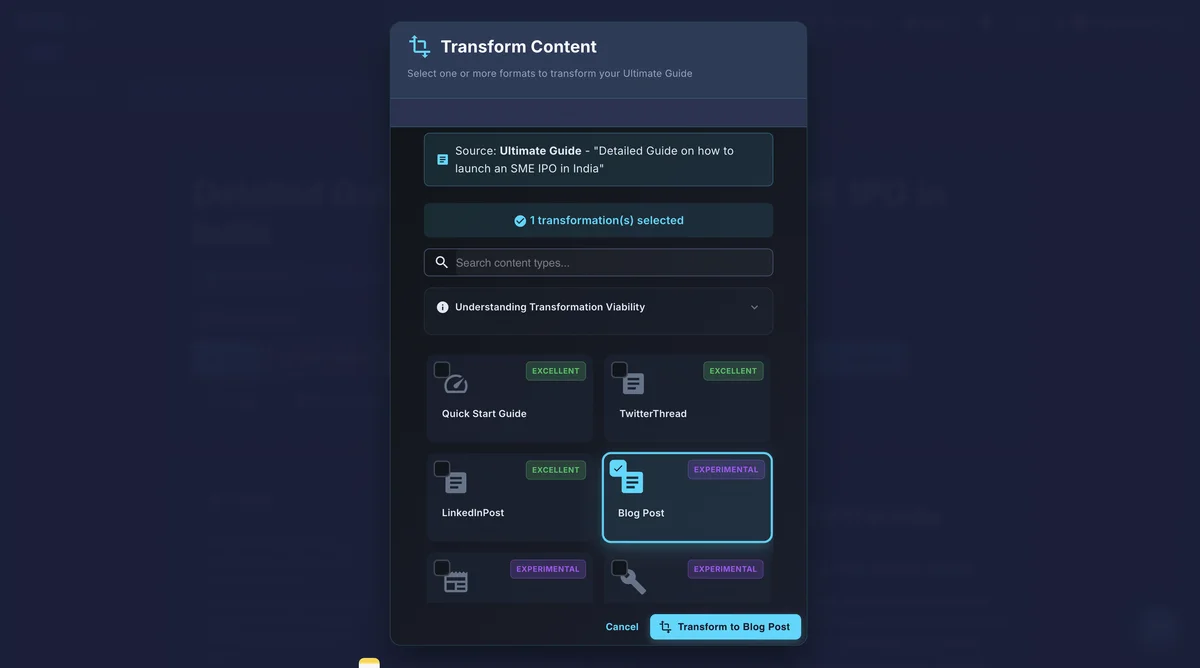
To repurpose blog content automatically, you paste the source post into an AI tool, select target formats such as slides, newsletters, social posts, or checklists, and the AI restructures — rather than copies — the material for each channel. Gixo does this in four steps: provide source content, select target formats, let the AI transform the content per channel, then review and publish. The output covers six formats from one post (slides, newsletter, social posts, checklist, infographic, video script) while preserving brand voice across all of them.
What are the ways to repurpose content from a blog post automatically — newsletter, social posts, or video script?
Transform a single blog post into six different content assets automatically.
Hand an approved blog post to Gixo Lumen as source material for a deck. Lumen is a separate product and plan; decks are not a Quill format.
Distill blog content into concise newsletter format with engaging subject lines, key takeaways, and clear calls to action. The AI adapts the tone for email readers who want quick, scannable insights.
Generate a series of social media posts from a single blog article. Each post captures a different angle, key stat, or insight from the original content, optimized for platforms like LinkedIn and Twitter.
Transform how-to blog posts into actionable checklists and step-by-step guides. The AI identifies procedural content and reformats it into a downloadable, practical checklist format.
Extract data points, statistics, and key findings from blog content and structure them into infographic-ready content. Get the text and data organized for visual design tools.
Convert written blog content into conversational video scripts with natural pacing, transitions, and speaker cues. Ideal for turning articles into YouTube content, webinars, or explainer videos.
How does automatic blog content repurposing work?
Four steps from one blog post to multi-channel content.
Paste your blog post or article into Gixo. The AI analyzes the content structure, identifies key themes, extracts data points, and understands the overall narrative to prepare for multi-format conversion.
Choose which output formats you want — slides, newsletter, social posts, checklist, or all of them. Each format has its own content requirements and the AI adapts the source material accordingly.
The AI does not simply copy and paste. It restructures, condenses, and reformats the content for each channel. Social posts are punchy and concise. Newsletters have clear takeaways. Slides have visual hierarchy.
Review each repurposed asset, make any adjustments, and export or publish. The content maintains your brand voice across all formats while being optimized for each specific channel and audience.
How does Gixo compare to other content repurposing tools?
| Capability | Gixo | Repurpose.io | ChatGPT | Manual |
|---|---|---|---|---|
| Blog to slides | ✓ | ✗ | Text only | Hours |
| Blog to newsletter | ✓ | ✗ | ✓ | 30+ min |
| Blog to social posts | ✓ | Video focus | ✓ | 30+ min |
| Blog to checklist | ✓ | ✗ | ✓ | 20+ min |
| Brand voice preserved | ✓ | N/A | Partial | ✓ |
| Multi-format in one tool | ✓ | Video only | Text only | ✗ |
| Professional export | ✓ | Video | ✗ | Varies |
What does automatic blog content repurposing include?
| Output format | What the AI does | Manual time saved |
|---|---|---|
| Blog to slides | Extracts key points, builds a 15-20 slide sequence with professional layouts from a 2,000-word article | Hours |
| Blog to newsletter | Distills content into subject line, key takeaways, and CTA for email readers | 30+ min |
| Blog to social posts | Generates 5-10 posts per 1,500-word article, each on a different angle/stat/insight | 30+ min |
| Blog to checklist | Identifies procedural content and reformats into a downloadable step-by-step checklist | 20+ min |
| Blog to infographic | Extracts data points and structures them for visual design tools | N/A |
| Blog to video script | Converts written content into conversational script with pacing and speaker cues | N/A |
| Brand voice | Preserved consistently across all repurposed formats | N/A |
Frequently Asked Questions
Inside Quill
Reuse the source artifact without losing its context
Updated