Turn any article into a LinkedIn post that gets noticed

LinkedIn rewards a specific content format: short hooks, scannable line breaks, professional storytelling, and engagement-driving CTAs. Gixo takes your existing articles, reports, or presentations and rewrites them specifically for how LinkedIn surfaces and ranks content.

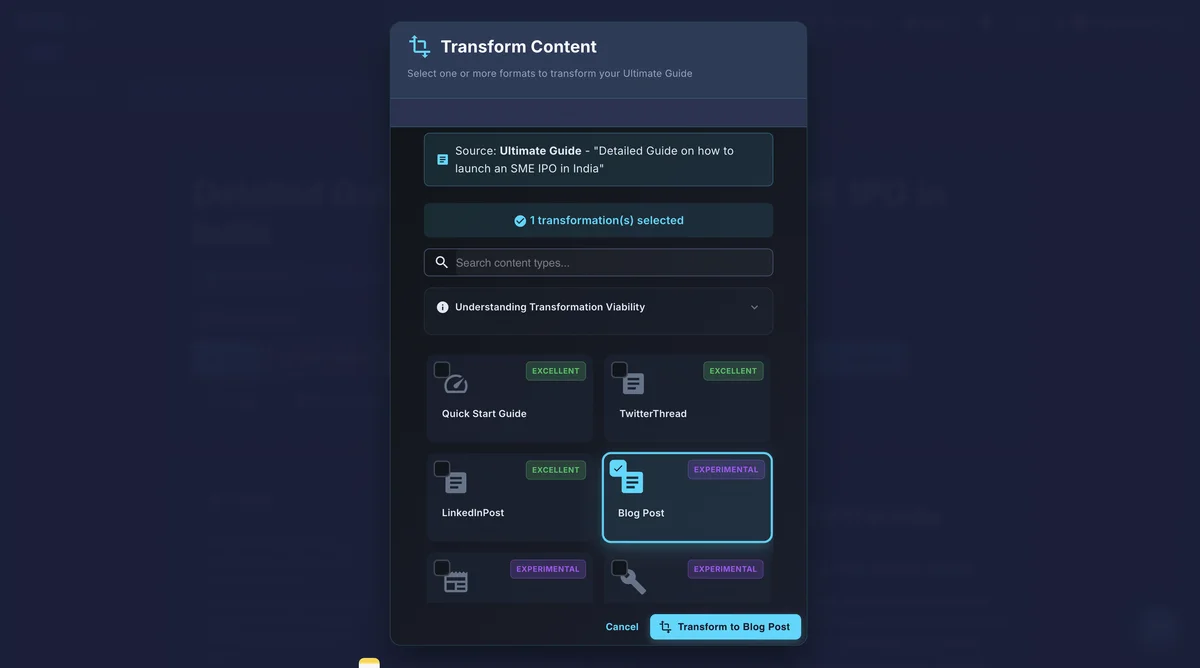
Gixo transform content into LinkedIn posts panel with Quick Start Guide, Twitter Thread, and Blog Post options
LinkedInAlgorithm-Optimized
3-5Post Angles per Article
ProTone & Formatting
CopyPaste Ready

Built for how LinkedIn actually works

Generic AI text does not perform on LinkedIn. Gixo understands the platform's unique engagement patterns — dwell time, "see more" clicks, comment triggers — and formats every post to maximize them.

Attention-Grabbing Hooks

Every LinkedIn post starts with a hook designed to stop the scroll. Gixo generates opening lines that create curiosity, challenge assumptions, or present surprising data from your content.

LinkedIn-Native Formatting

Short paragraphs, strategic line breaks, numbered lists, and white space that matches how high-performing LinkedIn posts are structured. Not a wall of text, but scannable content.

Multiple Post Angles

Generate several LinkedIn posts from one article, each with a different angle — a key statistic, a contrarian take, a personal lesson, or an actionable tip. One blog becomes a week of posts.

Call-to-Action Integration

Every post ends with a natural CTA — asking a question, inviting comments, or directing readers to the full article. Engagement prompts that feel organic, not forced.

Hashtag Suggestions

Relevant LinkedIn hashtags are suggested based on your content topic. The right hashtags increase discoverability without cluttering the post with irrelevant tags.

Copy-Ready Output

Posts are formatted exactly as they should appear on LinkedIn. Copy the output and paste directly into the LinkedIn post editor — no reformatting needed.

Why copy-pasting blog content to LinkedIn fails

LinkedIn's Algorithm Penalizes Long-Form Blog Format

When you copy a section from your blog and paste it into the LinkedIn post editor, the algorithm immediately works against you. Blog content is written for a different context — long paragraphs, subheadings, embedded images, internal links — none of which translate to LinkedIn's feed. The algorithm measures dwell time and early engagement within the first 60 to 90 minutes. A dense block of text copied from a blog post does not earn pauses, does not get "see more" clicks, and does not generate the comments that push a post into wider distribution.

LinkedIn's feed compresses everything above the fold into two to three lines. A blog paragraph that opens with scene-setting context or background information will be truncated before reaching the actual insight. Users scroll past because the visible preview gives them no reason to tap "see more." Gixo solves this by extracting the sharpest insight from your blog content and rewriting it as a hook that fits LinkedIn's fold point precisely, giving the algorithm the early engagement signal it needs to amplify your reach.

Platform-Native Formatting Drives Engagement

The highest-performing LinkedIn posts share a specific structural pattern: a punchy opening line, generous white space between short sentences, strategic use of numbered lists or single-line paragraphs, and a closing question that invites comments. This format is fundamentally different from blog writing, where longer paragraphs, transitional phrases, and detailed explanations are expected. Reformatting manually is tedious and most professionals skip it, which is why their LinkedIn posts underperform despite containing strong ideas.

Gixo handles this translation automatically. It takes your long-form blog content and restructures it into LinkedIn-native formatting — breaking complex arguments into scannable single-line statements, replacing transitional paragraphs with line breaks that create visual breathing room, and converting passive conclusions into active questions that drive comment threads. The result is content that looks and feels like it was written for LinkedIn from the start, because structurally it was.

From article to LinkedIn-ready in minutes

1.
Input Your Source Content

Paste a blog post, article, presentation notes, or any long-form content. Gixo identifies the most LinkedIn-worthy insights and data points.

2.
Select Post Style

Choose from storytelling, listicle, data-driven, contrarian take, or how-to post formats. Each style uses different LinkedIn engagement patterns.

3.
AI Generates LinkedIn Posts

Gixo creates multiple post variations with hooks, formatted body content, CTAs, and hashtag suggestions — each post ready to copy and publish.

4.
Copy and Post

Review the generated posts, make any personal adjustments, and paste directly into LinkedIn. Schedule across the week for consistent publishing.

Who uses it

From solo consultants to enterprise marketing teams, Gixo fits wherever LinkedIn presence matters.

Thought Leaders Building Personal Brands
Turn keynote talks, blog posts, and original research into a consistent stream of LinkedIn posts that reinforce your expertise. Gixo extracts the strongest talking points and repackages them with hooks and formatting that build audience trust and grow follower counts week over week.
B2B Companies Nurturing Leads via LinkedIn
Repurpose whitepapers, case studies, and product announcements into LinkedIn posts for your company page and employee advocacy programs. Warm up prospects in their feed so that when sales reaches out, your brand already has credibility and recognition established.
Content Marketers Maximizing Article ROI
Every blog post you publish represents hours of research and writing. Gixo ensures that investment compounds by generating three to five LinkedIn posts from each article, each approaching the topic from a different angle — so your content reaches audiences who will never visit your blog directly.
Consultants and Coaches Sharing Expertise
Convert client frameworks, workshop materials, and methodology documentation into bite-sized LinkedIn insights. Demonstrate expertise daily without spending hours writing each post from a blank page, and attract inbound leads who already understand your approach before the first call.

How it compares

FeatureGixoChatGPTTaplioManual
Content repurposingBlog to LinkedInPrompt-dependentLinkedIn-onlyManual rewriting
Hook generationAutomaticPrompt-dependentTemplatesManual brainstorming
Multiple post anglesMultiple per articleOne at a timeCarousel builderOne per session
LinkedIn formattingNative formatGenericOptimizedManual
Full content platformBlog + slides + socialGeneral purposeLinkedIn onlyNo
Hashtag suggestionsTopic-basedInconsistentAnalytics-basedManual research
Source content typesBlog, slides, articlesAny textLinkedIn onlyAny text

Tips for posts that perform

Post during peak LinkedIn hours. Tuesday through Thursday mornings between 7 and 10 AM in your audience's time zone consistently generate the highest engagement. LinkedIn's algorithm weighs early reactions heavily, so publishing when your network is most active gives your post the best chance of reaching the wider feed. Gixo lets you batch-generate posts ahead of time so you can schedule them for these optimal windows.
Lead with counterintuitive insights. The LinkedIn feed is saturated with predictable advice. Posts that open with a surprising claim, a contrarian perspective, or data that challenges conventional wisdom consistently earn higher dwell time and more comments. Gixo analyzes your source content for non-obvious angles and generates hooks that make readers pause because the opening line contradicts what they expected to see.
Batch-generate a week of posts from one article. Consistency is the single biggest factor in LinkedIn growth, and most professionals fail at it because writing individual posts is time-consuming. Gixo generates three to five distinct posts from a single article, each with a different angle and hook. Write one blog post, and your LinkedIn calendar for the entire week is filled with varied, high-quality content.
End every post with a genuine question. Comments are the strongest signal for LinkedIn's algorithm — a post with 10 comments will reach significantly more people than one with 100 likes. Close with a question that invites real opinions rather than simple agreement. Avoid generic prompts like "thoughts?" and instead ask specific, debatable questions that relate directly to your post's core argument.

Frequently Asked Questions

What makes a LinkedIn post perform well algorithmically?
LinkedIn prioritizes dwell time, "see more" clicks, and comments. Posts that open with a curiosity-driven hook, use short scannable paragraphs, and end with a question or discussion prompt consistently outperform walls of text. Gixo applies all of these patterns automatically.
How does Gixo handle the LinkedIn "see more" fold?
The first two to three lines of a LinkedIn post appear before the "see more" button. Gixo writes a hook specifically designed for those visible lines — a surprising statistic, a bold claim, or a relatable question — to maximize clicks into the full post.
Does Gixo generate different LinkedIn post styles?
Yes. From one source article, Gixo creates storytelling posts, numbered listicles, data-highlight posts, contrarian takes, and how-to breakdowns. Each style uses a different LinkedIn engagement pattern, giving you a full week of varied content.
Will the output sound professional enough for a business audience?
LinkedIn's audience expects a professional but approachable tone. Gixo calibrates its output for that balance — authoritative without being stiff, conversational without being casual. You can further adjust tone via brand voice settings.
Can I generate LinkedIn carousel or document posts?
Gixo generates the text content for LinkedIn posts, including carousel caption text and talking points per slide. For visual carousel assets, pair Gixo's text output with a design tool, or use Gixo's presentation feature to create slides you can export as a LinkedIn document post.
What is the best posting frequency for LinkedIn growth?
Three to four posts per week is the sweet spot for most professionals. Posting less than twice a week makes it difficult to build momentum with the algorithm, while daily posting can lead to audience fatigue and lower per-post engagement. By generating multiple posts from each article, Gixo makes it easy to maintain this ideal cadence without spending hours writing every day.
How do I maintain my authentic voice when using AI-generated LinkedIn posts?
Gixo generates the structure, hooks, and formatting — the parts that are most time-consuming to get right. The insights and opinions come from your source content, so the intellectual substance is already yours. Most users review the generated posts and add personal anecdotes, adjust specific phrases to match their voice, or tweak the closing question. The AI handles the LinkedIn-specific craft so you can focus on adding the personal touches that make posts distinctly yours.
Should I include links in my LinkedIn posts or keep them text-only?
LinkedIn's algorithm historically depresses reach on posts with external links because the platform wants to keep users on-site. The most effective strategy is to share the insight in the post itself and add the link as the first comment. Gixo formats posts as self-contained value pieces and notes the link placement strategy so your content gets maximum distribution without sacrificing the traffic opportunity.
Can I use Gixo to create LinkedIn posts for an employee advocacy program?
Yes. Marketing teams use Gixo to generate multiple post variations from company content, then distribute them to employees for personal posting. Each variation has a slightly different hook, angle, and CTA so the posts do not look identical across the team's profiles. This approach amplifies company messaging through personal networks while keeping each employee's feed authentic and varied.

Turn Every Article into LinkedIn Gold

Hook-driven, formatted, engagement-optimized LinkedIn posts from your existing content. No more blank page syndrome.

High Contrast Mode Disabled
An error has occurred. This application may no longer respond until reloaded. Reload 🗙