
Skip to content
Workflow-specific products Content, decks, briefs, proposals, legal, and sales each have a clearer buying path.
Review before delivery Draft, edit, collaborate, approve, and export in the same workspace.
Security + procurement path Security policy, support, and Azure Marketplace buying are public.

AI Social Media Content Generator — Turn Articles into Reviewable Posts

Transform your blog posts and articles into editable social media drafts. Gixo converts existing long-form content into LinkedIn posts, Twitter threads, and hook ideas, so you start from your own source instead of a blank prompt.

What your plan includes.Brand Voice is on Professional plans and above — from $79 per seat a month, minimum three seats. Writing, checks, exports, public share links and publishing are on every plan. The 14-day trial works like Starter, so it does not include Brand Voice.
Start Transforming ContentExplore Gixo Quill
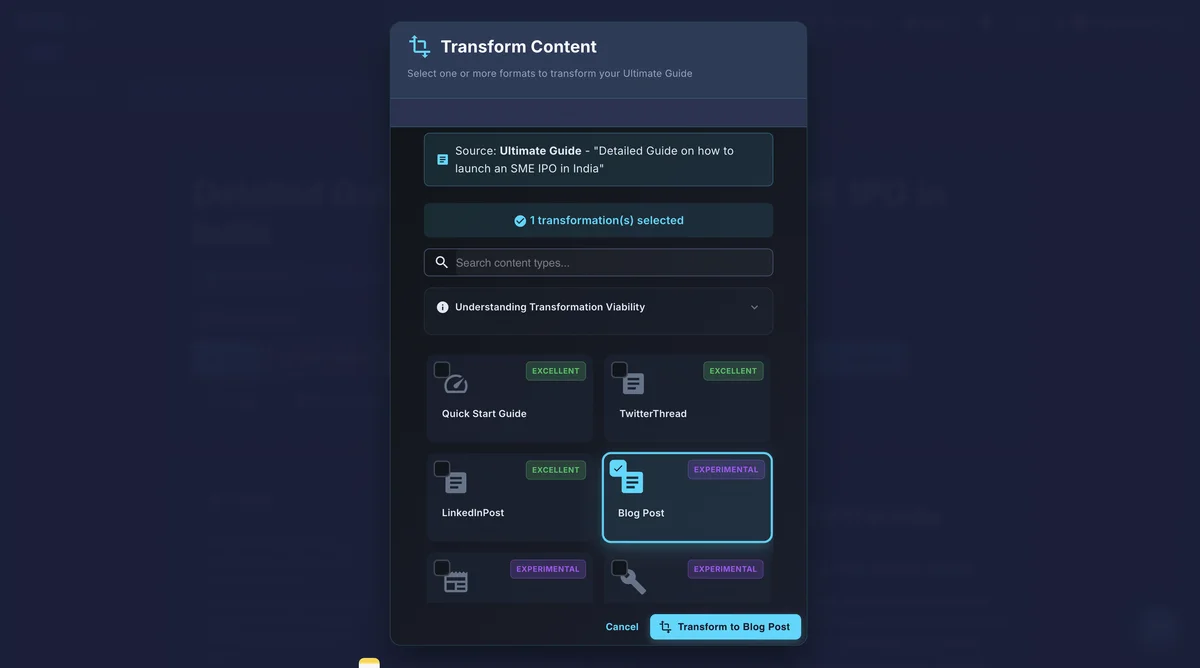
Gixo content transformation panel showing blog to LinkedIn post, Twitter thread, and other format options

An AI social media content generator is a tool that transforms existing long-form content — blog posts, articles, and reports — into platform-ready social posts instead of writing from a blank prompt. Gixo's version converts an article into LinkedIn posts, Twitter threads, and engagement hooks, applying trained brand voice when that feature is enabled and using platform-native formatting so the output can be reviewed before publishing. Batch size and eligibility depend on the current Quill workflow and plan; check the product before promising a particular archive size. Unlike a scheduler, it treats social content as a transformation problem, not a calendar-management problem.

LinkedInPost Transformation
TwitterThread Generation
EngagementHook Optimization
HashtagSuggestions

What can an AI social media content generator do with one article?

You already have source material. Gixo transforms articles, blog posts, and long-form pieces into social-ready formats shaped for each platform's conventions; the writer still reviews the message, claims, links, and final post.

Blog to LinkedIn Posts

Transform articles into professional LinkedIn post drafts. Gixo extracts key insights, adds hooks, and applies a LinkedIn-shaped structure; it does not predict reach or guarantee engagement.

Article to Twitter Threads

Break long-form content into compelling Twitter thread sequences. Each tweet is crafted to stand alone while building a cohesive narrative across the thread.

Hook Drafts

Create opening-line options shaped for the selected platform. Review whether each hook remains accurate and useful instead of treating it as a reach formula.

Hashtag & Tag Suggestions

Get hashtag suggestions from your topic and source. Check that each tag fits the current audience and platform before publishing.

Brand Voice Guidance

When the feature is enabled for the workspace and plan, a voice profile can guide the social drafts. Review each result for tone, source fidelity, and audience fit.

Batch Social Content

Transform multiple articles through the available batch workflow when your plan supports it. Review the resulting posts for source fidelity, links, claims, and platform fit before scheduling them.

Why transforming your articles beats generic AI content from scratch

The Social Media Content Bottleneck

Most teams already produce great long-form content — blog posts, articles, guides, and reports. But that content only reaches people who read blogs. Social media audiences consume content differently: they want short, punchy insights delivered in platform-native formats. The problem is not ideas — it is reformatting. Converting a 2,000-word article into a compelling LinkedIn carousel or a Twitter thread requires understanding each platform's conventions, and doing it manually is tedious.

Gixo approaches social content as a transformation problem, not a creation problem. When you already have strong source material, the AI extracts the most shareable insights and restructures them for each platform. The result is social content grounded in your best thinking, not generic posts generated from a blank prompt.

Platform-Native Formatting Matters

A LinkedIn post that reads like a Twitter thread will underperform. A tweet that reads like a blog excerpt will get scrolled past. Each platform has its own engagement patterns: LinkedIn rewards storytelling with line breaks and personal insights. Twitter rewards concise, punchy statements that provoke replies. Gixo understands these conventions and formats your content accordingly, producing output that feels native to each channel rather than cross-posted.

Social media AI workflows for AI social media marketing

Weekly Blog to Social Pipeline
When your workflow supports variations, turn a reviewed blog post into several LinkedIn and Twitter drafts. Compare them for source fidelity, edit them, and then move approved pieces into your scheduling tool.
Thought Leadership Amplification
Turn long-form thought leadership articles into bite-sized LinkedIn insights that position you as an industry expert. Extract the most quotable insights and present them in scroll-stopping formats.
Product Launch Campaigns
Transform product announcements and feature documentation into channel-specific drafts. Keep the source facts consistent, then adapt the wording and timing for each audience.
Archive Mining
Revisit your best-performing blog posts from six months ago and generate fresh social content from them. Evergreen ideas deserve repeated social exposure in new formats.

How does an AI social media content generator work?

1
Create Source Content

Write or import your blog post, article, or long-form content into Gixo. This becomes your source material.

2
Select Social Format

Choose your target platform and format: LinkedIn post, Twitter thread, engagement hook, or multiple formats at once.

3
AI Transforms

Gixo analyzes your content, extracts key messages, and rewrites them in platform-native language and structure.

4
Review & Publish

Edit the generated social content, adjust tone or length, and export or copy it directly to your social channels.

Tips for better social content

Lead with your most counterintuitive insight. The most shareable social content challenges assumptions. When Gixo generates multiple hook options, choose the one that makes readers stop and think rather than the one that summarizes the article.
Include specific numbers from your article. Data points perform well on social media because they are concrete and shareable. If your article contains statistics, make sure they appear prominently in the social version.
Generate multiple versions of each post. Create three to four variations of each LinkedIn post or Twitter thread. Test different hooks and angles to learn which formats resonate with your audience.
Space out social posts from the same article. Do not publish all social derivatives on the same day as the blog post. Spread them across the week to maintain consistent presence and reach different time zones.

What does Gixo's AI social media content generator include, and how does it compare?

FeatureGixoBuffer AIHootsuiteCopy.ai
Content transformationBlog to socialScheduling onlyScheduling onlyFrom scratch only
Brand voiceVoice profile from your samples, saved to the workspaceAsk which plan carries brand voiceAsk which plan carries brand voiceAlso derives a style from samples — ask which plan
Bulk generationAvailable workflow; confirm current limitScheduling, not transformationScheduling, not transformationVaries
SEO integrationBuilt-in on-page scoringAsk what is scored, if anythingAsk what is scored, if anythingAsk what is scored, if anything
Platform coverageLinkedIn, Twitter, moreMulti-platformMulti-platformGeneral copy
Source content types45+ content typesPost composerPost composerTemplates

Frequently Asked Questions

Does Gixo create social media posts from scratch?
Gixo specializes in content transformation, not standalone social post creation. You write or generate a blog post, article, or long-form piece first, and Gixo transforms that source content into platform-specific social formats like LinkedIn posts and Twitter threads. This approach produces higher-quality social content because it is grounded in your existing ideas.
What social formats can Gixo generate from my content?
Gixo can transform your articles into LinkedIn posts, Twitter threads, engagement hooks, summary snippets, and other short-form formats. Each transformation is optimized for the target platform's conventions, character limits, and audience expectations.
How many social posts can I generate at once?
Batch size depends on the current Quill workflow and your plan. Confirm the limit in the product before planning a full archive run, then review each transformation before publishing.
Will the social content match my brand voice?
When Brand Voice is enabled for the workspace and plan, the profile can guide LinkedIn and Twitter drafts. Review every result for tone, source fidelity, and the personal context your audience expects.
Can I use Gixo alongside my social media scheduling tool?
Absolutely. Gixo handles the content creation and transformation side. You can then copy or export the generated social content into your preferred scheduling tool like Buffer, Hootsuite, or any other platform for publishing and analytics.
Does Gixo optimize for LinkedIn's algorithm specifically?
Gixo can shape a draft around LinkedIn conventions such as line breaks, a clear opening, and a reviewable call to action. It does not predict distribution or guarantee engagement; the final message, links, and claims still need human review.
Can I generate social content from old blog posts?
Absolutely. Import any existing article — even one published months or years ago — and generate fresh social content from it. Evergreen content deserves ongoing social media exposure in new formats and angles.
How is this different from ChatGPT for social media?
ChatGPT generates generic social posts from prompts. Gixo transforms your specific articles into platform-native social content with your trained brand voice. The output is grounded in your actual ideas rather than generic AI content, and formatted specifically for each platform's engagement patterns.
Can I customize the generated social posts before publishing?
Yes. Every generated post is editable. Adjust the hook, swap statistics, change the call to action, or fine-tune the tone. Gixo gives you a polished draft that you refine, not a final product you must accept as-is.
What is an AI social media content generator?
An AI social media content generator is a tool that turns existing content — typically blog posts or articles — into platform-ready social posts like LinkedIn updates and Twitter threads, rather than generating posts from a blank prompt. Gixo's generator specializes in this transformation approach: it extracts key insights from your source content, adds platform-native formatting and hooks, and applies your trained brand voice, so posts are grounded in your existing writing rather than generic AI output.
How does an AI social media content generator differ from a social scheduling tool?
A social media content generator (like Gixo) creates and transforms the content itself — writing LinkedIn posts, Twitter threads, and hooks from your source articles. A scheduling tool (like Buffer or Hootsuite) handles posting and calendar management but does not generate or transform content from long-form source material. Gixo is designed to be used alongside a scheduling tool: generate the content in Gixo, then export or copy it into Buffer, Hootsuite, or any scheduler for publishing.

Transform Your Content for Social

Turn your blog posts and articles into LinkedIn posts, Twitter threads, and social content automatically.

Start Transforming Content

Inside Quill

Reuse the source artifact without losing its context

Gixo Quill transform-content dialog showing one source artifact being converted into another writing format
The Quill transformation workflow starts from an existing artifact and creates a selected derivative format for review, rather than forcing the team to restart from an empty prompt.

Updated