
Bring useful inputs
Set the reader, purpose, required points, sources and section budgets. Review extracted material from an upload, paste or URL before using it as grounding.
Gixo writes the description and builds schema.org Product markup from the product details you enter. Review the copy, current price and availability, and the markup your store actually publishes before delivery.
See a product facts-to-description example showing which claims need evidence before they become buyer-facing copy.
An AI product description generator with schema writes product copy and builds Product JSON-LD from structured product details. Gixo assembles factual fields by code from your inputs; it adds an Offer only when both price and currency are supplied. The generated description still needs review. Copy or export the HTML with its JSON-LD, then check whether your CMS retains the script, already supplies product markup, and publishes facts that match the visible page. Serialization does not establish factual accuracy or eligibility for a search feature.
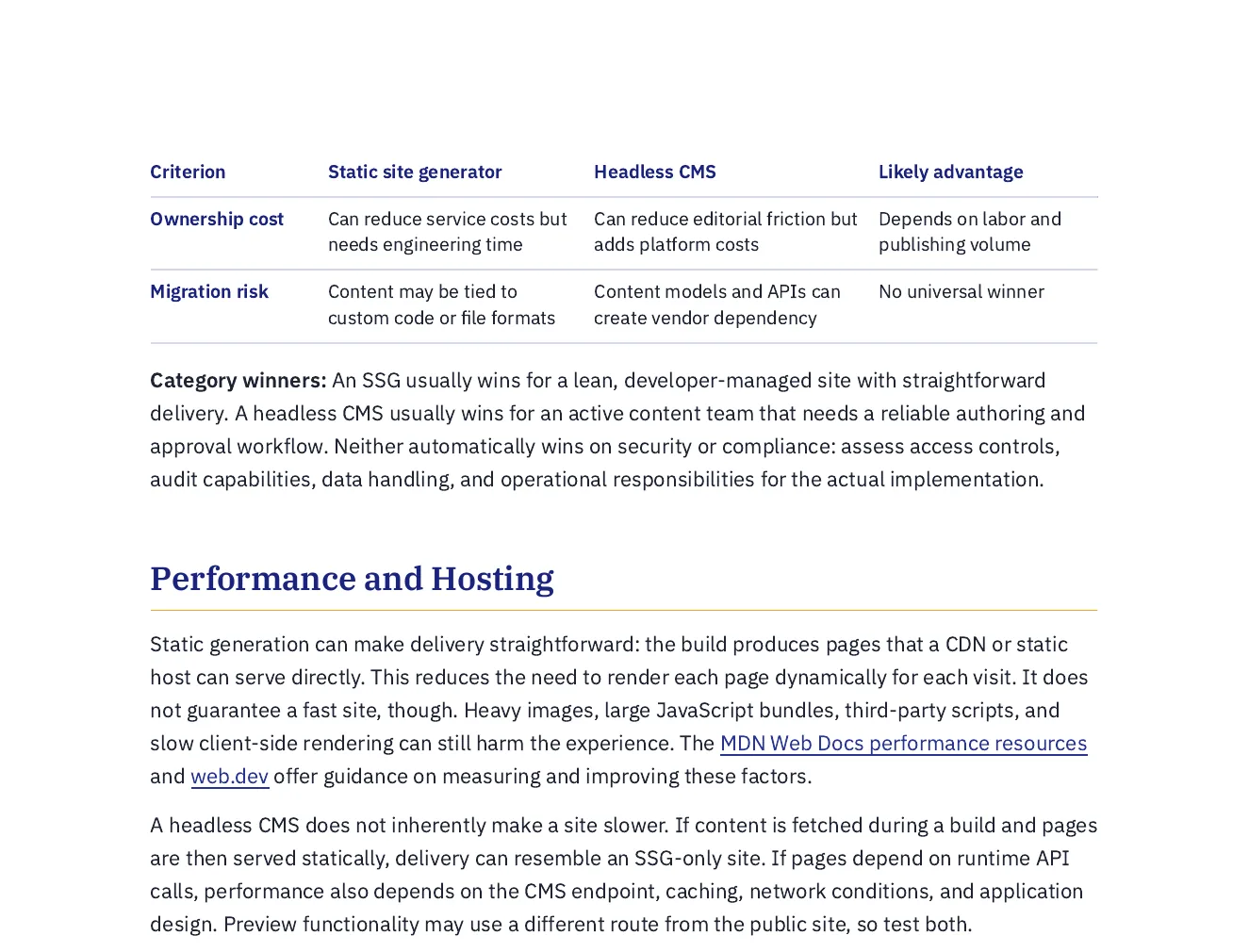
This is an actual Quill export, with the input brief available alongside it. Use the workflow below to connect source material, structure, editing and delivery.
A balanced comparison with a feature-by-feature table, pros and cons, lock-in and migration risks, and a plain statement of which situations favour each option.
Write a balanced comparison of building a marketing website with a static site generator and building it with a headless content management system. Compare authoring workflow, who can publish without a developer, performance and hosting, preview and review, cost of ownership, and the lock-in and migration risks. Say plainly which situations favour each option. Describe the approaches rather than ranking named products, and cite documentation from MDN Web Docs, web.dev and the Jamstack site, plus the platforms' own documentation pages, rather than third-party blog posts.
Open the full export and compare its statements with the cited sources before reuse.
Set the reader, purpose, required points, sources and section budgets. Review extracted material from an upload, paste or URL before using it as grounding.
Review the outline, then the draft. Add structured blocks, edit selected passages and use Image Studio for permitted generation, photo selection and responsive insertion; retain attribution where required.
Review citations, wording and metadata. Use the supported export or connected destination for the current account; Markdown handoff and a live publishing connection are different delivery paths.
Power Edit starts from an active selection. You can give iterative or voice-transcribed instructions, choose a reply language, stop a streamed response, inspect the result and explicitly replace the selected range. Full-document context is reference material. Structured blocks have typed fields, item-level regeneration and previews; their AI field assistance is separate from their layout.
Use builder or advanced prompts with the subject and document context. Shape style, mood, lighting, palette, composition, camera and supported image dimensions. Inspect generated alternatives or a selected real photo, retain required source attribution and edit alternative text before insertion. Finishes and prompt edits create a new result; compare it with the original instead of assuming an edit is lossless.
Import options depend on the source type: pasted text, Markdown or HTML; document extraction; spreadsheet cells; image OCR; and supported media transcription. Review extracted material before drafting. Export settings include the supported format, theme, author, spacing, headers, footers and page appearance. Inspect the actual download because HTML, print PDF and editable Word represent structure differently.
A source-led draft needs human review. HTML, PDF and editable Word have different layout fidelity; connected publishing support is destination-specific.
Product copy helps buyers understand the item; Product markup labels factual fields for machines. Keep the name, price, availability, and brand consistent with the visible page. Google requires relevant, accurate structured data, but markup does not guarantee rich results or an AI citation.
Compare the actual output and destination workflow of each tool rather than assuming other writers lack schema. Gixo generates the description and assembles Product JSON-LD from the details you enter. Check the result in the destination page, especially when the store already manages its own product markup.
Consistent copy and correct structured data, generated together and ready for your store.
Product JSON-LD from name, brand, SKU, GTIN, and other supplied fields. A nested Offer requires price and currency. Check required fields, supported values, factual accuracy, and the rendered destination markup before publishing.<script type="application/ld+json"> block. Confirm that the destination accepts scripts and avoids duplicate or conflicting Product markup; a CMS may strip the block or generate its own schema.| Capability | Gixo | Generic AI writer | Manual |
|---|---|---|---|
| Writes the description | Yes | Yes | Slow |
Valid Product / Offer schema | Built in, deterministic | Inspect the actual schema output | Build and validate the markup |
| Price taken from your data, never invented | Supplied price used in the Offer | Check how factual fields are populated | Review the entered values |
| Consistent brand voice across SKUs | Yes | Varies | Varies |
| Schema embedded in exportable HTML | Yes; check destination handling | Check export and CMS support | Embed and verify the script |
Product markup from your details in one pass.Inside Quill

Updated