
Writesonic alternative: Gixo Quill vs Writesonic
If you are evaluating one Writesonic alternative, compare the workflow that follows the first draft: source evidence, on-page checks, brand review, export, and publishing. Gixo Quill covers those steps in one content workspace; confirm the current Writesonic plan and limits against your own brief.
What your plan includes.Comments, team sharing and Brand Voice is on Professional plans and above — from $79 per seat a month, minimum three seats. Writing, checks, exports, public share links and publishing are on every plan. The 14-day trial works like Starter, so it does not include them.
Why teams choose Gixo Quill instead
Quill is built around the document after the first draft: evidence, review, and publishing in one workspace.
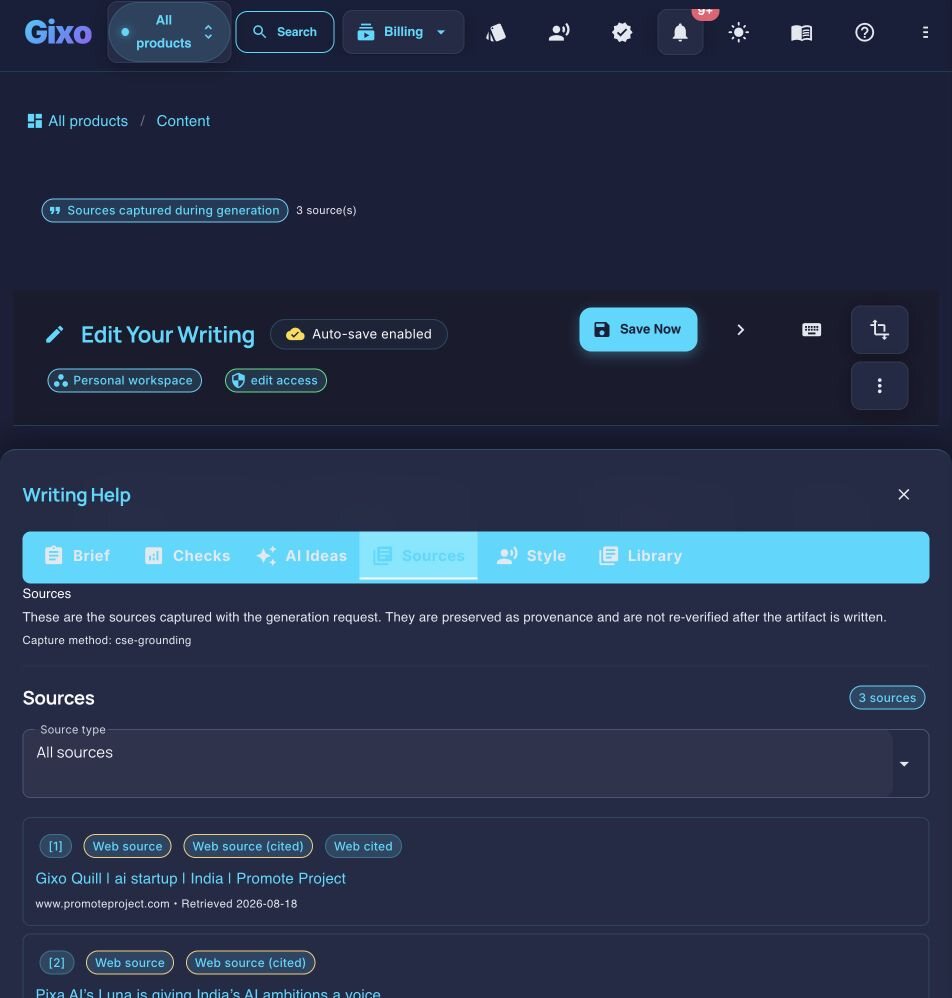
Gixo Quill grounds drafts in retrieved or supplied sources and keeps those sources visible for review. Generated content from any platform still needs human verification before publication.
Quill places supplied keywords, checks heading hierarchy and readability, and suggests internal links from your own library. Search intent, keyword difficulty and live SERP research stay external.
Give Quill samples of your own writing and it builds a voice profile from them, then applies it to new drafts. Writesonic derives a writing style from samples too, so read this one as parity rather than a reason to move.
Quill handles content. Approved source material can move to Gixo Lumen when you need a presentation, but Lumen remains a separate product and plan.
Publish directly to connected WordPress and Ghost sites. Use Medium draft handoff or export for Substack and other destinations.
Export content as clean HTML, Markdown, or styled PDF. More flexible output options than Writesonic for diverse publishing workflows.
Why users switch
We are not in a position to audit another company's product, and Writesonic ships changes as often as we do. A list of things we assert it cannot do would be stale by the time you read it — and you would be right to discount it, coming from us. So this section describes what Quill is built around, and the questions worth putting to any tool on your shortlist, including this one.
Quill is built for the stretch after the first draft. Generating prose is the commodity now; every tool in this category does it, and the differences that survive a month of real use are elsewhere. What costs a content team time is checking a draft, attaching sources to the claims in it, moving it through review, and getting it out in a file that does not need a manual pass in Word before anyone can send it.
Three questions separate most tools in this category, and they are worth asking on the plan you would actually buy rather than the marketing page:
- Does the tool attach sources to the claims it writes, or do you add them afterwards? Quill grounds drafts in retrieved or supplied sources and keeps those sources visible next to the claim for review.
- Does the exported file arrive in your house style? Quill applies a document design — typography, spacing, cover, contents — to DOCX and PDF, so the file that lands is the file you send.
- Does the work move from draft to review to published without leaving the workspace? Quill carries comments, team sharing and direct publishing to connected WordPress and Ghost sites.
Feature availability moves between pricing tiers frequently — ours included, and the plan notes on this page say which Quill tier each capability needs. Check the current tier on both sides before you decide.
A deeper look at the differences
A feature checklist only tells part of the story. The real differences between Writesonic and Gixo Quill become apparent when you examine how each platform handles the core workflows that professional content teams depend on every day.
Content Generation Depth and Structure
Quill writes long-form as a single structured document rather than a stack of generated blocks: a heading hierarchy it checks for order and nesting, sections that carry from one to the next, and a length target set by the content type you pick rather than by how long the model felt like being. The thing to test on any tool, with your own brief, is whether a 2,000-word draft arrives as an article or as fragments you then have to join — that is a difference you can see in ten minutes and cannot read off a feature table.
SEO Integration Without Separate SEO Tools or Content Optimization Tools
Quill places the keywords you supply, checks heading hierarchy and readability, and suggests internal links drawn from your own library, all inside the editor as you work. Be precise about what that is and is not: it is on-page structural analysis against your own inputs. It is not live SERP research. Search intent, keyword difficulty and competitor scoring come from a dedicated SEO tool, and if a live content score against the current top ten is what you are buying, that job stays with Surfer, Frase or Semrush whichever writer you choose.
Citation Quality
Quill grounds drafts in retrieved or supplied sources and renders citations inline, next to the claim they support, so a reviewer can check a statistic without leaving the document. Generated content from any platform still needs a human read before it is published — grounding narrows what you have to check, it does not remove the check. Ask any tool you are comparing to show you a finished draft with its sources attached, rather than a description of the feature.
Publishing Workflow
Quill can publish approved content directly to connected WordPress and Ghost sites, hand a draft to Medium, or export PDF, DOCX, HTML, Markdown, TXT, and JSON for other destinations. Competitor publishing capabilities change over time, so verify the current Writesonic workflow against the destinations your team actually uses.
How It Works
Provide your keyword or brief. Gixo Quill plans SEO structure and content approach.
Select one of Quill's direct-create content formats with its purpose-built structure guide.
AI creates cited, structured content. Edit any section with inline AI tools.
Export to HTML, PDF, or publish directly to your CMS platform.
Side-by-side comparison
| Feature | Gixo Quill | Writesonic |
|---|---|---|
| Evidence citations | Grounded in retrieved or supplied sources, rendered inline beside the claim | Ask to see a finished draft with its sources attached, not a description of the feature |
| SEO depth | On-page only: keyword placement, heading hierarchy, readability, internal links from your library | Ask whether the score is computed against your page alone or against the live SERP |
| Brand voice | A voice profile learned from writing samples you supply | Also derives a style from samples — ask which plan it is on, as we would expect you to ask us |
| Presentations | Separate Gixo Lumen product and plan | Ask whether decks are in the same subscription or a different product |
| CMS publishing | connected WordPress and Ghost sites; Medium draft handoff | Ask which destinations are live on your plan today |
| Export formats | PDF, DOCX, HTML, Markdown, TXT, and JSON | Ask for a DOCX of a finished piece and open it in Word before you decide |
| Document design on export | PDF preserves the document design exactly; DOCX arrives as an editable Word layout, where fonts, backgrounds and page breaks may differ. | Ask whether the export carries a document design or arrives as unstyled text |
| Content management | Full workspace: versions, comments, review states, team sharing | Ask where drafts live between sessions and who else can open them |
| Evaluation path | 14-day free trial, no card | Ask what the trial includes and whether it takes a card |
Who benefits from switching
Different roles experience different pain points with Writesonic. Here is where the switch to Gixo Quill delivers the most immediate impact.
Content marketers producing blog posts, pillar pages, and lead magnets need a reviewable article, not just a first draft. Quill checks supplied keywords, heading structure, readability, citations, and internal links from your own library. It does not predict rankings or replace live SERP research, so compare the review work you still have to do in each tool.
Agencies managing content for multiple clients need per-client brand voice profiles, consistent SEO quality, and efficient multi-site publishing. Quill's per-client voice profiles, on-page content scoring and direct CMS publishing are meant to reduce the per-client delivery effort. Compare that against whatever you use now on the two things that decide it at scale: whether voice settings are per-client and whether publishing is direct or copy-paste.
E-commerce teams can use Quill for product guides, category pages, buying guides, structured headings, and source-grounded drafts. Product descriptions can also carry deterministic Product/Offer JSON-LD built from entered product data; generic Article, FAQ, and HowTo schema are not automatically generated for every Quill draft.
Freelancers who serve multiple clients need a single tool that adapts to different brand voices, industries, and content types without requiring separate SEO subscriptions. Quill's all-inclusive platform replaces the need to stack Writesonic with a separate SEO tool, reducing monthly tooling costs while producing higher-quality deliverables that justify premium rates.
How to make the switch
Switching content platforms does not have to be disruptive. Follow these steps to move from Writesonic to Gixo Quill with minimal workflow interruption.
What you get when you export to Word or PDF
Most AI writers hand back prose and a download link. Quill gives you a document you set up first, with a live preview that redraws as you change it.
Headings export as real Word heading styles, not bold paragraphs, so the navigation pane and any contents list work. Numbered and bulleted lists carry their own numbering rather than typed-in digits.
Pick a theme, write the cover, choose where page numbers sit, turn the contents list on or off, set line spacing and orientation. A live preview redraws the whole document as you change each control, so you know what you are getting before you download it.
Inline markers, a references section with retrieval dates and full URLs, or both — they are separate switches. Images keep their attribution and licence line as a caption, so the file you hand over carries its own provenance rather than losing it at the door.
Six formats — PDF, Word, HTML, Markdown, plain text and JSON. The cover page and the contents list, when you include them, open both the PDF and the Word file; in Word the headings are real heading styles, the lists carry Word's own numbering and the footer numbers the pages.
See the actual export, not a description of it
Rather than describe the export, here is one. Both files are the same Quill article, exported on 30 September 2026 through the ordinary Export Document screen, both A4 portrait. Nothing was tidied up afterwards, and the article is a sample written for this purpose rather than a customer document.
3.2 MB, 36 pages, A4 portrait. The document design exactly as it was set up: a cover page with the title and date, a contents list, and a numbered footer on every page.
2.8 MB, A4 portrait, opens in Word. The same article as an editable layout: the same cover page and contents list, real Word heading styles so the navigation pane works, list numbering Word owns rather than typed-in digits, a page-numbered footer, and 19 embedded images.
They are not identical, and that is the point. PDF preserves the document design exactly; DOCX arrives as an editable Word layout, where fonts, backgrounds and page breaks may differ. Both open with the cover page and the contents list. In the Word file that list is written out as text rather than a field Word refreshes, so if you restructure the document, retype it; and the file names its fonts rather than carrying them, so a computer without Inter shows another font in its place. Both files carry the same 19 images, byte for byte. Open both before deciding which one your workflow needs — Quill exports PDF, DOCX, HTML, Markdown, TXT, and JSON, and these two are the ones that carry a document design.
Is Writesonic enough for professional content?
Writesonic is a capable tool for specific use cases. If your content needs are primarily short-form — social media posts, ad copy, email subject lines, product descriptions — it delivers reasonable output at a competitive price. Many users find it perfectly adequate for generating first drafts of marketing copy that gets refined by a human editor before publication.
The limitations emerge when content requirements expand beyond short-form generation. Teams that need their content to rank in search results, include verifiable evidence, maintain a consistent brand voice across multiple writers, or publish directly to CMS platforms will find Writesonic's capabilities insufficient. The tool was not designed for SEO-first content production, and retrofitting it with external SEO tools and manual citation workflows creates a fragmented process that scales poorly.
The question is not whether Writesonic is a bad tool — it is not. The question is whether your content goals have outgrown what it was built to do. If you are spending more time compensating for its limitations than benefiting from its speed, it is time to evaluate a platform designed for the depth and sophistication your content strategy demands. Gixo Quill was built for exactly that transition: professional content teams that need AI speed combined with SEO rigor, evidence integrity, and streamlined publishing.
Frequently Asked Questions
Inside Quill
Inspect captured sources beside the working draft
Updated