
A Jasper alternative that grounds claims in your sources and cites them inline
Jasper is moving toward a broader marketing AI and agent platform, with brand control over voice and style. Gixo Quill goes further on the content itself: claims grounded in real sources and cited inline, structure and readability checked, and — when you connect your brand — your product's real facts used instead of invented, plus the editor, review workflow, transformations, and publishing to finish the work in one place.
What your plan includes.Comments, mentions and team sharing is on Professional plans and above — from $79 per seat a month, minimum three seats. Writing, checks, exports, public share links and publishing are on every plan. The 14-day trial works like Starter, so it does not include comments.
Different product shapes: marketing AI platform or content workspace
This is the real decision point: broad marketing AI platform or durable content workspace.
What you get when you export to Word or PDF
Most AI writers hand back prose and a download link. Quill gives you a document you set up first, with a live preview that redraws as you change it.
Headings export as real Word heading styles, not bold paragraphs, so the navigation pane and any contents list work. Numbered and bulleted lists carry their own numbering rather than typed-in digits.
Pick a theme, write the cover, choose where page numbers sit, turn the contents list on or off, set line spacing and orientation. A live preview redraws the whole document as you change each control, so you know what you are getting before you download it.
Inline markers, a references section with retrieval dates and full URLs, or both — they are separate switches. Images keep their attribution and licence line as a caption, so the file you hand over carries its own provenance rather than losing it at the door.
Six formats — PDF, Word, HTML, Markdown, plain text and JSON. The cover page and the contents list, when you include them, open both the PDF and the Word file; in Word the headings are real heading styles, the lists carry Word's own numbering and the footer numbers the pages.
See the actual export, not a description of it
Rather than describe the export, here is one. Both files are the same Quill article, exported on 30 September 2026 through the ordinary Export Document screen, both A4 portrait. Nothing was tidied up afterwards, and the article is a sample written for this purpose rather than a customer document.
3.2 MB, 36 pages, A4 portrait. The document design exactly as it was set up: a cover page with the title and date, a contents list, and a numbered footer on every page.
2.8 MB, A4 portrait, opens in Word. The same article as an editable layout: the same cover page and contents list, real Word heading styles so the navigation pane works, list numbering Word owns rather than typed-in digits, a page-numbered footer, and 19 embedded images.
They are not identical, and that is the point. PDF preserves the document design exactly; DOCX arrives as an editable Word layout, where fonts, backgrounds and page breaks may differ. Both open with the cover page and the contents list. In the Word file that list is written out as text rather than a field Word refreshes, so if you restructure the document, retype it; and the file names its fonts rather than carrying them, so a computer without Inter shows another font in its place. Both files carry the same 19 images, byte for byte. Open both before deciding which one your workflow needs — Quill exports PDF, DOCX, HTML, Markdown, TXT, and JSON, and these two are the ones that carry a document design.
Where Gixo Quill is the better fit: choosing AI for content marketing
If your team wants a broad marketing AI platform that reaches across many campaign workflows, Jasper may still fit. If your team needs better content output plus the workspace around that output, Gixo Quill is the tighter product.
Turn briefs, source material, and existing drafts into structured content, then keep editing, evidence review, collaboration, transformation, export, and publishing attached to the same document.
That means the evaluation should focus less on who has more platform breadth and more on who helps your team finish a document cleanly once the first draft appears. That is where Gixo Quill is stronger: structured editing, review threads, source-aware work, brand voice, evidence grounding, references, transformations, localization, export, and direct publishing to connected WordPress and Ghost sites.
Set a structured, versioned editorial brief — primary keyword, search intent, audience, required topics, and the questions to answer — that flows into generation as coverage requirements, choose the source scope and evidence standard before generation, inspect citations afterward, and apply configurable writing and terminology controls during review.
The Gixo Quill stack stays the same
Against Jasper, the reason teams switch is not platform breadth. It is brand voice, evidence grounding, visible references, team review, and publishing from one focused workspace.
Brand voice
Shared voice settings and industry-aware presets keep the first shot consistent across writers, reviewers, and formats.
Grounding
The workflow expects grounded claims, so teams do not have to bolt trust checks onto the document after generation.
References
Visible sources and reference-quality notes stay attached to the draft so reviewers can inspect the supporting material directly.
Review
Comments, review states, assignees, due dates, versions, and activity belong to the document rather than scattered follow-up tools.
Publish
Direct publishing plus export keep the finish path inside the same product after the draft is approved.
Side-by-side comparison
| Capability | Gixo Quill | Jasper |
|---|---|---|
| Primary shape | Focused content workspace | Broader marketing AI platform |
| Review-ready first shot | Core product promise | Workflow-dependent |
| Brand voice, grounding, references | Built in, same settings across every Gixo product | Brand Voice and a style guide are headline platform features — ask which plan carries the ones you need |
| Editor + inline AI revision | Built in | Available |
| Comments and structured review workflow | Built in from Professional | Ask where review happens on the plan you would buy, and who can see a draft before it ships |
| Transform and localize approved content | Built in | Translation is a named platform capability — ask whether it is included on your plan or metered |
| Direct publishing destinations | connected WordPress and Ghost sites | Via integrations and extensions you configure — ask which destinations are live for your workspace today |
| Substack handling | Medium draft handoff and Substack export | Ask whether it is a supported destination or an export-and-paste step |
Frequently Asked Questions
Inside Quill
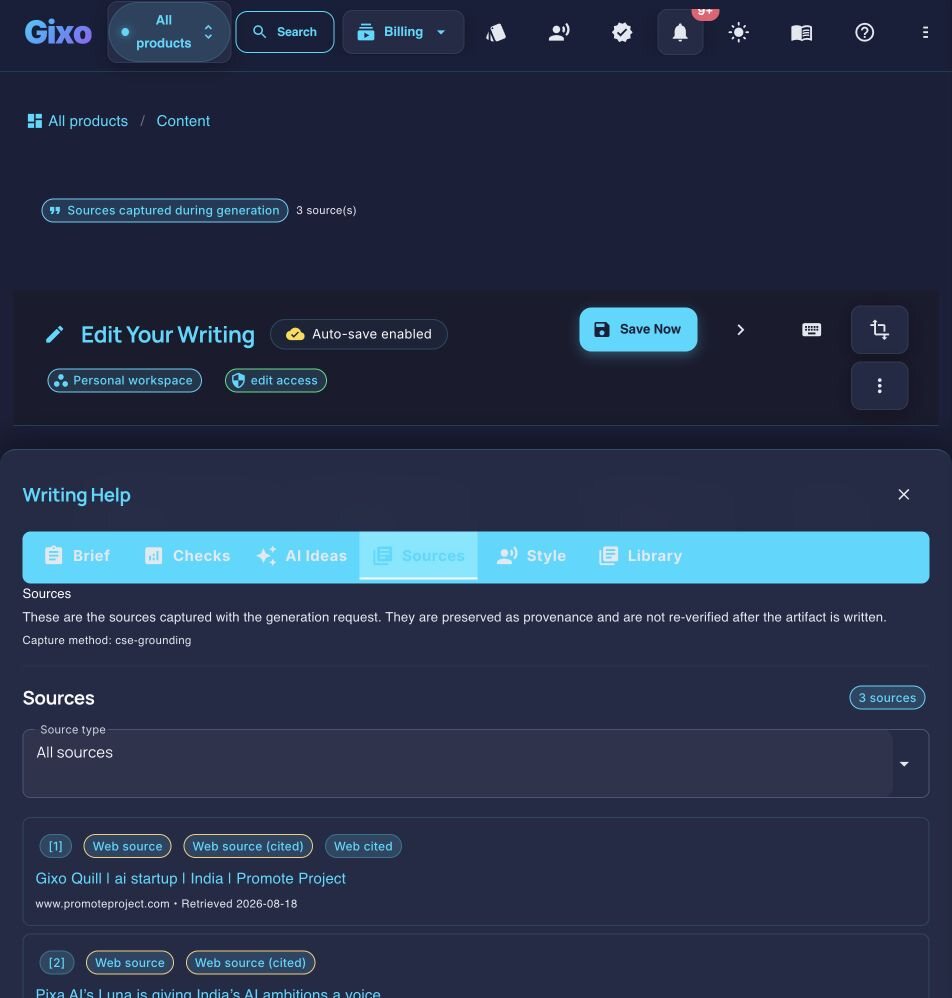
Inspect captured sources beside the working draft
Updated