
An Anyword alternative that grounds and cites — not just scores
Anyword is a gen-AI performance platform built around predicting how copy will score before you publish. Gixo Quill works on the content itself: sources and citations for inspection, structure and readability checks, and Product Dictionary terminology to guide drafting, plus editing, review, transformation and publishing paths. Human verification still decides whether claims and product facts are supported.
AI copywriting: predict the score, or ground the claims
This is the real decision point: a predicted performance score before publishing, or content whose claims are grounded, cited, and checked.
What you get when you export to Word or PDF
Most AI writers hand back prose and a download link. Quill gives you a document you set up first, with a live preview that redraws as you change it.
Headings export as real Word heading styles, not bold paragraphs, so the navigation pane and any contents list work. Numbered and bulleted lists carry their own numbering rather than typed-in digits.
Pick a theme, write the cover, choose where page numbers sit, turn the contents list on or off, set line spacing and orientation. A live preview redraws the whole document as you change each control, so you know what you are getting before you download it.
Inline markers, a references section with retrieval dates and full URLs, or both — they are separate switches. Images keep their attribution and licence line as a caption, so the file you hand over carries its own provenance rather than losing it at the door.
Six formats — PDF, Word, HTML, Markdown, plain text and JSON. The cover page and the contents list, when you include them, open both the PDF and the Word file; in Word the headings are real heading styles, the lists carry Word's own numbering and the footer numbers the pages.
See the actual export, not a description of it
Rather than describe the export, here is one. Both files are the same Quill article, exported on 30 September 2026 through the ordinary Export Document screen, both A4 portrait. Nothing was tidied up afterwards, and the article is a sample written for this purpose rather than a customer document.
3.2 MB, 36 pages, A4 portrait. The document design exactly as it was set up: a cover page with the title and date, a contents list, and a numbered footer on every page.
2.8 MB, A4 portrait, opens in Word. The same article as an editable layout: the same cover page and contents list, real Word heading styles so the navigation pane works, list numbering Word owns rather than typed-in digits, a page-numbered footer, and 19 embedded images.
They are not identical, and that is the point. PDF carries the designed print layout; DOCX arrives as an editable Word layout, where fonts, backgrounds and page breaks may differ. Inspect the downloaded file for the destination you need. Both open with the cover page and the contents list. In the Word file that list is written out as text rather than a field Word refreshes, so if you restructure the document, retype it; and the file names its fonts rather than carrying them, so a computer without Inter shows another font in its place. Both files carry the same 19 images, byte for byte. Open both before deciding which one your workflow needs — Quill exports PDF, DOCX, HTML, Markdown, TXT, and JSON, and these two are the ones that carry a document design.
Where Gixo Quill is the better fit
A predicted performance score does not establish that a claim is true. Compare how each tool uses source material, product context and terminology, then inspect the generated claims. Quill supplies source-aware drafting, citation context and dictionary guidance; a qualified reviewer still verifies the facts.
Turn briefs, source material, and existing drafts into structured content, then keep editing, evidence review, collaboration, transformation, export, and publishing attached to the same document.
Gixo Quill does not predict performance at all. So the evaluation is less about who predicts a number and more about whether the content is grounded, cited, checked, and ready to review. That is where Quill is stronger: structured editing, review threads, source-aware work, brand voice, evidence grounding, references, transformations, localization, export, and direct publishing to connected WordPress and Ghost sites.
Set a structured, versioned editorial brief — primary keyword, search intent, audience, required topics, and the questions to answer — that flows into generation as coverage requirements, choose the source scope and evidence standard before generation, inspect citations afterward, and apply configurable writing and terminology controls during review.
The Gixo Quill stack stays the same
Against Anyword, the reason teams switch is not a predicted score. It is brand voice, evidence grounding, visible references, team review, and publishing from one focused workspace.
Brand voice
Shared voice settings and industry-aware presets keep the first shot consistent across writers, reviewers, and formats.
Grounding
The workflow expects grounded claims, so teams do not have to bolt trust checks onto the document after generation.
References
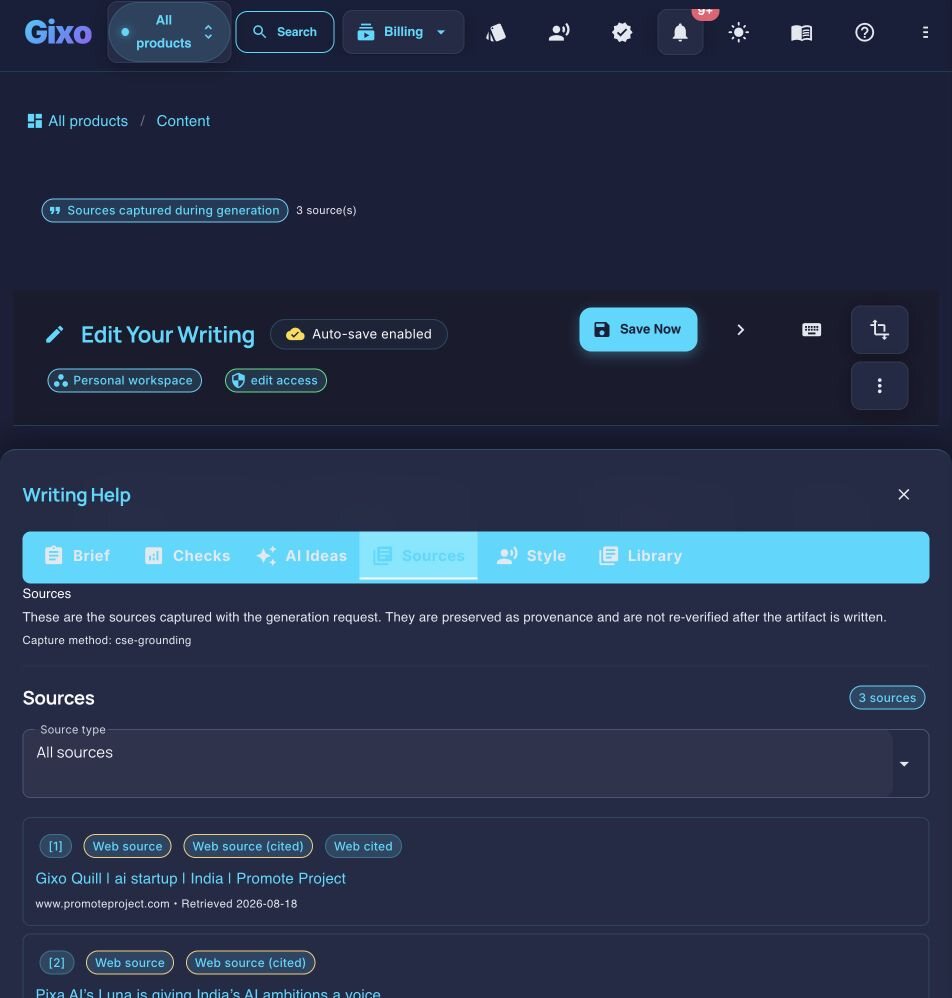
Visible sources and reference-quality notes stay attached to the draft so reviewers can inspect the supporting material directly.
Review
Comments, review states, assignees, due dates, versions, and activity belong to the document rather than scattered follow-up tools.
Publish
Direct publishing plus export keep the finish path inside the same product after the draft is approved.
Side-by-side comparison
| Capability | Gixo Quill | Anyword |
|---|---|---|
| Primary shape | Focused content workspace | Gen-AI performance platform |
| Claims grounded in sources and cited inline | Built in | Not the focus |
| Product-facts knowledge base | Built in (connect your brand) | anyword.com describes adding brand context to every prompt and a performance RAG API (20 Sep 2026) — ask how it sources your product facts |
| Structure, readability, and evidence checks | Built in | Ask what its scoring and SEO tools check beyond predicted performance |
| Approach to quality | Proven structure built into the draft | Predicted score after writing |
| Review workflow, transform, and publish | Built in | Varies |
Frequently Asked Questions
Inside Quill
Inspect captured sources beside the working draft
Updated