
Jasper vs Gixo Quill: compare the content workflow
This comparison focuses on the work after a first draft: source evidence, on-page checks, review, export, and publishing. Jasper and Quill change frequently, so verify current features and pricing on each vendor's plan before you buy.
Short answer: Jasper may fit teams prioritising campaign tooling, short-form marketing templates, or API-led workflows. Gixo Quill may fit teams that need research-backed long-form content with citations, review states, and direct publishing. Pricing and packaging are time-sensitive; compare the current plans directly rather than relying on a historical total.
Key differences between the two AI content marketing platforms at a glance
Both platforms generate AI content well. The real differences surface in post-generation capabilities — SEO tooling, citation handling, visual output, and total cost of ownership.
Gixo Quill includes supplied-keyword checks, heading analysis, readability, metadata, and internal-link suggestions. Ask which comparable checks are included in the Jasper plan you would buy rather than assuming an add-on is required.
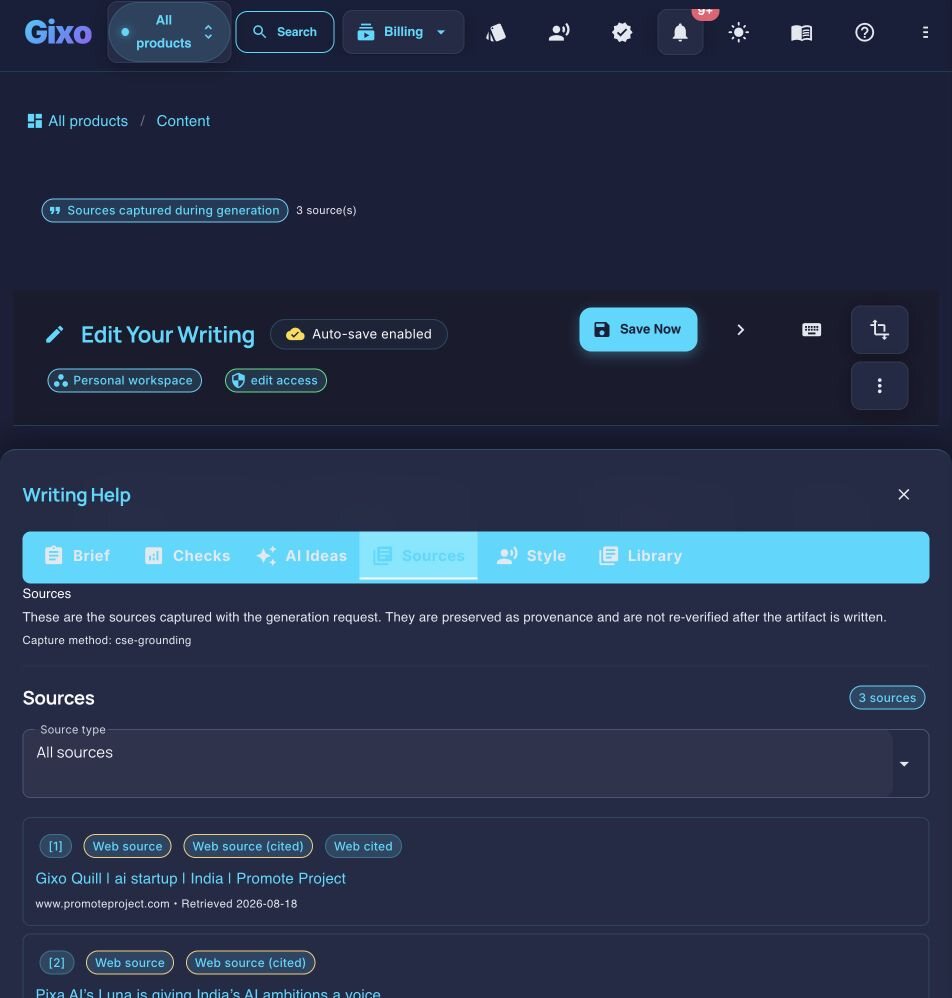
Gixo Quill retrieves relevant web sources, injects the source set into generation, and keeps citations and source records attached for review. Grounding improves traceability; editors still verify every important claim. Competitor research modes vary by plan and should be tested directly.
Quill can hand approved source content to Gixo Lumen for presentation creation. Lumen is a separate product and plan; slide decks are not a Quill feature.
Export from Gixo Quill as HTML, Markdown, PDF, or direct to WordPress and Ghost. Compare the current Jasper plan's export and publishing paths against the destinations your team actually uses.
Quill keeps structured drafting, evidence, review, content export, and publishing in one content workspace. Presentations and other artifact types remain in their own Gixo products.
Gixo Quill offers 50 structured format guides across direct creation and transformation-only workflows. Jasper uses templates that are less granular in defining section-level tone and formatting rules.
Total value vs add-on costs in your content production stack
Comparing sticker prices misses the point. What matters is the total cost and complexity of your content production stack.
Compare the complete workflow, not an old price stack
Jasper can be a capable text-generation choice, but the surrounding workflow is what determines the real buying decision. Ask whether your chosen plan includes the SEO research, evidence handling, review, export, publishing, and integrations you actually need. If it does not, price those add-ons from their current vendor pages and include the time spent moving drafts between tools. Quill keeps its on-page checks, evidence citations, review state, and publishing paths in the content workflow; presentations remain a separate Gixo product, Lumen.
Gixo Quill's Focused Content Workflow
Gixo Quill was built as a focused content platform. Keyword placement, heading structure, readability, source grounding, citations, and deterministic SEO checks stay in the writing workspace. The delivery workflow can generate and edit metadata that the document editor does not persist. Exports to HTML, Markdown, PDF, WordPress, and Ghost are built into the content interface. When a team also needs a presentation, approved source content can move into Gixo Lumen, which remains a separate product and plan.
How to evaluate both fairly
List what content types you produce, whether you need SEO tools, and if presentations or visual content are part of your workflow.
Compare Quill against the Jasper features your content workflow actually uses. Price Lumen or any other separate product only if your team also needs that artifact type.
Generate the same content on both platforms. Compare output quality, structure, citation support, and how much editing each requires.
Measure how long it takes to go from prompt to published content on each platform. Factor in editing, SEO optimization, and formatting time.
Who benefits most from switching
Different teams have different reasons to evaluate alternatives. Here are four common scenarios where the comparison matters most.
Full feature comparison
| Feature | Gixo Quill | Jasper |
|---|---|---|
| Content-side SEO workflow | Headings, supplied keywords, readability, links, brief coverage, and checks | Confirm current product workflow |
| Evidence citations | Grounded in retrieved or supplied sources, rendered inline beside the claim | Ask to see a finished draft with its sources attached |
| Presentation generation | Available in Gixo Lumen — separate product and plan | Ask whether decks are in the same subscription or a different product |
| Export formats | PDF, DOCX, HTML, Markdown, TXT, and JSON | Ask for a DOCX of a finished piece and open it in Word before you decide |
| Publishing destinations | connected WordPress and Ghost sites; Medium draft handoff and Substack export | Via integrations and extensions you configure — ask which are live for your workspace today |
| Brand voice training | A voice profile learned from writing samples you supply | Brand Voice and a style guide are headline platform features — ask which plan carries them |
| Content structure | H1-H4 hierarchy, tables, structured sections | Compare on your own brief — generate the same article in both and look at the heading tree |
| Style guides | 50 structured format guides | A style guide is a named platform feature — ask how it is authored and where it applies |
| Long-form content | Length targets set by content type, up to long-form; quality still needs your review | Long-form via the document editor — compare a full-length draft from each |
| Content repurposing | Newsletter and social transformations in Quill; deck handoff to Lumen | Content pipelines and translation are named platform features — ask which are on your plan and whether they are metered |
| Book/ebook creation | Available in Gixo Folio — separate product and plan | Ask whether book-length work is in scope for the plan you would buy |
| Team collaboration | Shared workspaces, unified brand | Team features available |
| API access | Enterprise-gated programmatic API; confirm access | Available |
Tips for running your own comparison
Before committing to either platform, run a structured evaluation. These four steps will surface the differences that matter for your specific workflow.
What you get when you export to Word or PDF
Most AI writers hand back prose and a download link. Quill gives you a document you set up first, with a live preview that redraws as you change it.
Headings export as real Word heading styles, not bold paragraphs, so the navigation pane and any contents list work. Numbered and bulleted lists carry their own numbering rather than typed-in digits.
Pick a theme, write the cover, choose where page numbers sit, turn the contents list on or off, set line spacing and orientation. A live preview redraws the whole document as you change each control, so you know what you are getting before you download it.
Inline markers, a references section with retrieval dates and full URLs, or both — they are separate switches. Images keep their attribution and licence line as a caption, so the file you hand over carries its own provenance rather than losing it at the door.
Six formats — PDF, Word, HTML, Markdown, plain text and JSON. The cover page and contents list are on the PDF; the Word file carries the heading styles, the list numbering and a page-numbered footer.
See the actual export, not a description of it
Rather than describe the export, here is one. Both files are the same Quill article, exported on 20 September 2026 through the ordinary Export Document screen, both A4 portrait. Nothing was tidied up afterwards, and the article is a sample written for this purpose rather than a customer document.
3.8 MB, 39 pages, A4 portrait. The document design exactly as it was set up: a cover page with the title and date, a contents list, and a numbered footer on every page.
2.8 MB, A4 portrait, opens in Word. The same article as an editable layout: real Heading 1 and Heading 2 styles so the navigation pane works, list numbering Word owns rather than typed-in digits, a page-numbered footer, and 19 embedded images.
They are not identical, and that is the point. PDF preserves the document design exactly; DOCX arrives as an editable Word layout, where fonts, backgrounds and page breaks may differ. The cover page and contents list belong to the PDF; the Word file gives you the structure to edit instead. Its contents list is written out as text rather than a field Word refreshes, so if you restructure the document, retype that list. Both files carry the same 19 images, byte for byte. Open both before deciding which one your workflow needs — Quill exports PDF, DOCX, HTML, Markdown, TXT, and JSON, and these two are the ones that carry a document design.
Frequently Asked Questions
Inside Quill
Inspect captured sources beside the working draft
Updated