
Skip to content
Sign In Try Free
Workflow-specific products Content, decks, briefs, proposals, legal, and sales each have a clearer buying path.
Review before delivery Draft, edit, collaborate, approve, and export in the same workspace.
Security + procurement path Security policy, support, and Azure Marketplace buying are public.
Books guide

How to create an ebook, from idea to EPUB

To create an ebook, decide what it is for, outline the chapters, write or import the text, structure it with real headings so it can reflow, export an EPUB (and a PDF if you give it away), then add a cover and distribute it. EPUB is the W3C standard format that Apple Books, Google Play Books and Amazon KDP accept. This guide walks each step and shows where a free tool is enough and where a book workspace like Gixo Folio helps.
EPUB 3 The W3C standard for ebooks; version 3.3 became a W3C Recommendation.
6 steps Purpose, outline, writing, structure, export, cover and distribution.
1,400 px Apple Books' minimum cover size on the shorter side, in RGB.
Free tool A short lead-magnet ebook can be built in the browser with no account.
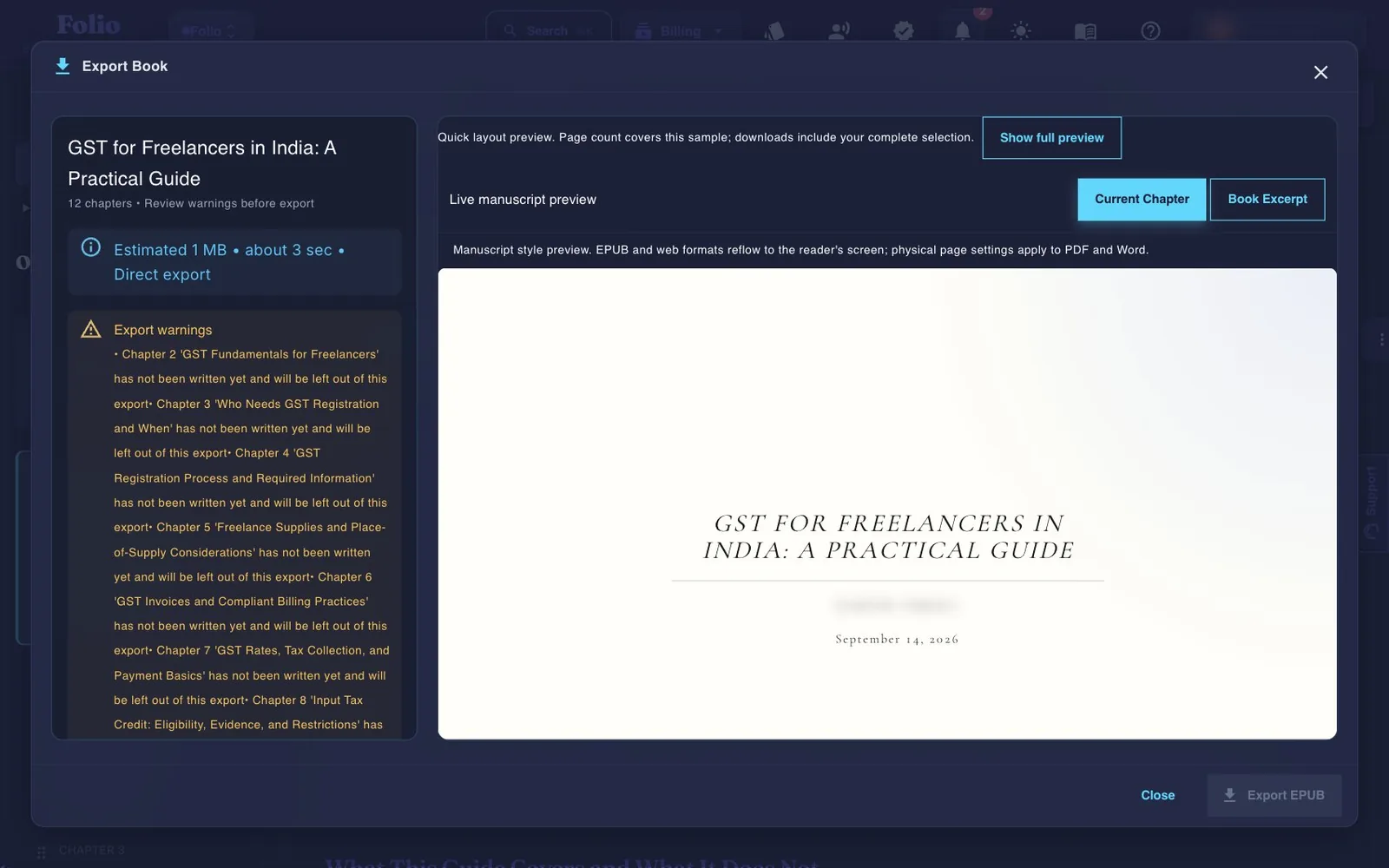
The Gixo Folio export options for a finished book
Folio's export step: the same finished manuscript becomes an EPUB for stores, a print PDF and an editable DOCX.
01Brief the book
02Shape the outline
03Draft chapters
04Review the manuscript
05Export the edition
Folio is a strong fit whenThe manuscript still needs structure, revision, and a finish line.

Use the persistent book workspace when the outcome is a real guide, authority book, training manual, client asset, or exportable edition.

Consider another tool whenYou only need one narrow part of the publishing job.

If your manuscript is already finished and you only need specialist formatting or a dedicated fiction system, a focused tool may be the simpler choice.

Which ebook are you creating?

The purpose decides the format, the length and the tool.

Lead magnet
A short guide you give away
Usually 10 to 40 pages, delivered as a PDF by email. Design and a clear promise matter more than length.
Store ebook
A book you sell
Delivered as a reflowable EPUB through KDP, Apple Books or Google Play; length and structure matter more than design.
Course or training
A manual or workbook
A structured guide for a course or team, often exported as PDF, or SCORM when it goes into a learning system.
Repurposed
Posts or a newsletter, collected
Existing articles shaped into chapters — quick to assemble, but repetition across pieces needs fixing.

How to create an ebook in six steps

The same order works for a free lead magnet and a book you sell.

1
Decide what the ebook is for
A lead magnet is a short PDF you give away; a store ebook is a reflowable EPUB you sell. Decide first, because it sets the length and the format.
2
Outline the chapters
List the chapters with one job each, in the order a reader needs them. For a short guide, five to eight sections is plenty.
3
Write or import the text
Draft each chapter against the outline, or import existing writing and shape it into chapters. Remove repeated passages as you go.
4
Structure it so the text can reflow
Mark chapter titles and sections as headings, avoid manual page breaks and spacing, and give every image alternative text.
5
Export the EPUB, and a PDF if you give it away
Export EPUB 3 for ebook stores; export a PDF for a download or email attachment. Check the EPUB in a validator before uploading.
6
Add a cover and distribute it
Make a cover at the store's size — about 2,560 × 1,600 pixels for KDP — then upload to your stores or attach the PDF to your sign-up flow.

Which ebook file does each destination need?

Store requirements read from Apple, Google and Amazon help pages on 25 September 2026.

DestinationFileNotes
Amazon KDPEPUB or DOCX (KPF also accepted)Ideal cover 2,560 × 1,600 px, 1.6:1
Apple BooksEPUBCover in JPEG or PNG, at least 1,400 px on the shorter side, RGB
Google Play BooksEPUB 3.3 preferred; EPUB 3 and 2 acceptedReflowable EPUB recommended
Email or website downloadPDFFixed layout, so design holds on every device
Editing or a co-authorDOCXEditable, tracked changes
Sources
Where the requirements come from

The EPUB 3.3 status is from the W3C Recommendation. Store requirements were read on 25 September 2026 from Apple's book asset guide, Google Play Books partner help and Amazon KDP's help pages. Kobo's accepted formats could not be confirmed on its own page that day, so they are not listed.

Free tools or a book workspace
Match the tool to the length

A short lead magnet does not need a book workspace. Folio's free ebook creator builds one in the browser with no account, and its DOCX to EPUB converter and EPUB checker handle a manuscript you already have.

A full-length ebook is different: it needs a chapter plan, drafting, a pass for repetition and consistency, and clean exports. That is what the Gixo Folio workspace does — plan the chapters, draft them with AI from your outline, audit the manuscript, then export EPUB 3, DOCX and a print PDF from the same book.

Writing an ebook with AI
Draft with it, then own every chapter

AI can draft ebook chapters quickly from an outline and notes, but it cannot know which claims are true in your field. Revise every chapter, check facts and examples, and remember that Amazon KDP asks you to disclose AI-generated text when you publish there.

Frequently Asked Questions

How do I create an ebook?
Decide what it is for, outline the chapters, write or import the text, structure it with heading styles, export an EPUB (and a PDF if you give it away), then add a cover and upload it to stores or your sign-up flow.
How do I make an ebook for free?
For a short guide, use a free browser tool such as Folio's ebook creator, or write it in Google Docs with heading styles and download it as EPUB or PDF.
What format should an ebook be in?
EPUB for ebook stores — it is the W3C standard that Apple Books, Google Play Books and KDP accept — and PDF for a free download, where a fixed layout keeps the design intact.
How long should an ebook be?
A lead-magnet ebook is often 10 to 40 pages; an ebook sold as a book usually runs like a short print book, commonly 20,000 to 60,000 words for practical nonfiction. Use the page count calculator to turn words into pages.
Can I write an ebook with AI?
Yes, as a drafting aid. A workspace like Gixo Folio drafts chapters from your outline, but you revise every chapter and check every claim. KDP asks you to disclose AI-generated text when you publish there.
What size should an ebook cover be?
For KDP, about 2,560 × 1,600 pixels at a 1.6:1 ratio. Apple Books asks for at least 1,400 pixels on the shorter side, in RGB.
Writing a full-length ebook?
Plan the chapters, draft them from your outline, audit the manuscript and export EPUB, DOCX and PDF from one workspace.