Sign In Try Free
Workflow-specific products Content, decks, briefs, proposals, legal, and sales each have a clearer buying path.
Review before delivery Draft, edit, collaborate, approve, and export in the same workspace.
Security + procurement path Security policy, support, and Azure Marketplace buying are public.
Books guide

How to self-publish a book, step by step

Self-publishing means you own the whole path: finish and edit the manuscript, format and export it as EPUB and PDF, commission or design a cover, choose a distribution platform such as Amazon KDP or IngramSpark, set the price and metadata, and launch. This guide walks each stage in order and is honest about where a tool helps and where the work is yours. Gixo Folio's job is the manuscript: it accelerates drafting, keeps the book structured, and exports a clean EPUB or PDF. The retail account, cover, ISBN, and upload all happen on the platform you publish to — not inside Folio.

Manuscript-first The finished, edited manuscript is the one asset every self-publishing step depends on.
EPUB + PDF Folio exports both the reflowable EPUB and the print-ready PDF most platforms accept.
You publish The KDP or IngramSpark account, cover, ISBN, and upload stay on the platform, in your control.
Launch-ready A stable manuscript and metadata plan is what turns a draft into a listing.
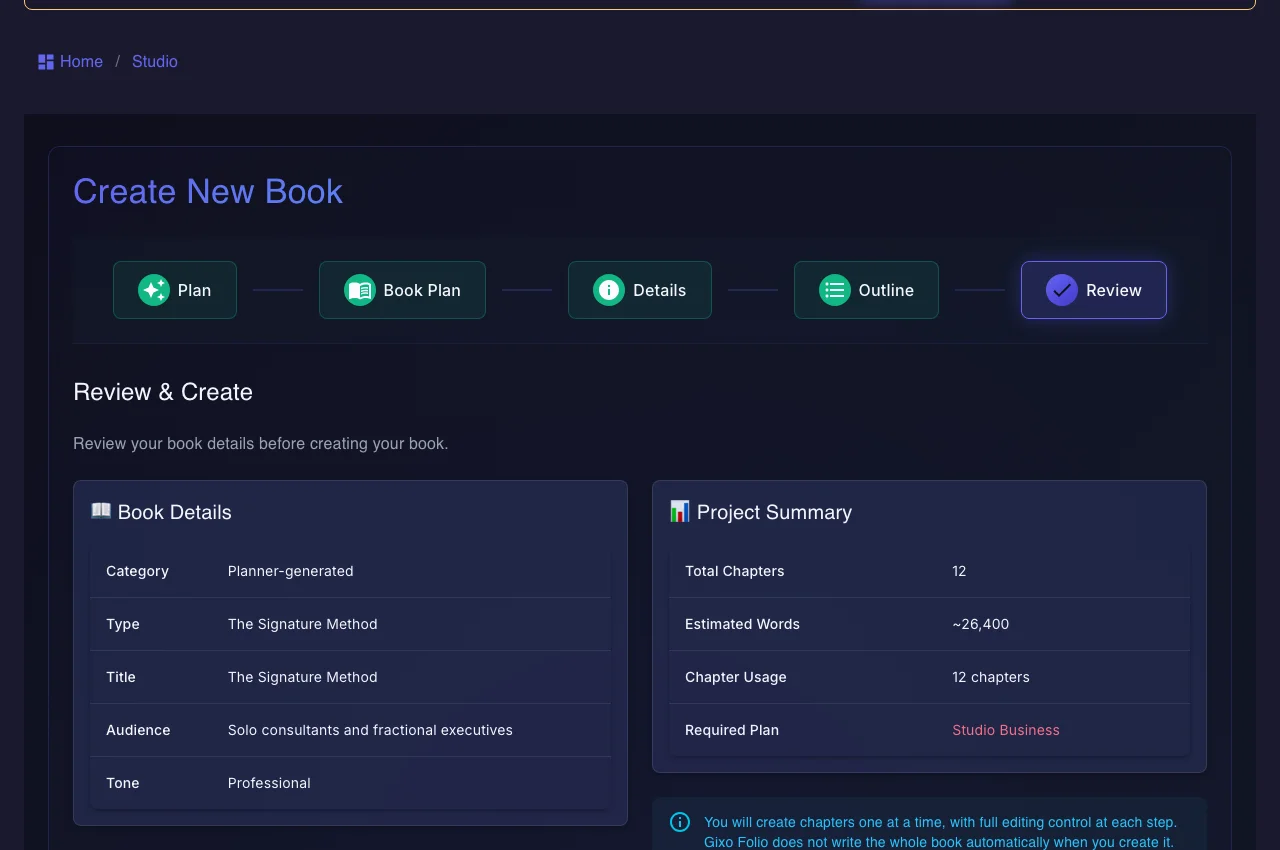
Gixo Folio — a manuscript review summary shown before final EPUB and PDF export
Gixo Folio produces and exports the finished manuscript as EPUB and PDF. The distribution steps — account, cover, ISBN, upload — happen on the retail platform, not inside Folio.
01Brief the book
02Shape the outline
03Draft chapters
04Review the manuscript
05Export the edition
Folio is a strong fit whenThe manuscript still needs structure, revision, and a finish line.

Use the persistent book workspace when the outcome is a real guide, authority book, training manual, client asset, or exportable edition.

Consider another tool whenYou only need one narrow part of the publishing job.

If your manuscript is already finished and you only need specialist formatting or a dedicated fiction system, a focused tool may be the simpler choice.

What does self-publishing a book actually involve?

Self-publishing is a sequence of distinct jobs. Knowing which are yours, which a platform owns, and which a manuscript tool speeds up keeps the project from stalling.

Manuscript
Finish and edit the book first
Nothing downstream works on an unstable draft. Complete the manuscript, revise it, and — for most authors — get a real editor or careful proofread before formatting.
Format
Export a clean EPUB and PDF
Retailers want a reflowable EPUB for ebooks and a print-ready PDF for paperbacks. Gixo Folio exports both from the finished manuscript so you are not hand-formatting in a word processor.
Cover
Get a cover that fits the store
A cover is a design job, not a manuscript job. Commission a designer or use a platform cover tool, and match the trim size and spine to your page count. Folio does not design covers.
Platform
Choose where the book is sold
Amazon KDP reaches the largest ebook and print audience; IngramSpark gives wider bookstore and library distribution. Many authors use both. Each has its own account and upload flow.
Metadata
Set title, description, categories, and ISBN
Your book's discoverability lives in its metadata: title and subtitle, description, keywords, categories, and — for print — an ISBN, which some platforms assign free while an owned ISBN you buy separately.
Launch
Price it and go live
Set the ebook and print price, confirm territories and rights, preview the listing, and publish. After launch, reviews and updates are managed in the platform dashboard.

How do you self-publish a book, step by step?

This is the order that keeps the work sane — stabilize the manuscript before you touch a store dashboard.

1
Finish and edit the manuscript
Complete every chapter, revise for clarity and consistency, then edit or have it edited. Fixing structure now is far cheaper than after the book is formatted.
2
Format and export the files
Turn the reviewed manuscript into a reflowable EPUB and a print-ready PDF. In Gixo Folio this is an export step from the same workspace you wrote in, not a separate reformatting project.
3
Commission the cover and interior details
Get a cover designed to the trim size you will print, and confirm front matter, title page, and back matter. This happens outside Folio, on your designer's tools or the platform's cover creator.
4
Set up the platform and upload
Create your Amazon KDP or IngramSpark account, start a new title, and upload the EPUB or PDF. This is the point where distribution genuinely begins, and it lives entirely on the platform.
5
Write the metadata and set pricing
Add the title, subtitle, description, categories, keywords, and ISBN, then set ebook and print prices and choose your territories and royalty options.
6
Preview, publish, and manage the launch
Use the platform previewer to check formatting, submit for review, and go live. After launch, track sales, gather reviews, and push corrected files if you find errors.

Which self-publishing steps does Gixo Folio handle, and which does the platform?

Being precise about this is the fastest way to avoid the wrong expectation — Folio owns the manuscript, the retailer owns distribution.

StepGixo FolioRetail platform (KDP, IngramSpark, etc.)
Draft the manuscriptAccelerates drafting and keeps chapters structuredNot where writing happens
Edit and reviewReview the full manuscript in the workspace before exportNot an editing tool
Format EPUB / PDFExports reflowable EPUB and print-ready PDFAccepts and validates your uploaded file
Cover designNot provided — use a designer or platform toolOften offers a basic cover creator
ISBNNot issued by FolioAssigns a free ISBN or accepts your owned one
Account and uploadNot part of FolioThe account, upload, and listing live here
Pricing and metadataYou plan it; Folio does not set store fieldsWhere price, description, and categories are entered
Distribution and salesFolio does not publish or distributeOwns the storefront, delivery, and royalties
The honest division of labor
A manuscript tool is not a publisher

It is easy to assume one product does the whole self-publishing job. It does not, and no honest tool should claim otherwise. Distribution is a relationship between you and a retail platform: you agree to their terms, you hold the account, you set the price, and you own the ISBN and rights. That is a feature, not a limitation — it keeps you in control of your book.

Gixo Folio's contribution is upstream of all of that. It helps you get to a finished, edited, well-structured manuscript faster, and it exports clean EPUB and PDF files that the platforms accept. What it does not do is design your cover, create your KDP account, assign your ISBN, or upload your book. Knowing that boundary before you start saves you from waiting on a step that was always yours to take.

Where authors get stuck
The manuscript stalls, so the launch never comes

In practice, most self-publishing projects do not fail at the upload screen. They fail earlier, when the manuscript drags because drafting and revising happen across scattered documents and the book never quite reaches a stable, exportable state. The store dashboard is the easy part; a finished book is the hard part.

That is the specific problem Gixo Folio is built for: keeping the drafting, revision, and review of a book in one workspace so the manuscript actually gets done, then handing you export-ready files. Once you have those files, the remaining steps — cover, account, metadata, pricing, launch — are concrete platform tasks you can work through in an afternoon.

Frequently Asked Questions

How do I self-publish a book?
Finish and edit the manuscript, format and export it as EPUB and PDF, get a cover, create an account on a platform like Amazon KDP or IngramSpark, upload the file, set the price and metadata, then preview and publish. The manuscript and formatting can be done in a tool like Gixo Folio; the account, cover, ISBN, and upload happen on the platform.
What are the steps to self-publish a book?
In order: complete and edit the manuscript, format and export the files, commission the cover, set up the retail platform and upload, write the metadata and set pricing, then preview and go live. Stabilizing the manuscript before touching a store dashboard is what keeps the process smooth.
Where do I actually publish a self-published book?
On a distribution platform. Amazon KDP is the largest for ebooks and print-on-demand; IngramSpark reaches more bookstores and libraries. Many authors publish on both. The account, upload, and listing all live on that platform, not inside a writing tool.
Does Gixo Folio publish my book to Amazon KDP for me?
No. Gixo Folio produces and exports the finished manuscript as EPUB and PDF. Creating the KDP account, designing the cover, getting the ISBN, uploading the file, and setting the listing are steps you complete on KDP itself. Folio's job ends at the export-ready file.
How much does it cost to self-publish a book?
Self-publishing on the major platforms has no upfront listing fee — they take a share of each sale — but real costs usually include editing, cover design, and optionally an owned ISBN. Manuscript tooling like Gixo Folio is a separate monthly plan; see the Books pricing page for current details.
Do I need an ISBN to self-publish?
For ebooks, most platforms do not require one. For print, you need an ISBN, and platforms like KDP will assign a free one tied to that platform, or you can buy your own to keep it portable across retailers. The ISBN is issued at the platform level, not by a manuscript tool.
What file format do I need to self-publish a book?
An ebook needs a reflowable EPUB; a paperback needs a print-ready PDF sized to your trim. Gixo Folio can export both from the finished manuscript, which is why formatting is usually the fastest part once the writing is done. See the EPUB vs PDF guide to choose per destination.
Can Gixo Folio write my whole book for me?
No. Folio accelerates drafting and keeps the book structured, but you supply the ideas, real experience, judgment, and voice. It is a workflow for finishing your manuscript and exporting it, not a replacement for the author.
Ready to get the manuscript finished and exported?
Start with the Books pricing page if the book is real now, or read the guide to see how drafting, review, and EPUB/PDF export work before you take the launch steps on your platform.