EPUB or PDF? Pick the right format for your readers
EPUB and PDF solve different distribution problems, so neither format is universally better for self-publishing. EPUB is the better fit for e-reader and digital book distribution because it uses reflowable layout that adapts to any screen. PDF is the better fit for review copies, print-style handoff, and anywhere fixed-layout rendering matters. In Gixo Folio, that format choice happens after the manuscript is finalized, not before.
EPUBBest for reflowable digital reading and most e-reader distribution.
PDFBest for fixed-layout review copies, print handoff, and stable page rendering.
Review firstIn Gixo Folio, the format choice happens after the manuscript is finalized in the workspace.
6 exportsEPUB, editable DOCX, chapter PDF, HTML, Markdown, and SCORM share the same export flow.
A finished book to inspect · Workbook
Six Weeks to a Daily Writing Habit
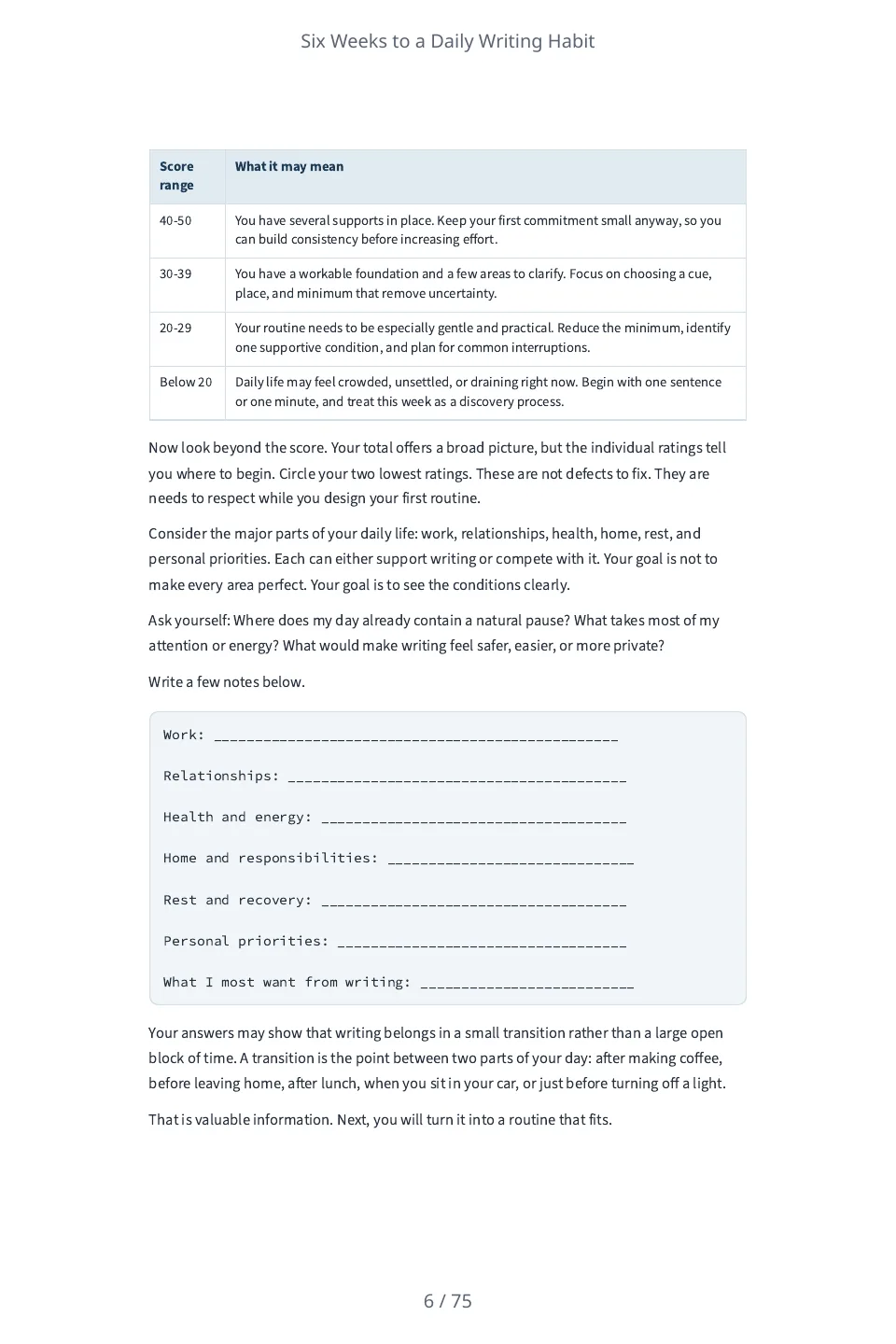
A six-week workbook of short exercises and reflection prompts for adults who want to start a daily writing habit. Each week is one chapter with ten-minute exercises to do with pen and paper, blank lines to write on and a page to look back on the week. Folio wrote it from one paragraph; each chapter runs about 3,000 to 3,800 words where the brief asked for about 2,800.
6 chapters · 21,038 words · 75-page PDF. It has not been edited, so judge the prose and the file for yourself.
A six-week workbook of short exercises and reflection prompts for adults who want to start a daily writing habit. Each week is one chapter of about 2,800 words with a few ten-minute exercises the reader does with a pen and paper, and a short page to look back on the week. Audience: Adults who want to write a little every day and have never kept the habit. Tone: Encouraging and practical. Do not state any statistic, study, survey, quotation, case study, testimonial or named person, and do not describe what research shows. Do not describe hypothetical writers or give anyone a name: speak to the reader as 'you'. Every exercise is something the reader does themselves with a pen and paper.
Read the sample review notes
Screened mechanically for what the brief forbade (a statistic, study, survey, quotation, case study, testimonial, named person or a claim about what research shows): the only figure is the ten minutes an exercise takes, and no person is named. It carries blank lines for the reader to write on. Nobody has edited the text, and nobody has read it for quality.
Review the exact edition before its publishing handoff
A format list is the starting point. Inspect print and ebook controls, freeze the manuscript and settings, then review the actual artifact that will leave the workspace.
Choose the actual print and ebook controls
Set standard or custom trim, mirrored margins, bleed and page headers. Inspect measured figure warnings; the paperback wrap uses the rendered interior's page count.
PDF is RGB, not PDF/X. EPUB 3 is reflowable; fixed-layout spreads and automatic index/bibliography generation are not provided.
Freeze and inspect the proof
Save a frozen edition, inspect its PDF or ebook artifact, add proof notes and corrections, and reproof changed files. Editorial clearance stays with that edition.
Approval is your recorded decision for one artifact. Later manuscript or layout changes need a new proof.
Prepare the author handoff
Choose the reviewed file, confirm provenance and destination requirements, then download the author handoff package and upload it yourself.
Folio does not issue ISBNs, publish to retailers or certify acceptance. Translation and audio are separate workflows.
Start blank, import and manually edit your own book. Its downloads and proofs do not need an active Folio subscription. New AI planning, drafting and editorial assistance need eligible access; translation and narration use separate edition conditions. Existing book view, comment and edit permissions apply.
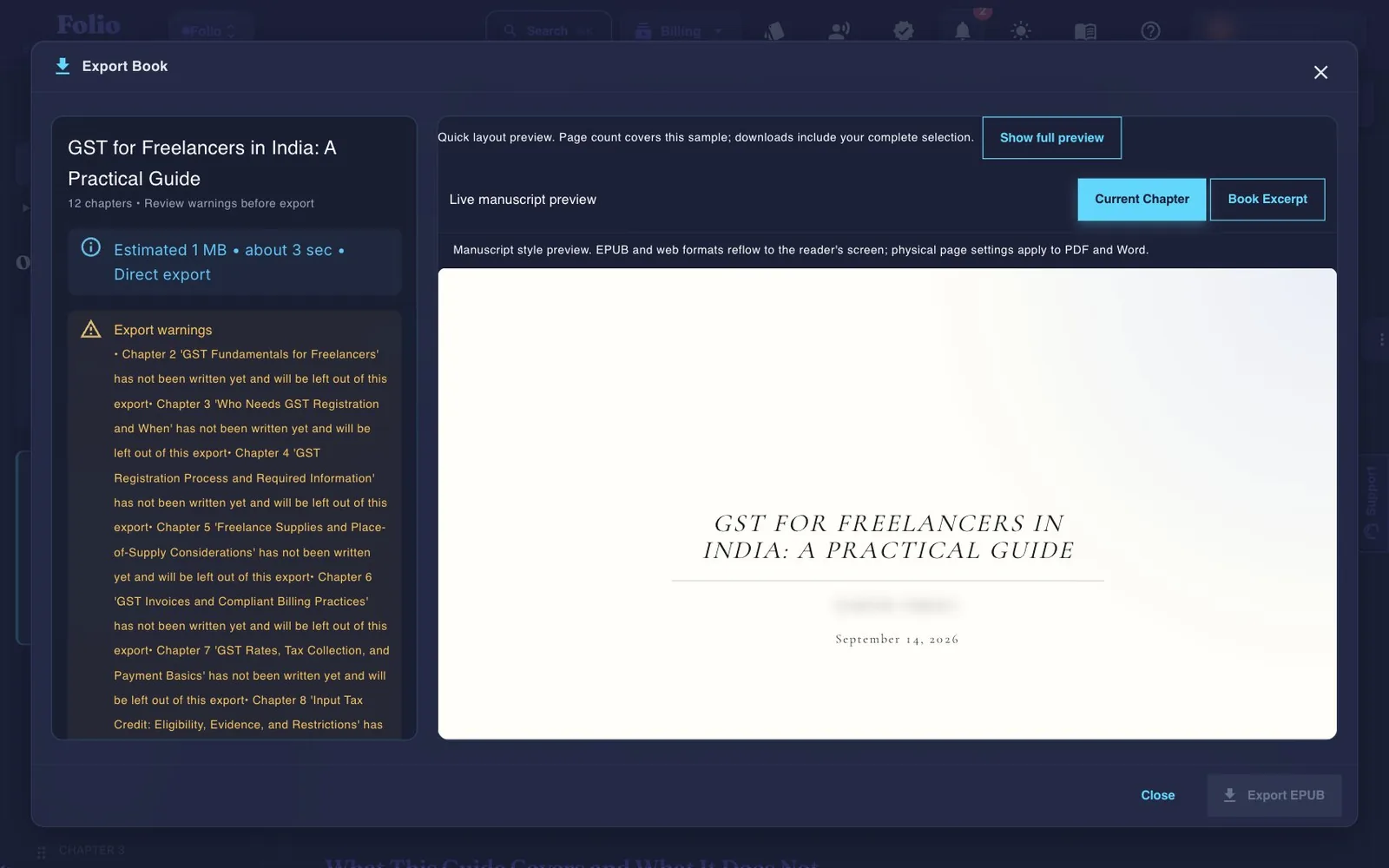
Gixo Folio's real export flow — a live manuscript preview plus a validation check that flags any chapter still missing content before you export. This screen comes from a book with most chapters still unwritten, captured before the dialog changed, so its Export EPUB button is grey while it waits for the warnings to be confirmed. Today unwritten chapters are listed and left out of the file, and only a highlighted drafting passage holds the export until you answer it.
01Brief the book
02Shape the outline
03Draft chapters
04Review the manuscript
05Export the edition
Folio is a strong fit whenThe manuscript still needs structure, revision, and a finish line.
Use the persistent book workspace when the outcome is a real guide, authority book, training manual, client asset, or exportable edition.
Consider another tool whenYou only need one narrow part of the publishing job.
If your manuscript is already finished and you only need specialist formatting or a dedicated fiction system, a focused tool may be the simpler choice.
Is EPUB better than PDF for self-publishing?
Treat the format as a distribution decision, not a drafting decision.
EPUB
Choose EPUB for e-readers
EPUB is typically the better fit when the book will be read on Kindle-like devices or distributed as a digital book.
PDF
Choose PDF for stable pages and reviews
PDF is the better fit when you want fixed rendering, internal review copies, or print-oriented handoff.
Manuscript first
Do not choose too early
The manuscript should be reviewed and finalized before the output format becomes the focus.
Export flow
Let the workflow handle the final download
Gixo Folio keeps the format choice inside one export surface rather than making you rebuild the manuscript elsewhere.
Validation
Review the book before selecting the file type
That avoids mistaking a draft for a format problem when the manuscript itself is not ready yet.
Editions
Check the separate edition file
International translations download as EPUB; audiobook editions have an audio-package download. These edition services do not inherit the ordinary book export menu. Inspect the delivered file and destination requirements.
When should you use EPUB and when should you use PDF?
Ask about the destination, not your personal preference.
1
Identify the destination
Will the file be read on e-readers, reviewed internally, printed, or uploaded to a specific platform?
2
Confirm the manuscript is finalized
Revise all chapters in the workspace before focusing on export format settings.
3
Export the right file
Choose EPUB for flexible digital reading or PDF for stable page rendering and print-style review.
4
Create more editions later if needed
Localized editions can be exported after the source book and translation are ready.
When should you use EPUB vs PDF for self-publishing?
Neither format is universally better; each is better for a different job.
The destination expects stable pages or print-like review
What matters most
Device adaptability
Layout consistency
How Gixo handles it
Available in the same final export flow after review
Available in the same final export flow after review
Why this question comes up too early
Format anxiety often hides manuscript uncertainty
A lot of buyers think the format is the main decision, but the harder problem is usually whether the manuscript is finalized. Once the book has been revised and reviewed in the workspace, the EPUB-versus-PDF decision becomes much clearer.
That is why Gixo Folio keeps the export step at the end of the workflow.
How Gixo Folio helps
The export choice happens at the right stage
Gixo Folio keeps EPUB and PDF inside the same final export flow, so the decision happens after the manuscript is finalized rather than in the middle of drafting. That makes the output choice calmer and more practical.
Ordinary book export supports several file formats. International translation and audiobook services have separate edition downloads and access conditions.
Frequently Asked Questions
Is EPUB better than PDF for self-publishing?
It depends on the destination. EPUB is usually better for e-reader distribution, while PDF is better for fixed-layout review copies and print-style handoff.
Should I export to PDF or EPUB first?
Choose after the manuscript is ready and based on where the file is going next.
Does Gixo Folio support both EPUB and PDF?
Yes. The Books export workflow supports both EPUB and PDF alongside other formats.
Can later editions be exported in different formats?
International translations download as EPUB, and audiobook editions have an audio-package download. Those separate edition workflows do not inherit the ordinary book’s PDF, DOCX, HTML, Markdown or SCORM export menu. Check the actual file and destination requirements.
Can I export to both EPUB and PDF from the same manuscript?
Yes. Gixo Folio supports both formats from the same workspace, so you can export multiple versions for different distribution channels.
What is the main difference between EPUB and PDF for self-publishing?
EPUB uses reflowable layout that adapts to the reader's device, which is why it fits e-reader and digital book distribution. PDF uses fixed layout, which is why it fits review copies and print-style handoff where the pages need to render exactly the same everywhere.
Which format should I export first, EPUB or PDF?
Neither by default. Gixo Folio treats format choice as a distribution decision made after the manuscript is finalized in the workspace, not a drafting decision made up front, and it supports exporting both EPUB and PDF from the same finished manuscript.
Export and publishing pages to read next
These pages explain the broader delivery workflow around file format choice.
Use the Books pricing page if the manuscript is moving toward final review and export, or read the guide to see how the workflow handles file-format decisions.