Skip to content
Arc
Sign In Get started
Workflow-specific products Content, decks, visuals, briefs, proposals, legal, books, and project delivery each have a clearer buying path.
Review before delivery Draft, edit, collaborate, approve, and export in the same workspace.
Security + procurement path Security policy, support, and Azure Marketplace buying are public.

Better Proposals Alternative — More Than Templates, With Source-First Drafting

Better Proposals provides design-first templates with send tracking and digital signatures for SMBs. Gixo drafts proposal content from your uploaded source files using AI, with tracked links and simple electronic signature for delivery. Different tools for different bottlenecks — design and delivery versus writing and drafting.

Try Gixo Arc View pricing

A Better Proposals alternative for teams whose bottleneck is writing, not sending: Gixo (Arc) drafts proposal content from uploaded source files — RFPs, client briefs, and scope documents — using AI, then exports to PDF, emails the recipient a tracked link, or sends it for simple electronic signature. Better Proposals gives you 200+ design templates plus built-in sending, view notifications, payments, and its own digital signatures for delivering proposals created in its editor or connected workflows. Choose Gixo if you need AI to turn source documents into a first draft; choose Better Proposals if its template and assistant workflows fit your inputs and you want designed templates and payments in the same tool you send and sign from.

From source material to reviewable draft

See what Arc helps your team review

Choose the proposal type, add the RFP, brief, notes, or prior work, then review a structured first draft before it reaches a client.

  1. 1Add source materialRFPs, briefs, notes, decks, and prior work
  2. 2Draft to the proposal typeSections and structure follow the real opportunity
  3. 3Review before deliveryYour team checks facts, scope, pricing, and commitments
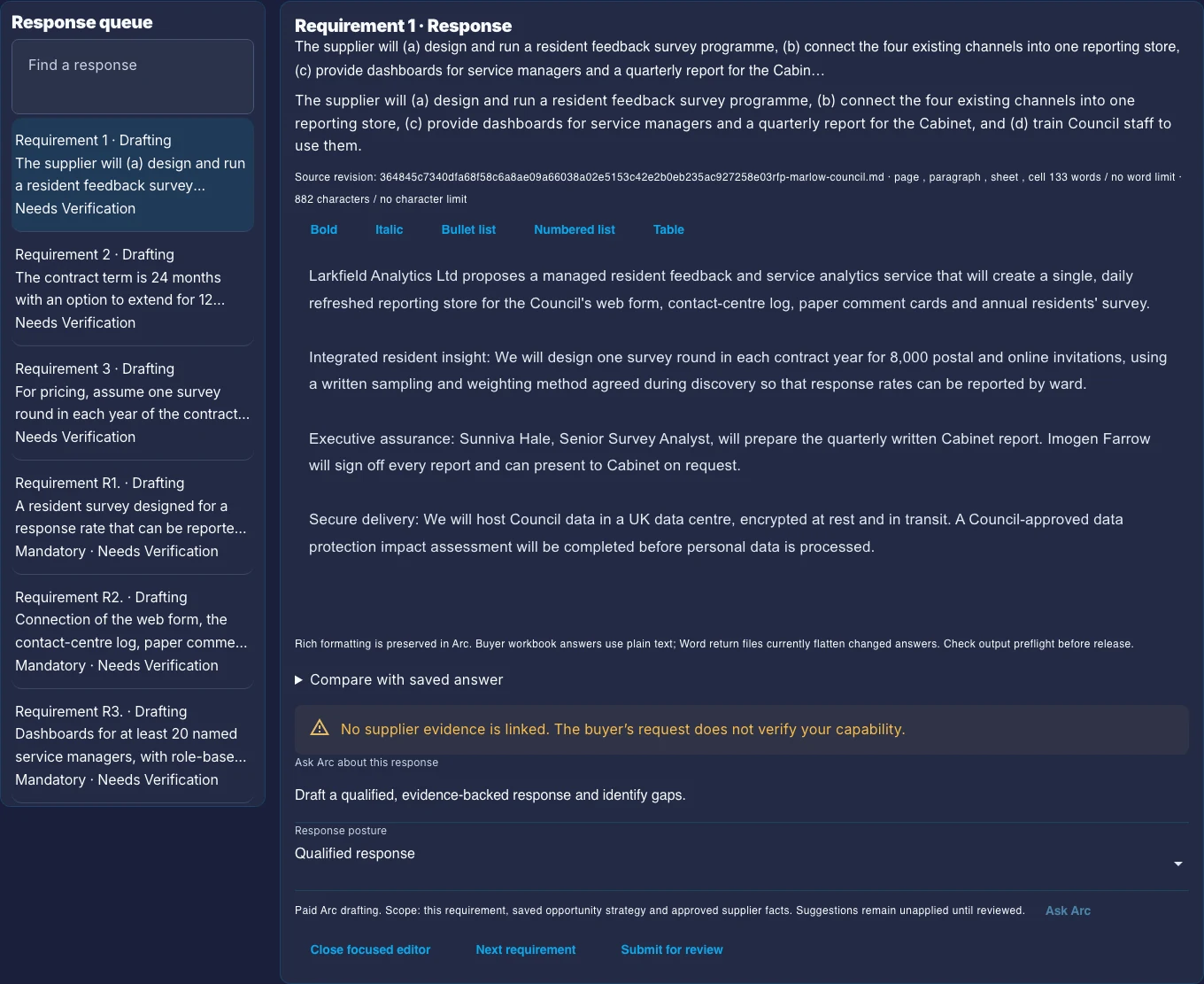
The Arc response workspace: a queue of buyer requirements marked Needs Verification, beside one requirement's response, its source file and a warning that no supplier evidence is linked.
What your team reviews. A buyer requirement beside its response, its source file and status, and a warning that no supplier evidence is linked yet. This is a real Arc screen captured on 10 October 2026 with a fictional sample. The response in it was prepared by hand, so read it for the review controls.
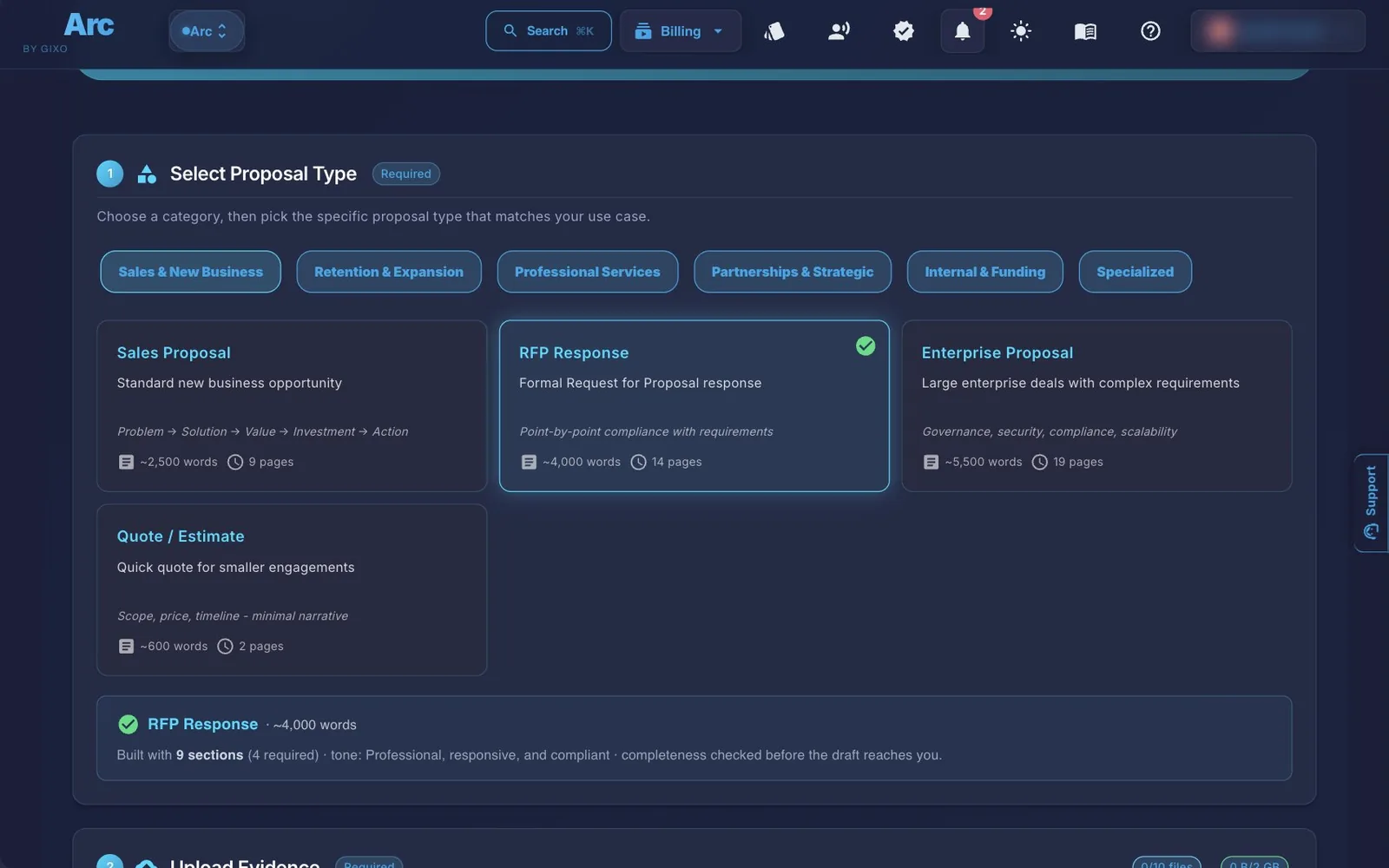
The Arc create page with RFP Response selected among the proposal types, and the upload step starting below it with no files added.
Where it starts. Choose a proposal type, add source material, and keep the drafting controls visible. Arc takes up to 10 source files per proposal, at up to 500 MB each (64 MB for Word, Excel and PowerPoint files) and 2 GB in total.
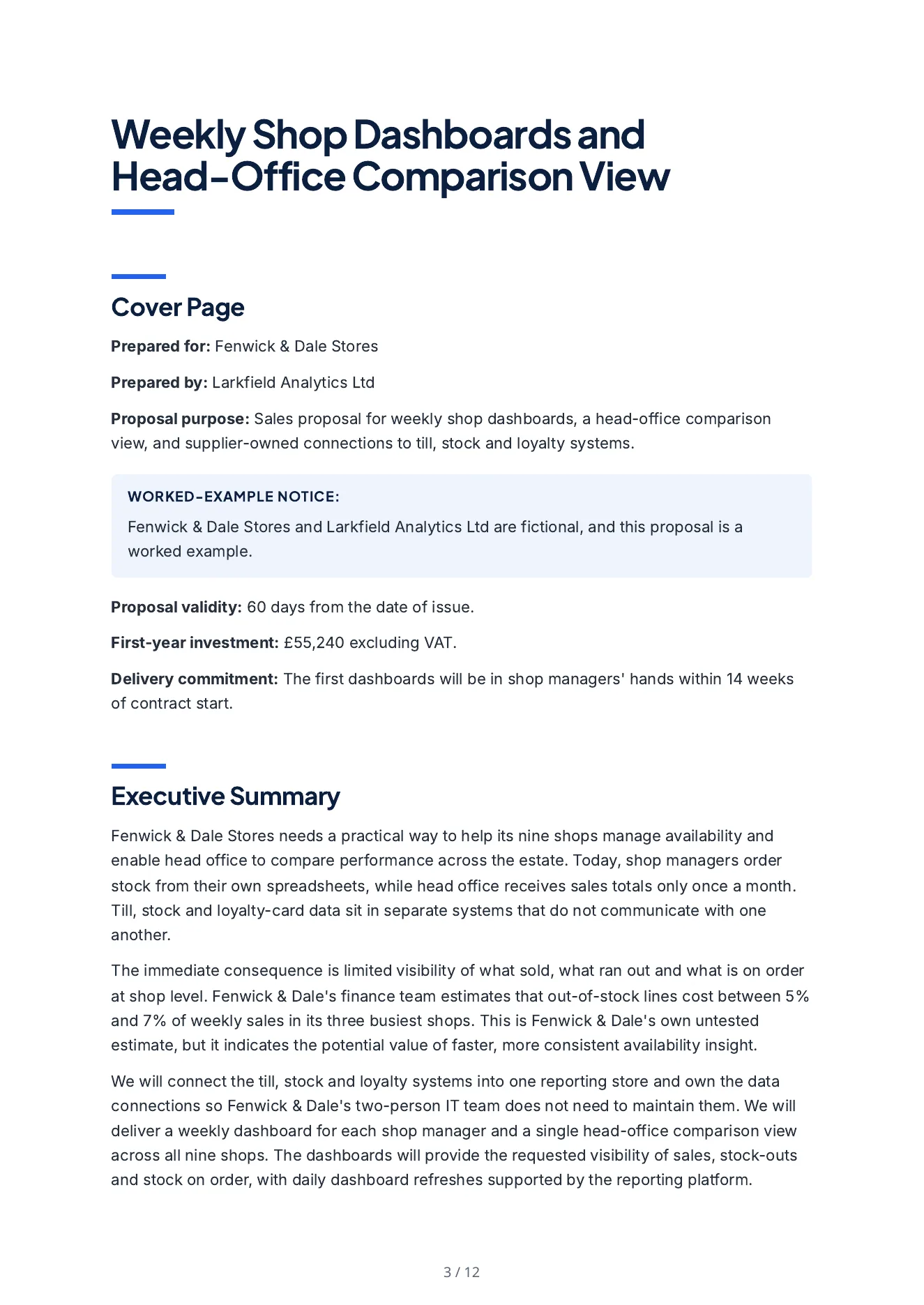
The first page of the sales proposal Arc wrote: the cover details, the notice that the buyer and bidder are fictional, and the start of the executive summary.
What Arc wrote. A proposal for an invented regional retailer: the buyer's own untested estimate of what stock-outs cost it (described as untested), what the supplier will deliver and own, the data connections and implementation approach, the launch timeline, a first-year price built from the bidder's rates, two case studies and the team. A separate reviewer agent read its 178 claims against the bidder's evidence file, the buyer's brief and the deal terms: 142 are supported, 36 add detail or an inference, none is absent from every input and none contradicts one. Every price line recomputes. It is not a person's review. PDFWord Follow three buyer questions through reviewer decisions to the returned workbook. That walkthrough is fictional and its answers and decisions are hand-authored; the returned file comes from Arc's exporter.

Check the current Better Proposals workflow with your source pack

Vendor information reviewed on : Better Proposals current MCP and collaboration plans, its AI proposal workflow and pricing. Compare required source intake, approval authority, exact buyer output and integrations on the plan you would buy. These are vendor-published capabilities, not hands-on comparative test results.

Arc links the Draft, Review and Deliver tasks to the saved proposal revision, with literal source passage receipts and named reviewer decisions. Optional policy checks, buyer value assumptions and separate Lumen handoffs have explicit limits; inspect the current Arc guide before selecting a workflow.

What Is the Difference Between Gixo and Better Proposals?

Both tools help SMBs create proposals. The difference is whether your bottleneck is writing the content or designing the delivery.

AI Content Generation vs Template Fill

Arc drafts from uploaded buyer and company source files and keeps requirement responses with evidence and named reviews. Better Proposals lists templates and reusable content alongside MCP integrations on eligible plans. Evaluate how each handles your actual source inputs and review requirements instead of assuming its templates exclude AI assistance.

Source Documents as Input

Gixo's workflow starts with uploading source files — RFPs, scope documents, technical specs — and extracting context before drafting. Ask Better Proposals to demonstrate starting from your actual source pack on the plan you would buy. If your proposals are driven by client documents, Gixo's intake is built for that.

Drafting Focus vs Send-and-Track

Gixo focuses on generating and refining the proposal draft, then exports to PDF, creates a tracked link that it can email to the recipient or you send yourself, or sends it for simple electronic signature. Better Proposals adds payment collection alongside its own sending, view notifications, and digital signatures. Gixo is a drafting tool; Better Proposals is a delivery platform.

How Do Gixo and Better Proposals Compare Feature by Feature?

Capability Gixo Arc Better Proposals
Drafting approachAI generation from source filesTemplates, reusable content and eligible MCP workflows
Source file uploadRFP, briefs, specs (PDF, DOCX, TXT)Ask Better Proposals to demonstrate your exact RFP intake and eligible MCP workflow
RFP requirement extractionAI-powered extractionAsk Better Proposals to demonstrate the exact assistant and RFP review job on your plan
Template libraryProposal structures200+ design templates
Proposal sendingExport (PDF, DOCX), a tracked link Arc can email to the recipient or you share yourself, or a signature request emailed to signersBuilt-in send with tracking
View notificationsIn-app and email alerts when the recipient opens or downloads the proposalReal-time notifications
Digital signaturesSimple electronic signature, signed PDF with audit certificateBuilt-in e-signatures
Payment integrationNot includedStripe, PayPal
Inline AI editingSection-level AI refinementAsk Better Proposals to demonstrate the exact assistant and RFP review job on your plan
Rich text editorBuilt-in with AIVisual block editor
PDF export themesMultiple professional themesWeb-first delivery
Target userTeams responding to RFPsSMB sales teams

When Should You Choose Gixo vs Better Proposals?

Choose Gixo When

Your proposals are driven by client documents — RFPs, briefs, scope documents — and you spend most of your time writing rather than designing. When you need AI to turn source materials into structured first drafts with professional PDF output.

Choose Better Proposals When

You send outbound sales proposals and want a polished template library and payment collection in the same platform you send and sign from. When you already know what to write and need a better way to present and deliver it.

Consider Both When

Your team needs AI drafting for complex RFP responses (Gixo) and also sends shorter sales proposals with designed templates and payment collection (Better Proposals). Use Gixo for the writing stage and Better Proposals for that delivery stage.

Better Proposals Comparison FAQ

Is Gixo a direct replacement for Better Proposals?
The products overlap in proposal creation and delivery. Arc links uploaded buyer/company files, evidence and requirement reviews. Better Proposals documents templates, reusable content, signing, payments and MCP on eligible plans, with additional collaboration and approval features on Enterprise. Test your exact workflow rather than assuming a drafting-versus-delivery split.
Can Gixo send proposals and track views like Better Proposals?
Yes, within limits. Gixo Arc creates recipient-specific tracked links with view and download counts kept in delivery history, and exports to PDF and DOCX. Arc can email the tracked link to the recipient from Gixo, or you can copy it into your own email tool, and it alerts you in Gixo and by email when the recipient opens or downloads the proposal. Arc does include simple electronic signature: each signer gets an emailed link to a frozen PDF of the proposal, and the completed copy gets an appended audit certificate, and Gixo records its SHA-256 fingerprint. It is not a qualified or certificate-based signature. If you need payment collection, pair Gixo's drafting with a delivery tool like Better Proposals or PandaDoc.
Does Better Proposals have AI drafting from source files?
Better Proposals lists MCP on Premium and Enterprise alongside reusable content and document delivery. Ask it to demonstrate the source input and assistant workflow you need on that plan. Arc drafts from uploaded RFPs and company files and exposes requirement evidence and reviewer decisions; no blanket absence of competitor AI is claimed.
Which tool is better for small businesses?
Choose from a trial using your actual client brief, review process and buyer deliverable. Arc supports uploaded-source drafting, requirement reviews, tracked links and simple electronic signature. Better Proposals documents templates, signing, payments and eligible MCP workflows. No universal fit or measured time saving is claimed.
How do pricing models compare?
Both use subscription pricing. Better Proposals prices by team size and features. Gixo uses seat-based plans for source-first AI drafting. Check each platform's current pricing page for details. Gixo also lets teams start by organizing source material before moving into full drafting workflows.
What is a good alternative to Better Proposals?
Gixo is an alternative for teams whose bottleneck is drafting rather than sending: it generates proposal content directly from uploaded RFPs, client briefs, and scope documents using AI, then exports to PDF with professional themes. It includes simple electronic signature, with the signed proposal available as a PDF with an audit certificate, and tracked links that Arc can email to the recipient, that record views and downloads, and that alert you when the recipient opens or downloads the proposal. It is not a full replacement — it does not collect payments, so teams that need payment collection in the tool they send from should pair Gixo's drafting with a delivery tool.
Is Gixo better than Better Proposals?
Neither is universally better. Compare source intake, reusable content, reviewer authority, exact outputs, recipient tracking and payment or integration needs using the same proposal. Arc includes source-based requirement review and simple electronic signature; Better Proposals documents its template, payment, signing and eligible MCP workflows.

Draft Better Proposals from Source Files

Upload your RFPs, client briefs, and context documents. Let AI generate structured first drafts. Export to PDF with professional themes.

Start Drafting View pricing

Updated