
Gixo Lumen Themes Guide
A comprehensive overview of every theme category in Gixo Lumen — presentation themes, infographic themes, and export themes. Learn how to choose the right visual style for your content and audience. The no-card 14-day trial adds AI generation and clean hybrid PPTX/PDF export. After the trial, existing decks remain reviewable, presentable, and downloadable; only continued AI generation requires paid Lumen.
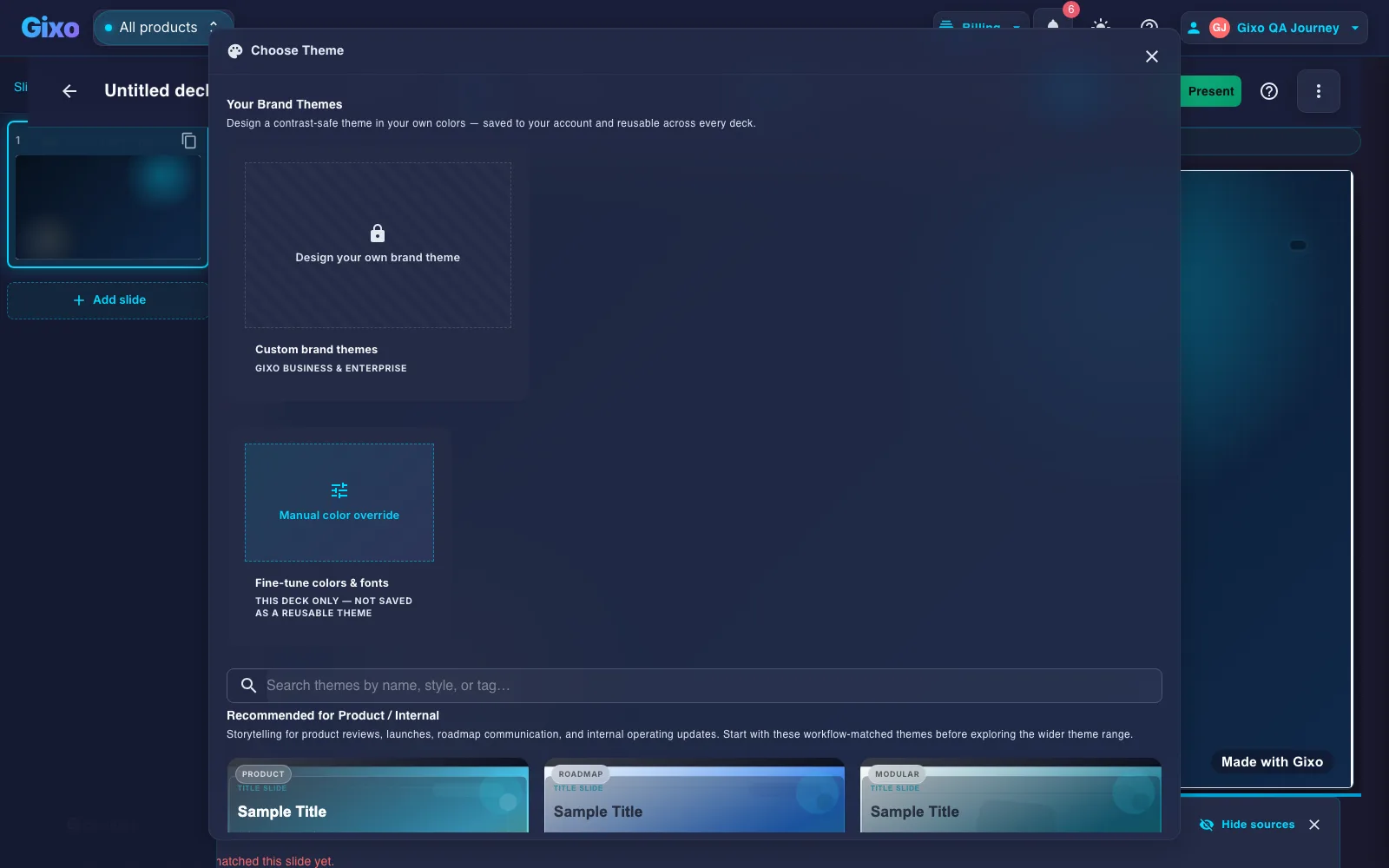
The theme picker, as it actually looks
Your saved brand themes, a manual color override for one-off decks, and curated themes recommended for the workflow you're in.
Three Theme Categories to Explore
Gixo organizes themes into three categories, each designed for a specific content type.
34 active themes for slide decks. The current library now spans core presentation systems plus workflow packs for consulting, finance, startups, sales, executive communication, and product storytelling instead of only generic corporate defaults.
15 themes for visual infographics. Each controls icon style, section layouts, data visualization colors, and typography. Options range from enterprise corporate to bold playful and healthcare wellness.
25 themes for PDF document exports. Apply professional styling to articles, briefs, and other content. Includes business, academic, legal, newsletter, executive, magazine editorial, and luxury minimalist styles.
Professional themes for business settings. Clean lines, muted palettes, clear data presentation. Suitable for boardroom presentations, financial reports, and executive briefs.
Visually distinctive themes for marketing, branding, and creative work. Bold gradients, vibrant colors, modern typography, and dynamic layouts that stand out.
Domain-specific themes for legal documents, academic papers, healthcare reports, and technical documentation. Each follows the formatting conventions of its field.
How to Choose the Right Theme
Corporate and executive audiences expect clean, professional themes. Creative teams and marketing contexts allow for bolder, more visually distinctive options. Academic audiences prefer structured, traditional formatting.
Use presentation themes for slide decks, infographic themes for visual data layouts, and export themes for PDF documents. Each category is optimized for its content format.
Browse the theme gallery to see previews of each style. Pay attention to typography, color palette, and layout approach. The preview gives you a clear idea of how your content will look.
If your organization has a defined visual identity, choose themes that complement your brand colors and typography style. Many themes use neutral palettes that work alongside any brand guidelines.
Popular Presentation Themes for Slide Decks
A current selection from the 34 active presentation themes available in Gixo.
| Theme | Style | Best For |
|---|---|---|
| Consulting Executive | Structured consulting and advisory system | Strategy decks, recommendations, client reviews |
| Consulting Workshop | Collaborative framework-building consulting style | Workshops, operating models, prioritization sessions |
| Finance Boardroom | Data-first boardroom reporting language | Investment reviews, KPI decks, operating updates |
| Finance Terminal | High-density analytical finance system | Market reviews, KPI analysis, metric-heavy reports |
| Startup Pitch Clean | Momentum-heavy fundraising system | Pitch decks, founder stories, investor updates |
| Startup Momentum | High-energy founder and traction storytelling | Launch decks, traction updates, fundraising narratives |
| Sales Conversion | Proof-led persuasion and CTA energy | Sales decks, campaign reviews, commercial pitches |
| Case Study Proof | ROI-led case study and testimonial design language | Customer stories, proof decks, commercial proposals |
| Executive Board | Safe, refined executive communication | Board decks, leadership updates, QBRs |
| Executive Annual Review | Formal year-in-review executive styling | Annual reviews, leadership summaries, board reporting |
| Product Launch | Screenshot-native launch storytelling | Roadmaps, launch decks, internal rollout narratives |
| Product Roadmap | Modular planning and rollout system | Roadmaps, planning decks, product operating reviews |
| Corporate Professional | Professional system with industry presets | Business meetings, proposals, reports |
| Minimal White | Content-first, high-clarity minimalism | Executive updates, product launches |
| Dark Professional | Refined dark mode with restrained contrast | Board briefings, investor decks |
| Creative Gradient | Warm gradients and friendly editorial energy | Marketing, branding, workshops |
| Brand Campaign Pop | Light-first consumer campaign energy | Launch decks, promos, brand storytelling |
| Gixo Signature | Cyan-glow product-tech identity | Innovation narratives, product launches |
| Gixo Prism Aurora | Aurora glass UI with premium motion cues | Design showcases, future-facing stories |
| Gixo Bento Modular | Structured grid system with product clarity | Portfolios, product walkthroughs |
| Gixo Serif Luxury | Premium serif restraint and investor polish | Luxury brands, premium services |
| Vogue Lookbook | High-fashion editorial contrast | D2C launches, campaign decks, portfolios |
| Hospitality Lifestyle | Sun-washed editorial hospitality direction | Travel, hotels, food, interiors, real-estate lifestyle |
| Brutalist Poster | Hard-edged monochrome poster system | Agencies, concept decks, product vision, creative reviews |
| Nature Organic | Earthy, human, and naturally warm | Wellness, sustainability, lifestyle brands |
| Atlas Geopolitical | Authoritative strategy and policy language | Geopolitics, consulting, research |
| Education Focus | Warm academic clarity | Training, lectures, workshops |
| DataForge Analytics | Chart-optimized, KPI-heavy presentation system | Analytics, finance, operations reviews |
Build Trust with Evidence-Backed Slides
Good themes make decks look professional. Evidence validation helps them hold up under scrutiny.
Keep decks grounded to source material and approved web research when needed. Gixo extracts key claims, highlights what needs verification, and surfaces citations, attribution, and trust status inside the deck viewer.
Style Your Document Exports
Themed PDF styling for articles, briefs, and documents.
| Theme | Style | Best For |
|---|---|---|
| Business | Professional, structured | General business documents |
| Executive | Premium, concise formatting | C-suite reports, board documents |
| Academic | Traditional, citation-ready | Research papers, academic reports |
| Legal | Formal, numbered sections | Legal documents, contracts |
| Newsletter | Editorial layout, headers | Email newsletters, digests |
| Magazine Editorial | Visually rich, columns | Long-form articles, features |
| Luxury Minimalist | White space, elegant typography | Premium brand content |
| Technical | Code-friendly, structured | Technical documentation |
| Startup Pitch Deck | Bold, energetic | Pitch documents, summaries |
Common Questions About Themes
Updated