
AI Org Chart Generator
Describe your team structure or paste a list of roles and reports, and Gixo Prism lays out a clean org chart automatically. No dragging boxes into place, no resizing to fit a long title — every name and role renders exactly as you wrote it.
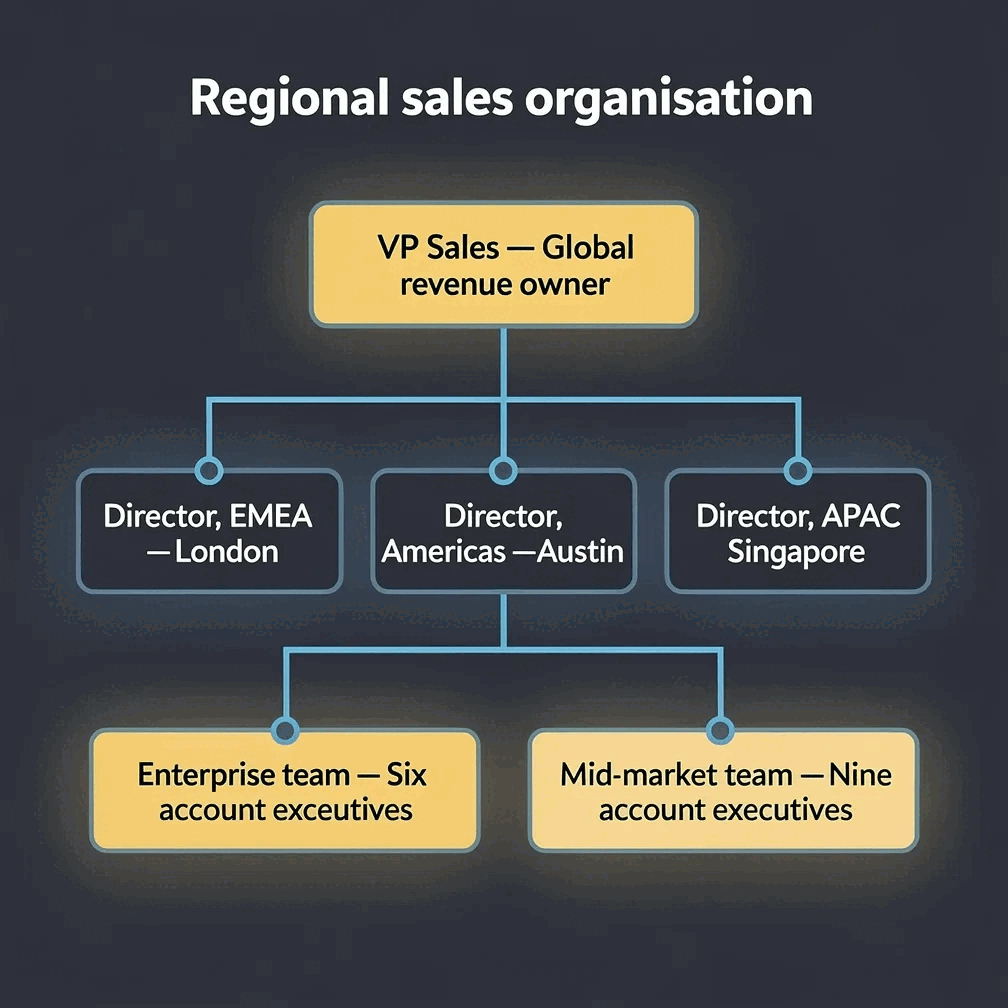
An AI org chart generator turns a description of your team or a plain list of roles and reports into a structured hierarchy diagram automatically. Gixo Prism's diagram maker includes a tree/hierarchy geometry built for exactly this: it reads your reporting lines, lays out the boxes and connectors, and places every name and title exactly as you typed it — no AI image model, so a person's name or title is never altered or invented. It's editable after generation and exports as clean, self-contained HTML/SVG.
What does Gixo Prism's diagram maker do for org charts?
Prism's diagram maker is deterministic: you describe the hierarchy, it lays out the chart, and every name and title renders exactly — never as an AI image that garbles the words.
Prism's diagram maker includes a tree geometry built for reporting lines and hierarchy — the same layout an org chart needs, laid out automatically.
There's no AI image model in the loop, so a person's name or title is never altered, misspelled, or invented — the text you enter is the text that appears.
Describe your team structure or paste a list of roles and who reports to whom. Prism reads it and lays out the boxes and connectors for you.
Prism applies your brand palette to the chart, so it matches the rest of your deck instead of looking like a one-off diagram.
Rename a box, move a report, add a level, and the chart re-renders cleanly. Export as clean, self-contained HTML/SVG.
The same maker also covers process, cycle, pyramid, funnel, pillars, matrix, Venn, concentric, stack, and graph — for when the structure isn't a hierarchy.
How do you make an org chart with AI? An organizational chart maker in four steps
From a list of roles to a finished, on-brand org chart in four steps.
Type out who reports to whom, or paste a plain list of roles and reporting lines.
The tree geometry places every box and connector automatically — no manual dragging or resizing to fit a long title.
Pick a theme preset — conservative, bold, brand-conservative, or brand-bold — or apply your Brand Kit palette directly.
Take the org chart as clean, self-contained HTML/SVG into your deck, doc, or page.
Frequently Asked Questions
Explore the Prism visual toolkit
Updated