
Skip to content
Sign In Try Free
Workflow-specific products Content, decks, briefs, proposals, legal, and sales each have a clearer buying path.
Review before delivery Draft, edit, collaborate, approve, and export in the same workspace.
Security + procurement path Security policy, support, and Azure Marketplace buying are public.
Books comparison

Compare Designrr with Folio for ebook authoring and review

Designrr repurposes existing material and also offers WordGenie ebook generation through a guided workflow. Gixo Folio is the alternative when you need a long-form book written: it plans the chapters, drafts them with AI from your outline, audits the manuscript and exports EPUB, DOCX and a print PDF. For a quick, visually designed lead magnet from existing content, Designrr is the better tool.
Compare current plans Check Designrr's included WordGenie workflow; Folio Author is $19/mo for eligible AI work.
URL and video in Designrr repurposes existing content; Folio imports DOCX, Markdown or text.
Flipbooks A Designrr output Folio does not produce.
Print PDF Folio exports a print interior at trims such as 6 × 9.

Write, review and prepare the same book for handoff

Folio keeps more than a draft: chapter edits, sources, reading coverage, reader suggestions and edition proofs remain attached to the book and its recorded revisions.

Choose the edit that fits the job

Write manually or request chapter prose. Continue and AI Write add text; Quick AI and Power Edit work on selections; Ask Folio proposes changes you review.

AI assistance can change meaning or invent details. Inspect saved versions and every proposed revision.

Keep research and review accountable

Attach readable sources, inspect extraction and passage coverage, run focused editorial passes and record claim/canon or reader-feedback decisions.

Bounded review and author approvals are not independent fact-checking. Changed inputs may make findings stale.

Keep proof and handoff with the revision

Freeze an edition, inspect the actual files, retain proof notes and prepare a handoff from the reviewed artifact.

Measured preflight is guidance. You own rights, final editing, platform requirements and the retailer upload.

Start blank, import and manually edit your own book. Its downloads and proofs do not need an active Folio subscription. New AI planning, drafting and editorial assistance need eligible access; translation and narration use separate edition conditions. Existing book view, comment and edit permissions apply.

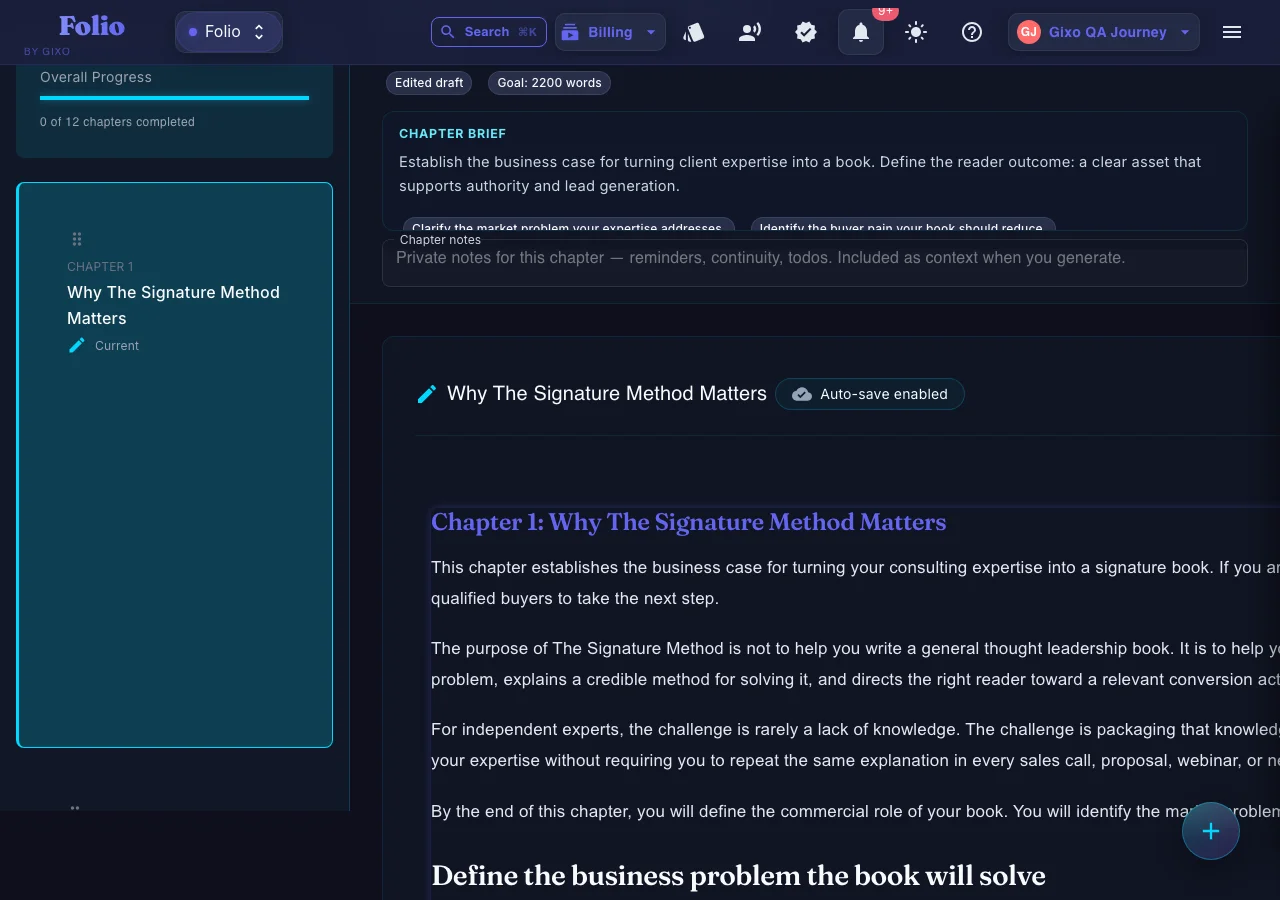
A nonfiction chapter drafted and open for editing in Gixo Folio
A nonfiction chapter in Folio: drafted from the chapter plan, then revised in the editor before export.
01Brief the book
02Shape the outline
03Draft chapters
04Review the manuscript
05Export the edition
Folio is a strong fit whenThe manuscript still needs structure, revision, and a finish line.

Use the persistent book workspace when the outcome is a real guide, authority book, training manual, client asset, or exportable edition.

Consider another tool whenYou only need one narrow part of the publishing job.

If your manuscript is already finished and you only need specialist formatting or a dedicated fiction system, a focused tool may be the simpler choice.

Which authoring and review controls to compare

The difference is length and structure, not design.

Structure
A chapter plan for a whole book
Folio plans the chapter list first and drafts each chapter to it, so a 30,000-word guide holds together instead of reading like stitched posts.
Drafting
Draft chapters from the reviewed plan
AI drafts chapters from your plan and notes. Author includes AI chapter drafting; Pro includes AI chapter drafting and an included edition under the displayed conditions.
Existing content
Import what you already wrote
Paste or import newsletter issues and articles as DOCX, Markdown or text, then shape them into chapters. Folio does not fetch URLs, videos or podcasts.
Review
Catch repetition across chapters
The consistency audit flags passages repeated across chapters — the most common flaw in a book assembled from posts.
Formats
Ebook, print and editable
EPUB 3 for stores, a print PDF at standard trims, editable DOCX, HTML and Markdown.
Free tool
Need a short lead magnet today?
Folio's free ebook creator builds a short lead-magnet ebook in the browser with no account.

How to choose between Designrr and Gixo Folio

Start from what exists already and how long the result has to be.

1
If the content already exists as posts or videos
Designrr repurposes it directly from those sources into a designed ebook or flipbook.
2
If the book has to be written
Folio plans and drafts the chapters, so a book exists where only an idea and notes did.
3
If design is the selling point
Designrr's templates and flipbooks are built for visual lead magnets; Folio exports structured book interiors with figure, trim and proof controls.
4
If it will be sold as a book
Folio's EPUB and print PDF are the files you take to a retailer such as KDP.

Gixo Folio vs Designrr

Designrr figures read from designrr.io on 25 September 2026 — treat them as approximate.

Decision areaGixo FolioDesignrr
Price$19/mo Author, $99/mo Pro, monthlyCheck the current Designrr plan and included WordGenie workflow
InputAn idea, notes, or DOCX, Markdown and text filesBlog posts, podcasts, videos and PDFs
AI drafting of new chaptersFrom an approved chapter planWordGenie also generates ebooks through a guided workflow
DesignBook interiors and templatesDesigned ebooks, lead magnets and flipbooks
OutputEPUB 3, DOCX, print PDF, HTML, MarkdownPDF, Kindle and ePub, flipbook, HTML embed
Whole-book reviewConsistency audit with a 0–100 scoreCompare the review controls needed for your book
Comparison basis
Read from Designrr's own pages

Designrr's plans and formats were checked against designrr.io and its pricing page on 25 September 2026; treat non-Gixo figures as approximate. Its trial terms were not shown on those pages, so none are stated here.

Where Designrr wins
Guided ebook generation and repurposing

If you already have the posts, the podcast or the video and want a good-looking lead magnet or flipbook quickly, Designrr is built for exactly that, and Folio cannot fetch a URL or a video at all.

Where Gixo Folio is the better fit
A book someone reads start to finish

A book sold on a store or handed to a client has to read as one argument. Folio plans the chapters, drafts to that plan, reads the whole manuscript for repetition and drift, and exports EPUB and print files you inspect against retailer requirements.

Folio prepares downloadable book files; it does not publish them to a retailer, provide human copyediting, or guarantee publishing or commercial outcomes.

Frequently Asked Questions

What is a good Designrr alternative for writing a full book?
Gixo Folio. It plans a chapter list, drafts each chapter with AI from that plan, audits the whole manuscript and exports EPUB, DOCX and a print PDF. Designrr is stronger at turning existing posts and videos into designed lead magnets.
How much does Designrr cost?
Check Designrr's current plan page and which WordGenie workflow it includes. WordGenie generates ebooks through guided selections; Folio's displayed Author and Pro prices apply to its own AI work, while own-book downloads are separate.
Can Folio turn my blog or newsletter into an ebook?
Yes, from files: import the posts as DOCX, Markdown or text and shape them into chapters, then draft the connecting material. Folio does not fetch URLs, videos or podcasts.
Does Folio make flipbooks?
No. Folio exports EPUB 3, DOCX, print PDF, HTML and Markdown. For flipbooks, Designrr is the better fit.
Is there a free ebook creator?
Yes. Folio's free ebook creator builds a short lead-magnet ebook in the browser with no account. Full-length books use the Folio workspace.
Need a book, not a brochure?
Plan the chapters, draft them from your notes, audit the manuscript and export EPUB, DOCX and print PDF from one workspace.

Updated