
Make the intake specific
Supply the parties, document kind, jurisdiction, obligations, dates and reference material. Review imported content and retain its source identity before using it in a new matter.
Use Gixo for MSAs, consulting agreements, and service contracts when your team needs a first draft shaped by scope, payment, IP, liability, and governing-law inputs before legal review begins.
An AI service agreement generator is a structured intake-to-draft workflow that turns scope, payment, IP, liability, and governing-law inputs into a reviewable first draft of an MSA or service contract. Reference files and governing context can shape the draft, but Lex can show supplied-file sentence support in Cited sources, which does not establish legal authority; reviewers verify facts and authority independently. It supports up to 10 parties per agreement and exports to PDF, DOCX, HTML, and TXT. The job is not to ask AI for a legal answer — it is to prepare a draft a qualified reviewer can actually work with.
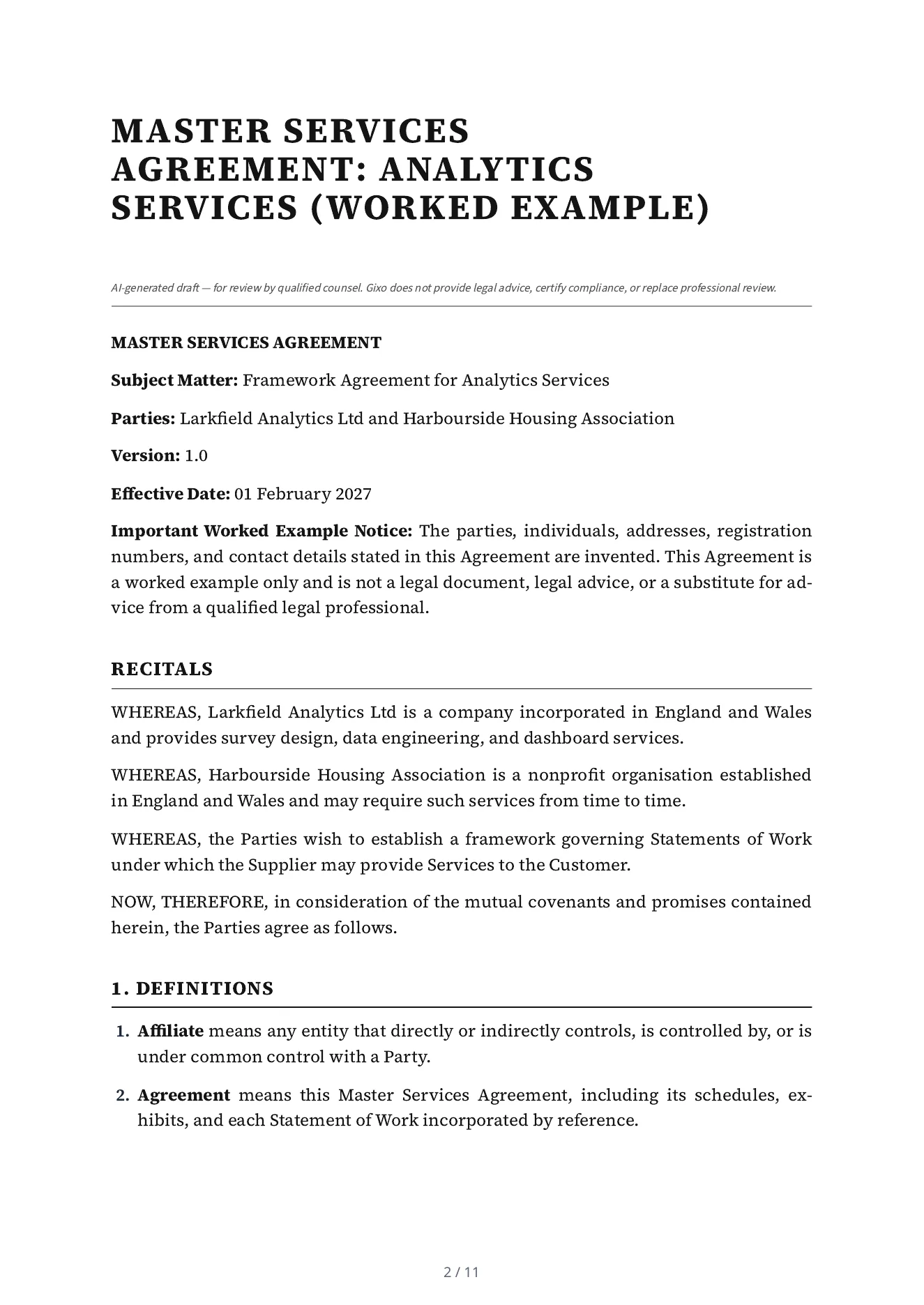
This is a real Lex export for invented parties. Inspect the input and clauses as a worked example, with professional review kept separate from automated drafting and checks.
A master services agreement of 17 numbered parts: definitions, scope of services, service levels and change orders, fees, intellectual property, confidentiality, data protection, warranties, indemnification, limitation of liability, force majeure, term and termination, transition assistance, governing law, general provisions and schedules. Its first page says it is a worked example, not a legal document.
Draft a Master Services Agreement: analytics services between Larkfield Analytics Ltd (Supplier) and Harbourside Housing Association (Customer). Governing law: England and Wales. Effective date: 2027-02-01. Term: Two years from the effective date, renewable by written agreement. Confidentiality: Five years after the agreement ends. The Supplier provides survey design, data engineering and dashboard services to the Customer under statements of work agreed in writing. Excluded: any service not set out in a signed statement of work. Dependencies: the Customer provides access to its systems and a named contact for each statement of work. State on the first page that the parties, people and addresses in this agreement are invented and that it is a worked example, not a legal document. The notice email address of Larkfield Analytics Ltd is notices@larkfield-analytics.example and of Harbourside Housing Association is notices@harbourside-housing.example (both invented).
Read mechanically against the intake, not by a lawyer: 10 of the 12 facts the intake gave are in the draft (the two registration numbers are not printed), nothing is left as a placeholder, and it states two terms the intake did not give, 30 days and 10 Business Days, which Lex chose.
Supply the parties, document kind, jurisdiction, obligations, dates and reference material. Review imported content and retain its source identity before using it in a new matter.
Use the legal workspace's permitted structural tools, Draft Checks and review paths. Compare proposed changes with the saved draft and original material; unsupported Word edits must be handled explicitly.
Have qualified counsel review enforceability, local requirements and the actual commercial intent. Check the current approval state and the downloaded document after a change.
Select the target clause and give Ask Lex a bounded instruction. Missing facts remain visible for review. Inspect the before-and-after proposal, required clause checks and any explicit outside-matrix or mandatory-clause override before versioned application. Use the legal workspace's structural allowlist rather than assuming every general content-editor block is available.
Inspect immutable playbook versions, anchored findings, provenance and precedent variants before staging a change. Matters retain original sources, quotation findings and source-version comparisons. Review extracted obligations for timing, ownership and source revision; negotiation turns and agreement-pack review cells have their own decisions and current-version requirements.
Original-format Word export, tracked changes against an original and saved-version redlines are separate paths. Unsupported edits must be surfaced rather than silently claimed as preserved. Inspect the layout, validator notes and downloaded file, then retain its delivery receipt. Counsel's review applies to the actual matter and version.
Every contract in Lex, drafted or imported, gets an AI contract review: each clause the document type expects marked present, weak or absent; up to 25 risks with a level, the party each falls on, why it matters and replacement wording; and provisions that cannot both be followed. Every quotation is checked against the contract text, findings are decided before approval, and there is no single risk score. The same review reads the key terms and obligations with the words they quote and proposes them into the Agreement Pack. Review every document puts up to 25 documents of an Agreement Pack, or up to 200 in a matter, into one table with your own questions as columns and an Excel export. Approvers can be named in order, and signing supports up to 10 signers with an optional signing order and automatic reminders; it is a simple electronic signature, not a qualified one. A qualified reviewer still decides what the contract says.
Lex does not provide legal advice or certify compliance. The public specimen is not a universally reusable legal template. Word fidelity depends on the supported original-document and saved-version path; unrestricted Power Edit and image insertion are not legal editing features.
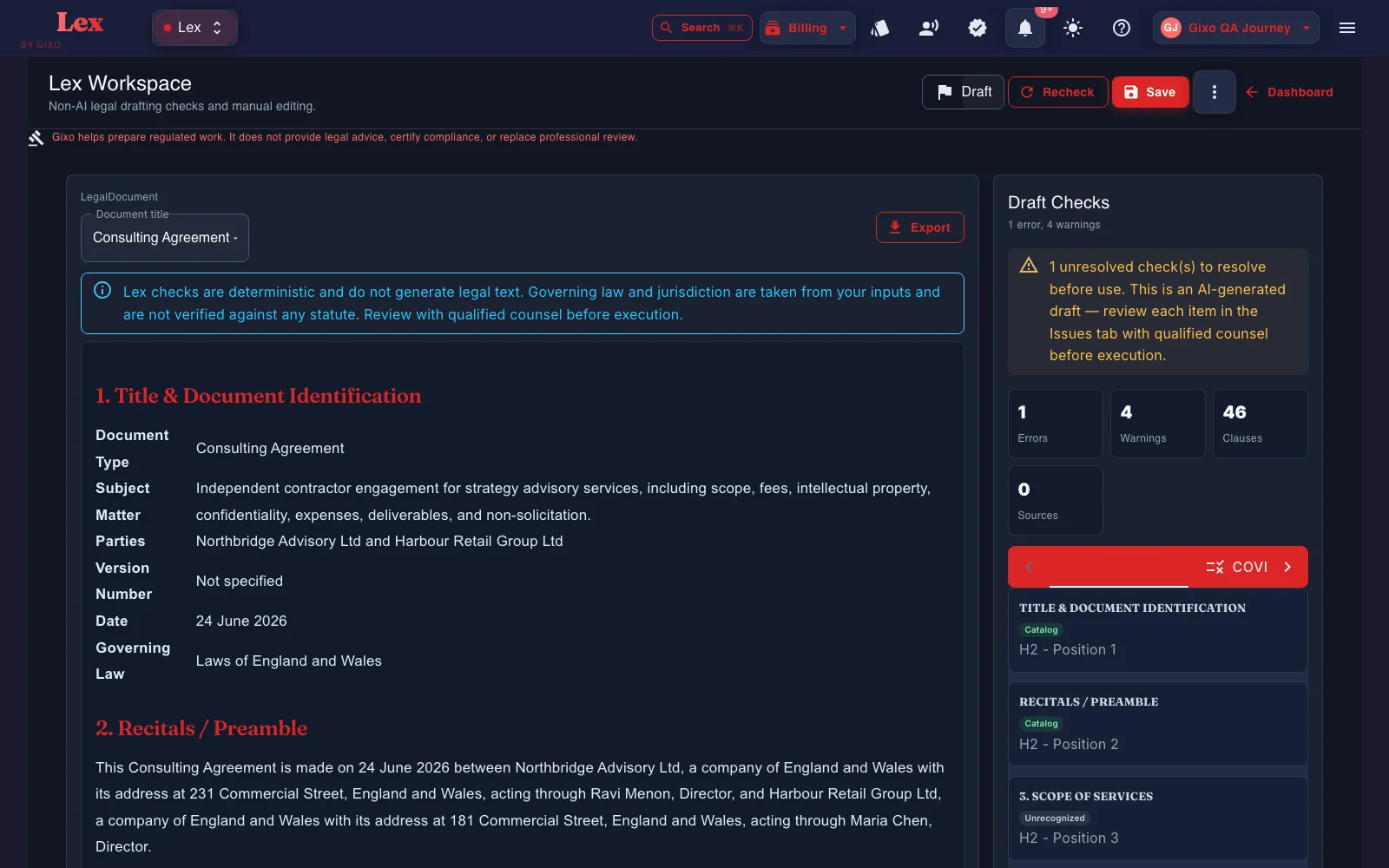
The job is not to ask AI for a legal answer. The job is to prepare a draft or artifact that a qualified reviewer can actually work with.
Capture the service scope, deliverables, acceptance logic, and statement-of-work structure before the draft is written.
Shape the first draft around the payment model, limitations, indemnities, and commercial guardrails that matter to the deal.
Bring the ownership and license assumptions into the intake so the draft is closer to the real business arrangement.
Reference files and governing context can shape the draft. Cited sources can show which draft sentences are supported by supplied reference files. This in-app support does not establish legal authority or statutory compliance and is not inserted into the contract or its exports; reviewers still check the facts and law independently.
Supply prior MSAs and service templates as reference input for the next draft. Reviewers confirm that the output follows the intended language.
After the first draft, Lex runs an AI contract review of the whole contract, with every quotation checked against the text, beside rule checks: clause coverage against a versioned playbook, clause-conflict detection, and defined-term and cross-reference checks. Findings, tracked-change DOCX redlines, comments, review state, assignees, due dates, and version history all stay attached to the same document. A contract imported from Word can go back as that same DOCX, with the Lex edits shown as Word tracked changes; where Lex cannot track an edit faithfully, such as inside a field, an existing revision, a header or a footer, it refuses the export instead of altering the document. Reviewers still verify every clause and conclusion.
Start from the MSA or service-contract scenario and capture the parties, scope, and commercial context.
Bring the commercial assumptions into the intake before the first draft is generated.
Upload reference contracts when internal precedent should inform the next draft, then verify the resulting clauses.
Keep edits and review attached to the agreement, then export in PDF, DOCX, HTML, and TXT when it is ready.
| Capability | Gixo | Template downloads | Consumer legal sites | General AI |
|---|---|---|---|---|
| Service-agreement intake | Structured | Template dependent | Questionnaire | Test on the same inputs |
| Scope, payment, IP structure | Built in | Manual edits | Test on the same inputs | Test on the same inputs |
| Reference-file input | Yes | Ask if it accepts your files | Ask if it accepts your files | Paste or upload; verify current support |
| Governing-law-aware draft | Yes | Template dependent | Test on the same inputs | Test on the same inputs |
| Legal advice or filing | Not included | No | Ask the vendor | No |
The other columns describe what each kind of tool is generally for, not a test of a named product, and products differ. Run the same brief and reference files through anything on your shortlist, then compare the draft, the review trail and the export.
Updated