
Whimsical Alternative
Whimsical is the fast, minimalist way to sketch flowcharts, mind maps, and wireframes — genuinely great for freeform thinking. Gixo Prism is the Whimsical alternative for the other end of the same spectrum: when a flowchart or diagram has to be exact, structured, and on-brand enough to put in front of a client or board, not just a sketch.

The visual stays useful after it leaves Prism.
Prism is designed for work that gets reviewed, edited, exported, and reused—not just admired in a feed.
Gixo Prism is the Whimsical alternative built for when a flowchart or diagram has to be exact and structured — not just sketched fast. Its flowchart maker has exactly two deterministic modes, decision flow and swimlane, and its diagram maker adds 14 named geometries you choose, so the same input always renders the same correct output with no AI image model in the loop. Whimsical stays faster and freer for brainstorming, mind maps, and wireframes; Prism is built for the moment that flowchart or diagram needs to be precise, on-brand, and ready for a client or board.
When should you use a Whimsical alternative instead of Whimsical?
Whimsical is the right tool for sketching fast and thinking freely. Prism is built for the moment that flowchart or diagram needs to be exact, structured, and on-brand for a client or board.
Decision flow for branching yes/no logic, or swimlane for named lanes with per-lane actions — like a cross-team handoff. Both render exactly, every time.
Pick the shape instead of drawing it freehand: process, cycle, pyramid, funnel, tree, pillars, matrix, Venn, concentric, stack, or graph.
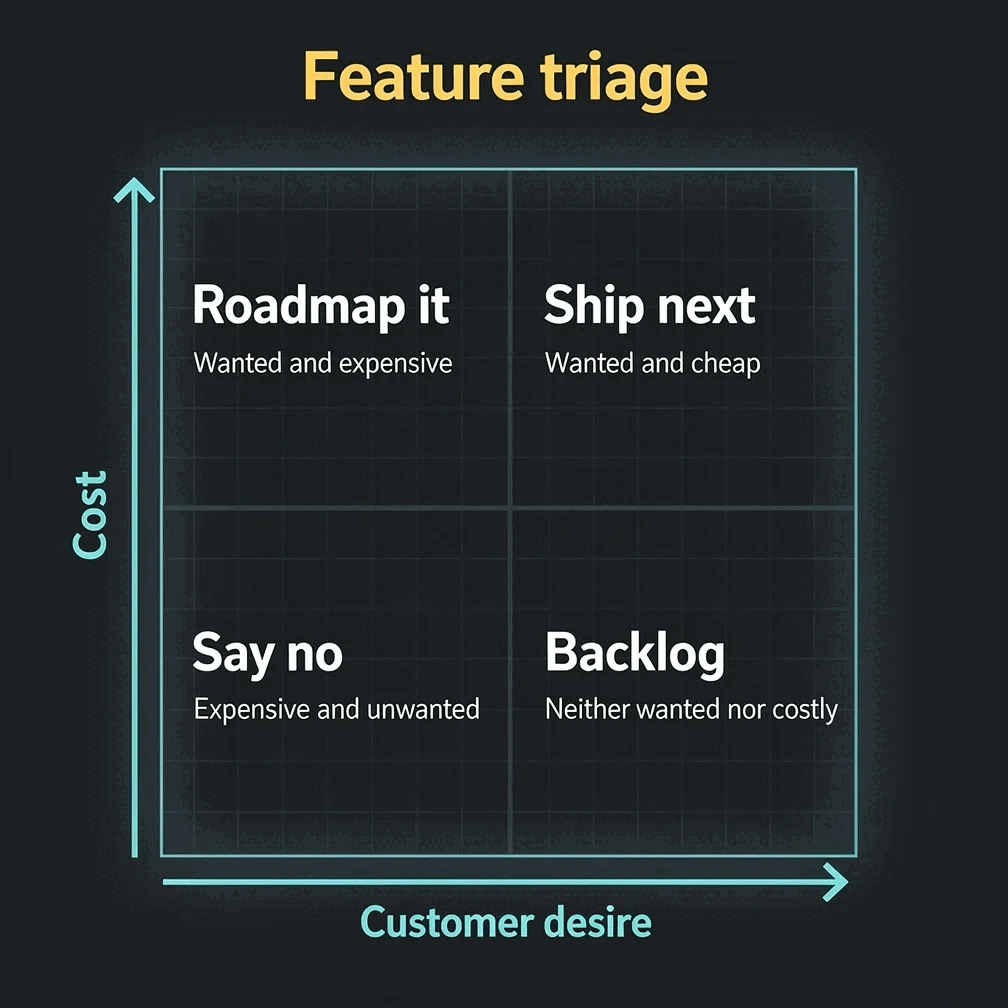
Build a proper two-axis matrix — custom axis labels, exact placement — instead of a freehand box someone drew by eye.
Paste a CSV and get a clean chart in any of 22 types, from bar, line and pie to waterfall, Gantt and heatmap, rendered to SVG so the values are always correct.
No AI image model in the loop. The same input always produces the same exact output — no garbled labels, no drifted layout.
Four theme presets — conservative, bold, brand-conservative (default), brand-bold — plus your Brand Kit palette applied consistently across a whole batch.
Turn a single stat, quote, callout, definition, or comparison into a sharp, on-brand card you can drop into a deck, doc, or post.
Change the lanes, labels, and layout and the makers re-render exactly. Export maker visuals as clean, self-contained HTML/SVG.
When you want a narrative piece from a topic or draft, Prism shapes it into a structured, content-backed infographic you can edit and export as PNG or HTML.
How does Gixo Prism's flowchart and diagram maker turn a process into an exact visual?
Structured from the first step, so the output is something you can trust in front of a client.
Paste steps for a flowchart, or describe the structure you want to show for a diagram.
Decision flow or swimlane for a flowchart; one of the 14 diagram geometries — including a quadrant matrix with real axis labels — for a diagram.
Adjust lanes, steps, and labels. Prism renders every value it uses exactly, rejects a draft carrying a figure absent from your source, and applies your brand palette across the set.
Take a maker visual as clean HTML/SVG into your deck, doc, or page. AI infographics also export as PNG.
Gixo Prism vs Whimsical: which flowchart software should you use?
Both are AI-native — the closest positioning match Prism has to any competitor. But they sit at opposite ends of the same spectrum: speed-of-sketching versus precision. Here's the honest split.
- Whimsical is fastest for freeform thinking. Sketch a flowchart, mind map, or wireframe with no fixed modes or shapes to choose — just draw. That speed and looseness is genuinely its strength, and it does mind-mapping and wireframing that Prism doesn't attempt.
- Gixo Prism is built for exactness. Its flowchart maker has exactly two deterministic modes — decision flow and swimlane — and its diagram maker adds 14 named geometries you pick, including a quadrant matrix with real, custom axis labels. No AI image model in the loop, so the same input always renders the same correct output.
- Brand governance is where Prism pulls ahead. Four theme presets plus your Brand Kit palette apply automatically across a whole batch, so a set of flowcharts and diagrams looks like it came from one team rather than one-off manual styling.
- Export is practical, with honest limits. Prism's makers export HTML, SVG, PNG, PDF, and PPTX. In the PPTX, bar, horizontal bar, stacked bar, line, area, pie, donut, scatter, radar, and bar-and-line combo charts arrive as native PowerPoint charts with their numbers in an embedded workbook that Edit Data opens; waterfall, funnel, Gantt, heatmap, treemap, symbol map, Marimekko, bubble, Sankey, bullet, slope, and dumbbell charts arrive as editable PowerPoint shapes and text, as does any chart PowerPoint cannot draw the way Prism does, such as a pie with a negative slice or an area chart with a missing value. Diagrams, flowcharts, and cards arrive as editable PowerPoint shapes and text, and a visual with a logo arrives as a full-slide image. Whimsical exports more broadly for its freeform boards.
- Use both. Sketch and brainstorm in Whimsical for speed, then rebuild the flowchart or diagram that has to be exact and go in front of a client or board in Prism, where the structure stays precise and on-brand.
Frequently Asked Questions
Explore the Prism visual toolkit
Updated