
Bring useful inputs
Set the reader, purpose, required points, sources and section budgets. Review extracted material from an upload, paste or URL before using it as grounding.
One blog post can become a LinkedIn post, Twitter thread, checklist or video script inside Quill — and can be handed to Gixo Lumen as source material for a deck. Newsletter-style copy needs a brief within a supported text type rather than a dedicated Newsletter selector. Review the new artifact and its relationship to the original.
What your plan includes. Writing, checks, exports, public share links, publishing to WordPress and Ghost, and the Medium export are on every plan, from $10 per seat a month. Brand Voice needs Starter; comments and Brand Kit need Professional; bulk needs Business.
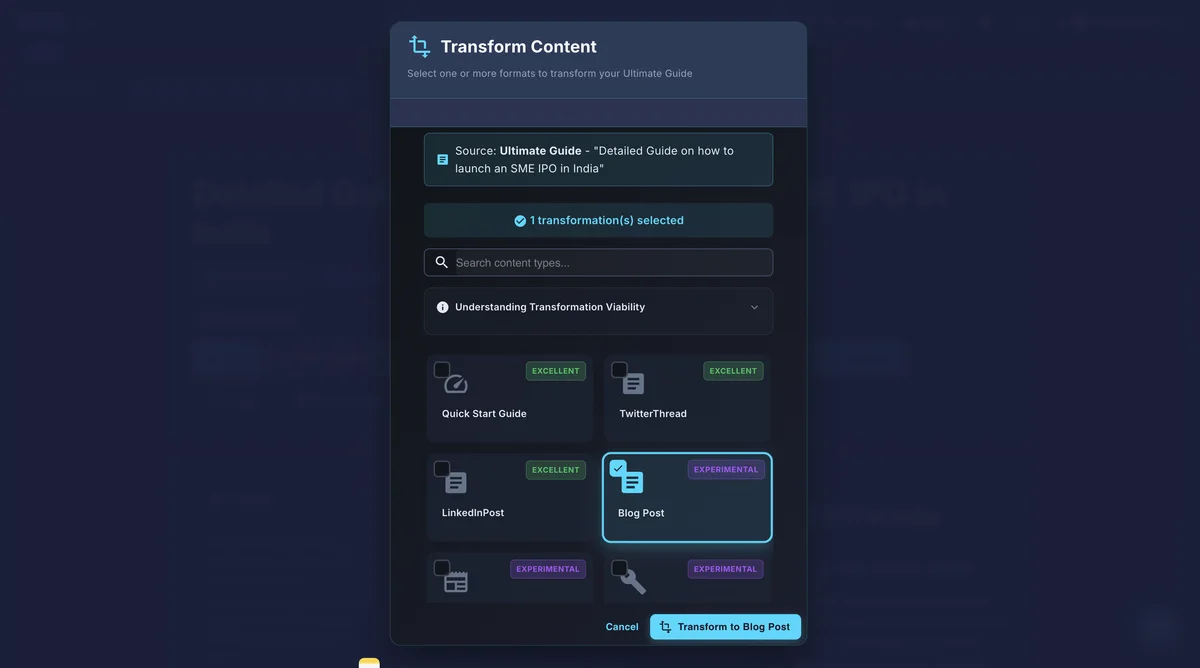
AI content repurposing adapts an existing article for a different reader, channel or format. In Quill, choose a text transformation such as a checklist, LinkedIn post, Twitter thread or video script, then review the separate result. Newsletter-style copy needs a brief within a supported text type. A presentation is created in Gixo Lumen; a finished infographic is created in Gixo Prism. Those products have their own setup and access. Rewriting does not itself verify claims, preserve every qualification or approve the destination artifact.
AI content repurposing adapts a source to a different audience, purpose and format. Preserve supported facts while changing the hook, reading order and call to action. Do not carry a figure into a short format without the context needed to understand it.
| Part | Worked detail |
|---|---|
| Source article | Keep the full explanation, citations, qualifications and original scope available for review. |
| LinkedIn post | Choose one supported takeaway and a reader-specific opening; preserve a route back to the full source. |
| Short script | Write for spoken delivery, explain necessary terms and inspect what is lost when the source becomes scenes or narration. |
| Review | Compare names, dates, quantities, qualification and attribution against the source before approving each derivative. |
A transformed draft still needs format-specific review. Exporting a post or script does not establish a connected publishing account, scheduled multi-channel delivery or a completed video. Inspect the actual finished artifacts rather than assuming every transformation preserves every picture and layout.
A worked workflow
A fictional source paragraph says: “The team tested a new onboarding checklist with 24 volunteers. Seventeen completed the first task without help. The pilot did not measure retention, revenue or a comparison group.” The supplied limits must survive each derivative.
The saved pilot-review guide was selected through Create from this, then Rewrite as another format. Quill generated and saved a text-only Checklist. Compare the source and derivative: both retain 24 volunteers, four weeks, 30-to-18 request counts, the 12-request and 40% arithmetic, and the qualification that no comparison group establishes causation.
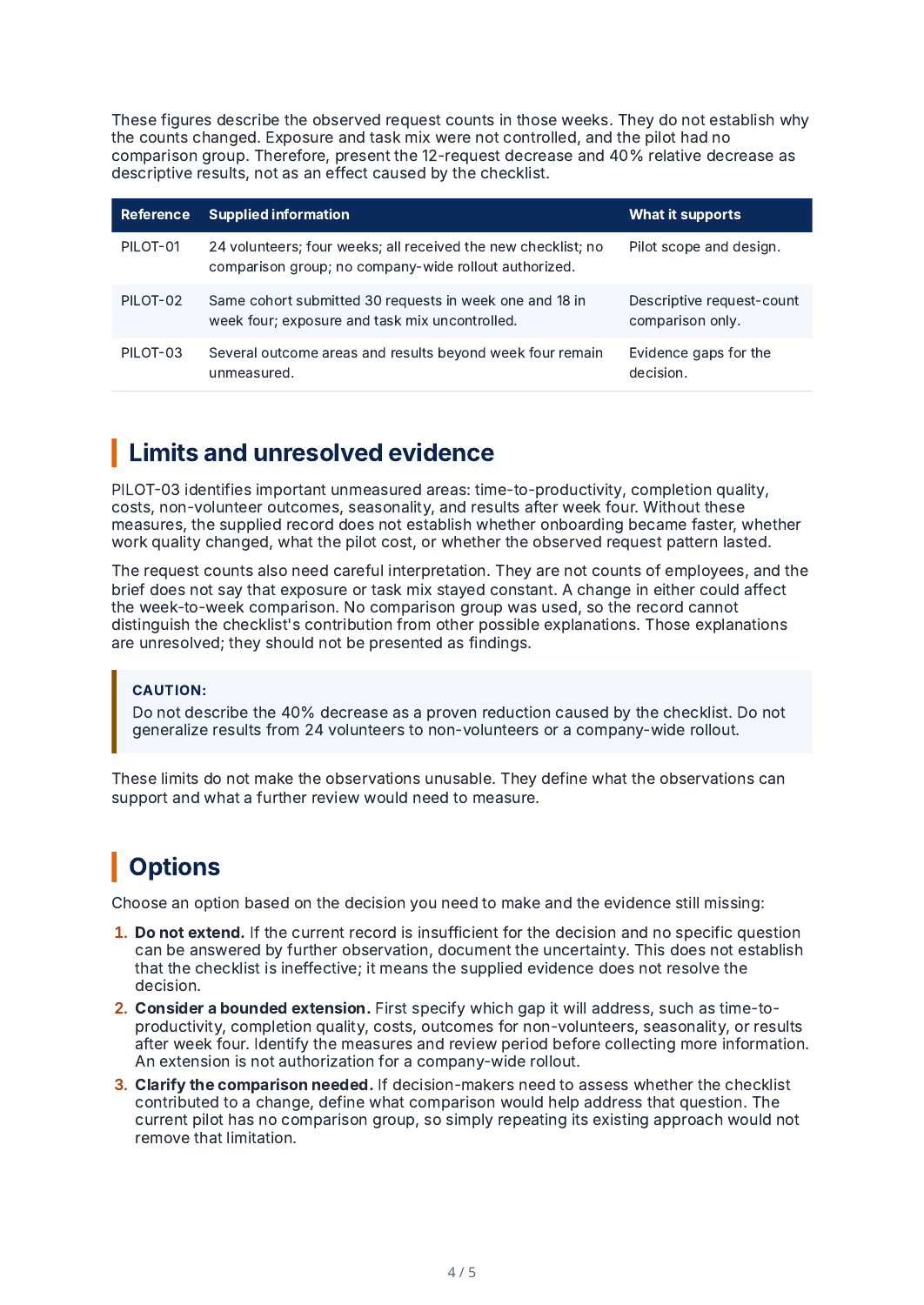
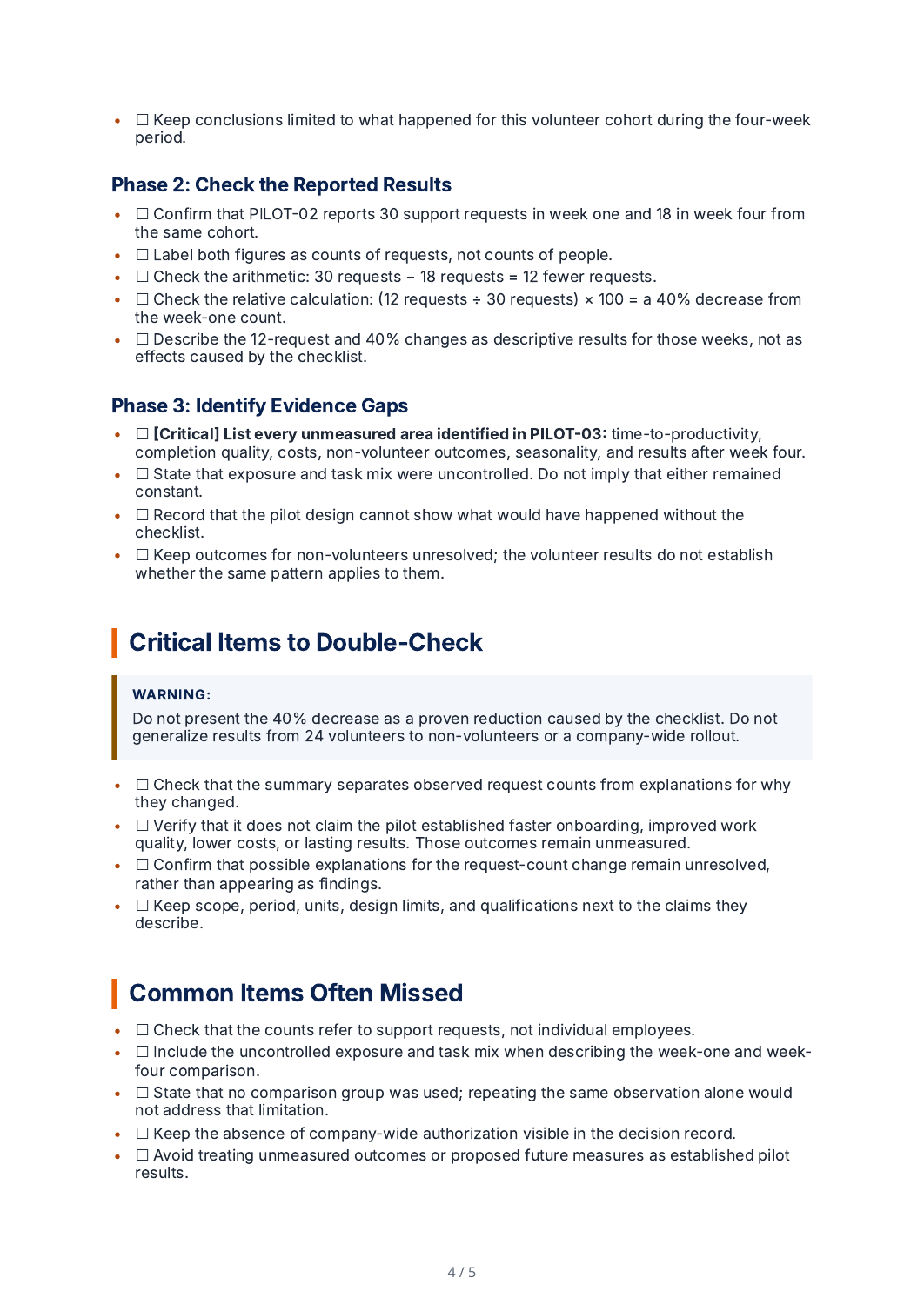
A real source-based conversion from a fictional saved How-To Guide to one Checklist. Quill reported 998 source words and 886 checklist words; the export workspace counted 929 checklist words. This is not a complete LinkedIn/email/thread package or an automatic publishing run. The original guide's final source review remained incomplete; check the evidence and each derivative before use.
Choose the source article and the supported transformation, then specify audience, purpose, tone and target format.
Inspect: The source’s 24 volunteers and 17 completions are observations. There is no control group or measured retention outcome.
For a short post, lead with the review question and one supported finding. For a script, use speakable sentences and explain the pilot context.
Inspect: A possible editorial opening is “What should we check before extending this onboarding pilot?” It is an authored planning example, not a captured model response.
Review the derivative alongside the source and correct any added cause, missing denominator or unsupported business outcome.
Inspect: “Seventeen volunteers completed the task” retains the observation. “The checklist improved onboarding” would add a comparison the source never made.
Read the exported post or script and check links, attribution, figures and format-specific qualifications.
Inspect: A script is a text artifact. Its existence does not establish video rendering, a connected publishing account or scheduled delivery.
Fictional supplied source and explicitly authored comparison wording. The related real Quill export remains separately identified; no unexecuted AI transformation is presented as a captured result.
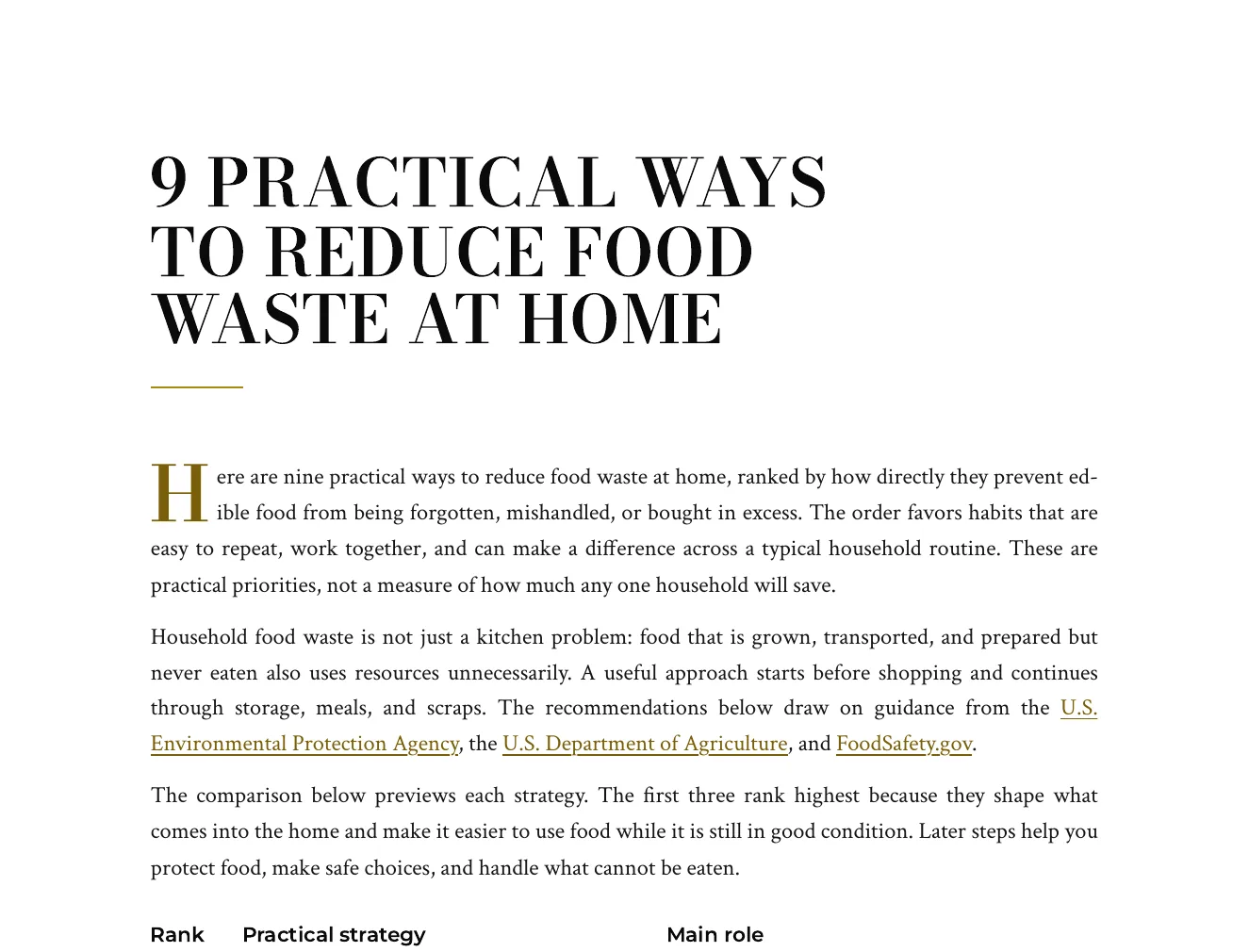
This is an actual Quill export, with the input brief available alongside it. Use the workflow below to connect source material, structure, editing and delivery.
Nine numbered tips, each saying what to do, why it works and how to start, with a ranked summary table and EPA, USDA and FoodSafety.gov guidance linked in the text.
Write a numbered article of nine practical ways a household can reduce the food it throws away. Each item should say what to do, why it works and how to start. Include how to plan meals, store food, read date labels, use leftovers and handle scraps. Ground the advice in guidance published by the U.S. Environmental Protection Agency, the U.S. Department of Agriculture and FoodSafety.gov, and cite those agency pages. Cite no other organisation. Do not quote statistics, percentages or dollar amounts; give practical advice and attribute each piece of guidance to the agency page it comes from.
Open the full export and compare its statements with the cited sources before reuse.
Set the reader, purpose, required points, sources and section budgets. Review extracted material from an upload, paste or URL before using it as grounding.
Review the outline, then the draft. Add structured blocks, edit selected passages and use Image Studio for permitted generation, photo selection and responsive insertion; retain attribution where required.
Review citations, wording and metadata. Use the supported export or connected destination for the current account; Markdown handoff and a live publishing connection are different delivery paths.
Power Edit starts from an active selection. You can give iterative or voice-transcribed instructions, choose a reply language, stop a streamed response, inspect the result and explicitly replace the selected range. Full-document context is reference material. Structured blocks have typed fields, item-level regeneration and previews; their AI field assistance is separate from their layout.
Use builder or advanced prompts with the subject and document context. Shape style, mood, lighting, palette, composition, camera and supported image dimensions. Inspect generated alternatives or a selected real photo, retain required source attribution and edit alternative text before insertion. Finishes and prompt edits create a new result; compare it with the original instead of assuming an edit is lossless.
Import options depend on the source type: pasted text, Markdown or HTML; document extraction; spreadsheet cells; image OCR; and supported media transcription. Review extracted material before drafting. Export settings include the supported format, theme, author, spacing, headers, footers and page appearance. Inspect the actual download because HTML, print PDF and editable Word represent structure differently.
A source-led draft needs human review. HTML, PDF and editable Word have different layout fidelity; connected publishing support is destination-specific.
Adapt one source for a chosen destination. Text transformations and handoffs to other Gixo products follow different paths.
Hand an approved blog post to Gixo Lumen as source material for a deck. Lumen is a separate product and plan; decks are not a Quill format.
Request newsletter-style copy through a brief within a supported text type: describe the subject line, key takeaways and call to action you need. There is no dedicated Newsletter selector. Review the result and send it through your email service.
Generate a series of social media posts from a single blog article. Each post captures a different angle, key stat, or insight from the original content, optimized for platforms like LinkedIn and Twitter.
Transform how-to blog posts into actionable checklists and step-by-step guides. The AI identifies procedural content and reformats it into a downloadable, practical checklist format.
Prepare the article's source-backed points for an infographic, or create a derived artifact in Gixo Prism. A finished visual is a separate product workflow; review its numbers, labels, and source context there.
Convert written blog content into conversational video scripts with natural pacing, transitions, and speaker cues. Ideal for turning articles into YouTube content, webinars, or explainer videos.
Four steps from a source article to a reviewed destination artifact.
Paste your blog post or article into Gixo. The AI analyzes the content structure, identifies key themes, extracts data points, and understands the overall narrative to prepare for multi-format conversion.
Choose a Quill text format such as a checklist, LinkedIn post, Twitter thread or video script. Put newsletter-style requirements in a brief within a supported text type. For a deck or finished visual, use the Lumen or Prism handoff and complete that product's setup. Each result is a separate artifact to review.
The AI proposes a new structure and wording for the selected channel. Compare the new text with the source: condensation can remove a condition, and expansion can introduce unsupported detail.
Check each asset's claims, tone, links, and destination format. Source approval is not approval of every derived copy. Save changes and review the new artifact; where its workspace requires approval for publication, deliver an approved release.
Prepared example: a source article says, “Unopened items can be returned within 30 days; shipping costs are excluded.” A social post can say, “Return unopened items within 30 days. Shipping costs are excluded.” “Return anything for free” would change both the eligibility and cost. Review the source quote and the new post together before using it.
The editorial workspace records a derived copy's origin. If that origin changes, refresh creates a new copy rather than overwriting the existing artifact; destination edits remain in the earlier copy. Complete the destination's format setup where required, and review the refreshed result independently.
| Capability | Gixo path | Review before delivery |
|---|---|---|
| Blog to slides | Lumen handoff | Review the deck narrative, slide layout, and source claims in Lumen |
| Blog to newsletter-style draft | Brief within a supported Quill text type; no dedicated selector | Check claims, links, subject line and email formatting; send through your email service |
| Blog to social posts | Quill text transformation or Quill social derived copy | Check each post's claim scope and platform requirements |
| Blog to checklist | Quill text transformation | Confirm step order, prerequisites, and exceptions |
| Brand voice | Source context and selected voice guidance | Review the tone and terminology for the new audience |
| Infographic | Prism handoff for a finished visual | Review the source numbers, labels, and visual interpretation in Prism |
| Export | Use the destination product's supported export | Inspect the final file and its links before sharing |
| Output format | What the AI does | Where to finish |
|---|---|---|
| Blog to slides | Use the source article to propose a deck narrative and layout | Gixo Lumen |
| Blog to newsletter | Draft a subject line, takeaways, and call to action | Review in Quill; send through your email service |
| Blog to social posts | Adapt a selected idea into a post or thread | Review in Quill; publish through the destination platform |
| Blog to checklist | Propose ordered actions from procedural source material | Quill |
| Blog to infographic | Carry source-backed points into a separate visual artifact | Gixo Prism |
| Blog to video script | Draft narration, pacing, and speaker cues | Review the script in Quill; production happens in your video workflow |
| Brand voice | Use source context and voice directions to guide the wording | Review each destination artifact |
Connect your own Webflow collection, Notion parent page, HubSpot blog or Shopify blog in Settings → Integrations. Quill tests the connection before saving it. The delivery form shows the platforms you have connected: a Webflow CMS item, a Notion page, a HubSpot blog draft or a Shopify blog article. Review the destination, permissions and final result before delivery.
Use Create from this to make another format from a saved draft. Review each result as a separate piece: the structure, length, source links and images may change. Keep the original article available while you prepare the versions your channels need.
Open in Google Docs sends an eligible written document through its Word export to your own connected Google Drive. It appears only where that connector is configured and you have download permission. This is a separate file handoff; later edits are not synchronized, and it is not a Google Workspace Marketplace add-on.
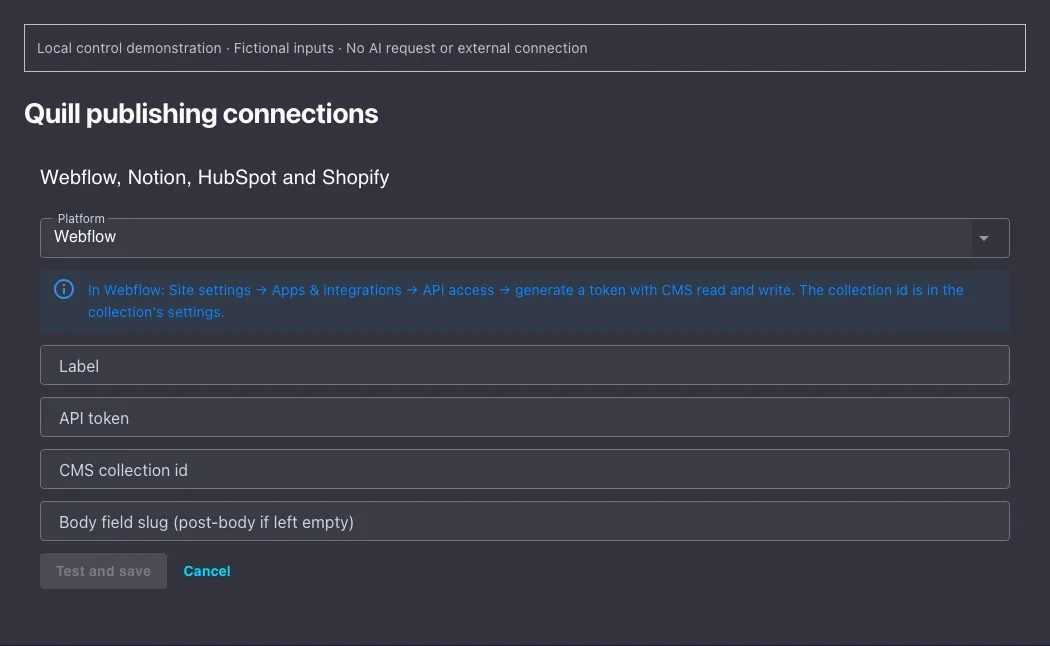
Choose a publishing connection Follow the complete Quill guide
Inside Quill
Updated