
Gixo Prism · Visual guide
Workflow Diagram
A workflow diagram maps how work moves through the people and systems that handle it — the steps, their order, the decisions that branch them, and who owns each. It differs from a plain flowchart in emphasis: a flowchart shows what happens next, a workflow diagram shows who does it. When handoffs between teams are the problem, a swimlane layout that assigns each step to an owner is what makes the problem visible.
Last reviewed: August 2026
A current Prism output
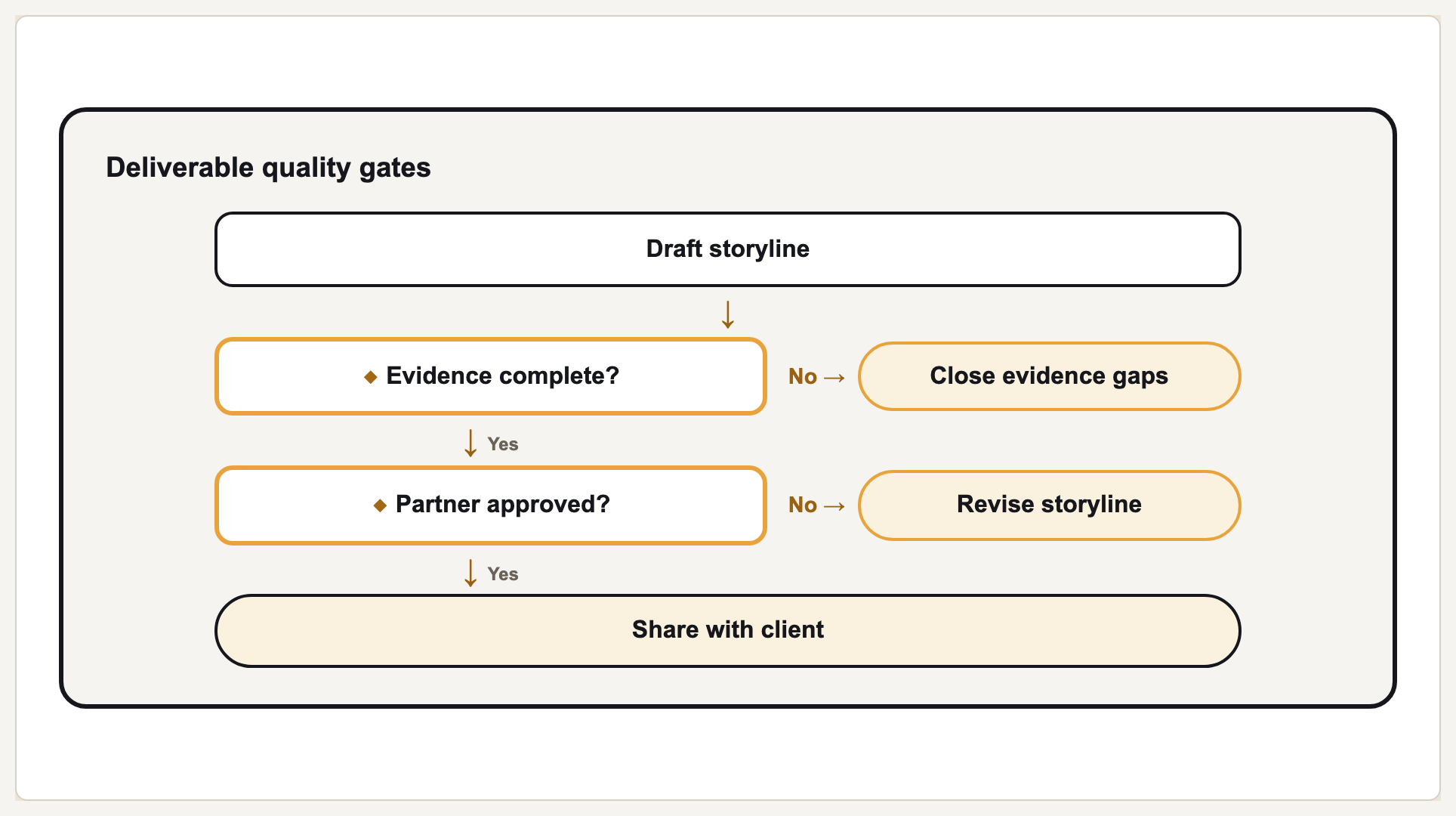
This is a current deterministic workflow render. The steps and connections come from structured inputs rather than a decorative mockup.
Workflow, flowchart, swimlane
These three names overlap in practice. A flowchart is the general form: steps and decisions connected by arrows. A workflow diagram is a flowchart of real work, so it usually includes the systems involved and often the timing. A swimlane diagram is a workflow diagram organised into rows or columns by owner, and it is the version that makes handoffs and bottlenecks legible.
Most workflows are documented and never reread, because they were drawn at the wrong level of detail. A diagram that shows every field validation is a specification, not a map. Draw the level at which decisions get made and hands change; sub-steps belong in the procedure the diagram links to.
The other reason they go unread is unlabelled decisions. Every branch point needs its condition written on the arrows — 'approved' and 'rejected', not two unlabelled lines. An unlabelled branch forces the reader to reconstruct the rule from the shapes around it.
Which layout to use
| Situation | Layout | Why |
|---|---|---|
| Linear procedure, one owner | Process | Ownership adds nothing; keep it simple |
| Branching on conditions | Decision flowchart | Branches need labelled conditions |
| Multiple teams or systems | Swimlane | Handoffs are where delay and error live |
| Repeating cycle | Cycle | Only when the last step genuinely feeds the first |
| Sequence over calendar time | Roadmap or timeline | When 'when' matters more than 'what next' |
Mapping a workflow
Fix the boundaries
What starts the workflow and what ends it. Most unreadable workflow diagrams have no clear beginning, so they sprawl into adjacent processes.
List the steps as verbs
'Approve invoice', not 'Invoice approval'. Verb phrases expose steps that are actually two steps.
Assign an owner to each
One owner per step. A step with two owners is usually the handoff causing the delay you are mapping.
Label every branch
Write the condition on each outgoing arrow. Unlabelled branches are the most common defect in workflow diagrams.
Cut to the level of decisions
If a step has no decision and no handoff, consider folding it into its neighbour. The map is not the procedure.
Creating one in Gixo Prism
Once the steps, owners and branch conditions are written down, the drawing is mechanical. The free flowchart maker below takes them as structured steps and renders the decision or swimlane form deterministically, so spacing and alignment stay consistent as the workflow grows instead of being nudged by hand every time it changes.
What Gixo Prism does here
Prism renders process, swimlane and decision-flowchart geometries deterministically — you supply the steps, owners and branch conditions, and layout and spacing are handled for you, so the diagram stays consistent as it grows rather than being nudged by hand. The free flowchart maker covers decision and swimlane forms without an account.
Workflow diagram: FAQ
What is a workflow diagram?
A map of how work moves through the people and systems handling it: the steps, their order, the decisions that branch them, and who owns each one.
What is the difference between a workflow diagram and a flowchart?
A flowchart shows what happens next. A workflow diagram shows who does it and usually which system it happens in. In practice a workflow diagram is a flowchart of real work.
When should I use swimlanes?
When more than one team or system is involved. Swimlanes make handoffs visible, and handoffs are where most delay and error occur.
How detailed should a workflow diagram be?
Detailed to the level where decisions are made and work changes hands. Field-level detail belongs in the procedure, not the map.
How do I create a workflow diagram?
Fix what starts and ends it, list the steps as verb phrases, assign one owner to each, write the condition on every branch, and cut to the level where decisions get made and work changes hands. The steps above are that procedure in order.
What tool should I use to create a workflow diagram?
One that renders the structure rather than asking you to draw and align boxes — the structure is the work, the layout is not. Gixo Prism's free flowchart maker takes steps, owners and branch conditions and renders decision and swimlane forms without an account.
Map your workflow free
The free flowchart maker builds decision and swimlane diagrams from structured steps.