
Sign In Try Free
Workflow-specific products Content, decks, briefs, proposals, legal, and sales each have a clearer buying path.
Review before delivery Draft, edit, collaborate, approve, and export in the same workspace.
Security + procurement path Security policy, support, and Azure Marketplace buying are public.
Books alternative

A better fit than Sudowrite when you need structured books and final exports

Sudowrite is strong when the job is fiction ideation and creative drafting. Gixo Folio fits better when you need a manuscript brief, chapter workflow, revision, export-ready delivery, and localized editions from the same workspace.
Nonfiction-first Built for focused books, guides, workbooks, and authority manuscripts.
Cancel when done Monthly plans built to be cancelled when the book ships — not a forever subscription.
$19/mo Folio Author includes planning, import, AI chapter drafting, revision, and export.
89 Supported locale variants for international editions once the source manuscript is ready.
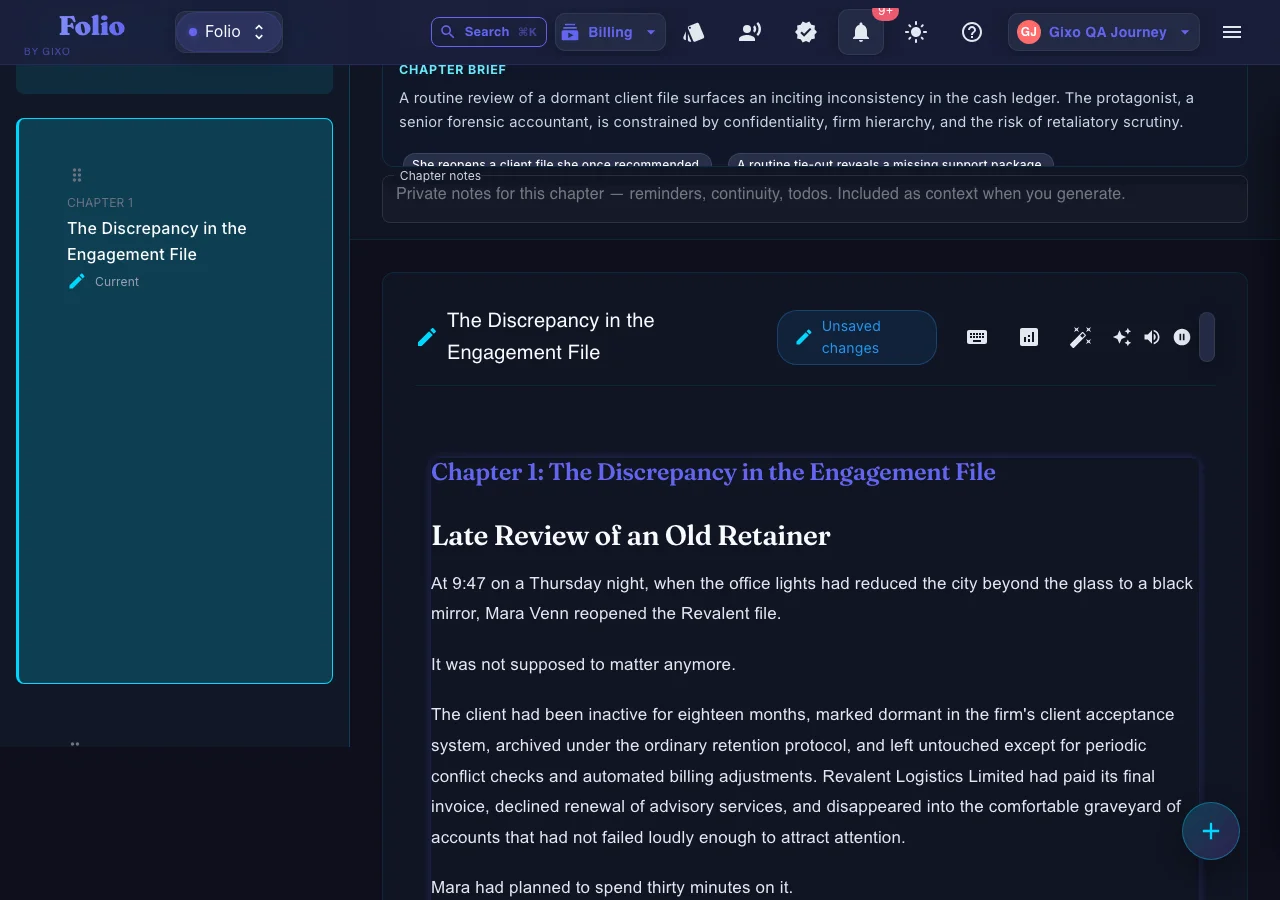
Gixo Folio — a real fiction chapter drafted inside Gixo Folio's editor
A real fiction chapter drafted inside Gixo Folio — the workspace supports long-form narrative prose, not just nonfiction guides.
01Brief the book
02Shape the outline
03Draft chapters
04Review the manuscript
05Export the edition
Folio is a strong fit whenThe manuscript still needs structure, revision, and a finish line.

Use the persistent book workspace when the outcome is a real guide, authority book, training manual, client asset, or exportable edition.

Consider another tool whenYou only need one narrow part of the publishing job.

If your manuscript is already finished and you only need specialist formatting or a dedicated fiction system, a focused tool may be the simpler choice.

Where Gixo Folio is the stronger choice over Sudowrite

This is the better fit when the hardest part is finishing and shipping a coherent manuscript, not just generating scenes or prompts.

Manuscript brief
Start from a usable book brief
Anchor the manuscript in title, audience, promise, and outcome before you draft chapters.
Structured drafting
Keep every chapter in one workflow
Outline, draft, revise, and save the book chapter by chapter instead of bouncing between brainstorming tools.
Final review
Revise and finalize before export
Review chapters in the workspace and confirm the manuscript is complete before triggering the final export.
Final delivery
Ship EPUB, editable DOCX, chapter PDF, HTML, Markdown, and SCORM
Choose the export path that matches the destination instead of copying chapters into another formatter.
Edition expansion
Create international editions later
When the source manuscript is final, spin out localized editions across 89 locale variants.
Import-first activation
Start from the material you already have
Bring in a manuscript, article archive, or client notes before you spend a paid month on AI drafting and export.

How to decide between Gixo Folio and Sudowrite

Choose based on the job you need the tool to do after the draft exists.

1
Choose your manuscript type
If you are writing a guide, business book, workbook, or client education asset, start from a workflow that expects structure and review.
2
Decide how you will finish
If you already know you need a final export, compare who owns the last mile instead of just the draft quality.
3
Check the pricing shape
If you want bounded spend for one book, subscribe only for the drafting/export months and cancel when it ships.
4
Plan for editions
If translation or localized distribution matters later, keep the source manuscript and edition workflow together.

Gixo Folio vs Sudowrite

A positioning comparison, not a fiction-quality scorecard.

Decision areaGixo FolioSudowrite
Primary fitStructured books, guides, workbooks, authority manuscriptsFiction-first brainstorming and creative drafting
Planning modelBook brief plus chapter workflowIdea generation and scene-level assistance
Review and exportRevision workflow plus final exportExport is not the product center of gravity
Pricing shapeMonthly paid plans covering the book workflowRecurring monthly tiers
Edition strategyLocalized editions across 89 localesNot positioned around multilingual editions
Best choice whenYou need the manuscript finished and deliveredYou want more fiction ideation support
Choose Sudowrite if
You are mainly buying fiction ideation

Sudowrite is still the more obvious choice if your primary pain is scene expansion, brainstorming, and fiction-specific prompting. If the book lives mostly as an ongoing creative draft, that positioning makes sense.

That is a different buying decision from choosing the system that helps you brief, review, export, and localize a finished book.

Choose Gixo Folio if
You want the manuscript workflow to end in a deliverable

Gixo Folio is the stronger fit when the book has a job to do: sell expertise, support clients, teach a process, or become a finished lead asset. The workflow is opinionated around chapter structure, revision, and exportable output.

That makes it a better Sudowrite alternative for nonfiction authors, consultants, coaches, and teams who care more about shipping the book than generating more possibilities.

Frequently Asked Questions

Is Gixo Folio a fiction replacement for Sudowrite?
Not exactly. Sudowrite remains more fiction-forward. Gixo Folio is the better replacement when you need a structured manuscript workflow, final export, and edition-ready nonfiction output.
Why would someone choose Gixo Folio over Sudowrite?
Choose Gixo Folio when the manuscript needs to move from brief to review to export inside one product. That is especially useful for nonfiction, authority books, workbooks, and client-facing guides.
Does Gixo Folio export final files directly?
Yes. The Books workspace supports EPUB, editable DOCX, chapter PDF, HTML, Markdown, and SCORM with background and direct download paths.
Can I turn a finished book into other language editions?
Yes. Once the source manuscript is ready, Gixo Folio supports international editions across 89 locale variants.
Can I try Gixo Folio before committing?
Folio uses a paid-plan model. Choose Author or Pro based on the book project, then cancel when the book ships.
Need a Sudowrite alternative for finished books?
Start with the Books pricing page if you are comparing purchase models, or read the workflow guide if you want to see how Gixo Folio handles planning, revision, and final export.